Freedom251 › AI Chord Progression Generators
Veena Studio AI Drum Generator
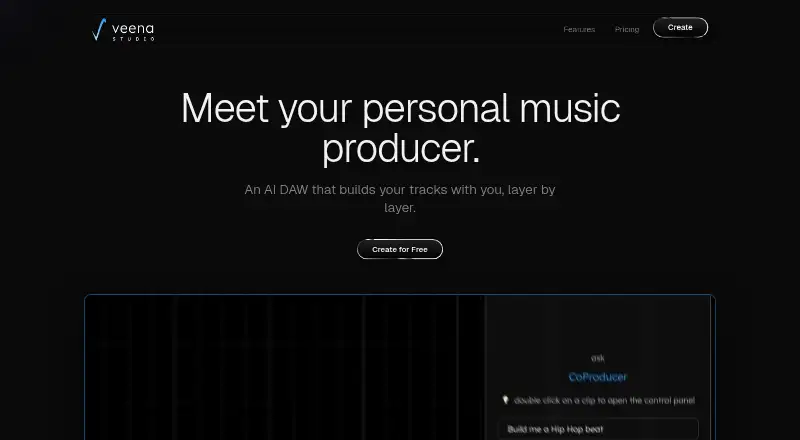
What Veena Studio AI Drum Generator is
Veena Studio AI Drum Generator is a browser-based digital audio workstation with an AI CoProducer for creating editable music tracks from song descriptions. Describe a groove and the drum generator creates a MIDI pattern on a 16-step grid, where individual hits can be changed. CoProducer can also make separate tracks for beats, bass, chords, melodies, arrangements, and mixes. The studio includes a timeline, piano roll, mixer, recording, 61 instrument presets, seven drum kits, a 16-pad sampler, and 10 effects. Other tools include voice-to-instrument conversion, stem separation, AI mixing and mastering, audio-to-MIDI, and sample search. Exports include WAV, MP3, MIDI, and stems, without an export cap or watermark on either plan. Users can connect their own VST3 and AU plug-ins through Veena Bridge and collaborate in shared sessions in real time. Veena says users own the music they generate on every plan. The Free plan includes up to five projects; Veena Pro costs $20 a month. The browser studio runs on computers and phones, including school Chromebooks.
Who it suits
It suits songwriters, singers, rappers, producers, beginners, bands, and students who want to build or edit music in a browser. The free plan may suit those starting with a limited number of projects.
What it does well
- Drum grooves become editable MIDI patterns
- Exports have no cap or watermark
- Includes 61 instrument presets and seven drum kits
- Supports real-time session collaboration
- Users own generated music on every plan
What to know first
- Free plan allows up to five projects
- Pro costs $20 a month
- No free trial is listed
Limits
The Free plan allows up to five projects, a daily CoProducer allowance, and basic AI models. Pro removes the project limit and daily request cap; it is credit-metered.
Plans
| Plan | Billed and limits | Price |
|---|---|---|
| Free | No card required; no end date. · Daily CoProducer allowance · up to 5 projects · basic AI models · uncapped exports with no watermark | Free |
| Veena Pro | Billed monthly; monthly only. · No daily request cap · premium AI models · project limit lifted · credit-metered | $20 a month |
As veena.studio lists them, read 4 Oct 2026. The maker's own page has the final word.
Getting started
- Visit veena.studio in a browser on a computer or phone.
- Start with the Free plan, which requires no card, or choose Veena Pro.
- Describe a groove to generate a drum pattern, or describe a song for CoProducer tracks.
- Edit the generated tracks in the timeline, piano roll, or mixer.
- Export WAV, MP3, MIDI, or stems, or share a session for collaboration.
Veena Studio AI Drum Generator is a browser-based music workspace that turns groove descriptions into editable drum patterns and can build other parts of a song. It is best for musicians who want to develop AI-generated ideas inside a production environment, rather than generate a beat and leave. The main trade-off is that its most capable AI access and room for more projects sit behind a monthly subscription.
Overview
Veena combines a 16-step drum editor with CoProducer, which can create beats, bass, chords, melodies, arrangements and mixes as separate tracks. That breadth makes it more useful for shaping a whole song than for people who only need a quick drum loop. The generated parts remain editable, so the AI supplies material to work with rather than a fixed finished result.
The studio brings together a timeline, piano roll, mixer and recording, along with 61 instrument presets, seven drum kits, a 16-pad sampler and 10 effects. Users own music they generate on either plan. Veena says prompts and relevant content may be processed by third-party AI providers and that it uses reasonable technical and organizational safeguards for personal information.
Key features
Drum patterns and song parts
Describe a groove and Veena produces a MIDI pattern on a 16-step grid. Editing hits individually gives producers a practical way to refine timing and arrangement instead of accepting the AI's first pass. CoProducer can generate other song components as separate tracks, a useful distinction for anyone building an arrangement rather than collecting isolated loops.
Production tools and collaboration
Voice-to-instrument conversion, stem separation, AI mixing and mastering, audio-to-MIDI conversion and sample search extend the workflow beyond generation. Users can also run their own VST3 and AU plug-ins through Veena Bridge. These tools make the browser studio a more substantial production option, though the product's appeal depends on wanting an integrated workspace rather than a narrowly focused drum generator.
Sessions can be shared by link for real-time collaboration, and collaborators can use CoProducer. Exports include WAV, MP3, MIDI and stems, with no export cap or watermark on either plan. That means the free plan's limits constrain project capacity and AI use, not the number or branding of exports.
Pricing
Veena is freemium, with no free trial. The free plan costs nothing, requires no card and has no end date. It includes a daily CoProducer allowance, up to five projects, basic AI models and uncapped exports without a watermark. It is a sensible starting point for occasional use or a small number of active songs; the daily allowance and five-project ceiling make it less suitable for sustained, multi-project work.
Veena Pro costs $20 a month, billed monthly, with no other billing term. It removes the daily request cap, provides premium AI models and lifts the project limit. Pro is the fit for users who rely on CoProducer regularly or keep more than five projects, but it is credit-metered, so removing the daily cap does not mean unlimited generation. Both plans retain uncapped, watermark-free exports. Veena says users own their generated music on every plan.
Platforms
Veena runs in a browser on computers and phones, and its maker says it works on school Chromebooks. The listed platforms are web, Android and iOS. Browser access and phone support broaden where sessions can be opened, while plug-in use through Veena Bridge is relevant to users bringing VST3 or AU tools into their setup.
Who it's for
Songwriters, singers, rappers and producers who want editable AI-created parts alongside conventional studio tools are the clearest fit. Bands and students may also benefit from link-based collaboration and browser access, including on school Chromebooks. Beginners can start with the free plan, but anyone generating frequently should weigh its daily allowance and project cap against Pro's monthly price and credit meter.
Veena is less compelling for someone who wants only a simple beat generator, or who needs a no-cost workspace for many projects and frequent AI requests. Its full value lies in combining generation, editing and audio production in one place.
Pros and cons
- Editable generation across a song: drum hits and other generated parts are separate tracks that users can shape, making the output more adaptable than a finished, uneditable beat.
- Exports are not a free-plan bottleneck: WAV, MP3, MIDI and stems are available without an export cap or watermark on both plans.
- Broad production toolkit: the timeline, mixer, sampler, effects, audio tools and third-party plug-in support can keep more of the production process in one workspace.
- Free use has clear constraints: the daily CoProducer allowance and five-project cap may interrupt regular work or limit how many songs can stay active.
- Pro is credit-metered: the $20 a month plan removes the daily request cap, but credits still govern use.
- AI content may involve third parties: prompts and relevant content may be processed by third-party AI providers, a consideration for users working with sensitive material.
Alternatives
For a wider set of options, browse AI Beat Makers.
Rewind AI Beat Maker may suit users who prefer a token-based free allowance: its free account includes 5,000 tokens per day and a 10,000-token signup bonus, with a Basic plan at $5 a month. InsMelo AI Beat Maker is another freemium Android, iOS and web option, with a free plan that includes 3.9 credits.
Songen is worth considering for iOS and macOS users who want a free allowance of 100 generated loops per day and one export, or a Premium plan at $8.99 a month with unlimited generating and up to 250 exports per month. Soundverse AI Beat Maker offers a free tier with 1,000 signup tokens and creation, voice cloning and stem-splitting tools across Android, iOS, web and API.
AIBeatMaker may fit web users comfortable with a limited free plan that restricts downloads and commercial rights; its Starter plan costs $10 a month. Beat Shaper offers unlimited generations and MP3 downloads on its free Starter plan, with personal, non-commercial use and a maximum song length of 32 MIDI clips; its Creator plan costs €9 a month.
CedarGrooveNET is a free option for users seeking a macOS or web tool. DrumBot AI may suit users who want a dedicated groove workflow: its free Explorer plan includes 20 grooves per day and five MIDI and WAV exports per month, with a free trial also offered.
Verdict
Veena is a strong choice for songwriters and producers who want AI-generated drums and other song parts they can edit, arrange and export in a browser-based studio. Its uncapped, watermark-free exports make the free plan useful beyond a casual preview, while the five-project cap and daily AI allowance limit heavier use. Choose Pro if regular CoProducer work or a larger project library justifies $20 a month; look elsewhere if you need a simpler beat-only tool or unrestricted generation without a credit meter.
Verdict
Veena combines AI-generated editable tracks with a full set of studio and audio tools in a browser. Its free plan is limited to five projects, while Pro lifts the project limit and costs $20 a month.
Questions
Is Veena Studio free?
Yes. The Free plan costs nothing, requires no card, and has no end date.
How much is Veena Pro?
Veena Pro costs $20 a month, billed monthly.
What platforms does Veena support?
Veena runs in a browser on computers and phones. Its about page says it works on school Chromebooks.
Can I export MIDI from Veena?
Yes. Veena exports MIDI, as well as WAV, MP3, and stems, without an export cap or watermark on either plan.
Can I use my own plugins?
Yes. Veena Bridge lets users run their own VST3 and AU plug-ins.
Who owns music generated in Veena?
Veena says users own the music they generate on every plan.
Facts from Veena Studio AI Drum Generator's own pages
- Audio tools
- Features include voice-to-instrument conversion, stem separation, AI mixing and mastering, audio-to-MIDI, and sample search. · veena.studio, 4 Oct 2026
- Collaboration
- Users can share a link and collaborate on a session in real time, with CoProducer available to collaborators. · veena.studio, 4 Oct 2026
- Drum generator
- The AI drum generator turns a described groove into a MIDI pattern on a 16-step grid that users can edit hit by hit. · veena.studio, 4 Oct 2026
- Export
- The studio exports WAV, MP3, MIDI, and stems with no export cap or watermark on either plan. · veena.studio, 4 Oct 2026
- Headquarters
- United States · veena.studio, 28 Sept 2026
- Integrations
- Users can run their own VST3 and AU plug-ins through Veena Bridge. · veena.studio, 4 Oct 2026
- Intended users
- The maker describes use by songwriters, singers, rappers, producers, beginners, bands, and students. · veena.studio, 4 Oct 2026
- Music generation
- CoProducer can create beats, bass, chords, melodies, arrangements, and mixes as separate editable tracks. · veena.studio, 4 Oct 2026
- Ownership
- Veena says users own the music they generate on every plan. · veena.studio, 4 Oct 2026
- Privacy and security
- The privacy policy says prompts and relevant content may be processed by third-party AI providers and that Veena uses reasonable technical and organizational measures to protect personal information. · veena.studio, 4 Oct 2026
- Product
- Veena is a browser-based AI digital audio workstation with a CoProducer that builds editable tracks from song descriptions. · veena.studio, 4 Oct 2026
- Studio contents
- The studio includes a timeline, piano roll, mixer, recording, 61 instrument presets, 7 drum kits, a 16-pad sampler, and 10 effects. · veena.studio, 4 Oct 2026
- Support
- Veena provides a help centre and lists [email protected] for questions and feedback. · veena.studio, 4 Oct 2026
- Supported devices
- Veena runs in a browser on computers and phones, and its about page says it works on school Chromebooks. · veena.studio, 4 Oct 2026
Where Veena Studio AI Drum Generator stands on Freedom251
- AI Chord Progression Generators#5 of 29
- AI Beat Makers#15 of 24