Freedom251 › AI Song Cover Generators

InsMelo AI Beat Maker
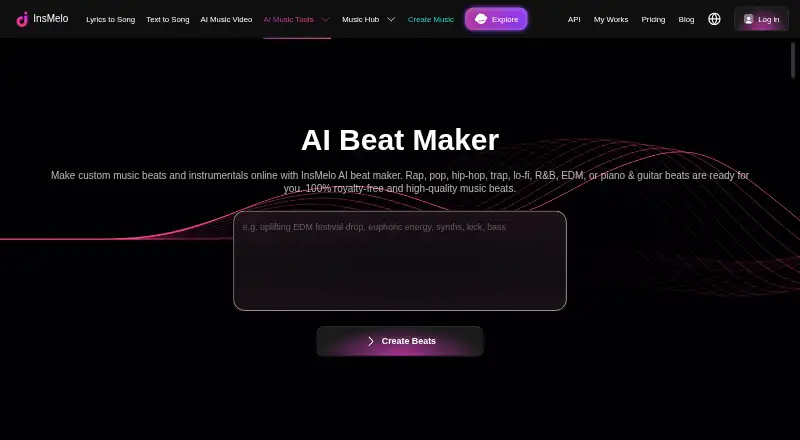
What InsMelo AI Beat Maker is
InsMelo AI Beat Maker turns text ideas into instrumental beats shaped by a requested genre, mood, tempo, and instruments. Its listed styles include rap, pop, hip-hop, trap, lo-fi, R&B, EDM, piano, and guitar. Users can adjust BPM, change instruments, and refine a beat’s structure. They can preview a generated beat, revise its description, extend its length, and separate tracks before downloading. Exports include MP3, WAV, MIDI, and stems. The maker says exported beats can be imported into DAWs such as FL Studio, Ableton, and GarageBand, or used in video editing software. InsMelo lists drum pattern generation and beat arrangement tools. The service is available on Android, iOS, and the web, with mobile downloads linked from its page. New users receive free credits for their first two beats; pay-as-you-go and subscription options are available afterward. The Free plan costs nothing and includes 3.9 credits. Pro and Ultra are listed, but their prices are not provided. Commercial licensing depends on the plan: Free and Creator plans are personal and non-commercial, while Pro Studio or higher includes a commercial licence.
Who it suits
It suits musicians, rappers, songwriters, and content creators who want to generate or refine instrumental beats from text ideas. The maker also presents it for people without a musical background, with exports that can be used in audio workstations or video editing software.
What it does well
- Generates beats from genre, mood, tempo, and instrument requests.
- Covers rap, pop, hip-hop, trap, lo-fi, R&B, EDM, piano, and guitar.
- Users can adjust BPM, instruments, and beat structure.
- Offers MP3, WAV, MIDI, and stem exports.
- Available on Android, iOS, and the web.
What to know first
- Free credits cover the first two beats for new users.
- Free and Creator plans are limited to personal, non-commercial use.
- Prices for Pro and Ultra are not provided.
Limits
The Free plan costs nothing and includes 3.9 credits. New users receive free credits for their first two beats; afterward, pay-as-you-go or subscription options are available. Free and Creator plans allow personal, non-commercial use; Pro Studio or higher includes a commercial licence.
Plans
| Plan | Billed and limits | Price |
|---|---|---|
| Free | 3.9 credits | Free |
| Pro | The pricing page lists Pro but does not expose its price or billing amount in the opened page. | On request |
| Ultra | The pricing page lists Ultra but does not expose its price or billing amount in the opened page. | On request |
As insmelo.com lists them, read 30 Sept 2026. The maker's own page has the final word.
Getting started
- Open the InsMelo AI Beat Maker website.
- Use the linked Apple App Store or Google Play download for a mobile device.
- Describe a beat idea and request a genre, mood, tempo, and instruments.
- Use the free credits for the first two beats, then choose pay-as-you-go or a subscription option.
InsMelo AI Beat Maker creates instrumental beats from a text description, with controls to refine tempo, instruments, and structure. It is best suited to musicians and creators looking for a quick draft they can take into another editing tool; the small free allowance and unresolved paid-plan prices make it a less certain choice for ongoing use.
Overview
Describe a genre, mood, tempo, and instrumentation, and InsMelo generates an instrumental beat to work from. Its listed styles span rap, pop, hip-hop, trap, lo-fi, R&B, EDM, piano, and guitar. That range is useful for exploring familiar directions, but this is a beat-making tool rather than a complete songwriting workflow.
Users can adjust BPM, change instruments, and refine the arrangement, then revise the prompt or extend the beat. Previewing before download and separating tracks can help turn an initial sketch into a more useful draft. Exports include MP3, WAV, and MIDI, with stems for deeper editing. InsMelo says exported material can be imported into FL Studio, Ableton, and GarageBand, or used in video-editing software.
Key features
- Text-led beat generation: Set the genre, mood, tempo, and instruments in a description. This offers a direct way to develop an instrumental idea without starting from a blank arrangement.
- Beat refinement: Adjust BPM, switch instruments, refine structure, revise the description, and extend a generated beat. These controls give users room to shape a draft, though the service is not presented as a full DAW.
- Preview and track separation: Listen before downloading and separate tracks for further work. The option is useful when a beat needs editing beyond the initial generation.
- Multiple export formats: Download MP3, WAV, or MIDI, with stems also offered. MIDI and separated parts provide more room for downstream editing than an audio file alone.
- Mobile and web access: The service is available on Android, iOS, and the web, with app downloads linked through Google Play and the Apple App Store.
Pricing
InsMelo uses a freemium model. The Free plan costs nothing and includes 3.9 credits; new users receive free credits for their first two beats. That is enough to try the basic prompt-to-beat workflow, but it is a narrow allowance for anyone expecting to generate regularly. After those first two beats, pay-as-you-go or subscription options are available.
The pricing page also names Pro and Ultra, but neither has a published price or billing amount. Both therefore require custom pricing, making it difficult to compare the paid options or judge their fit before contacting the maker. The available plan information does not establish the quotas or terms of those tiers.
Commercial rights need particular attention. Although the beat-maker page describes beats as royalty-free and suitable for commercial projects, the user agreement says Free and Creator plans are personal and non-commercial; Pro Studio or higher plans include a commercial licence. Confirm the licence for the specific plan before using a beat in paid or promotional work.
Platforms
InsMelo runs on the web and has Android and iOS apps. That combination suits users who want to sketch from a phone and access the tool in a browser, while the export formats and stated DAW compatibility support moving a draft into a separate production workflow.
Who it's for
Musicians, rappers, songwriters, and content creators can use InsMelo to turn a written musical direction into an instrumental starting point. Its stated audience also includes people without a musical background, for whom prompt-based generation and adjustable BPM may be more approachable than building a beat from scratch. It is a weaker fit for users who need a generous free quota, known subscription costs, or commercial rights on the Free plan.
Pros and cons
Pros
- Useful control after generation: Prompt revision, BPM changes, instrument switching, structure refinement, and length extension give users several ways to improve a draft.
- Flexible handoff: MP3, WAV, MIDI, and stems support different editing needs, and InsMelo identifies several DAWs that can take its exports.
- Web and mobile availability: Users can access it across browsers and the two major mobile platforms.
Cons
- Limited initial use: The free credits cover the first two beats, which leaves little room for sustained experimentation.
- Paid costs are unclear: Pro and Ultra have no published prices or billing amounts, so budgeting requires more than choosing a visible plan.
- Commercial use depends on tier: Free and Creator are personal and non-commercial under the user agreement, despite the beat-maker page's broader commercial-use description.
Alternatives
AI Beat Makers is a directory list for comparing tools in the same category; AI Song Cover Generators is a category list for a different kind of music tool.
- Rewind AI Beat Maker is worth comparing if daily token allowances matter: its free plan specifies 2,500 tokens per day anonymously or 5,000 with a free account, plus a 10,000-token signup bonus. It also supports Android, iOS, web, and API.
- Songen may suit iOS or macOS users who want a stated daily loop allowance: its free plan includes 100 generated loops per day and one free export, while Premium is $8.99 a month.
- Veena Studio AI Drum Generator is another Android, iOS, and web option, with a free tier that includes a daily CoProducer allowance, up to five projects, basic AI models, and uncapped exports without a watermark.
- AIBeatMaker may be preferable for browser-only use if online streaming without downloads or commercial rights is enough: its free plan includes daily tries and public tracks with 30-day cloud storage.
- Beat Shaper offers a free plan with unlimited generations and MP3 downloads for personal, non-commercial use, with a maximum song length of 32 MIDI clips; its Creator plan is €9 a month.
- CedarGrooveNET is a free alternative available on macOS and the web.
- DrumBot AI is a web-based alternative with a free Explorer plan that includes 20 grooves per day, five MIDI and WAV exports per month, and five audio analyses per month, but no pattern-library saves or commercial licence.
Verdict
InsMelo AI Beat Maker is a sensible pick for musicians and creators who want to turn a written idea into an editable instrumental and export it for further production. Its prompt controls, arrangement tools, and MIDI and stem exports are the strongest reasons to choose it. Look elsewhere if you need substantial free generation or clear paid pricing; check the plan’s commercial licence before using a beat in commercial work.
Verdict
Choose InsMelo AI Beat Maker if you want to turn text ideas into adjustable instrumental beats and export them for further editing. Check the plan’s commercial licence before using a beat in commercial work; Free and Creator plans are personal and non-commercial.
Questions
Is InsMelo AI Beat Maker free?
A Free plan is listed as free with 3.9 credits. New users receive free credits for their first two beats.
Which platforms are supported?
InsMelo lists Android, iOS, and web availability. Its page links to Apple App Store and Google Play downloads.
What formats can I export?
The listed formats are MP3, WAV, and MIDI, with stems also available.
Can I use its beats commercially?
The beat-maker page describes beats as royalty-free and suitable for commercial projects, while the user agreement limits Free and Creator plans to personal, non-commercial use. Pro Studio or higher includes a commercial licence.
Which tools can use exported beats?
InsMelo says exported beats can be imported into FL Studio, Ableton, and GarageBand, or used in video editing software.
Who makes InsMelo?
The user agreement names Adelina Wu Pty Ltd as the company.
Facts from InsMelo AI Beat Maker's own pages
- Audience
- The maker describes the tool as suitable for musicians, rappers, content creators, songwriters, and users without a musical background. · insmelo.com, 30 Sept 2026
- Commercial rights
- The beat-maker page describes beats as royalty-free and suitable for commercial projects, while the user agreement says free and Creator plans are personal and non-commercial and Pro Studio or higher plans include a commercial licence. · insmelo.com, 30 Sept 2026
- Company
- The user agreement names Adelina Wu Pty Ltd as the company and states that the agreement is governed by Australian law. · insmelo.com, 30 Sept 2026
- Customization
- Users can adjust BPM, switch instruments, and refine the beat structure. · insmelo.com, 30 Sept 2026
- Editing
- Users can preview a generated beat, revise its description, extend its length, and separate tracks before download. · insmelo.com, 30 Sept 2026
- Exports
- The page says beats can be downloaded in MP3, WAV, or MIDI, with stems also offered for deeper editing. · insmelo.com, 30 Sept 2026
- Free usage limit
- New users receive free credits to generate their first two beats, after which the page says pay-as-you-go or subscription options are available. · insmelo.com, 30 Sept 2026
- Genres
- The maker lists rap, pop, hip-hop, trap, lo-fi, R&B, EDM, piano, and guitar beats among its styles. · insmelo.com, 30 Sept 2026
- Integrations
- InsMelo says exported beats can be imported into DAWs such as FL Studio, Ableton, and GarageBand, or used in video editing software. · insmelo.com, 30 Sept 2026
- Mobile availability
- The beat-maker page links to downloads on the Apple App Store and Google Play. · insmelo.com, 30 Sept 2026
- Privacy and security
- The privacy policy says InsMelo collects account, usage, and content data, applies technical and organisational security measures, and does not claim that any online service is completely secure. · insmelo.com, 30 Sept 2026
- Support
- The maker lists [email protected] as its support contact and links to a Discord community. · insmelo.com, 30 Sept 2026
- What it does
- InsMelo AI Beat Maker turns text ideas into custom instrumental beats based on requested genre, mood, tempo, and instruments. · insmelo.com, 30 Sept 2026
Where InsMelo AI Beat Maker stands on Freedom251
- AI Song Cover Generators#8 of 56
- AI Beat Makers#4 of 24