
Songen
What Songen is
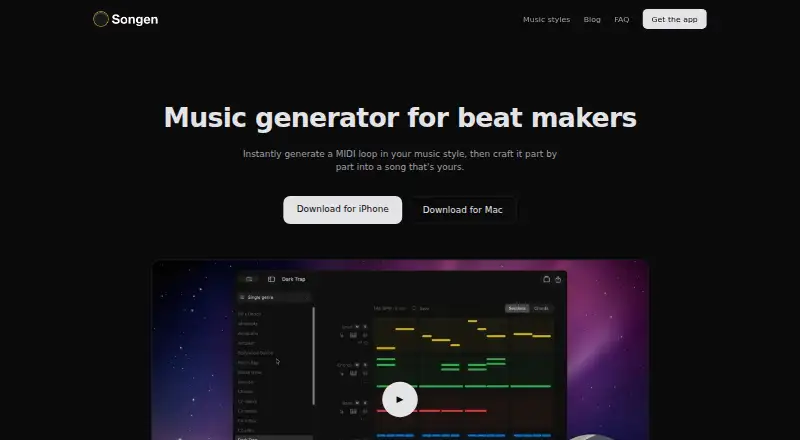
Songen generates instrumental MIDI loops in a selected style, building lead, chord, bass, and drum parts. Its on-device engine writes notes from scratch rather than using premade loops, and generation and exports work without an internet connection. Users can edit notes, regenerate individual tracks or sections, and use a piano roll that highlights chord notes. The app offers nearly 50 styles, including Trap, Amapiano, Lo-fi, House, and Cinematic. It exports MIDI and WAV audio as complete mixes or separated stems for use in other music software. Songen runs on iPhone, iPad, and Mac, with no Android or Windows version. The free plan includes 100 generated loops per day and one free export. Premium is $8.99 a month, $89.99 a year, or $149.99, paid once, and includes unlimited generating and saved tunes, with up to 250 exports per month. Songen says its generated beats are royalty-free and may be sold, licensed, or released without clearance, attribution, or extra fees. It does not write lyrics or record vocals; an internet connection is needed to purchase Premium.
Who it suits
Songen suits music makers who want to generate and refine instrumental loops on iPhone, iPad, or Mac. It is less suited to people looking for lyric writing, vocal recording, Android, or Windows support.
What it does well
- Creates MIDI notes on-device without premade loops.
- Offers nearly 50 music styles.
- Exports full mixes or separated stems.
- Generation and exports work offline.
- Generated beats are described as royalty-free.
What to know first
- No Android or Windows version is available.
- The free plan includes one export.
- The app does not write lyrics or record vocals.
- An internet connection is needed to purchase Premium.
Limits
The Free plan costs nothing and allows 100 generated loops per day and one export. Premium plans allow up to 250 exports per month, despite unlimited generating and saved tunes.
Plans
| Plan | Billed and limits | Price |
|---|---|---|
| Free | 100 generated loops per day · one free export | Free |
| Premium, Liftime | Unlimited generating · unlimited saved tunes · up to 250 exports per month | $149.99, paid once |
| Premium | Unlimited generating · unlimited saved tunes · up to 250 exports per month | $8.99 a month |
| Premium, Annual | Unlimited generating · unlimited saved tunes · up to 250 exports per month | $89.99 a year |
As songen.app lists them, read 2 Oct 2026. The maker's own page has the final word.
Getting started
- Visit the Songen website or use Songen on iPhone, iPad, or Mac.
- Choose a music style for a loop.
- Generate the instrumental MIDI loop on-device.
- Edit notes or regenerate tracks and sections as needed.
- Export MIDI or WAV as a full mix or separate stems.
- Connect to the internet if purchasing Premium.
Songen is a beat-making app for music makers who want to shape instrumental ideas track by track. It suits producers who work with MIDI and want generation and exports to function offline. Its main trade-off is a one-export free plan and Apple-only availability.
Overview
Songen builds loops from MIDI notes rather than premade patterns, combining lead, chords, bass and drums in a chosen style. Its on-device approach and editable parts make it a better fit for developing a musical idea than for anyone seeking a finished vocal song or a prompt-driven song generator.
The maker says generated beats are royalty-free and may be sold, licensed or released without clearance, attribution or extra fees. Songen is instrumental only: it does not write lyrics or record vocals.
Key features
Generate and revise
Nearly 50 styles include Trap, Amapiano, Lo-fi, House and Cinematic. Users can edit MIDI notes, regenerate a track or section, and use a piano roll that highlights chord notes. That combination gives producers room to keep a promising loop while changing only the parts that need work.
Arrange and export
Drum-pattern generation and beat-arrangement tools support building out a loop. Exports include MIDI and WAV, as a full mix or separated stems, making it possible to move a project into other music software or work with individual parts. MIDI export is useful for further editing; the free plan's single export, however, is a real constraint for anyone expecting to iterate through multiple deliverables.
Offline workflow
Generation and exports work without an internet connection because the engine runs on-device. An internet connection is required to purchase Premium. This is a practical advantage for composing away from a connection, though the app remains tied to Apple hardware.
Pricing
Songen has a free plan and three paid options. Free costs nothing and allows 100 generated loops per day but only one export. The daily generation allowance is generous for exploration; the export cap makes it more of a try-before-committing plan than a dependable production tier.
Premium costs $8.99 a month. Premium, Annual costs $89.99 a year, and Premium, Liftime costs $149.99, paid once. All three paid plans include unlimited generating, unlimited saved tunes and up to 250 exports per month. The annual price is lower than paying the monthly rate for a year, while the lifetime option avoids recurring billing; both retain the same monthly export ceiling. The 250-export cap matters to high-volume users despite unlimited generation.
Platforms
Songen is available for iPhone, iPad and Mac. There is no Android or Windows version, so it is not an option for users whose music setup depends on those platforms.
Who it's for
Songen is best suited to Apple-based producers who want to generate instrumental MIDI ideas, then edit parts and export stems or mixes into other music software. It is less suitable for songwriters needing lyrics or vocals, and for users who need cross-platform access. The maker also offers its Vibin AI Audio Engine for licensing into DAW plugins, mobile music apps, educational tools and beat-making platforms; interested developers can contact [email protected].
Generated music is treated as non-confidential under the terms. Users are responsible for exporting and securing their own music, and the company disclaims liability for its disappearance. That makes maintaining independent backups important.
Pros and cons
- Pros: On-device generation and offline exports suit work without a dependable connection.
- Pros: Track- and section-level regeneration, note editing and chord highlighting allow targeted changes instead of restarting a loop.
- Pros: MIDI, WAV and stem exports support further production in other music software.
- Cons: The free plan permits only one export, limiting ongoing use without Premium.
- Cons: The app is Apple-only and creates instrumentals, excluding Windows and Android users and anyone needing lyrics or vocals.
- Cons: Paid plans cap exports at 250 per month even though generation is unlimited.
Alternatives
For a broader set of platform options, AI Beat Makers collects alternatives. Consider Rewind AI Beat Maker if Android or web access matters; its free plan uses daily token allowances rather than Songen's one-export cap. InsMelo AI Beat Maker is another choice for Android or web users, with a free plan that includes 3.9 credits.
Soundverse AI Beat Maker may suit users seeking web or Android access; its free tier includes 1,000 signup tokens and supports song creation, voice cloning and stem splitting. Veena Studio AI Drum Generator is a web and Android option whose free plan offers a daily CoProducer allowance, up to five projects and uncapped exports without a watermark.
AIBeatMaker is worth considering for web-only workflows, but its free plan limits users to online streaming, with no downloads or commercial rights. Beat Shaper offers a web-based free plan with unlimited generations and MP3 downloads for personal, non-commercial use; it caps song length at 32 MIDI clips. CedarGrooveNET is a free alternative for users comparing macOS and web access. DrumBot AI is a web option with a free Explorer plan that allows 20 grooves per day and five MIDI and WAV exports per month, but no commercial license.
Verdict
Choose Songen if you use Apple devices and want offline generation of editable instrumental MIDI, with stems and WAV available when you are ready to move a loop into another tool. Its focused editing and on-device workflow are compelling for that use. Look elsewhere if you need vocals, Windows or Android support, or more than one export without paying; even Premium limits exports to 250 per month.
Verdict
Songen focuses on editable instrumental loops, with MIDI and WAV exports and offline generation. Its free plan is limited to one export, and the app is available only for Apple devices.
Questions
How much does Songen cost?
The Free plan costs nothing. Premium is $8.99 a month, Premium, Annual is $89.99 a year, and Premium, Liftime is $149.99, paid once.
What does the free plan include?
It allows 100 generated loops per day and one export.
Which devices support Songen?
Songen is available for iPhone, iPad, and Mac. There is no Android or Windows version.
Can I use Songen offline?
Generation and exports work offline. An internet connection is needed to purchase Premium.
What can Songen export?
It exports MIDI and WAV audio, either as a full mix or separate stems.
Can I release or sell beats made with Songen?
The maker says generated beats are royalty-free and may be sold, licensed, or released without clearance, attribution, or extra fees.
Facts from Songen's own pages
- Company
- The terms identify Vibin Oy as the company and give its address as Isonjärvenranta 1 C, 02940 Espoo, Finland. · songen.app, 2 Oct 2026
- Data and music storage
- The terms say generated music is non-confidential, users should export and secure their own music, and the company is not liable for its disappearance. · songen.app, 2 Oct 2026
- Editing
- Users can edit generated MIDI notes, regenerate individual tracks or sections, and use a piano roll that highlights chord notes. · songen.app, 2 Oct 2026
- Engine licensing
- The maker offers the Vibin AI Audio Engine for integration into DAW plugins, mobile music apps, educational tools, and beat-making platforms, with licensing by contact. · songen.app, 2 Oct 2026
- Exports
- Songen exports MIDI and audio as full mixes or separated stems for use in other music software. · songen.app, 2 Oct 2026
- Fresh generation
- The built-in engine writes MIDI notes from scratch and generates loops on-device without premade loops or an internet connection. · songen.app, 2 Oct 2026
- Headquarters
- Espoo, Finland · songen.app, 28 Sept 2026
- Instrumental only
- Songen generates instrumental MIDI and does not write lyrics or record vocals. · songen.app, 2 Oct 2026
- Offline use
- Generation and exports work offline; an internet connection is needed to purchase Premium. · songen.app, 2 Oct 2026
- Product
- Songen generates full MIDI loops in a chosen style, with lead, chords, bass, and drums that users can refine track by track and section by section. · songen.app, 2 Oct 2026
- Royalty-free use
- Songen says its generated beats are royalty-free and users may sell, license, or release them without clearance, attribution, or extra fees. · songen.app, 2 Oct 2026
- Styles
- Songen offers nearly 50 music styles, including Trap, Amapiano, Lo-fi, House, and Cinematic. · songen.app, 2 Oct 2026
- Support contact
- The maker lists [email protected] for engine licensing and questions. · songen.app, 2 Oct 2026
- Supported devices
- Songen is available for iPhone, iPad, and Mac, and the FAQ says there is no Android or Windows version. · songen.app, 2 Oct 2026
- Who it is for
- The maker describes Songen as a beat-making app for music makers who want to co-create with AI without waiting on a prompt. · songen.app, 2 Oct 2026
Where Songen stands on Freedom251
- AI Music Apps#9 of 22
- AI Beat Makers#16 of 24