Freedom251 › Chord Finder Software

ChordSequence
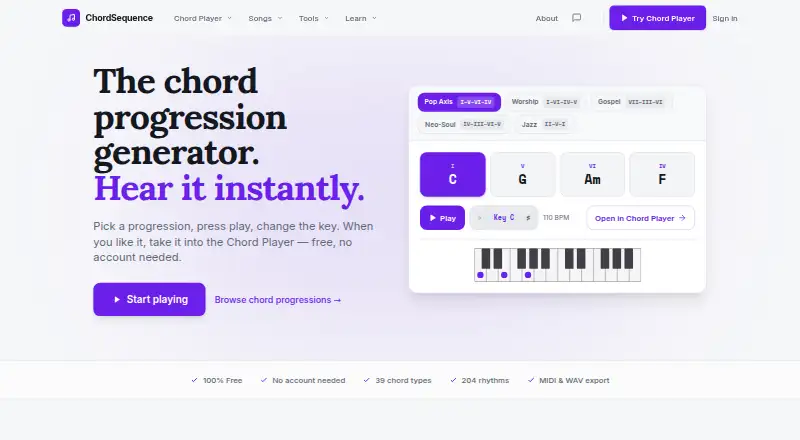
What ChordSequence is
ChordSequence is a free suite of browser-based music tools for songwriters, producers, students, teachers, worship teams, and learners. Its chord player plays user-selected progressions with drums, bass, piano, guitar, and synth, using 548 rhythms across styles such as pop, rock, salsa, and reggae. Users can reorder chords, group them into sections, loop sections, and edit instrument parts. The mixer provides separate volume, pan, mute, solo, EQ, and compression controls for instruments, plus reverb for the full mix. Songs can be exported as WAV audio or MIDI notes for use in a DAW. Other tools include a chord finder, transposer, key detector, Circle of Fifths, tuner, metronome, guitar and bass tabs, and drum machine. The browser tools use the Web Audio API and are stated to work on Chrome, Firefox, Safari, and Edge. An Android app works offline, needs no account, and supports Android 8.0 or later. There is no iPhone app, though iPhone users can use the browser player. The free plan has no paywall or usage limit.
Who it suits
It suits people learning, writing, or arranging music who want chord playback and related browser tools. Android users can also use the app offline without an account.
What it does well
- Free plan has no paywall or usage limit.
- Exports songs as WAV or MIDI.
- Offers 548 rhythms across multiple styles.
- Android app works offline and needs no account.
- Saved Android songs stay on the phone.
What to know first
- No iPhone app is available.
- Android app requires Android 8.0 or later.
Plans
| Plan | Billed and limits | Price |
|---|---|---|
| Free | All features free · no paywall or usage limit · WAV and MIDI export | Free |
As chordsequence.com lists them, read 4 Oct 2026. The maker's own page has the final word.
Getting started
- Visit https://chordsequence.com/ in Chrome, Firefox, Safari or Edge.
- Open the chord player and select a progression.
- Choose a rhythm and edit the arrangement or instrument parts.
- Use the mixer, then export as WAV or MIDI if needed.
- On Android 8.0 or later, install the app for offline use without an account.
ChordSequence is a free music workspace for building and hearing chord progressions, with extra tools for theory, practice, and reference. It is best for songwriters, producers, students, and teachers who want to develop an idea in a browser or offline on Android. Its strongest draw is a broad set of arranging and export tools without a paywall.
Overview
The progression player gives selected chords an arrangement of drums, bass, piano, guitar, and synth. Chords can be reordered, grouped into sections, and looped, and parts can be edited within a rhythm. That makes it useful for exploring how a progression might work as a song, not just identifying its chords.
The player sits alongside a chord finder, transposer, key detector, Circle of Fifths, tuner, metronome, guitar and bass tabs, and drum machine. Reverse chord lookup and progression generation add ways to work from either a sound or a blank page. This breadth will suit learners and writers who want one place for several common tasks; musicians looking for a single specialized utility may find the larger toolkit unnecessary.
Key features
Playback and arrangement
There are 548 rhythms across styles including pop, rock, salsa, and reggae. That range gives writers room to compare grooves, while section looping helps them focus on one part of a developing song. The range is useful for sketching, though the player is a songwriting aid rather than a substitute for a full DAW.
Mixing and exports
Each instrument has volume, pan, mute, solo, EQ, and compression controls, with reverb applied to the whole mix. This gives a progression sketch more shaping options before it leaves the browser. WAV audio and MIDI note exports support different next steps: audio for listening or sharing, and MIDI for further work in a DAW.
Supporting tools
The wider collection includes tools for finding and transposing chords, detecting a key, consulting the Circle of Fifths, tuning, keeping time, and viewing guitar or bass tabs. A chord chart export is also available. The combination makes ChordSequence a useful learning and idea-development hub, especially for people who move between theory, practice, and composition.
Pricing
The Free plan costs nothing and includes all features, with no paywall or usage limit. WAV and MIDI export are included, so users do not have to give up the main workflow or cap their use to stay on the free tier. There is no free trial; the product is free.
Platforms
ChordSequence runs in a browser using the Web Audio API and supports Chrome, Firefox, Safari, and Edge. Its Android app works offline, requires no account, and supports Android 8.0 or later. Saved songs in the Android app stay on the phone; the maker says songs are private unless shared. There is no iPhone app, so iPhone users must use the browser player.
The site is hosted on Netlify and uses Supabase for its community song library database. The maker invites bug reports and feature ideas at [email protected].
Who it's for
Songwriters and producers can use the player to try progressions against different rhythms, shape sections, and export a sketch for DAW work. Music students, learners, and teachers get a broader set of theory and practice utilities alongside the playback tools. Worship teams may also find the progression player useful for trying arrangements. It is a weaker fit for iPhone users who want a dedicated app, or musicians who need a full production environment rather than a browser-based sketching tool.
Pros and cons
- Pros: The progression player combines arrangement controls, per-instrument mixing, and WAV and MIDI exports without a usage cap or paid tier.
- Pros: A wide selection of rhythms and additional reference and practice tools can support several songwriting and learning tasks in one place.
- Pros: The Android app works offline and does not require an account.
- Cons: iPhone users have no dedicated app and must rely on the browser player.
- Cons: The player is geared toward arranging progressions and exporting sketches, not replacing a full DAW.
Alternatives
Chord Finder Software is a useful directory for readers comparing tools centered on finding chords.
Choose ChordU if you want an alternative with Android, iOS, and web access; its free plan has limited access, while its $5 a month Premium plan adds uploads, MusicOnly mode, and downloads.
Chord Analyser is an Android alternative for readers who want a chord-analysis app.
Chordio is an option for readers seeking an iOS or macOS music app.
Harmony Pro is another free option, available on macOS, web, and Windows.
OtoTheory is an iOS and web alternative for readers who prefer that platform mix.
Autochords is an iOS alternative; some progressions require PRO.
Chord ai is an Android and iOS alternative with a free tier and paid Pro plan.
ChordProgressions.org is a free in-browser studio for readers who want a web-only option.
Verdict
ChordSequence is a strong choice for songwriters, producers, and learners who want to hear, shape, and export progressions without paying or hitting a usage limit. Its mixture of arrangement controls, exports, and supporting tools is the main reason to choose it. Look elsewhere if a dedicated iPhone app or a full production environment is essential.
Verdict
ChordSequence combines a progression player, mixing controls, exports, and a broad set of music utilities at no cost. iPhone users must use the browser player rather than a dedicated app.
Questions
Is ChordSequence free?
Yes. The listed Free plan includes all features, has no paywall or usage limit, and supports WAV and MIDI export.
Which platforms does it support?
ChordSequence has browser tools and an Android app. There is no iPhone app, but iPhone users can use the browser player.
Does the Android app work offline?
Yes. It works offline, needs no account and supports Android 8.0 or later.
Can I export music from ChordSequence?
Yes. The browser player exports songs as WAV audio or MIDI notes for use in a DAW.
What music tools are included?
Along with the chord player, the site lists a chord finder, transposer, key detector, Circle of Fifths, tuner, metronome, guitar and bass tabs, and drum machine.
Who made ChordSequence?
Elías Corsino Saldaña built its first version in 2024. He is a musician and software developer from the Dominican Republic.
Facts from ChordSequence's own pages
- Android app
- The Android app works offline, requires no account, and supports Android 8.0 or later. · chordsequence.com, 4 Oct 2026
- Arrange and edit
- Users can reorder chords, group them into sections, loop sections, and edit instrument parts in a rhythm. · chordsequence.com, 4 Oct 2026
- Browser support
- The site says it runs in the browser using the Web Audio API and works on Chrome, Firefox, Safari, and Edge. · chordsequence.com, 4 Oct 2026
- Chord player
- The chord player plays user-selected chord progressions with drums, bass, piano, guitar, and synth. · chordsequence.com, 4 Oct 2026
- Export
- The browser player exports songs as WAV audio or MIDI notes for use in a DAW. · chordsequence.com, 4 Oct 2026
- Founded
- 2024 · chordsequence.com, 28 Sept 2026
- iPhone availability
- The site says there is no iPhone app yet and directs iPhone users to the browser player. · chordsequence.com, 4 Oct 2026
- Maker and origin
- The maker says Elías Corsino Saldaña built the first version in 2024 and is a musician and software developer from the Dominican Republic. · chordsequence.com, 4 Oct 2026
- Mixer
- The player provides per-instrument volume, pan, mute, solo, EQ, and compression, plus reverb for the whole mix. · chordsequence.com, 4 Oct 2026
- Other tools
- The site lists tools including a chord finder, transposer, key detector, Circle of Fifths, tuner, metronome, guitar and bass tabs, and drum machine. · chordsequence.com, 4 Oct 2026
- Privacy
- The maker says saved songs are private unless shared, and the Android app stores songs on the phone without uploading them. · chordsequence.com, 4 Oct 2026
- Rhythms
- The browser player offers 548 rhythms across styles including pop, rock, salsa, and reggae. · chordsequence.com, 4 Oct 2026
- Security and hosting
- The terms say the site is hosted on Netlify and uses Supabase for the community song library database. · chordsequence.com, 4 Oct 2026
- Support
- The maker lists [email protected] for contact and invites bug reports and feature ideas. · chordsequence.com, 4 Oct 2026
- What it does
- ChordSequence is a free suite of browser-based music tools for songwriters, producers, and students. · chordsequence.com, 4 Oct 2026
- Who it is for
- The site describes the tools as being for songwriters, producers, music students, worship teams, learners, and teachers. · chordsequence.com, 4 Oct 2026
Where ChordSequence stands on Freedom251
- Chord Finder Software#10 of 27