Freedom251 › Chord Finder Software

ChordProgressions.org
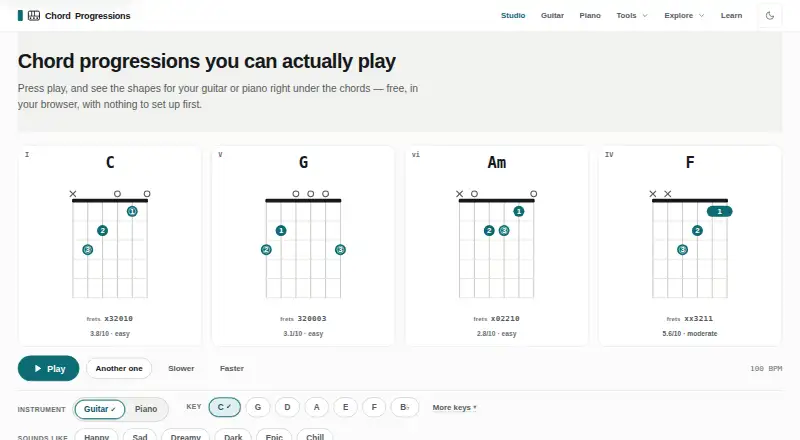
What ChordProgressions.org is
ChordProgressions.org is a free browser-based studio for creating, hearing, analyzing, and exporting chord progressions for guitar and piano. Its tools include a generator, builder, finder, identifier, analyzer, and transposer. Users can generate guitar shapes and piano voicings, adjusting settings such as tuning, capo position, difficulty, inversions, and fingering. Theory analysis can display Roman numerals, Nashville numbers, chord functions, cadence points, borrowed chords, and a key estimate with a confidence rating. The studio accepts MIDI input and imports MusicXML, project files, and plain-text chord sheets. Audio analysis runs in the browser and produces an editable chord timeline with a confidence score. Export choices include MIDI, WAV, chord chart PDF, PNG and SVG diagrams, plain text, CSV, JSON, MusicXML, and share links. Projects autosave in the browser and stay on the device; imported files are read locally rather than uploaded. The practice tool loops progressions with a metronome and count-in and offers ear-recognition and playing practice in every key. JavaScript is required for studio playback and editing.
Who it suits
ChordProgressions.org suits guitarists, pianists, songwriters, and people learning music theory who want browser-based progression tools and practice features. It also fits users who want projects to remain on their device rather than upload imported files.
What it does well
- Free browser-based studio for guitar and piano.
- Offers a generator, analyzer, finder, and transposer.
- Imports MIDI, MusicXML, project files, and chord sheets.
- Projects autosave locally and imported files are not uploaded.
- Exports include MIDI, PDF, MusicXML, and more.
What to know first
- JavaScript is required for studio playback and editing.
- Audio chord timelines are estimates, though editable.
- Studio playback and editing require a browser.
Limits
The studio is free, with no trial. JavaScript is needed for studio playback and editing; the progression library, key reference, theory articles, and chord tables work as plain HTML without it.
Plans
| Plan | Billed and limits | Price |
|---|---|---|
| ChordProgressions.org | Free in-browser studio; JavaScript required for studio playback and editing | Free |
As chordprogressions.org lists them, read 3 Oct 2026. The maker's own page has the final word.
Getting started
- Open https://chordprogressions.org/ in a web browser.
- Enable JavaScript for studio playback and editing.
- Create or find a progression, or import a supported file.
- Adjust instrument voicing and theory settings as needed.
- Practice in the studio or export the progression.
Verdict
ChordProgressions.org pairs progression creation and theory analysis with practice tools and a wide range of exports. Its studio playback and editing depend on JavaScript, while projects and imported files stay in the browser.
Questions
How much does ChordProgressions.org cost?
The listed plan is free. There is no free trial.
Which instruments does it support?
It supports guitar and piano, including generated guitar shapes and piano voicings.
What can I export?
Export formats include MIDI, WAV, chord chart PDF, PNG and SVG diagrams, plain text, CSV, JSON, MusicXML, and a share link.
Can I import files or use a MIDI device?
The studio supports MIDI input and output and imports MIDI, MusicXML, project files, and plain-text chord sheets.
Where are projects and imported files handled?
Projects autosave in the browser and stay on the device. Imported files are read in the browser and are not uploaded.
Does it require JavaScript?
JavaScript is required for studio playback and editing. The progression library, key reference, theory articles, and chord tables work as plain HTML without it.
Facts from ChordProgressions.org's own pages
- Audio analysis
- Audio decoding and analysis run in the browser, and the resulting chord timeline is an estimate with a confidence score that remains editable. · chordprogressions.org, 3 Oct 2026
- Exports
- Export options include MIDI, WAV, chord chart PDF, PNG and SVG diagrams, plain text, CSV, JSON, MusicXML, and a share link. · chordprogressions.org, 3 Oct 2026
- Guitar and piano
- It generates guitar shapes and piano voicings, with settings for tunings, capo positions, difficulty, inversions, and fingering. · chordprogressions.org, 3 Oct 2026
- Integrations
- The studio lists MIDI device input and output and imports MIDI and MusicXML files; no third-party service integrations are stated on the opened page. · chordprogressions.org, 3 Oct 2026
- Intended users
- The site presents tools and learning materials for guitarists, pianists, songwriters, and people learning music theory. · chordprogressions.org, 3 Oct 2026
- Library size
- The site says its progression library contains more than 130 patterns across genres. · chordprogressions.org, 3 Oct 2026
- Local storage and privacy
- The site says projects autosave in the browser and stay on the device; imported files are read in the browser and never uploaded. · chordprogressions.org, 3 Oct 2026
- MIDI and file support
- The studio supports MIDI input and output and imports MusicXML, project files, and plain-text chord sheets. · chordprogressions.org, 3 Oct 2026
- Practice
- The practice tool loops a progression with a metronome and count-in, and offers ear-recognition and playing practice in every key. · chordprogressions.org, 3 Oct 2026
- Progression tools
- Its listed tools include a progression generator, builder, finder, identifier, analyzer, and transposer. · chordprogressions.org, 3 Oct 2026
- Purpose
- The site offers a browser-based studio for creating, hearing, analyzing, customizing, and exporting chord progressions for guitar and piano. · chordprogressions.org, 3 Oct 2026
- Security limitation
- The studio requires JavaScript for playback and editing; the progression library, key reference, theory articles, and chord tables work as plain HTML without it. · chordprogressions.org, 3 Oct 2026
- Theory analysis
- The analyzer can show Roman numerals, Nashville numbers, chord functions, cadence points, borrowed chords, and a key estimate with a confidence rating. · chordprogressions.org, 3 Oct 2026
Where ChordProgressions.org stands on Freedom251
- Chord Finder Software#13 of 27