Freedom251 › Chord Finder Software
Chord Analyser
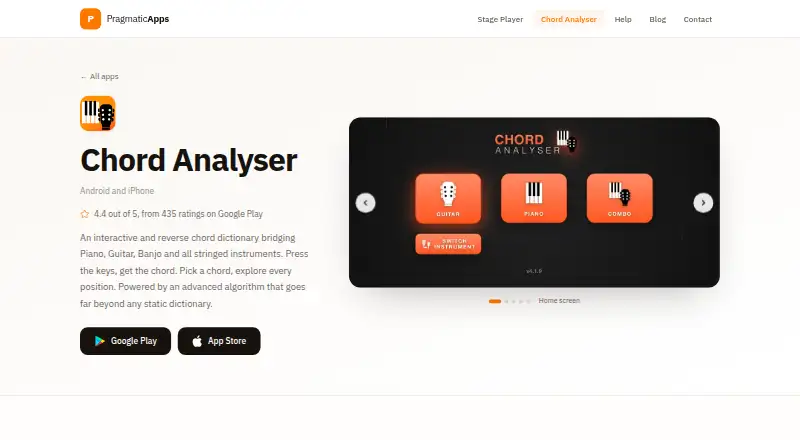
What Chord Analyser is
Chord Analyser identifies chords from notes entered on a piano keyboard or fretboard, then shows playable positions for the selected chord. Its dictionary recognizes over 3,500 chords and computes positions algorithmically. The chart editor handles measures, subdivisions, repeats, time and key signatures, playback, automatic voicing and PDF export. The free version has no time limit or ads, but includes only one chord chart; more charts require the full version, a one-time purchase priced by the app store. Full-version features include eight additional instruments, open tunings, MIDI input, unlimited charts and chart transposition. Microphone chord recognition is a beta for Android only: it identifies one chord at a time and may struggle on older phones. The maker says real-time audio transcription is processed on-device and does not need an internet connection. Chord Analyser is available on Android and iOS. Its maker describes it as an app for learners, composers, performers and musicians who play across instruments.
Who it suits
It suits learners, composers, performers and musicians who want chord positions or tools for creating charts. Those needing more than one chart or MIDI input need the full version.
What it does well
- Recognizes over 3,500 chords
- Shows playable positions for selected chords
- Chart editor exports PDF
- Free version has no time limit or ads
- Audio transcription is processed on-device
What to know first
- Free version includes only one chord chart
- Microphone recognition is Android-only beta
- Microphone recognition handles one chord at a time
Limits
The free plan includes one chord chart; additional charts require the full version. The full version's price is set by the app store and is a one-time payment.
Plans
| Plan | Billed and limits | Price |
|---|---|---|
| Free | No time limit · no ads · one chord chart · PDF export | Free |
| Free version | Core chord finder · piano · guitar · tenor banjo · one chord chart · PDF export · no ads | Free |
| Promo version | one-time in-app purchase · Full version features at promotional price | $3.49, paid once |
| Full version | one-time in-app purchase · Additional instruments · open tunings · left-handed fretboard · bookmarks · Combo view · Android microphone recognition · MIDI · unlimited charts · transposition | $6.99, paid once |
As pragmaticapps.net lists them, read 2 Oct 2026. The maker's own page has the final word.
Getting started
- Visit the Chord Analyser website.
- Install the app on Android or iOS.
- Use the free plan, which has no time limit and includes one chart.
- Enter notes on the piano keyboard or fretboard to identify a chord.
- Choose the full version through your app store for additional instruments and chart features.
Overview
Chord Analyser is a mobile tool for chord discovery and chart writing, best suited to musicians who want both in one app. Its breadth is strongest when you move between instruments; the free tier’s one-chart ceiling is the main constraint.
Key features
Enter notes on a piano keyboard or fretboard to identify a chord, or use the dictionary of more than 3,500 chords. Reverse lookup is useful when you know the notes but not the chord name. The app computes playable positions for selected chords, and its voicing explorer helps compare options rather than leaving you with a bare chord label.
The chart editor supports measures, subdivisions, repeats, time and key signatures, playback, automatic voicing and PDF export. That is a substantial step beyond a lookup reference: it can serve musicians who need to draft and share charts. The free edition allows one chart, however, so it is better for occasional use or evaluation than maintaining a catalogue.
Microphone recognition is an Android-only beta, handles one chord at a time and may struggle on older phones. Treat it as an experimental extra, not a dependable reason to choose the app; it is not an option on iOS. The maker says real-time audio transcription is processed on-device without an internet connection. Google Play lists no data collected or shared with third parties for the app.
Pricing
The Free plan costs nothing, has no time limit and no ads, and includes one chord chart plus PDF export. It is a sensible starting point for learning the lookup tools or producing a single chart, but the cap rules it out for regular chart writers.
The Full version is a one-time payment, with the price set by the app store. It adds eight instruments—5-string banjo, ukulele, 7-string guitar, violin, viola, mandolin, 5-string mandolin and balalaïka—as well as open tunings, MIDI input, unlimited charts and chart transposition. This is the more suitable choice for multi-instrument players, MIDI users and anyone building multiple charts; the trade-off is an upfront store-dependent price rather than a stated universal amount. There is no free trial.
Platforms
Chord Analyser is available on Android and iOS. MIDI input in the full version works on instrument pages and in the chart editor. Microphone chord recognition is limited to Android and remains in beta.
Who it's for
The maker positions the app for learners, composers, performers and musicians who play across instruments. Learners can use note entry and the chord dictionary to connect notes with chord names; performers and composers gain chart playback, export and transposition. It is less compelling for someone who needs only an occasional chord answer, or who expects reliable automatic listening on an older Android phone.
The app is made by Nicolas Foudral, whom Google Play identifies with an address in Marseille, France. The maker describes the apps as a one-person project and gives [email protected] for support.
Pros and cons
- Pros: More than 3,500 chords, reverse lookup and computed playable positions bring identification and practical voicing together.
- Pros: The chart editor combines playback and structural notation features with PDF export, useful for preparing material to share.
- Pros: The full version spans additional instruments and adds MIDI, open tunings, transposition and unlimited charts.
- Cons: The free version’s single-chart limit makes it a poor long-term fit for anyone keeping several arrangements.
- Cons: Microphone recognition is restricted to Android, still beta, and may falter on older phones.
Alternatives
For a wider set of chord-finding choices, browse Chord Finder Software. Choose ChordSequence instead if you want a free Android or web option with all features, no paywall or usage limit, and WAV and MIDI export. ChordU is worth considering for Android, iOS or web access, especially if its Premium plan’s uploads, MusicOnly mode and downloads suit your workflow; it costs $5 a month.
Chordio is an iOS and macOS alternative with built-in sounds, an on-screen keyboard and real-time MIDI chord detection in its free download. For an iOS-and-web sketching option, OtoTheory offers three local saves on its free plan, while MIDI and audio export are unavailable there. ChordProgressions.org is a free browser studio, with JavaScript required for playback and editing.
chords·lol, SongEngine and Chordify are also alternatives to consider.
Verdict
Choose Chord Analyser if you want a mobile chord dictionary that also supports playable voicings and structured, exportable charts, especially across several instruments. Its broad toolkit is the case for paying once; the main reason to look elsewhere is the one-chart free cap, or a need for reliable audio recognition on iOS or older Android hardware.
Verdict
Chord Analyser combines chord lookup with chart creation on Android and iOS. The free version is limited to one chart, and the full-version price depends on the app store.
Questions
Is Chord Analyser free?
Yes. The Free plan costs nothing, has no time limit or ads, and includes one chord chart.
What does the full version add?
It adds eight instruments, open tunings, MIDI input, unlimited chord charts and chart transposition. Its one-time price comes from your app store.
Which platforms does it support?
Chord Analyser is available on Android and iOS.
Can it recognize chords through a microphone?
Microphone recognition is an Android-only beta. It identifies one chord at a time and may struggle on older phones.
Does it work offline for audio transcription?
The maker says real-time audio transcription is processed on-device and does not require an internet connection.
Who makes Chord Analyser?
Google Play identifies the developer as Nicolas Foudral and lists an address in Marseille, France. The maker provides [email protected] for support.
Facts from Chord Analyser's own pages
- Advertising and tracking
- The maker states that the app has no advertising, trackers or data harvesting. · pragmaticapps.net, 15 Oct 2026
- Algorithmic voicings
- Chord positions are calculated on the fly rather than retrieved from a fixed position list, including for custom tunings. · pragmaticapps.net, 15 Oct 2026
- Android distribution
- Google Play lists at least 100,000 downloads and an Everyone content rating. · play.google.com, 15 Oct 2026
- API and SDK
- The reviewed product, help and store pages describe the end-user mobile app but do not document a public API, SDK or developer integration surface. · pragmaticapps.net, 15 Oct 2026
- Audio privacy
- The maker says audio processing for real-time audio transcription is performed on-device and does not require an internet connection. · pragmaticapps.net, 2 Oct 2026
- Audio recognition
- Microphone chord recognition is Android-only, beta, analyzes one held chord at a time, and asks users to sustain it for at least four seconds. · pragmaticapps.net, 15 Oct 2026
- Chart library
- The paid version allows unlimited charts with rename, duplicate, reorder, import, export and transposition functions. · pragmaticapps.net, 15 Oct 2026
- Chord charts
- The chart editor supports subdivisions, bar lines, repeats, time and key signatures, playback, auto voicing and PDF export. · pragmaticapps.net, 15 Oct 2026
- Chord coverage
- The product page says the app recognizes more than 3,500 chords, including major, minor, diminished, augmented, seventh, ninth and suspended families. · pragmaticapps.net, 15 Oct 2026
- Chord dictionary
- The dictionary lets users choose a root and chord quality, then browse positions calculated for the selected instrument and tuning. · pragmaticapps.net, 15 Oct 2026
- Chord library
- The app recognizes over 3,500 chords and provides a chord dictionary with algorithmically computed positions. · pragmaticapps.net, 2 Oct 2026
- Combo view
- The premium Combo page displays a piano keyboard and fretboard together, keeping both views synchronized. · pragmaticapps.net, 15 Oct 2026
- Data safety
- Google Play lists no data shared with third parties and no data collected for the app. · play.google.com, 15 Oct 2026
- Documentation
- Official help pages provide step-by-step guides for setup, chord naming, instruments and tunings, microphone and MIDI, charts, and free-versus-full limits. · pragmaticapps.net, 15 Oct 2026
- Free version limit
- The free version includes one chord chart; additional charts require the full version. · pragmaticapps.net, 2 Oct 2026
- Headquarters
- Marseille, France · pragmaticapps.net, 28 Sept 2026
- Interactive fretboard
- Users can tap frets and open strings, hear each entered note, and receive chord readings with note degrees and staff notation. · pragmaticapps.net, 15 Oct 2026
- Interactive piano
- Users can press any combination of piano keys to receive chord names and notation. · pragmaticapps.net, 15 Oct 2026
- Left-handed mode
- A display option mirrors the fretboard for left-handed players while preserving the same chords and tuning. · pragmaticapps.net, 15 Oct 2026
- Limit: instrument coverage
- A Google Play reviewer requested support for eight-string instruments and reported that an open high-E string could be inaudible during chord preview. · play.google.com, 15 Oct 2026
- Limit: missing search
- Google Play reviewers requested a chord search bar because the large number of chord types makes browsing difficult. · play.google.com, 15 Oct 2026
- Limit: older audio issues
- An App Store reviewer reported that some piano-library sounds and play buttons did not work after an update and asked for fixes. · apps.apple.com, 15 Oct 2026
- Maker
- Google Play identifies the developer as Nicolas Foudral and lists an address in Marseille, France. · play.google.com, 2 Oct 2026
- Maker identity
- The Apple listing identifies Nicolas FOUDRAL as the seller, while Google Play lists the developer as Pragmatic apps. · apps.apple.com, 15 Oct 2026
Where Chord Analyser stands on Freedom251
- Chord Finder Software#4 of 27