Freedom251 › Game Testing Software

Gua
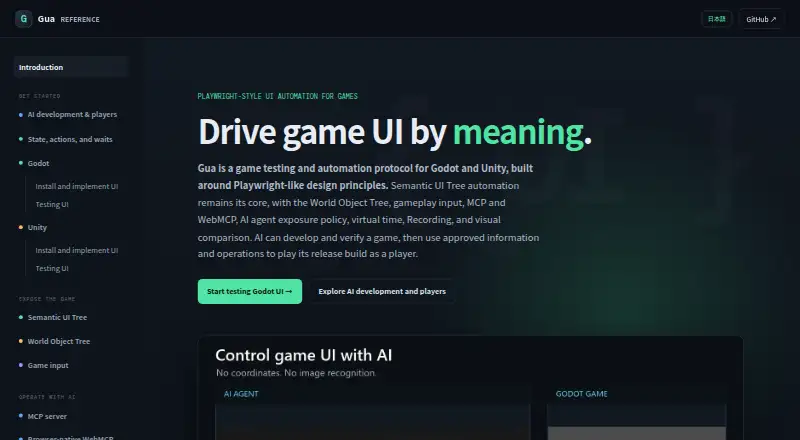
What Gua is
Gua is an open-source protocol for testing and automating games built with Godot and Unity. It exposes semantic UI information such as IDs, roles, text, hierarchy, bounds, visibility, values, focus and selection, allowing tests or AI agents to query and operate controls. Tests can wait for UI conditions in NUnit, xUnit, MSTest or C++ rather than relying on fixed delays. Visual testing compares PNG screenshots with baselines using thresholds, masks, difference ratios and operating-system or renderer variants. Recording captures semantic actions, timing, revisions and wait conditions for replay. Failure artifacts can include UI trees and diffs, pending requests, event history, logs, runtime and environment details, screenshots and game-process output. The native MCP server connects AI tools to a running game over WebSocket; WebMCP exposes tools in Godot Web Export and Unity WebGL builds. The documentation describes a Godot 4.7 add-on and Unity 6 support for UI Toolkit, uGUI and TextMeshPro. Player mode denies screenshots by default. WebMCP requires an experimental browser API, and stable Unity desktop support excludes IL2CPP, IMGUI and EditorWindow automation.
Who it suits
Gua suits game developers who need automated UI testing or semantic controls for AI-assisted development and verification. It is aimed at Godot and Unity projects, with documented engine-specific limits.
What it does well
- Open-source and free.
- Supports Godot and Unity.
- Tests can wait for UI conditions without fixed delays.
- Records semantic actions for replay.
- Failure artifacts can include logs and UI diffs.
What to know first
- Player mode denies screenshots by default.
- WebMCP requires an experimental browser API.
- Unity support excludes IL2CPP, IMGUI and EditorWindow automation.
Limits
Gua is listed as free and open source, with no paid plan or trial described. Stable Unity desktop support is limited to Unity 6000.5+ Mono on Windows, Linux, and Intel or Apple Silicon macOS; IL2CPP, IMGUI, and EditorWindow automation are unsupported. Player mode denies screenshots by default, and WebMCP requires a browser implementing the experimental document.modelContext API.
Getting started
- Get the Godot add-on or Windows Inspector from GitHub Releases.
- Use the documented Godot 4.7 add-on or Unity 6 package for your engine.
- Connect a native MCP server to a running game over WebSocket, or use WebMCP in a supported web build.
- For Player mode screenshots, have the game host opt in before starting the bridge.
Verdict
Gua offers semantic UI automation, visual comparisons, recording and diagnostics for supported Godot and Unity projects. Its browser and Unity limits, along with default screenshot restrictions, are important to account for.
Questions
Is Gua free?
Yes. Its pricing model is free, and the pricing note says open source.
Which game engines does Gua support?
The site documents a Godot 4.7 add-on and Unity 6 support for UI Toolkit, uGUI, and TextMeshPro.
What license does it use?
The official documentation links to an MIT License.
How does it connect AI tools to a game?
The native MCP server connects to a running game over WebSocket. WebMCP exposes semantic tools in Godot Web Export and Unity WebGL browser builds.
Does Gua support screenshots in Player mode?
Player mode denies screenshots by default because semantic rules cannot redact rendered pixels. The game host can opt in before starting the bridge.
Where can users get the downloads or support?
The site directs users to GitHub Releases for the Godot add-on and Windows Inspector, and directs questions to its support Discord server.
Facts from Gua's own pages
- AI integrations
- The native MCP server connects AI tools to a running game over WebSocket, while WebMCP exposes tools in Godot Web and Unity WebGL browser builds. · gua.orizika.com, 4 Oct 2026
- Core automation
- Gua exposes semantic UI state and lets tests operate controls through actions such as click, focus, set value, select, scroll, and press key. · gua.orizika.com, 4 Oct 2026
- Diagnostics
- Failure artifacts can include the UI tree and diff, pending requests, event history, logs, runtime version, environment, screenshot, and game-process output. · gua.orizika.com, 3 Oct 2026
- Download
- The site directs users to GitHub Releases for the Godot add-on and Windows Inspector. · gua.orizika.com, 4 Oct 2026
- Engines
- The site describes a recommended GDScript add-on for Godot 4.7 and a Unity package for Unity 6 that reflects UI Toolkit, uGUI, and TextMeshPro. · gua.orizika.com, 3 Oct 2026
- Game engine support
- The site documents a Godot 4.7 add-on and Unity 6 support for UI Toolkit, uGUI, and TextMeshPro. · gua.orizika.com, 4 Oct 2026
- Integrations
- The native MCP server connects to a running game over WebSocket, while WebMCP registers semantic tools in a Godot Web Export or Unity WebGL browser tab. · gua.orizika.com, 3 Oct 2026
- License
- The official documentation links to an MIT License. · gua.orizika.com, 4 Oct 2026
- Product
- Gua is a game testing and automation protocol for Godot and Unity built around Playwright-like design principles. · gua.orizika.com, 4 Oct 2026
- Recording
- Gua.Testing.Recording records semantic actions and wait conditions for replay, with sensitive values stored as secret keys rather than plaintext. · gua.orizika.com, 4 Oct 2026
- Screenshot restriction
- Player mode denies screenshots by default because semantic rules cannot redact rendered pixels; the game host may opt in before starting the bridge. · gua.orizika.com, 4 Oct 2026
- Secret handling
- Sensitive values can be redacted from snapshots, logs, diagnostics, and recordings, then resolved in memory during replay. · gua.orizika.com, 4 Oct 2026
- Security controls
- An AI player policy can hide UI or world objects, omit or redact fields, replace or quantize values, and restrict allowed UI actions. · gua.orizika.com, 4 Oct 2026
- Semantic UI automation
- It exposes UI state such as IDs, roles, text, hierarchy, bounds, visibility, enabled state, values, focus, and selection for semantic queries and actions. · gua.orizika.com, 3 Oct 2026
- Support
- The site directs users with questions to its support Discord server. · gua.orizika.com, 4 Oct 2026
- Supported desktop scope
- Unity stable desktop support covers Windows x64, Linux x64, Intel macOS, and Apple Silicon macOS; IL2CPP, Unity IMGUI, and EditorWindow automation are unsupported. · gua.orizika.com, 4 Oct 2026
- Testing
- Its .NET testing support includes NUnit, xUnit, MSTest, and C++ helpers, with state-based waits intended to avoid fixed sleeps. · gua.orizika.com, 4 Oct 2026
- Unity limits
- The documented stable Unity desktop scope is Unity 6000.5+ Mono on Windows, Linux, and Intel or Apple Silicon macOS; IL2CPP, IMGUI, and EditorWindow automation are unsupported. · gua.orizika.com, 3 Oct 2026
- Use cases
- Gua supports AI-assisted game development and verification, as well as AI agents playing release builds with approved information and operations. · gua.orizika.com, 3 Oct 2026
- Visual testing
- Gua.Testing.Visual compares rendered PNG screenshots with baselines and supports pixel thresholds, masks, and OS or renderer variants. · gua.orizika.com, 4 Oct 2026
- WebMCP limitation
- WebMCP requires a browser implementing the experimental document.modelContext API, and the released Godot and Unity built-in ports do not currently advertise screenshot support. · gua.orizika.com, 3 Oct 2026
Where Gua stands on Freedom251
- Game Testing Software#7 of 18