Freedom251 › GPU Tuning Software
Green Curve
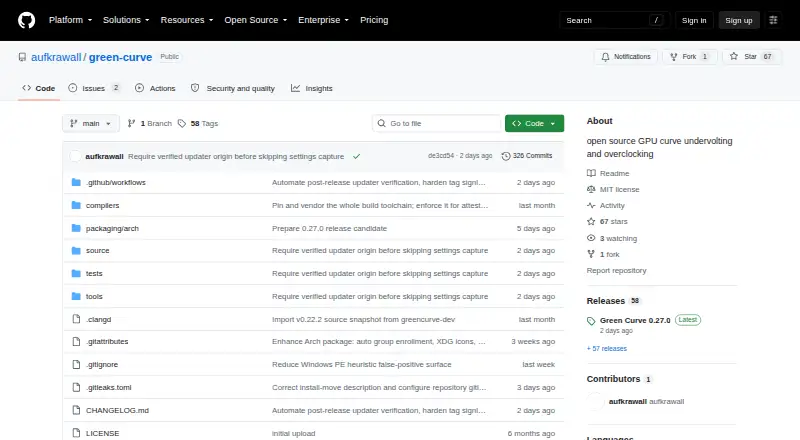
What Green Curve is
Green Curve is a free, open-source utility for tuning NVIDIA GeForce GPUs on Windows and Linux. It can inspect and edit live voltage/frequency curves, adjust core and effective VRAM offsets, and set power targets. Supported GPU architectures run from Pascal through Blackwell, with a best-effort fallback for future architectures. Fan options include driver control, fixed speed, and custom temperature curves with up to eight points, hysteresis, and configurable polling. Five profile slots per user can be switched with global hotkeys or automatically according to the foreground application. A built-in CLI handles hardware probing, profile switching, and live-state output in text or JSON. Windows has a native GUI; Linux has a keyboard- and mouse-navigable terminal interface. The app loads NVAPI and NVML from the locally installed NVIDIA driver rather than bundling proprietary driver binaries. The project states it has no telemetry or remote error reporting. Windows x64 and Linux x64 are validated on NVIDIA hardware; ARM64 targets lack completed live hardware validation. Tuning can cause instability or hardware damage.
Who it suits
It suits GeForce owners who want to adjust clock curves, offsets, power targets, or fan behavior. The listed real-hardware validation covers Windows x64 and Linux x64.
What it does well
- Edits live voltage/frequency curves and power targets
- Offers five profile slots and automatic app-based switching
- Fan curves support up to eight points
- CLI can output live state as JSON
- Optional updater verifies signed manifests before download
What to know first
- ARM64 targets lack completed live-hardware validation
- Tuning can cause instability or hardware damage
- Building requires Python 3.10 or later
Getting started
- Open the Green Curve GitHub project website.
- Choose a Windows setup installer or portable archive, or a Linux archive or Arch Linux package.
- Install or unpack the package for your system.
- Run the read-only self-test to check driver access, VF-curve readback, memory topology, and available control domains.
- Use the Windows GUI, Linux terminal interface, or CLI to inspect hardware and configure settings.
Overview
Green Curve is a free utility for tuning NVIDIA GeForce graphics cards on Windows and Linux. It suits users who want direct control over GPU curves, clocks, power, or cooling, especially those comfortable managing the risks of overclocking. Its range of controls and automation is compelling, but validation is limited to x64 systems and tuning can destabilize or damage hardware.
The project supports GeForce GPUs from Pascal through Blackwell, with a best-effort fallback for future architectures. It is MIT-licensed and independent of NVIDIA, loading NVAPI and NVML from the installed driver rather than bundling proprietary driver binaries.
Green Curve separates the interface from hardware control: an unprivileged GUI or terminal client communicates with an elevated background service over a local named pipe on Windows or a restricted Unix domain socket on Linux. The project says it has no telemetry, analytics, cloud tracking, or remote error reporting. Its optional release check sends no hardware details, profiles, or settings.
Key features
Curve, clock, and power controls
The utility can inspect and edit live voltage/frequency curves, set core and effective VRAM offsets, and change power targets. A read-only self-test reports driver and curve readback, memory topology, and available control domains. That gives users a way to see what their system exposes before tuning, though it cannot make risky adjustments safe.
Fan control and profiles
Users can leave fan behavior to the driver, set a fixed percentage, or build a temperature curve with up to eight points, configurable hysteresis, and polling intervals. Five saved profile slots per user, global hotkey switching, and automatic switching based on the foreground application help separate settings by task. Five slots may be restrictive for users who keep many presets.
Interfaces and automation
Windows gets a native Win32 GUI; Linux gets a terminal interface navigable by keyboard and mouse. Built-in CLI commands support hardware probing, profile switching, and live-state output in text or JSON, making the tool useful beyond manual adjustment. The different interfaces may be a drawback for users who expect a graphical Linux application.
The optional updater verifies signed release manifests and installs updates only with user consent. The maker offers Windows installers and portable archives, Linux archives and Arch Linux packages, along with SHA-256 files and build-provenance attestations for program packages.
Pricing
Green Curve is free, with no paid plan described. The free utility includes its tuning controls, profiles, interfaces, and CLI; there is no paid tier to unlock additional capacity. Building it requires Python 3.10 or later, a consideration for users compiling from source.
Platforms
Green Curve supports Windows and Linux, with Windows x64 and Linux x64 validated on real NVIDIA hardware. Windows arm64 and Linux arm64 are compile targets, but do not have completed live-hardware validation, so users on those systems should not assume equivalent support. GPU coverage spans Pascal, Turing, Ampere, Lovelace, and Blackwell GeForce cards; support for later architectures is best-effort.
Who it's for
Green Curve is best for GeForce owners who want to adjust voltage/frequency curves, offsets, power limits, or fan behavior and value profile switching or scripting. Its self-test can help establish which controls the driver exposes. It is a poor fit for anyone seeking risk-free performance changes: the project warns that tuning may cause instability, shorten hardware lifespan, or damage hardware.
Pros and cons
- Broad control set: Curve editing, clock and memory offsets, power targets, and three fan modes cover several common tuning needs in one utility.
- Useful profile and CLI options: Hotkeys, foreground-app switching, and JSON-capable commands support both routine switching and automation.
- Clear local-control design: The GUI and TUI run unprivileged while a separate service handles hardware access; the project also states that it does not track users remotely.
- Hardware risk remains real: Adjusting clocks, voltage, power, or fan speeds can cause instability or hardware damage, so this is not a set-and-forget choice for cautious users.
- Validation is x64-focused: ARM builds lack completed live-hardware validation, and future GPU support is best-effort.
- Profile count is finite: Five saved slots per user may not suit users who need a larger library of presets.
Alternatives
Browse GPU Overclocking Software or GPU Tuning Software for other options. For a Windows alternative, Arc Power is free. ASUS GPU Tweak III is another free Windows option, while CoreCtrl is a free, open-source GNU/Linux application. Intel VTune Profiler is a free standalone tool or part of the Intel oneAPI Toolkit, with commercial and non-commercial use permitted and community support available. Linux users can also consider free PenguinBurner or TuxClocker; the latter is GPL-3 and has hardware-specific GPU/CPU support. For newer AMD graphics cards on Windows, MoreClockTool is intended for experienced users and carries an overclocking risk warning. Gainward ExperTool is another free Windows alternative.
Verdict
Choose Green Curve if you use a supported GeForce GPU on validated x64 Windows or Linux and want a free combination of curve, power, fan, profile, and CLI controls. Its strongest case is the breadth of local tuning and automation without a paid tier. Look elsewhere if you need validated ARM support, or avoid GPU tuning utilities altogether if the possibility of instability or hardware damage is unacceptable.
Verdict
Green Curve combines GPU tuning controls, profiles, and CLI access in a free utility for Windows and Linux. Check the platform validation and the project's hardware-risk warning before changing settings.
Questions
Is Green Curve free?
Yes. Its pricing model is free, and a free plan is listed.
Which GPUs and operating systems does it support?
It supports NVIDIA GeForce GPUs from Pascal through Blackwell, with a best-effort fallback for future architectures. It runs on Windows and Linux; x64 is validated on real NVIDIA hardware, while ARM64 has not completed live hardware validation.
What can I tune?
You can inspect and edit live voltage/frequency curves, core and effective VRAM offsets, power targets, and fan behavior. Fan modes include driver auto, fixed percentage, and custom temperature curves.
Does it have a graphical interface?
Windows has a native Win32 graphical interface. Linux has a keyboard- and mouse-navigable terminal interface.
Is Green Curve open source, and what is its license?
Yes. It is open source and licensed under the MIT License.
Does it include NVIDIA driver binaries or send telemetry?
It loads NVAPI and NVML from the locally installed NVIDIA driver and does not bundle proprietary driver binaries. The project states it has no telemetry, analytics, cloud tracking, or remote error reporting.
Facts from Green Curve's own pages
- Architecture
- An unprivileged GUI or TUI client communicates with an elevated background service through a local named pipe on Windows or a restricted Unix domain socket on Linux. · github.com, 29 Sept 2026
- Automation
- Built-in CLI commands support hardware probing, profile switching, and live-state output in text or JSON. · github.com, 29 Sept 2026
- Build requirement
- Building Green Curve requires Python 3.10 or later. · github.com, 30 Sept 2026
- CLI
- Built-in CLI commands support hardware probing, profile switching, and live-state output, including JSON output. · github.com, 30 Sept 2026
- Compatibility checks
- The read-only self-test reports driver and VF-curve readback, memory topology, and control-domain availability. · github.com, 29 Sept 2026
- Curve and clock controls
- It can inspect and edit live VF curves, clock offsets, effective VRAM offsets, and power target limits. · github.com, 29 Sept 2026
- Downloads
- The maker offers Windows setup installers and portable archives, Linux archives and Arch Linux packages, and publishes SHA-256 files and GitHub build-provenance attestations for program packages. · github.com, 30 Sept 2026
- Driver integration
- Green Curve dynamically loads NVAPI and NVML from the locally installed NVIDIA driver and does not bundle proprietary driver binaries. · github.com, 30 Sept 2026
- Fan control
- Fan modes include driver auto, fixed percentage, and custom temperature curves with up to eight points, configurable hysteresis, and polling intervals. · github.com, 29 Sept 2026
- GPU support
- It supports GeForce GPUs from Pascal through Blackwell, with a best-effort fallback backend for future architectures. · github.com, 29 Sept 2026
- Integrations
- The application uses NVAPI and NVML interfaces from the locally installed NVIDIA driver and does not bundle proprietary driver binaries. · github.com, 29 Sept 2026
- Intended users
- The project is for users tuning GeForce GPU clocks, voltage curves, power limits, or fan behavior; the README warns that tuning can cause instability or hardware damage. · github.com, 29 Sept 2026
- Interface
- It provides a native Win32 GUI on Windows and a keyboard- and mouse-navigable terminal UI on Linux. · github.com, 30 Sept 2026
- License
- Green Curve is licensed under the MIT License and is described as independent of NVIDIA. · github.com, 29 Sept 2026
- License and risk
- The project is MIT-licensed and warns that changing GPU clocks, voltage, power, or fan speeds can cause instability, reduced hardware lifespan, or hardware damage. · github.com, 30 Sept 2026
- Platform validation
- Windows x64 and Linux x64 are validated on real NVIDIA hardware; Windows arm64 and Linux arm64 are compile targets without completed live hardware validation. · github.com, 30 Sept 2026
- Privacy
- The project states that it has no telemetry, analytics, cloud tracking, or remote error reporting; its optional GitHub release check sends no hardware information, profiles, or settings. · github.com, 30 Sept 2026
- Profiles
- It includes five saved profile slots per user, global hotkey switching, and automatic profile switching based on the foreground application. · github.com, 30 Sept 2026
- Purpose
- Green Curve is an open-source NVIDIA GPU utility for tuning voltage/frequency curves, clock offsets, power limits, and fan curves. · github.com, 30 Sept 2026
- Security
- The project says it has no telemetry, analytics, cloud tracking, or remote error reporting; its optional GitHub release check sends no hardware information, profiles, or settings. · github.com, 29 Sept 2026
- Security architecture
- A background service handles hardware control while the GUI and TUI run unprivileged, communicating through a local named pipe on Windows or restricted Unix socket on Linux. · github.com, 30 Sept 2026
- Supported GPUs
- It supports GeForce GPUs based on Pascal, Turing, Ampere, Lovelace, and Blackwell, with a best-effort fallback for future architectures. · github.com, 30 Sept 2026
- Support limits
- Windows x64 and Linux x64 are validated on real NVIDIA hardware; Windows arm64 and Linux arm64 are compile targets without completed live hardware validation. · github.com, 29 Sept 2026
- Tuning features
- Users can edit live VF curves, set core and VRAM offsets and power targets, and choose driver-auto, fixed-speed, or custom fan control. · github.com, 30 Sept 2026
Where Green Curve stands on Freedom251
- GPU Tuning Software#10 of 16
- GPU Overclocking Software#13 of 19