Freedom251 › GPU Cluster Management Software

GPUStack
What GPUStack is
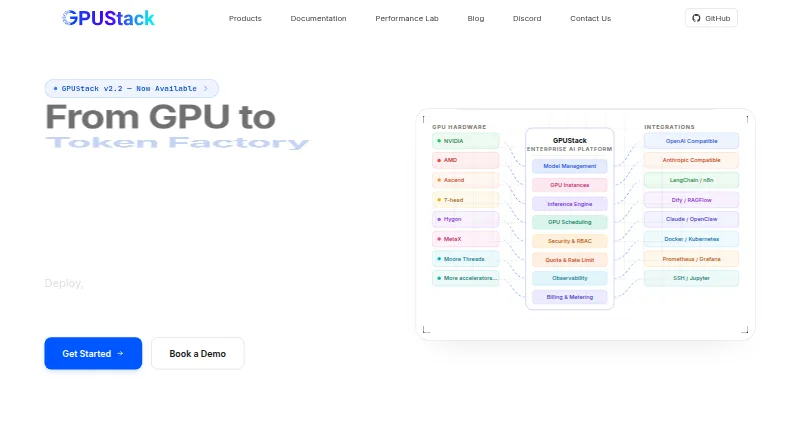
GPUStack is a free, open-source GPU cluster manager for deploying and scaling AI models across on-premise, cloud, or hybrid infrastructure. It exposes models through OpenAI-compatible and Anthropic-compatible endpoints and supports inference engines such as vLLM, SGLang, llama.cpp, TensorRT-LLM, and MindIE. Users can browse models from Hugging Face and ModelScope or provide local files, with compatibility checks. GPUStack can provision GPU instances with lifecycle controls, partitioning, SSH key injection, Jupyter access, and persistent S3 or NFS storage. Deployment options include on-premise, Kubernetes, and multi-cloud; air-gapped deployments are also supported. The maker lists accelerators from NVIDIA, AMD, Ascend, T-head, Hygon, MetaX, Moore Threads, Cambricon, and Iluvatar. Security features include role-based access, multi-tenancy, SSO, scoped API keys, IP allowlisting, token quotas, and usage analytics. A deployment constraint is that worker nodes support Linux only; Windows users are directed to consider WSL2, while macOS worker nodes are unsupported.
Who it suits
GPUStack suits teams deploying AI models across on-premise, cloud, or hybrid GPU infrastructure. It may also fit organizations seeking Kubernetes support, model-serving endpoints, and access controls.
What it does well
- Supports OpenAI- and Anthropic-compatible endpoints
- Supports on-premise, Kubernetes, and multi-cloud deployments
- Includes GPU partitioning and persistent storage
- Community Edition is free
What to know first
- Worker nodes support Linux only
- Windows users are directed to consider WSL2
- macOS worker nodes are not supported
Limits
GPUStack worker nodes support Linux only; Windows users are directed to consider WSL2, and macOS worker nodes are not supported. Enterprise Edition licensing and pricing require contacting the company.
Plans
| Plan | Billed and limits | Price |
|---|---|---|
| GPUStack Community Edition | Open-source GPU cluster manager | Free |
As gpustack.ai lists them, read 29 Sept 2026. The maker's own page has the final word.
Getting started
- Visit https://gpustack.ai/ to access GPUStack Community Edition.
- Choose an on-premise, Kubernetes, multi-cloud, or hybrid deployment approach.
- Set up Linux worker nodes; Windows users are directed to consider WSL2.
- Browse models from Hugging Face or ModelScope, or provide local model files.
- Use the provided inference endpoints to expose deployed models.
GPUStack is an open-source platform for serving AI models and managing GPU infrastructure. It suits teams coordinating models and accelerators across private and cloud environments. Its broad deployment and hardware support are compelling, provided worker nodes can run Linux.
Overview
GPUStack brings model serving, GPU provisioning, and cluster controls into one platform. Interactive workload scheduling, quotas, utilization metrics, Kubernetes support, and cloud GPU support give operators tools to manage shared capacity across hybrid deployments. That breadth is useful for teams managing a mix of infrastructure, though the Linux worker requirement narrows where the cluster can run.
Models can be exposed through OpenAI-compatible and Anthropic-compatible APIs. Operators can choose among vLLM, SGLang, llama.cpp, TensorRT-LLM, and MindIE, and source model files from Hugging Face or ModelScope or supply them locally. Automated compatibility checks can help catch model and environment mismatches before deployment.
Key features
GPUStack supports accelerators from NVIDIA, AMD, Ascend, T-head, Hygon, MetaX, Moore Threads, Cambricon, and Iluvatar. This is a practical advantage for organizations with varied hardware rather than a single accelerator vendor. Integrations span application frameworks and tools such as OpenWebUI, LangChain, n8n, Dify, RAGFlow, Claude Code, and OpenClaw, alongside Docker, Podman, Kubernetes, Helm, Prometheus, and Grafana.
GPU instance provisioning includes lifecycle controls, GPU partitioning, SSH key injection, Jupyter access, and persistent S3 or NFS storage. These capabilities make GPUStack relevant not only for model serving but also for teams allocating accelerator instances to users and workloads. It supports on-premise, Kubernetes, and multi-cloud deployments, and the maker says air-gapped setups are supported.
Security controls include role-based access control, multi-tenancy, OIDC, SAML, and AD-LDAP single sign-on, scoped API keys, IP allowlisting, token quotas, and usage analytics. Enterprise adds immutable audit logs, CIDR-based allowlists and blocklists, per-model and per-API-key access rules, and high availability for control planes and model services with automatic failover and traffic rerouting. Those additional safeguards are aimed at organizations with stricter governance and uptime requirements.
Pricing
GPUStack Community Edition costs nothing and is an open-source GPU cluster manager. It is the natural starting point for teams that want to manage GPU clusters and model deployments without a paid license. GPUStack Enterprise has custom pricing; contact the company for pricing and licensing. Its added audit, access-control, and availability features make it the better fit for organizations that need those enterprise controls.
The contact page also offers personalized demos and guidance on architecture, deployment, and scaling, with replies typically within one business day.
Platforms
GPUStack is listed for API, Linux, macOS, self-hosted, web, and Windows use. The important deployment constraint is that worker nodes support Linux only. Windows users are directed to consider WSL2, while macOS is not supported as a worker-node platform, so the listed desktop platforms should not be taken to mean that native Windows or Mac workers can join a cluster.
Who it's for
GPUStack is best suited to organizations that need a central way to serve models, allocate GPU instances, and govern usage across on-premise, cloud, or hybrid infrastructure. Its range of accelerators, engines, and integrations is especially relevant to teams with diverse AI workloads. It is less suitable for anyone who needs native Windows or macOS worker nodes.
Pros and cons
- Broad accelerator and engine support: Teams can work across multiple hardware families and choose among several serving engines.
- Combines serving and GPU provisioning: Model APIs, instance lifecycle controls, partitioning, and persistent storage support both inference and shared GPU operations.
- Flexible deployment: On-premise, Kubernetes, multi-cloud, and air-gapped deployment options suit varied infrastructure needs.
- Linux-only workers: Windows and macOS cannot serve as native worker nodes, limiting where cluster capacity can run.
- Enterprise controls require Enterprise Edition: Immutable audit logs and high-availability failover are Enterprise features rather than Community Edition capabilities.
Alternatives
GPU Cluster Management Software is the category directory for comparing tools in this area.
Choose dstack if an open-source self-hosted orchestration stack or a GPU marketplace billed by usage better matches your deployment approach. ClearML is worth considering for its open-source self-hosted version and free Community plan, which is described as requiring no credit card. Backend.AI offers home users an open-source option to install on their own hardware, as well as a free try-out plan.
HAMi is an alternative if you specifically want open-source GPU virtualization middleware for AI workloads on Kubernetes. NVIDIA ShadowPlay is another listed option. OpenPBS may suit readers seeking an open-source edition under AGPL 3.0, with community-forum support that carries no guarantees; TORQUE Resource Manager is another free open-source project, with use, modification, and distribution subject to the PBS license. Apache YuniKorn is an alternative under Apache License 2.0 whose source release must be built before use.
Verdict
Choose GPUStack if you need one open-source platform for model serving, GPU instance management, and governance across mixed accelerators and hybrid infrastructure. The Linux-only worker requirement is the clearest reason to look elsewhere, while Enterprise is the route for immutable audits and high availability.
Verdict
GPUStack brings model serving, GPU instance management, and deployment options together in a free community edition. Plan around the Linux-only worker-node requirement when choosing where to run it.
Questions
Is GPUStack free?
GPUStack Community Edition is free and open source.
What platforms and deployment environments does it support?
It supports API, Linux, macOS, self-hosted, web, and Windows platforms. Deployment options include on-premise, Kubernetes, and multi-cloud, with hybrid and air-gapped deployments supported.
Can worker nodes run on Windows or macOS?
Worker nodes support Linux only. Windows users are directed to consider WSL2, and macOS is not supported for worker nodes.
Which inference engines does GPUStack support?
Listed engines include vLLM, SGLang, llama.cpp, TensorRT-LLM, and MindIE.
What integrations are listed?
Integrations include OpenWebUI, LangChain, n8n, Dify, RAGFlow, Claude Code, OpenClaw, Docker, Podman, Kubernetes, Helm, Prometheus, and Grafana.
How can I get Enterprise Edition pricing?
The company directs users to contact it for pricing and Enterprise Edition licensing. Its contact page also offers personalized demos and architecture, deployment, and scaling guidance.
Facts from GPUStack's own pages
- Deployment
- It supports on-premise, Kubernetes, and multi-cloud GPU deployments, and the maker states that air-gapped deployments are supported. · gpustack.ai, 29 Sept 2026
- Enterprise availability
- GPUStack Enterprise describes control-plane and model-service high availability with automatic failover and traffic rerouting. · gpustack.ai, 29 Sept 2026
- Enterprise licensing
- The contact page directs users to contact the company for pricing and Enterprise Edition licensing. · gpustack.ai, 29 Sept 2026
- Enterprise security
- GPUStack Enterprise describes immutable audit logs, CIDR-based IP allowlists and blocklists, and per-model and per-API-key access rules. · gpustack.ai, 29 Sept 2026
- GPU service
- GPUStack can provision GPU instances with lifecycle controls, GPU partitioning, SSH key injection, Jupyter access, and persistent S3 or NFS storage. · gpustack.ai, 29 Sept 2026
- Headquarters
- Shenzhen, Guangdong, China · gpustack.ai, 28 Sept 2026
- Inference APIs
- It exposes models through OpenAI-compatible and Anthropic-compatible endpoints. · gpustack.ai, 29 Sept 2026
- Inference engines
- The platform supports inference engines including vLLM, SGLang, llama.cpp, TensorRT-LLM, and MindIE. · gpustack.ai, 29 Sept 2026
- Integrations
- Listed integrations include OpenWebUI, LangChain, n8n, Dify, RAGFlow, Claude Code, OpenClaw, Docker, Podman, Kubernetes, Helm, Prometheus, and Grafana. · gpustack.ai, 29 Sept 2026
- Linux worker requirement
- The Docker installation page says GPUStack worker nodes support Linux only; Windows users are directed to consider WSL2, and macOS is not supported for worker nodes. · docs.gpustack.ai, 29 Sept 2026
- Model sources
- Users can browse and download models from Hugging Face and ModelScope or provide local model files, with automated compatibility checks. · gpustack.ai, 29 Sept 2026
- Security
- The site lists RBAC, multi-tenancy, OIDC/SAML/AD-LDAP SSO, scoped API keys, IP allowlisting, token quotas, and usage analytics. · gpustack.ai, 29 Sept 2026
- Support
- The contact page offers personalized demos and architecture, deployment, and scaling guidance, and says replies typically arrive within one business day. · gpustack.ai, 29 Sept 2026
- Supported hardware
- The maker lists NVIDIA, AMD, Ascend, T-head, Hygon, MetaX, Moore Threads, Cambricon, and Iluvatar accelerators. · gpustack.ai, 29 Sept 2026
- What it does
- GPUStack is an open-source GPU cluster manager for deploying, governing, and scaling AI models across on-premise, cloud, or hybrid infrastructure. · gpustack.ai, 29 Sept 2026
Where GPUStack stands on Freedom251
- GPU Cluster Management Software#5 of 21