Freedom251 › GPU Cluster Management Software
Backend.AI
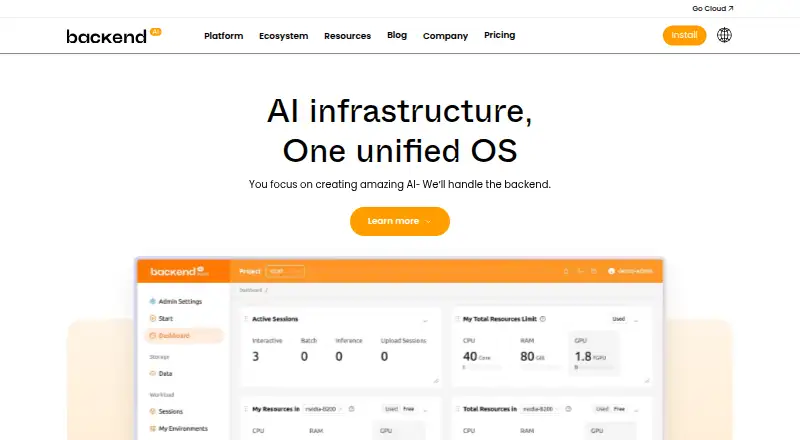
What Backend.AI is
Backend.AI provides infrastructure for building, training, and serving AI models, as well as running parallel computing jobs. Its container-level GPU virtualization allows multiple users to share a physical GPU through fractional allocation. The Sokovan scheduler handles multi-node, multi-tenant workloads and policy-based resource management. The platform says its hardware abstraction layer supports more than 12 accelerator types, including NVIDIA, AMD, Intel, Rebellions, and FuriosaAI products. It can run on-premises, in public clouds, or in hybrid environments; the site says installation, model deployment, and updates can operate without internet access in air-gapped networks. Its browser-based WebUI provides GPU cluster management, resource monitoring, session management, and policy-based allocation. Listed cloud environments include AWS, GCP, Azure, and OCI, while named storage integrations include VAST, WEKA, Pure Storage, and IBM Storage Scale. The free Open-source plan is for home users installing on their own hardware. Enterprise options require a quote. Production guidance says compute nodes should be network-isolated with restricted inbound access.
Who it suits
Backend.AI is described for organizations ranging from small teams with one GPU to institutions running clusters of thousands. Its deployment options may suit teams operating on-premises, in public clouds, or in air-gapped networks.
What it does well
- Fractional GPU allocation lets users share physical GPUs.
- Scheduler supports multi-node, multi-tenant workloads.
- Supports more than 12 accelerator types.
- Can be deployed on-premises, in cloud, or hybrid.
- Air-gapped installation and updates are supported.
What to know first
- Enterprise plan prices require a quote.
- Free Open-source plan is for home users on own hardware.
- Production guidance calls for network-isolated compute nodes.
Plans
| Plan | Billed and limits | Price |
|---|---|---|
| Open-source | For home users · install and use on your own hardware | Free |
| Try-out | Request trial · Small cloud service trial · available for a limited time | Free |
| Enterprise (on-premises) | Request a quote · Enterprise-specific features · GPU allocation across multiple organizations and users | On request |
| Enterprise (cloud) | Request a quote · Lablup cloud resources · user and group management · resource allocation | On request |
As backend.ai lists them, read 30 Sept 2026. The maker's own page has the final word.
Backend.AI is an AI infrastructure platform for building, training, and serving models, and running parallel-computing jobs. It is best for teams and institutions coordinating shared accelerators across users or clusters. Its self-hosted open-source plan offers a free starting point, while enterprise and cloud deployments require custom pricing.
Overview
Fractional GPU allocation is Backend.AI’s clearest practical advantage: multiple users can share one physical GPU instead of reserving a whole card per user. That can stretch accelerator capacity in a busy team, though the value is lower for a single user with dedicated hardware. This is cluster infrastructure, not a lightweight end-user app; production guidance calls for network-isolated compute nodes with restricted inbound access.
Sokovan supports multi-node, multi-tenant workloads and policy-based resource management. Those controls suit organizations coordinating jobs across users and machines, while smaller setups may not need the added orchestration. Quotas and GPU utilization metrics help administrators govern allocation and see how resources are being used.
Key features
- GPU sharing and accelerator coverage: Container-level virtualization supports fractional GPU allocation. The hardware abstraction layer supports more than 12 accelerator types, including products from NVIDIA, AMD, Intel, Rebellions, and FuriosaAI, giving organizations options beyond a single vendor’s hardware.
- Storage and data movement: Named integrations include VAST, WEKA, Pure Storage, and IBM Storage Scale, with NVIDIA GPUDirect Storage support. This is relevant for teams already using those storage systems; the named integrations alone do not establish fit for other environments.
- Browser-based management: The WebUI handles GPU cluster management, resource monitoring, sessions, and policy-based allocation. It gives administrators a browser interface for common operational tasks alongside the platform’s API.
- Flexible deployment: Backend.AI runs on-premises, in public cloud, or in hybrid setups, and can support air-gapped installation, model deployment, and updates. AWS, GCP, Azure, and OCI are named cloud environments for GPU instances. Air-gapped operation is useful for disconnected networks, but does not remove the need to plan secure deployment.
Pricing
Backend.AI uses a freemium model, with a free plan and a free trial. The free options lower the barrier to evaluation, but they do not provide the enterprise-specific allocation features or Lablup cloud resources described in the paid plans.
- Open-source: free. Intended for home users to install and run on their own hardware. It is the clearest fit for individuals or teams prepared to operate a self-hosted deployment; it does not include the enterprise-specific features described for the on-premises plan.
- Try-out: free, billed Request trial. This is a small cloud-service trial available for a limited time, making it a way to evaluate a hosted setup rather than a continuing free cloud tier.
- Enterprise (on-premises): Custom pricing, billed Request a quote. Includes enterprise-specific features, including GPU allocation across multiple organizations and users. It fits organizations that need centrally managed shared hardware on their own premises.
- Enterprise (cloud): Custom pricing, billed Request a quote. Includes Lablup cloud resources, user and group management, and resource allocation. It suits organizations seeking those managed cloud resources rather than supplying all infrastructure themselves.
Platforms
Backend.AI supports API, Linux, self-hosted, and web access. It supports Kubernetes, both workload scheduling modes, hybrid deployment, cloud GPUs, quota controls, and GPU utilization metrics. The range suits organizations combining local and cloud infrastructure; it is not positioned as a desktop app for general users.
Who it's for
Backend.AI is aimed at organizations ranging from small teams with one GPU to institutions managing clusters of thousands. Its sharing, quotas, scheduling, and monitoring are most compelling when multiple users need governed access to accelerators. Lablup invites organizations to contact its team for help planning clusters and scaling production workloads.
Pros and cons
- Pro: Fractional GPU allocation can make physical accelerators serve multiple users rather than sit reserved for one workload.
- Pro: Multi-node scheduling, quotas, and utilization metrics give administrators tools to coordinate and monitor shared resources.
- Pro: On-premises, cloud, hybrid, and air-gapped deployment options cover varied infrastructure constraints.
- Con: Production compute nodes should be network-isolated with restricted inbound access, adding deployment and security work.
- Con: Enterprise on-premises and cloud plans use custom pricing, so organizations must request a quote to assess cost.
- Con: The Try-out cloud service is time-limited, and the free Open-source plan requires users to provide and manage their own hardware.
Alternatives
Browse GPU Cluster Management Software for more options in this category.
- dstack is a free alternative with self-hosted open-source orchestration; choose it if that free stack and its broader listed platform coverage are a better fit. Its GPU marketplace charges by usage.
- ClearML is a freemium option whose self-hosted version is described as 100% open source on GitHub; consider it if that open-source self-hosted approach is your priority.
- GPUStack offers a free, open-source GPU cluster manager; it is a direct option to consider if that community-edition model suits your needs.
- HAMi is free, open-source GPU virtualization middleware for AI workloads on Kubernetes; choose it if you want that narrower Kubernetes-oriented approach.
- NVIDIA ShadowPlay is a free Windows option with GeForce hardware and driver requirements; consider it when those requirements and its Windows platform fit your use.
- OpenPBS offers a free open-source edition under AGPL 3.0, with community forum support that carries no guarantees; consider it if those terms suit your needs.
- TORQUE Resource Manager is a free open-source project whose use, modification, and distribution are subject to the PBS license; consider it if that licensing model fits.
- Apache YuniKorn is free under Apache License 2.0, and its source code release must be built before use; consider it if those terms and setup fit.
Verdict
Choose Backend.AI if your organization needs to share GPUs fractionally, coordinate multi-tenant workloads, and manage a cluster across on-premises, cloud, or hybrid infrastructure. Its combination of allocation controls and deployment flexibility is the main reason to choose it. Look elsewhere if you need a low-maintenance application, require predictable enterprise pricing up front, or do not need cluster-level GPU management.
Verdict
Backend.AI brings GPU sharing, scheduling, and cluster management together across several deployment settings. Organizations should assess its quote-based enterprise options and production network-isolation guidance.
Facts from Backend.AI's own pages
- Accelerators
- The platform says its hardware abstraction layer supports more than 12 accelerator types, including NVIDIA, AMD, Intel, Rebellions, and FuriosaAI products. · backend.ai, 30 Sept 2026
- Air-gapped use
- The site says installation, model deployment, and updates can operate without internet connectivity in air-gapped networks. · backend.ai, 30 Sept 2026
- Cloud providers
- The site lists AWS, GCP, Azure, and OCI as public cloud environments for GPU instances. · backend.ai, 30 Sept 2026
- Deployment
- Backend.AI can be deployed on-premises, in public cloud environments, or in a hybrid setup. · backend.ai, 30 Sept 2026
- Founded
- 2015 · backend.ai, 23 Sept 2026
- GPU sharing
- Its container-level GPU virtualization lets multiple users share a physical GPU through fractional GPU allocation. · backend.ai, 30 Sept 2026
- Headquarters
- Seoul, South Korea · backend.ai, 23 Sept 2026
- Installation
- The installation page offers operating-system and architecture selectors for downloading installation files. · backend.ai, 30 Sept 2026
- Intended users
- Lablup describes its audience as ranging from small teams with a single GPU to institutions running clusters of thousands. · lablup.com, 30 Sept 2026
- Orchestration
- The Sokovan scheduler supports multi-node, multi-tenant workloads and policy-based resource management. · backend.ai, 30 Sept 2026
- Purpose
- Backend.AI is an AI infrastructure platform for building, training, and serving models and running parallel computing jobs. · backend.ai, 30 Sept 2026
- Security architecture
- Backend.AI's documentation says compute nodes should be network-isolated with restricted inbound access in production deployments. · docs.backend.ai, 30 Sept 2026
- Storage integrations
- Named storage backends include VAST, WEKA, Pure Storage, and IBM Storage Scale, with NVIDIA GPUDirect Storage support. · backend.ai, 30 Sept 2026
- Support
- Lablup invites organizations to contact its team for help planning AI clusters and scaling production workloads. · lablup.com, 30 Sept 2026
- Web interface
- Backend.AI WebUI provides browser-based GPU cluster management, resource monitoring, session management, and policy-based allocation. · backend.ai, 30 Sept 2026
Where Backend.AI stands on Freedom251
- GPU Cluster Management Software#1 of 21