Freedom251 › Cloud Migration Tools

Google Compute Engine
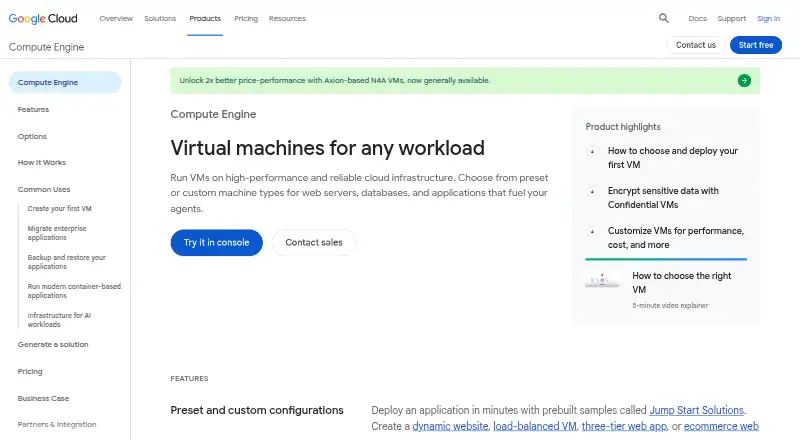
What Google Compute Engine is
Google Compute Engine provides self-managed virtual machines hosted on Google infrastructure. Customers can select predefined machine types or configure custom machines with 1 to 96 vCPUs and up to 8.0 GB of memory per core. Storage options include Persistent Disk and Local SSD, and supported systems include Linux and Windows, with images such as Debian, Ubuntu, Fedora CoreOS, FreeBSD, and Windows Server. Managed instance groups can add VMs during peak demand and replace underperforming ones. When a host fails, live migration can move its VM to another host in the same zone. Confidential VMs encrypt data in use, while Shielded VMs defend against rootkits and bootkits. The service integrates with Cloud Storage, App Engine, and BigQuery, and resources can be controlled through a REST-based API. Docker containers can be run and orchestrated on VMs with Google Kubernetes Engine. The free tier covers one eligible e2-micro VM monthly in certain US regions, within storage and data-transfer limits. Usage-based VM billing has a one-minute minimum and then increments by the second; related resources can have separate prices.
Who it suits
It suits teams that need to configure and manage virtual machines, scale VM groups, or connect compute resources to other Google Cloud services. Users should review free-tier eligibility and usage-based charges against their planned configuration.
What it does well
- Custom machines support 1 to 96 vCPUs.
- Managed instance groups can add and replace VMs.
- Live migration can move a VM within its zone.
- Confidential and Shielded VM options are available.
What to know first
- Free-tier use is limited to listed regions and resources.
- Free trials exclude GPUs and Windows Server VM images.
- VM resources have a one-minute minimum charge.
Limits
The free tier includes one non-preemptible e2-micro VM instance per month in us-west1, us-central1, or us-east1, 30 GB-months of standard persistent disk, and 1 GB of monthly outbound data transfer from North America to eligible destinations. GPUs and TPUs are excluded. During a Free Trial, users cannot add GPUs, use Google Cloud Marketplace, request quota increases, or create VMs based on Windows Server images.
Plans
| Plan | Billed and limits | Price |
|---|---|---|
| Compute Engine Free Tier | Free up to the listed monthly limits. · 1 non-preemptible e2-micro VM instance per month in us-west1, us-central1, or us-east1 · 30 GB-months standard persistent disk · 1 GB monthly outbound data transfer from North America to eligible destinations · GPUs and TPUs excluded | Free |
| Pay-as-you-go Compute Engine | Usage-based; billed at the end of each billing cycle. VM resources have a one-minute minimum, then are billed in one-second increments. · Prices vary by VM configuration and usage · disk, images, networking, sole tenancy, Confidential VM service, and GPUs are priced separately | On request |
As cloud.google.com lists them, read 5 Oct 2026. The maker's own page has the final word.
Getting started
- Open the Google Compute Engine product page.
- Choose the Compute Engine Free Tier or pay-as-you-go plan.
- Select a predefined machine type or configure a custom machine.
- Choose a supported Linux or Windows image and storage option.
- Configure and control resources through the REST-based API.
Google Compute Engine is a service for running virtual machines that you configure and manage on Google infrastructure. It is best suited to teams that need control over compute resources and already work with Google Cloud services. Its VM flexibility and built-in resilience options are useful, but the small free allowance and separately priced resources make ongoing costs dependent on workload choices.
Overview
Compute Engine provides self-managed VMs rather than a managed application runtime. Customers can choose predefined machine types or build custom configurations, then control resources through a REST-based API. That control suits workloads with specific requirements, but it also means customers are responsible for choosing and managing their machines.
Single-instance availability SLAs are 99.95% for memory-optimized VMs and 99.9% for other VM families. Live migration moves a VM to another host in the same zone when its current host goes down. These measures help address host failures; they do not remove the need to plan for application resilience.
Key features
Custom machine types range from 1 to 96 vCPUs, with up to 8.0 GB of memory per core. This lets teams tune CPU and memory allocations to a workload rather than rely only on preset configurations. Persistent Disk and Local SSD provide block-storage choices, while integrations with Cloud Storage, App Engine, and BigQuery can suit organizations using those services.
Managed instance groups can add VMs to handle peak load and replace underperforming instances. That makes scaling and instance replacement less manual, though the underlying VMs remain the customer's responsibility. For security, Confidential VMs encrypt data in use, while Shielded VMs defend against rootkits and bootkits.
Compute Engine supports Linux and Windows VMs, with images including Debian, CentOS Stream, Fedora CoreOS, SUSE, Ubuntu, Red Hat Enterprise Linux, FreeBSD, and Windows Server. Docker containers can run on its VMs and be managed and orchestrated with Google Kubernetes Engine. Google Cloud also lists ISO/IEC 27001, 27017, and 27018, SOC 1/2/3, and PCI DSS certifications and attestations.
Pricing
Compute Engine Free Tier
The free plan costs nothing, billed free up to its monthly limits. It includes one non-preemptible e2-micro VM instance per month in us-west1, us-central1, or us-east1, 30 GB-months of standard persistent disk, and 1 GB of monthly outbound data transfer from North America to eligible destinations. GPUs and TPUs are excluded. This is a bounded way to evaluate a small VM workload, not a broad allowance for production use.
Pay-as-you-go Compute Engine
Paid usage is billed at the end of each billing cycle, with a one-minute minimum for VM resources and one-second increments thereafter. The price is usage-based and depends on VM configuration and usage. Disks, images, networking, sole tenancy, Confidential VM service, and GPUs are priced separately, so compute charges alone do not represent the full cost of a deployment.
Free Trial users receive Basic Support, including documentation, community forums, billing assistance, and Active Assist. During the trial, they cannot add GPUs to VMs, use Google Cloud Marketplace, request quota increases, or create VMs based on Windows Server images. These restrictions can block evaluation of workloads that depend on those capabilities.
Platforms
Compute Engine supports API, Linux, web, and Windows platforms. Linux and Windows VM support gives teams a broad choice of operating systems, while the REST-based API offers programmatic resource control.
Who it's for
Compute Engine is a strong fit for teams that need configurable VMs, want to scale instance groups, or use Google Cloud services such as Cloud Storage, App Engine, and BigQuery. Its security and host-resilience features add useful safeguards for VM workloads. It is less suitable for buyers seeking a fixed subscription price, a generous unrestricted free tier, or a fully managed application platform.
Pros and cons
- Pros: Custom machine types cover 1 to 96 vCPUs and up to 8.0 GB memory per core, allowing close resource matching.
- Pros: Managed instance groups can add capacity at peak load and replace underperforming instances.
- Pros: Live migration, Confidential VMs, and Shielded VMs address host availability and distinct security concerns.
- Cons: The free tier is limited to one eligible e2-micro VM, modest storage and transfer allowances, and excludes GPUs and TPUs.
- Cons: Usage-based billing and separately priced resources make total spend depend on configuration and supporting services.
- Cons: Free Trial restrictions on GPUs, Marketplace, quota increases, and Windows Server images limit some evaluations.
Alternatives
For planning or comparing migration options, browse Cloud Migration Tools.
AWS Transform MGN (formerly AWS Application Migration Service) is worth considering when the task is source-server migration: its free period covers 2,160 hours (90 days when used continuously) per source server for the service charge, while AWS infrastructure used for replication is separate.
Google Cloud Migration Center is a better fit for cost estimates and assessments at no extra cost; other Google Cloud products may still incur charges.
Tencent Cloud Cloud Migration Service offers free migration tools, with migration resources and ongoing post-migration resources and services charged separately.
Amazon Database Migration Service is a database-migration option with an AWS Free Tier offering $100 in credits and up to an additional $100 for activating foundational AWS services; credits are valid for up to 12 months.
AWS Schema Conversion Tool is a free option for schema conversion on 64-bit Windows, Fedora Linux, or Ubuntu Linux.
Google Migrate to Containers is a free option for migrating workloads to Google Cloud, though other Google Cloud services used can incur charges.
Ora2Pg is free software under GPL v3. pgloader is a freemium alternative whose maker identifies Dimitri Fontaine as its author and maintainer since 2005.
Verdict
Choose Google Compute Engine if your workloads need configurable, self-managed VMs and you value its scaling, security, and host-resilience options. Its main advantage is control over machine design within Google Cloud; look elsewhere if you need predictable bundled pricing or a free tier that covers more than a narrowly bounded VM setup.
Verdict
Compute Engine offers configurable VMs, scaling options, and several security and resilience features. The free tier is bounded, while paid usage depends on VM configuration and can involve separately priced resources.
Questions
Is Google Compute Engine free?
It has a free tier priced at $0, with listed monthly limits. The pay-as-you-go plan is usage-based, billed at the end of each billing cycle.
What does the free tier include?
It includes one non-preemptible e2-micro VM monthly in us-west1, us-central1, or us-east1, 30 GB-months of standard persistent disk, and 1 GB of monthly outbound data transfer from North America to eligible destinations. GPUs and TPUs are excluded.
Which operating systems does it support?
Compute Engine supports Linux and Windows VMs. Listed images include Debian, CentOS Stream, Fedora CoreOS, SUSE, Ubuntu, Red Hat Enterprise Linux, FreeBSD, and Windows Server.
Can I use the service through an API?
Yes. Resources can be configured and controlled through a REST-based API.
What does a Free Trial restrict?
Free Trial users cannot add GPUs to VMs, use Google Cloud Marketplace, request quota increases, or create VMs based on Windows Server images.
What support and compliance information is listed?
Every Google Cloud customer, including Free Trial users, receives Basic Support with documentation, community forums, billing assistance, and Active Assist. Listed certifications and attestations include ISO/IEC 27001, ISO/IEC 27017, ISO/IEC 27018, SOC 1/2/3, and PCI DSS.
Facts from Google Compute Engine's own pages
- Availability
- The product page states single-instance availability SLAs of 99.95% for memory-optimized VMs and 99.9% for other VM families. · cloud.google.com, 5 Oct 2026
- Compliance
- Google Cloud lists certifications and attestations including ISO/IEC 27001, ISO/IEC 27017, ISO/IEC 27018, SOC 1/2/3, and PCI DSS. · cloud.google.com, 5 Oct 2026
- Containers
- The product page says Docker containers can be run, managed, and orchestrated on Compute Engine VMs with Google Kubernetes Engine. · cloud.google.com, 5 Oct 2026
- Free trial limits
- During a Free Trial, users cannot add GPUs to VMs, use Google Cloud Marketplace, request quota increases, or create VMs based on Windows Server images. · docs.cloud.google.com, 5 Oct 2026
- Integrations and control
- Compute Engine integrates with Cloud Storage, App Engine, and BigQuery, and resources can be configured and controlled through a REST-based API. · cloud.google.com, 5 Oct 2026
- Machine configurations
- Customers can use predefined machine types or create custom machine types from 1 to 96 vCPUs with up to 8.0 GB of memory per core. · cloud.google.com, 5 Oct 2026
- Operating systems
- Compute Engine supports Linux and Windows VMs, and lists Debian, CentOS Stream, Fedora CoreOS, SUSE, Ubuntu, Red Hat Enterprise Linux, FreeBSD, and Windows Server images. · cloud.google.com, 5 Oct 2026
- Product
- Compute Engine is an infrastructure-as-a-service product offering self-managed virtual machines hosted on Google infrastructure. · cloud.google.com, 5 Oct 2026
- Resilience
- Live migration moves a VM to another host in the same zone when its current VM host goes down. · cloud.google.com, 5 Oct 2026
- Scaling
- Managed instance groups can automatically add VMs to handle peak load and replace underperforming instances. · cloud.google.com, 5 Oct 2026
- Security
- Compute Engine offers Confidential VMs to encrypt data in use and Shielded VMs to defend against rootkits and bootkits. · cloud.google.com, 5 Oct 2026
- Storage
- Compute Engine offers block storage options including Persistent Disk and Local SSD. · cloud.google.com, 5 Oct 2026
- Support
- Every Google Cloud customer, including Free Trial users, receives Basic Support with documentation, community forums, billing assistance, and Active Assist. · cloud.google.com, 5 Oct 2026
Where Google Compute Engine stands on Freedom251
- Cloud Migration Tools#5 of 32
- Infrastructure as a Service (IaaS) Software#3 of 18
Look at these too
- AWS Transform MGN (formerly AWS Application Migration Service)
- AWS Schema Conversion Tool
- Amazon Database Migration Service
- Google Cloud Migration Center
- Google Migrate to Containers
- Flexera One IT Asset Management
- Every alternative →
- Compare Google Compute Engine with AWS Transform MGN (formerly AWS Application Migration Service)