Freedom251 › Cloud Migration Assessment Tools

Google Cloud Migration Center
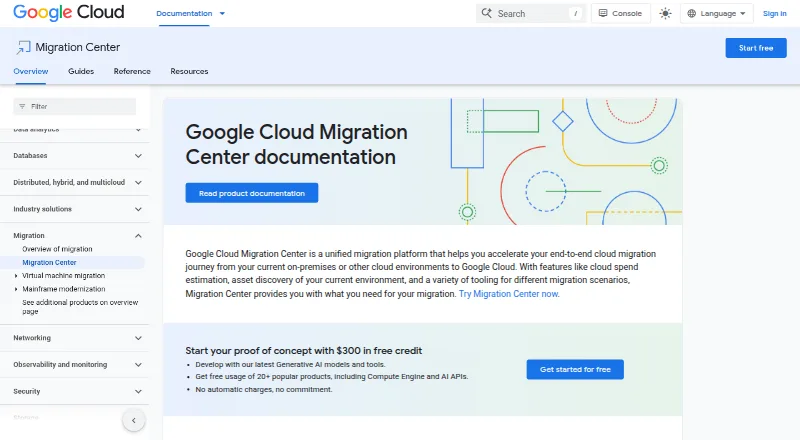
What Google Cloud Migration Center is
Google Cloud Migration Center helps organizations plan a move from on-premises systems or other cloud environments to Google Cloud. It estimates future Google Cloud costs from the size and configuration of existing resources, inventories servers and Microsoft SQL Server, MySQL, and PostgreSQL databases, and assesses total cost of ownership and application or network dependencies. Its recommendations suggest Google Cloud destinations based on technical fit, while planning tools cover what to migrate and how, including rehost, replatform, and refactor strategies. Infrastructure information can be collected automatically once, continuously, or by manual import. Documented discovery covers AWS assets, Azure virtual machines in preview, and on-premises servers and virtual machines. A discovery client can produce offline assessment reports without uploading sensitive data. Cost estimates and assessments are available at no extra cost, though other Google Cloud products may incur charges. Migration Center supports discovery, assessment, and dependency mapping, but not continuous replication or database migration.
Who it suits
It suits teams assessing infrastructure and planning a move to Google Cloud from on-premises systems or other cloud environments. Its offline assessment option may suit teams that do not want to upload sensitive data for that report.
What it does well
- Estimates future Google Cloud costs from existing resources.
- Inventories servers and three named database types.
- Maps application and network dependencies.
- Offers offline assessment reports without uploading sensitive data.
What to know first
- Does not support continuous replication.
- Database migration is not supported.
- Azure VM discovery is in preview.
- Other Google Cloud products may incur charges.
Limits
Migration Center provides cost estimates and assessments at no extra cost. Other Google Cloud products may incur charges; the installed discovery client does not support database asset discovery.
Plans
| Plan | Billed and limits | Price |
|---|---|---|
| Migration Center | Cost estimates and assessments at no extra cost; other Google Cloud products may incur charges | Free |
As cloud.google.com lists them, read 28 Sept 2026. The maker's own page has the final word.
Getting started
- Visit https://cloud.google.com/migration-center.
- Choose automated one-time collection, continuous collection, or manual import for infrastructure data.
- Use the discovery client on a Windows machine to scan Windows and Linux devices.
- Use its command-line interface on a Linux or Windows host to create an offline assessment report.
Google Cloud Migration Center is a planning platform for organizations considering a move to Google Cloud. It is best suited to teams that need to understand their existing infrastructure and map out a migration before choosing execution tools. Its strength is a free, broad assessment workflow; it is not a service for replicating workloads or migrating databases.
Overview
Migration Center helps turn information about current infrastructure into decisions about what to move and where. It estimates future Google Cloud costs from resource size and configuration, assesses total cost of ownership, identifies application and network dependencies, and recommends destinations based on technical fit. Together, those capabilities can help teams prioritize a migration before committing to a design.
Planning guidance covers rehosting, replatforming, and refactoring. That makes the platform useful across different approaches to modernization, but the distinction between planning and execution matters: teams that need continuous replication or database migration will need a separate tool.
Key features
Discovery and assessment
Migration Center can inventory servers and Microsoft SQL Server, MySQL, and PostgreSQL databases through automatic scanning or manual upload. Infrastructure data can be collected once, continuously, or imported manually, giving teams options for how to assemble an assessment. Documented discovery methods cover AWS assets, on-premises servers and virtual machines, and Azure virtual machines in preview. Azure coverage is therefore not on the same footing as the other documented sources.
Discovery client and privacy
The installed discovery client runs on Windows machines and scans Windows and Linux devices, but it does not support database asset discovery. That makes it a narrower fit for assessments centered on database estates. A separate discovery client CLI runs on Linux and Windows hosts and can produce offline assessment reports without uploading sensitive data to Google Cloud, which is useful when data-handling constraints rule out cloud upload.
For client communication with Google Cloud, Migration Center uses service-account authentication and SSL/TLS encryption. Collected PII, SPII, and secrets are encrypted at rest with AES128_GCM and Windows DPAPI. Migration Center also says it does not collect application or file-storage data and, apart from IP addresses, does not collect PII or data subject to PCI or HIPAA requirements. This limits the scope of collected information, though teams should still consider their own policies when choosing collection methods.
Quick TCO Estimator
The Gemini-powered Quick TCO Estimator is a preview feature for automated TCO estimates and is available in four listed Google Cloud regions. Its preview status and regional availability make it a limited option for teams that need this particular estimation workflow.
Pricing
Migration Center — free. Cost estimates and assessments are available at no extra cost. This suits teams that want to assess a potential Google Cloud move without paying for the planning platform itself. Other Google Cloud products may incur charges, so free assessments do not make the wider migration cost-free.
The plan includes discovery and assessment and dependency mapping, but not continuous replication or database migration. The tradeoff is clear: teams get cost and planning support without a charge for those capabilities, but must look elsewhere for execution functions that Migration Center does not provide.
Platforms
Migration Center lists API, Linux, self-hosted, web, and Windows platforms, and supports both deployment models. The discovery client itself runs only on Windows machines, while the separate CLI supports Linux and Windows hosts; those distinctions matter when choosing a collection setup.
Who it's for
Migration Center is a strong fit for organizations moving from on-premises infrastructure or another cloud to Google Cloud, especially when they need to estimate costs, map dependencies, and compare migration destinations before implementation. Its manual and automated collection options can accommodate different assessment workflows.
It is a poor fit as a standalone choice for teams whose immediate need is database migration or continuous replication. The client’s lack of database discovery also makes that installed scanning route less useful for database-focused inventories, even though the platform can inventory supported database types through other methods.
Pros and cons
- Pros: Cost estimates and assessments cost nothing. Teams can evaluate workloads and destinations without a platform charge.
- Pros: Broad planning coverage. Cost estimates, ownership assessments, dependency mapping, and destination recommendations support early migration decisions.
- Pros: Flexible collection choices. One-time and continuous automated collection, manual import, and offline CLI reports suit different assessment needs.
- Cons: No continuous replication or database migration. Migration Center cannot serve as the execution tool for those jobs.
- Cons: Discovery routes have limitations. Azure virtual machine discovery is in preview, and the installed client cannot discover database assets.
- Cons: Other Google Cloud products may cost extra. The free platform does not remove charges for services used in a migration.
Alternatives
AWS Transform MGN (formerly AWS Application Migration Service) is worth considering when a migration plan calls for source-server replication: its free period bills 2,160 hours (90 days when used continuously) per source server for the service charge, while AWS infrastructure used for replication is separate.
Tencent Cloud Cloud Migration Service is another free migration option; its migration resources and ongoing post-migration resources and services are paid separately.
Amazon Database Migration Service is the alternative to consider for database migration. Its AWS Free Tier offers $100 in credits, with up to an additional $100 for activating foundational AWS services; credits are valid for up to 12 months.
AWS Schema Conversion Tool is a free option for schema conversion on 64-bit Windows, Fedora Linux, or Ubuntu Linux.
Google Migrate to Containers is a free alternative for migrating workloads to Google Cloud; other Google Cloud services used may cost extra.
Ora2Pg is free software under GPL v3.
pgloader offers a Community plan at no cost for evaluating or non-critical use, with best-effort support.
Striim is a freemium data-pipeline alternative with a free Developer plan of 25 million events per month and a Cloud plan for automated data pipelines.
For a broader shortlist, see Cloud Migration Tools.
Verdict
Choose Google Cloud Migration Center when the priority is to assess infrastructure, costs, dependencies, and destination fit before moving to Google Cloud. Its main advantage is putting substantial planning capability behind a free plan; its main limitation is that it stops short of replication and database migration. Teams needing either capability should pair it with a tool built for execution or choose another migration service.
Verdict
Migration Center provides discovery, cost assessment, and planning tools for moves to Google Cloud. It does not provide continuous replication or database migration.
Questions
How much does Google Cloud Migration Center cost?
The Migration Center plan is free. Cost estimates and assessments are at no extra cost, though other Google Cloud products may incur charges.
What can Migration Center discover?
It can inventory servers and Microsoft SQL Server, MySQL, and PostgreSQL databases. Documented discovery methods cover AWS assets, Azure virtual machines in preview, and on-premises servers and virtual machines.
Can I collect infrastructure data continuously?
Yes. Collection options include automated continuous collection, automated one-time collection, and manual import.
Can it create an assessment without uploading sensitive data?
Yes. The discovery client CLI runs on Linux and Windows hosts and can create offline assessment reports without uploading sensitive data to Google Cloud.
Does Migration Center handle the full migration?
It provides migration planning tools and supports rehost, replatform, and refactor strategies. It does not provide continuous replication or database migration.
Facts from Google Cloud Migration Center's own pages
- Assessment
- Assessments can report total cost of ownership, identify application and network dependencies, and suggest Google Cloud destinations based on technical fit. · docs.cloud.google.com, 28 Sept 2026
- Asset discovery
- It can inventory servers and Microsoft SQL Server, MySQL, and PostgreSQL databases through automatic scanning or manual data upload. · docs.cloud.google.com, 28 Sept 2026
- Cloud sources
- Documented discovery methods cover AWS assets and Azure virtual machines in preview, as well as on-premises servers and virtual machines. · docs.cloud.google.com, 28 Sept 2026
- Collection options
- Infrastructure data can be collected through automated one-time collection, automated continuous collection, or manual import. · docs.cloud.google.com, 28 Sept 2026
- Cost estimates
- It provides rapid estimates of future Google Cloud costs based on the size and configuration of existing resources. · docs.cloud.google.com, 28 Sept 2026
- Data collection privacy
- Migration Center says it does not collect application or file-storage data, and, apart from IP addresses, does not collect PII or data subject to PCI or HIPAA compliance requirements. · docs.cloud.google.com, 28 Sept 2026
- Discovery client limits
- The installed discovery client runs only on Windows machines, scans Windows and Linux devices, and does not support database asset discovery. · docs.cloud.google.com, 28 Sept 2026
- Founded
- 1998 · cloud.google.com, 28 Sept 2026
- Headquarters
- Mountain View, California, USA · cloud.google.com, 28 Sept 2026
- Migration planning
- The platform provides migration planning tools, best practices, and recommendations on what to migrate and how. · docs.cloud.google.com, 28 Sept 2026
- Migration strategies
- Migration tools support strategies including rehost, replatform, and refactor. · docs.cloud.google.com, 28 Sept 2026
- Offline assessment
- The discovery client CLI runs on Linux and Windows hosts and can create offline assessment reports without uploading sensitive data to Google Cloud. · docs.cloud.google.com, 28 Sept 2026
- Preview feature
- Quick TCO Estimator is a Gemini-powered preview for automated TCO estimates and is available in four listed Google Cloud regions. · docs.cloud.google.com, 28 Sept 2026
- Purpose
- Google Cloud Migration Center is a unified platform for moving from on-premises or other cloud environments to Google Cloud. · docs.cloud.google.com, 28 Sept 2026
- Security
- Discovery client communication to Google Cloud is authenticated with a service account and encrypted using SSL/TLS; collected PII, SPII, and secrets are encrypted at rest with AES128_GCM and Windows DPAPI. · docs.cloud.google.com, 28 Sept 2026
Where Google Cloud Migration Center stands on Freedom251
- Cloud Migration Assessment Tools#1 of 19
- Cloud Migration Tools#4 of 32