Freedom251 › Keyboard and Mouse Customization Software
Glorious CORE
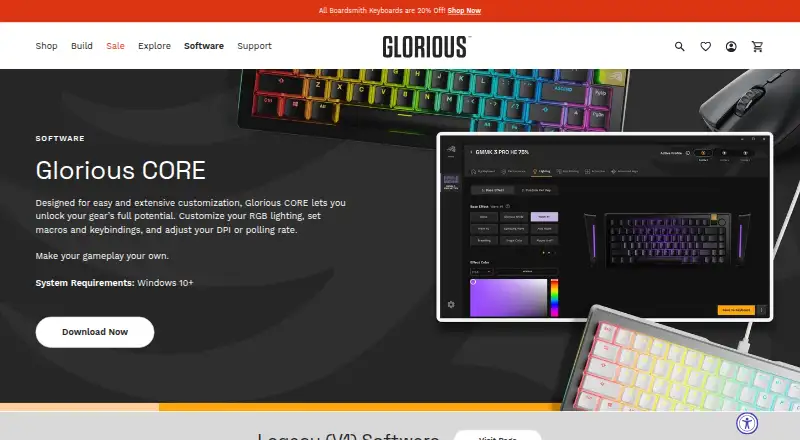
What Glorious CORE is
Glorious CORE is free software for configuring most Glorious gear on Windows and macOS. It lets users adjust RGB lighting, macros, keybindings, DPI sensitivity, and polling rate, and supports onboard device memory. Glorious recommends CORE for full feature control and firmware updates, although its products work out of the box. The software does not support GMMK 1 or the Model O/O- Wired (V1) and Model D/D- Wired (V1) mice; Glorious provides legacy software for those devices and lists CORE V1 as a legacy download. Windows requires version 10 or later. The macOS download requires macOS Big Sur through Sonoma and an Apple M1 or later. A Glorious ID is not needed for configuration, but is required to save profiles to the cloud. Owners of 4KHz/8KHz PRO Series mice need CORE to use polling rates above 1KHz. CORE can check for updates at launch when automatic updates are enabled, and users can also check manually in settings.
Who it suits
CORE suits Glorious gear owners who want to customize lighting, controls, sensitivity, or polling rate. It is relevant to 4KHz/8KHz PRO Series mouse owners seeking polling rates above 1KHz.
What it does well
- Adjusts RGB lighting, macros, and keybindings
- Supports onboard device memory
- Configuration does not require a Glorious ID
- Available for Windows and macOS
What to know first
- Does not support GMMK 1 or listed wired V1 mice
- Cloud profile saving requires a Glorious ID
- macOS requires an Apple M1 or later
Limits
CORE supports most Glorious products, but excludes GMMK 1 and the specified wired V1 mice. Cloud profile saving requires a Glorious ID. The macOS download requires macOS Big Sur through Sonoma and an Apple M1 or later.
Plans
| Plan | Billed and limits | Price |
|---|---|---|
| Glorious CORE | For configuring Glorious products; most products supported · Cloud profile saving requires a Glorious ID | Free |
As gloriousgaming.com lists them, read 3 Oct 2026. The maker's own page has the final word.
Getting started
- Open the Glorious software page.
- Choose the Windows or macOS download that matches your system requirements.
- Install CORE and connect a supported Glorious product.
- Configure lighting, macros, keybindings, DPI, or polling rate.
- Sign in with a Glorious ID if you want to save profiles to the cloud.
- Check for updates at launch or manually in settings.
Glorious CORE is free configuration software for owners of compatible Glorious keyboards, mice, and other gear. It is the right fit for users who want to adjust device behavior and lighting, especially on high-polling-rate PRO Series mice. Most Glorious products are supported, but older wired models and specific operating-system requirements can rule it out.
Overview
CORE brings device controls together without charging for the software or requiring an account to configure products. Glorious gear works out of the box, so CORE is not necessary for basic use; its value is in fuller feature control and firmware updates. Cloud profile saving is optional and requires a Glorious ID.
Compatibility deserves a check before installation. CORE supports most Glorious products, but not GMMK 1, Model O/O- Wired (V1), or Model D/D- Wired (V1). Glorious provides legacy software for those devices, and also lists CORE V1 as a legacy download.
Key features
For supported devices, CORE controls RGB lighting, macros, keybindings, DPI sensitivity, and polling rate. That range makes it useful to people who want to tailor input behavior or lighting rather than keep default settings. Onboard device memory is supported, which can keep settings on the device; macros and keybindings offer more control over how peripherals respond.
The polling-rate feature matters most to owners of 4KHz or 8KHz PRO Series mice: CORE is required to use rates above 1KHz. That makes the application more than a convenience for users seeking those higher rates, while others can treat it as an optional route to customization and firmware updates.
Glorious says CORE receives regular feature, bug-fix, and functionality updates. Users can enable update checks at launch or check manually in settings. A recent Windows update, version 2.1.21, added GMMK Eternal 96% support and more GHS Wireless InfinitePlay game equalizer presets. Software support is available by email and live chat.
Pricing
Glorious CORE: free. The free plan covers configuration for most Glorious products, with cloud profile saving requiring a Glorious ID. There is no free trial because the software is free. This is a straightforward fit for Glorious owners who want device controls without a software subscription; it does not extend compatibility to the excluded legacy models.
Platforms
CORE is available for Windows and macOS, but the requirements differ. Windows requires Windows 10 or later. The macOS download requires macOS Big Sur through Sonoma and an Apple M1 or later, so owners of older Macs or systems outside that range should not assume compatibility.
Who it's for
CORE suits Glorious peripheral owners who want to customize lighting, input controls, sensitivity, or polling rate, and is particularly important for PRO Series mouse owners seeking rates above 1KHz. It is less suitable for owners of the excluded wired V1 mice or GMMK 1, who need legacy software, and for anyone seeking configuration software for non-Glorious devices.
Pros and cons
- Pros: Free configuration for most Glorious products, with no account required for device setup.
- Pros: Combines lighting, macros, keybindings, DPI, and polling-rate controls, with onboard device memory support.
- Pros: Required for 4KHz/8KHz PRO Series mice to use polling rates above 1KHz.
- Cons: GMMK 1 and the listed wired V1 mice are excluded and require legacy software.
- Cons: Cloud profile saving requires a Glorious ID, and macOS support is limited to Big Sur through Sonoma on Apple M1 or later.
Alternatives
For supported Logitech devices, Logi Options+ is another free option on Windows 10 or later and macOS 12 or later. Choose be quiet! IO Center if its Linux, macOS, web, or Windows availability better fits your platform needs. Logitech G HUB is a free alternative for Logitech G gear, with LIGHTSYNC RGB customization, device configuration, presets, and game profiles.
SteelSeries GG is a free Windows 10+ download for those considering another gaming-peripheral utility. Rebind offers a free software mode on Linux, macOS, and Windows, with no account or Rebind Link required. For compatible HyperX devices on Windows, consider HyperX NGENUITY. Akko Cloud Driver supports Windows and Mac downloads, though model compatibility varies by driver version and some VIA/QMK models are incompatible. Fnatic OP Software is an early-access option for supported Fnatic gear.
For more options, browse Keyboard and Mouse Customization Software or Gaming Peripheral Software.
Verdict
Choose Glorious CORE if you own supported Glorious gear and want free, focused control over its lighting and input settings, particularly if you need higher-than-1KHz polling on a PRO Series mouse. Look elsewhere if your device is one of the excluded models, your system misses the stated requirements, or you need software for another brand.
Verdict
CORE offers configuration controls for most Glorious products at no charge. Check device compatibility and operating system requirements first, and note that cloud profile saving requires a Glorious ID.
Questions
How much does Glorious CORE cost?
The listed plan is free.
Does using CORE require a Glorious ID?
No ID is required to configure products. A Glorious ID is required to save profiles to the cloud.
Which systems does CORE support?
It is listed for Windows and macOS. Windows requires version 10 or later; the macOS download requires Big Sur through Sonoma and an Apple M1 or later.
Which Glorious gear works with CORE?
CORE supports most Glorious products. GMMK 1 and the Model O/O- Wired (V1) and Model D/D- Wired (V1) are exceptions; Glorious provides legacy software for them.
Can CORE change polling rate?
Yes. Owners of 4KHz/8KHz PRO Series mice need CORE to use polling rates above 1KHz.
How can users get software support?
Glorious directs software users to customer support by email and live chat.
Facts from Glorious CORE's own pages
- Account requirement
- A Glorious ID is not required to configure products, but is required to save profiles to the cloud. · gloriousgaming.com, 3 Oct 2026
- Audience
- Glorious describes its gear as being for gamers who want a customizable setup. · gloriousgaming.com, 3 Oct 2026
- Device use
- Glorious says its products work out of the box; CORE is recommended for full feature control and firmware updates. · gloriousgaming.com, 3 Oct 2026
- Founded
- 2014 · gloriousgaming.com, 28 Sept 2026
- Free plan
- Yes · gloriousgaming.com, 20 Sept 2026
- Headquarters
- Dallas, Texas, United States · gloriousgaming.com, 28 Sept 2026
- Legacy software
- Glorious provides legacy software for GMMK 1 and the listed wired V1 mice, and lists CORE V1 as a legacy download. · gloriousgaming.com, 3 Oct 2026
- Macro support
- Yes · gloriousgaming.com, 20 Sept 2026
- Mac support
- The macOS download requires macOS Big Sur through Sonoma and an Apple M1 or later. · gloriousgaming.com, 3 Oct 2026
- Onboard device memory
- Yes · gloriousgaming.com, 20 Sept 2026
- Polling rate control
- Yes · gloriousgaming.com, 20 Sept 2026
- Polling rate limit
- 4KHz/8KHz PRO Series mice require CORE to use polling rates above 1KHz. · gloriousgaming.com, 3 Oct 2026
- Privacy
- Glorious's privacy policy says it describes the information the company collects and how it uses, maintains, protects, and discloses it. · gloriousgaming.com, 3 Oct 2026
- Purpose
- Glorious CORE lets users customize Glorious gear, including RGB lighting, macros, keybindings, DPI, and polling rate. · gloriousgaming.com, 3 Oct 2026
- Recent release
- The changelog says CORE 2.1.21 for Windows added GMMK Eternal 96% support and additional GHS Wireless InfinitePlay game equalizer presets. · gloriousgaming.com, 3 Oct 2026
- Sensitivity controls
- Yes · gloriousgaming.com, 20 Sept 2026
- Software updates
- Glorious says CORE is regularly updated with features, bug fixes, and functionality improvements. · gloriousgaming.com, 3 Oct 2026
- Support
- Glorious directs software users to customer support by email and live chat. · gloriousgaming.com, 3 Oct 2026
- Supported gear
- CORE supports most Glorious products, with GMMK 1 and Model O/O- Wired (V1) and Model D/D- Wired (V1) listed as exceptions. · gloriousgaming.com, 3 Oct 2026
- Supported operating systems
- cross-platform · gloriousgaming.com, 20 Sept 2026
- Update checks
- CORE can check for updates at launch when automatic updates are enabled, and users can also check manually in settings. · gloriousgaming.com, 3 Oct 2026
- Windows support
- The software page lists Windows 10+ as the PC system requirement. · gloriousgaming.com, 3 Oct 2026
Where Glorious CORE stands on Freedom251
- Keyboard and Mouse Customization Software#15 of 105
- Gaming Peripheral Software#13 of 39