Freedom251 › Keyboard and Mouse Customization Software
Fnatic OP Software
What Fnatic OP Software is
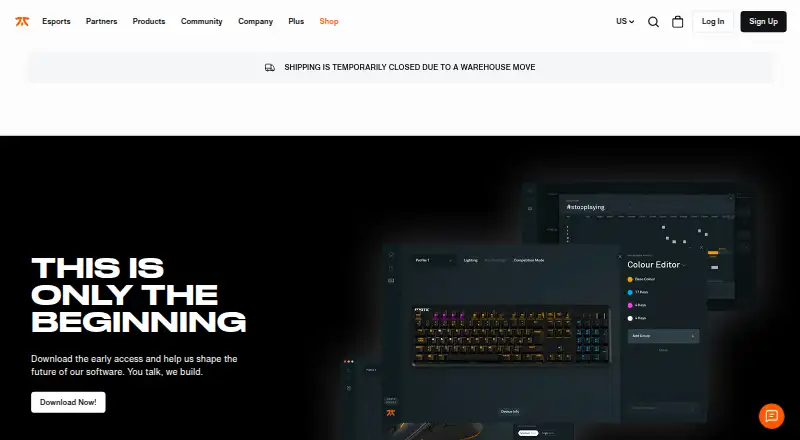
Fnatic OP Software is a free utility for customizing supported Fnatic gear on Windows and macOS. Users can adjust DPI, lift-off distance, polling rate, keybinds, macros, and device lighting; supported headsets can use virtual 7.1 surround sound. Lighting can be set to one of 16.8 million colours. Users can create profiles, cycle through them, and import or export them to different devices. The early-access product page describes up to eight backlight profiles with controls for colour, animation speed, and pattern direction. Competition mode lets users choose which buttons and lighting effects are active during tournaments. Macros can be recorded and assigned, and can open applications, files, or links with one click. Settings can be stored in onboard device memory. Fnatic provides Windows and macOS downloads and describes the software as early access. Its help article says 64-bit Windows support starts at Windows 8. RUSH, Clutch1, and Flick1 devices have a separate Gen1 download. The Lamzu x Fnatic THORN is not compatible with FNATIC OP and requires Lamzu software.
Who it suits
It suits owners of supported Fnatic gear who want to adjust device controls, lighting, profiles, or macros. Check the compatibility notes for legacy devices and the Lamzu x Fnatic THORN.
What it does well
- Controls DPI, lift-off distance, and polling rate.
- Customize keybinds and macros.
- Create, cycle, import, and export profiles.
- Store settings in onboard device memory.
- Competition mode controls active buttons and lighting.
What to know first
- Software is described as early access.
- Windows support starts at 64-bit Windows 8.
- RUSH, Clutch1, and Flick1 need a separate Gen1 download.
- Lamzu x Fnatic THORN is incompatible.
Limits
The free plan is early access and is described as customizing supported Fnatic gear. RUSH, Clutch1, and Flick1 require a separate Gen1 download; the Lamzu x Fnatic THORN is incompatible with OP.
Plans
| Plan | Billed and limits | Price |
|---|---|---|
| Fnatic OP Software | Early access; customizes supported Fnatic gear | Free |
As fnatic.com lists them, read 7 Oct 2026. The maker's own page has the final word.
Getting started
- Open the Fnatic OP Software website.
- Choose the Windows or macOS download for your computer.
- Install the software and connect supported Fnatic gear.
- Configure device controls, lighting, key bindings, or macros.
- Create profiles or use competition mode as needed.
Overview
Fnatic OP Software is a free configuration app for supported Fnatic mice, keyboards and headsets, with controls for lighting, inputs and mouse behaviour. It suits owners who want to tailor compatible gear across Windows or macOS; its broad feature set is appealing, but the early-access status and device-specific compatibility make checking support essential.
Fnatic, a London-based esports brand founded in 2004, presents OP as a way to adjust gear for everyday use or tournament play. It is not a per-app profile manager, so users who need settings to switch automatically with each application should look elsewhere.
Key features
Device tuning and profiles
For supported mice, OP controls DPI, lift-off distance and polling rate, giving users several ways to tune responsiveness. Sensitivity controls and onboard device memory add practical flexibility, including the ability to keep settings on compatible hardware.
Users can create multiple profiles, cycle between them, and import or export profiles to different devices. That helps when switching setups, though the absence of per-app profiles means profile changes are not tied to individual games or programs.
Inputs, lighting and competition mode
Keybinds and macros can be customized on supported devices. The early-access page also describes recording and assigning macros, plus one-click launches for applications, files and links. These options suit users who want shortcuts or custom controls, but their usefulness depends on compatible gear.
Lighting effects can be customized across 16.8 million colours. The early-access product page describes up to eight backlight profiles, with colour, animation speed and pattern direction controls. Competition mode lets users choose which buttons and lighting effects remain active during tournaments, a focused option for players who want to limit distractions or accidental inputs.
Supported headsets can use virtual 7.1 surround sound. Fnatic does not claim this capability for every headset, so it should be treated as device-dependent rather than a general feature.
Pricing
Fnatic OP Software — free: the free early-access plan customizes supported Fnatic gear. There is no paid tier or free trial; the plan's cost is not a barrier, but device compatibility is. Fnatic's product page describes OP as early access, so users who need a settled, dependable configuration workflow should weigh that status before making it part of their setup.
Platforms
Fnatic provides downloads for Windows and macOS. Its help article specifies support for 64-bit Windows from Windows 8 onward. Windows users on other configurations should confirm compatibility before installing; no specific macOS version range is given.
Some Fnatic hardware requires different software. RUSH, Clutch1 and Flick1 devices have a separate Gen1 download, while the Lamzu x Fnatic THORN is not compatible with OP and requires Lamzu software. Fnatic directs OP users to its Help & Feedback support portal.
Who it's for
OP is a strong fit for owners of supported Fnatic gear who want free control over mouse tuning, macros, lighting and device profiles in one application. Tournament players may value competition mode, and users with compatible headsets can also adjust virtual surround sound.
It is a weaker choice for mixed-brand setups, users who need per-app profile switching, or anyone whose device falls outside OP compatibility. Check the exact model and its required software first; Fnatic's separate legacy download and the THORN exception show that the OP name alone does not guarantee support.
Pros and cons
- Pro: The free plan covers a substantial range of supported-device settings, including DPI, polling rate, macros and lighting, without a subscription cost.
- Pro: Multiple profiles can be cycled, imported and exported, making it easier to carry a preferred setup across compatible devices.
- Pro: Competition mode gives tournament players a way to choose active buttons and lighting effects.
- Con: OP is early access, which may not suit users who need a mature, dependable setup tool.
- Con: Profiles are not per-app, so users must switch them themselves rather than having settings follow a game or program.
- Con: Compatibility has exceptions: some older Fnatic devices use Gen1 software, and the Lamzu x Fnatic THORN requires Lamzu software.
Alternatives
For a broader directory of peripheral tools, browse Gaming Peripheral Software or Keyboard and Mouse Customization Software. For other free, device-specific options, consider:
- be quiet! IO Center is a free option with Linux, macOS, web and Windows availability; choose it if those platforms suit your setup better.
- Keychron Launcher is a free web app for compatible Keychron devices, making it a more fitting choice for those devices.
- ROCCAT Swarm II is free configuration software for compatible Turtle Beach devices, with Windows, Android and iOS support.
- Akko Cloud Driver offers free Windows and Mac downloads, but model compatibility varies by driver version and it does not support all VIA/QMK models.
- MonsGeek Driver provides free keyboard driver and configuration downloads, with supported models varying by driver.
- MOZA Pit House is free MOZA Racing hardware control software for Windows, Android and iOS.
- 8BitDo Ultimate Software V2 is a free choice for supported 8BitDo devices; it requires Windows 10 (1903) or above or macOS 13.0 or above.
- AOC G-Menu is a free Windows option for supported AOC devices.
Verdict
Choose Fnatic OP Software if you own supported Fnatic gear and want a free, feature-rich way to tune it, particularly for mouse controls, macros and tournament profiles. Look elsewhere if you need per-app settings, use incompatible hardware, or cannot accept an early-access tool as part of your setup.
Verdict
Fnatic OP Software offers extensive settings for supported Fnatic gear at no cost. Confirm device compatibility and the early-access status before relying on it.
Questions
How much does Fnatic OP Software cost?
The Fnatic OP Software plan is free, at no cost.
Which platforms does it support?
Downloads are provided for macOS and Windows. Fnatic's help article specifies 64-bit Windows versions from Windows 8 onward.
Can it record macros?
Yes. Macros can be recorded and assigned on supported Fnatic devices.
Does it support profiles?
Yes. Users can create multiple profiles, cycle through them, and import or export them to different devices. Per-app profiles are not supported.
Will it work with RUSH, Clutch1, or Flick1?
Those devices have a separate Gen1 download from Fnatic.
Does it work with the Lamzu x Fnatic THORN?
No. Fnatic says that device is not compatible with OP and requires Lamzu software.
Facts from Fnatic OP Software's own pages
- Backlight profiles
- The early-access product page says users can set up to eight backlight profiles and customize their colours, animation speed, and pattern direction. · fnatic.com, 7 Oct 2026
- Company
- Fnatic describes itself as a global esports performance brand headquartered in London and says it was founded in 2004. · fnatic.com, 7 Oct 2026
- Competition mode
- Competition mode lets users choose which buttons and lighting effects are active during tournaments. · help.fnatic.com, 7 Oct 2026
- Device compatibility limit
- Fnatic says the Lamzu x Fnatic THORN is not compatible with FNATIC OP and requires Lamzu software. · fnatic.com, 7 Oct 2026
- Downloads
- Fnatic provides downloads for Windows and macOS; the product page describes the software as early access. · fnatic.com, 7 Oct 2026
- Founded
- 2004 · fnatic.com, 28 Sept 2026
- Free plan
- Yes · fnatic.com, 22 Sept 2026
- Headquarters
- London, United Kingdom · fnatic.com, 28 Sept 2026
- Key bindings and macros
- Users can customize keybinds and macros for supported Fnatic devices. · fnatic.com, 7 Oct 2026
- Legacy software
- Fnatic provides a separate Gen1 download for RUSH, Clutch1, and Flick1 devices. · fnatic.com, 7 Oct 2026
- Lighting
- Users can customize device lighting effects and choose from 16.8 million colours. · fnatic.com, 7 Oct 2026
- Macro actions
- The early-access product page says macros can be recorded and assigned, and users can launch applications or open files and links with one click. · fnatic.com, 7 Oct 2026
- Macro support
- Yes · fnatic.com, 22 Sept 2026
- Mouse controls
- The software offers controls for DPI, lift-off distance, and polling rate. · fnatic.com, 7 Oct 2026
- Onboard device memory
- Yes · fnatic.com, 22 Sept 2026
- Per-app profiles
- No · fnatic.com, 22 Sept 2026
- Polling rate control
- Yes · fnatic.com, 22 Sept 2026
- Profiles
- Users can create multiple profiles, cycle through them, and import or export them to different devices. · fnatic.com, 7 Oct 2026
- Purpose
- Fnatic OP lets users customize supported Fnatic gear, including DPI, macros, keybinds, and virtual 7.1 surround sound on supported headsets. · fnatic.com, 7 Oct 2026
- Sensitivity controls
- Yes · fnatic.com, 22 Sept 2026
- Support
- Fnatic directs OP users to its Help & Feedback support portal. · fnatic.com, 7 Oct 2026
- Supported operating systems
- cross-platform · fnatic.com, 22 Sept 2026
- Windows support
- Fnatic's help article says OP supports 64-bit Windows versions from Windows 8 onward. · help.fnatic.com, 7 Oct 2026
Where Fnatic OP Software stands on Freedom251
- Keyboard and Mouse Customization Software#16 of 105
- Gaming Peripheral Software#9 of 39