Freedom251 › Gaming Peripheral Software
8BitDo Ultimate Software V2
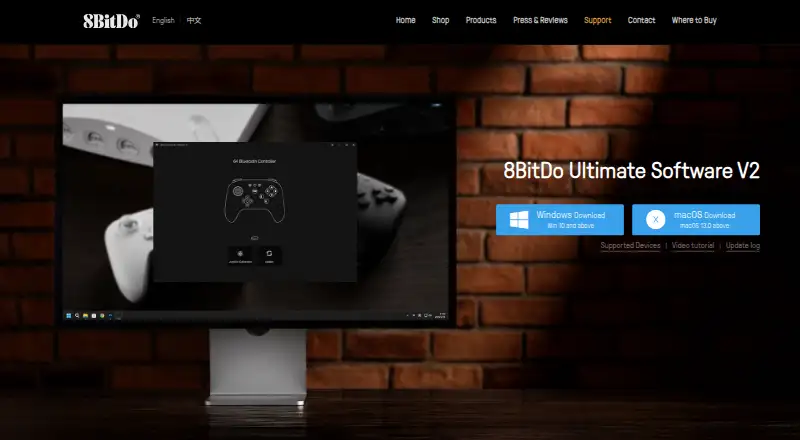
What 8BitDo Ultimate Software V2 is
8BitDo Ultimate Software V2 configures supported 8BitDo devices and provides firmware updates when available. Users can remap or disable supported keys, make profiles, and record macros that trigger multiple instructions with one keystroke. For compatible devices, it can also adjust lighting effects and colors; the FAQ lists audio configuration among V2’s enhanced features. The supported-device list includes selected 8BitDo controllers for Windows and macOS and identifies which customization features each supports. Other listed device types include mechanical keyboards, numpads, mice, speakers, adapters, arcade controllers, and mod kits. The software is free for supported 8BitDo devices. It requires Windows 10 (1903) or later, or macOS 13.0 or later, and the FAQ says there is no mobile version. For certain devices that are not recognized, the product FAQ provides button combinations and USB connection steps. 8BitDo’s privacy policy says it may collect software-use and device information, including operating system, applications, IP address, and location.
Who it suits
It suits owners of supported 8BitDo devices who use Windows or macOS and want to customize controls, lighting, or macros. Check the device list to see which features apply to a particular device.
What it does well
- Free for supported 8BitDo devices.
- Remap or disable supported keys and save profiles.
- Record macros triggered by one keystroke.
- Adjust lighting on supported devices.
- Firmware updates are added when available.
What to know first
- Works only with supported 8BitDo devices.
- Requires Windows 10 (1903) or later or macOS 13.0 or later.
- No mobile version.
Limits
The free plan covers supported 8BitDo devices only. The software requires Windows 10 (1903) or later or macOS 13.0 or later, and has no mobile version.
Plans
| Plan | Billed and limits | Price |
|---|---|---|
| 8BitDo Ultimate Software V2 | Supported 8BitDo devices only · Windows 10 (1903) or above · macOS 13.0 or above | Free |
As app.8bitdo.com lists them, read 30 Sept 2026. The maker's own page has the final word.
Getting started
- Open the 8BitDo Ultimate Software V2 website.
- Use a Windows 10 (1903) or later PC, or a Mac running macOS 13.0 or later.
- Connect a supported 8BitDo device and use the available customization features.
- If a listed device is not recognized, follow the product FAQ’s button-combination and USB connection steps.
Verdict
V2 brings device configuration, profiles, macros, and firmware updates together for supported 8BitDo hardware. It is limited to Windows and macOS, and available customization depends on the device.
Questions
How much does 8BitDo Ultimate Software V2 cost?
It is free for supported 8BitDo devices.
Which platforms does it support?
It runs on Windows 10 (1903) or later and macOS 13.0 or later. The FAQ says there is no mobile version.
What can I customize?
Depending on the supported device, you can remap or disable keys, create profiles, record macros, and adjust lighting. The FAQ also lists audio configuration among V2 enhancements.
Can it update device firmware?
Yes. The software keeps 8BitDo device firmware up to date, with new firmware added when available.
What device types are listed?
Listed types include game controllers, mechanical keyboards, numpads, mice, speakers, adapters, arcade controllers, and mod kits.
What information may 8BitDo collect?
Its privacy policy says it may collect software-use and device details, including operating system, applications, IP address, and location.
Facts from 8BitDo Ultimate Software V2's own pages
- Audio configuration
- The FAQ lists audio configuration among V2’s enhanced features. · app.8bitdo.com, 30 Sept 2026
- Device recognition help
- The product FAQ gives button combinations and USB connection steps for certain devices that are not recognized. · app.8bitdo.com, 30 Sept 2026
- Firmware caveat
- The update log records past firmware update failures and fixes for some listed devices. · app.8bitdo.com, 30 Sept 2026
- Firmware updates
- The page says new firmware is added to the software when available. · app.8bitdo.com, 30 Sept 2026
- Free plan
- Yes · app.8bitdo.com, 20 Sept 2026
- Key mapping
- Users can remap or disable supported keys and create profiles. · app.8bitdo.com, 30 Sept 2026
- Lighting
- The software can adjust supported devices’ lighting effects and colors. · app.8bitdo.com, 30 Sept 2026
- Macros
- Users can record macro instructions and trigger multiple instructions with one keystroke. · app.8bitdo.com, 30 Sept 2026
- Macro support
- Yes · app.8bitdo.com, 20 Sept 2026
- Mobile support
- An 8BitDo FAQ for the Ultimate 2 Wireless Controller says the software supports Windows and macOS versions only, with no mobile version. · support.8bitdo.com, 30 Sept 2026
- Operating systems
- The stated requirements are Windows 10 (1903) or above and macOS 13.0 or above. · app.8bitdo.com, 30 Sept 2026
- Privacy
- 8BitDo’s privacy policy says it may collect information about software use and device details, including operating system, software applications, IP address, and location. · shop.8bitdo.com, 30 Sept 2026
- Privacy safeguards
- The privacy policy says the company maintains commercially reasonable physical, electronic, and procedural safeguards for personal information. · shop.8bitdo.com, 30 Sept 2026
- Purpose
- The software configures 8BitDo devices and keeps their firmware up to date. · app.8bitdo.com, 30 Sept 2026
- Support
- The company’s shop contact page lists [email protected] for customer support. · shop.8bitdo.com, 30 Sept 2026
- Supported devices
- The page lists selected 8BitDo controllers for Windows and macOS and indicates which customization features each supports. · app.8bitdo.com, 30 Sept 2026
Where 8BitDo Ultimate Software V2 stands on Freedom251
- Gaming Peripheral Software#3 of 39
- Keyboard and Mouse Customization Software#52 of 105