Freedom251 › Keyboard and Mouse Customization Software
Keychron Launcher
What Keychron Launcher is
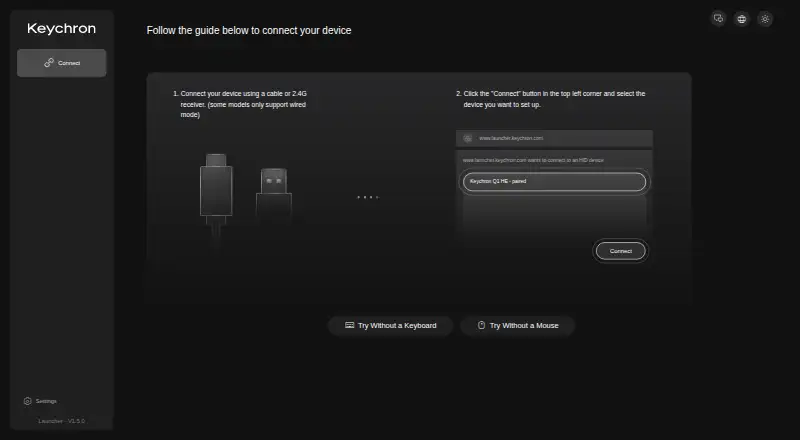
Keychron Launcher is a free web application for configuring compatible Keychron keyboards and mice. It can remap individual keys and knobs, set functions across supported devices, and build macros that trigger sequences of key presses. Keyboard controls include lighting effects and RGB settings for hue, saturation, brightness, and effect speed. Users can also update or flash keyboard firmware, upload keymap files, reset mappings, and export keymaps. Launcher includes polling rate and sensitivity controls, as well as support for onboard device memory. The remapping guide covers Keychron keyboards using QMK or ZMK firmware. Devices connect by cable or 2.4 GHz receiver, though some models work only over a wired connection. The web app runs on Windows, macOS, Linux, and other operating systems; Keychron recommends a current version of Chrome, Opera, or Edge. Its Quick Start feature requires the supplementary Keychron Assistant software, with installation instructions for macOS and Windows. Keychron says most of its keyboards are open source, allowing community review of their firmware.
Who it suits
Launcher suits Keychron keyboard and mouse owners who want to adjust key assignments, macros, lighting, or device settings from a web app. It is especially relevant to owners of keyboards using QMK or ZMK firmware.
What it does well
- Remaps individual keys and knobs.
- Creates macros that trigger multiple keys.
- Controls keyboard RGB settings and lighting effects.
- Supports keymap upload, reset, and export.
- Free web app with Windows, macOS, and Linux support.
What to know first
- Compatibility guidance covers Keychron keyboards using QMK or ZMK firmware.
- Some devices require a wired connection.
- Quick Start requires separate Keychron Assistant software.
Limits
The app is free. Quick Start requires supplementary Keychron Assistant software, and compatibility guidance describes support for keyboards using QMK or ZMK firmware.
Plans
| Plan | Billed and limits | Price |
|---|---|---|
| Keychron Launcher | Free web app for compatible Keychron devices | Free |
As launcher.keychron.com lists them, read 7 Oct 2026. The maker's own page has the final word.
Getting started
- Open the Keychron Launcher website in the latest Chrome, Opera, or Edge.
- Connect a compatible device by cable or 2.4 GHz receiver; some models require a cable.
- Use the controls to remap keys or knobs, create macros, or adjust lighting and device settings.
- Upload, reset, or export keymap files as needed.
- Install Keychron Assistant for the Quick Start feature; installation instructions are available for macOS and Windows.
Overview
Keychron Launcher is a free web app for configuring compatible Keychron keyboards and mice. It is most useful to owners who want control over layouts, macros, lighting, and device settings without paying for configuration software. Its range of controls is a strong fit for supported gear, but model and connection requirements—and a separate installation for Quick Start—make compatibility worth checking first.
Key features
Launcher can remap individual keys and knobs and configure key functions across supported devices. Its macro editor can combine multiple key presses into an operation, which helps with repeatable workflows or preferred input layouts. These tools are specifically for compatible Keychron devices, not a general-purpose peripheral configurator.
For supported keyboards, lighting controls include RGB hue, saturation, brightness, and effect speed. Firmware updates and flashing, plus the ability to upload, reset, and export keymap files, make Launcher useful for both routine adjustments and more substantial configuration changes. Onboard memory, polling-rate control, and sensitivity controls add further device-level options, though their relevance depends on the particular compatible device.
The remapping guide describes support for Keychron keyboards using QMK or ZMK firmware. Keychron recommends the latest Chrome, Opera, or Edge. Devices connect by cable or 2.4 GHz receiver, while some models support wired connection only. Quick Start requires installing the supplementary Keychron Assistant software; installation instructions are provided for macOS and Windows. If a device is not detected, Keychron directs users to its help center and support email.
Keychron says its open-source keyboard firmware can be reviewed by the community for safety and hidden features. That transparency may matter to users who want to inspect firmware, but it does not change the need to verify that a particular device is supported.
Pricing
Keychron Launcher costs nothing. The free web app covers compatible Keychron devices, with no paid tier or free-trial decision to weigh. Its main trade-off is scope rather than price: users with unsupported hardware, or models that require a connection method they cannot use, will not get value from the free plan.
Platforms
Launcher is web-based and supports Windows, macOS, Linux, and other operating systems. That makes it more flexible than a tool limited to one desktop platform, but browser choice still matters: Keychron recommends the latest Chrome, Opera, or Edge. Some device models also require a wired connection, and Quick Start adds separate Keychron Assistant installation instructions for macOS and Windows.
Who it's for
Choose Launcher if you own a compatible Keychron keyboard or mouse and want one free place to change mappings, build macros, tune lighting, update firmware, or manage keymap files. It is especially appealing if a browser-based tool suits your setup and your device supports your preferred cable or 2.4 GHz receiver connection.
Look elsewhere if you need software for another brand, want configuration without checking device and firmware compatibility, or cannot meet the browser or connection requirements. Quick Start is also less convenient if you want to avoid installing supplementary software.
Pros and cons
- Pros: Free access to remapping, macros, lighting, firmware tools, and keymap file management for compatible Keychron devices.
- Pros: Web-based support across Windows, macOS, and Linux gives users flexibility in where they configure supported hardware.
- Cons: Its brand-specific compatibility makes it unsuitable as a general utility for keyboards and mice from other makers.
- Cons: Browser recommendations, model-specific wired-only support, and the separate Assistant requirement for Quick Start add setup checks.
Alternatives
be quiet! IO Center is another free option with Linux, macOS, web, and Windows platforms. ROCCAT Swarm II is a free choice for compatible Turtle Beach devices, with Android, iOS, and Windows support. Akko Cloud Driver may suit Akko owners seeking free Windows or Mac downloads, though model compatibility varies by driver version and it does not cover all VIA/QMK models.
Fnatic OP Software is a free early-access option for supported Fnatic gear on macOS and Windows. MonsGeek Driver offers free keyboard driver and configuration downloads for macOS, web, and Windows, with supported models varying by driver. MOZA Pit House is a free download for MOZA Racing hardware on Android, iOS, and Windows.
8BitDo Ultimate Software V2 is limited to supported 8BitDo devices and requires Windows 10 (1903) or above or macOS 13.0 or above. AOC G-Menu is a free option for supported AOC devices on Windows. For broader category browsing, see Gaming Peripheral Software or Keyboard and Mouse Customization Software.
Verdict
Keychron Launcher is a sensible first choice for owners of compatible Keychron gear who want a broad set of configuration tools at no cost. Its standout case is the combination of browser-based access with mapping, macros, lighting, and firmware controls. The main reason to look elsewhere is equally clear: compatibility and connection limits can rule it out, and Quick Start brings an extra software installation.
Verdict
Choose Keychron Launcher if you want a free way to configure a compatible Keychron keyboard or mouse, including remapping, macros, and lighting. Check device compatibility and connection requirements first, and account for the separate Assistant installation if you plan to use Quick Start.
Questions
How much does Keychron Launcher cost?
It is free. The listed plan is free.
Does it have a free plan or trial?
Yes, it has a free plan. There is no free trial.
Which platforms does it support?
The web app supports Windows, macOS, Linux, and other operating systems. Keychron recommends the latest Chrome, Opera, or Edge.
Which keyboards are covered by its remapping guide?
The guide describes support for Keychron keyboards using QMK or ZMK firmware.
Can it update firmware and manage keymaps?
It supports keyboard firmware updates and flashing. Users can upload keymap files, reset mappings, and export keymap files.
Who makes Keychron Launcher?
Keychron makes keyboards and mice. The company says it began in 2017 with an idea for a wireless mechanical keyboard for Mac users.
Facts from Keychron Launcher's own pages
- Company background
- Keychron says it specializes in designing and building keyboards and mice and that most of its keyboards are open source. · keychron.com, 7 Oct 2026
- Company founding
- Keychron says it started in 2017 with an idea for a wireless mechanical keyboard for Mac users. · keychron.com, 7 Oct 2026
- Compatibility
- The remapping guide describes Launcher support for Keychron keyboards that use QMK or ZMK firmware. · keychron.com, 7 Oct 2026
- Connection requirement
- Devices connect through a cable or 2.4 GHz receiver, though some models support wired connection only. · keychron.com, 7 Oct 2026
- Firmware
- Launcher supports keyboard firmware updates and flashing. · keychron.com, 7 Oct 2026
- Free plan
- Yes · keychron.com, 20 Sept 2026
- Keymap files
- Users can upload keymap files, reset current mappings, and export keymap files. · keychron.com, 7 Oct 2026
- Key remapping
- It can remap individual keys and knobs, and configure key functions across supported devices. · keychron.com, 7 Oct 2026
- Lighting
- Launcher can modify keyboard lighting effects and configure RGB controls such as hue, saturation, brightness, and effect speed. · keychron.com, 7 Oct 2026
- Macros
- Users can create macro commands that trigger multiple keys to perform an operation. · keychron.com, 7 Oct 2026
- Macro support
- Yes · keychron.com, 20 Sept 2026
- Onboard device memory
- Yes · keychron.com, 20 Sept 2026
- Operating systems
- Keychron says its web-based Launcher supports Windows, macOS, Linux, and other operating systems. · keychron.com, 7 Oct 2026
- Polling rate control
- Yes · keychron.com, 20 Sept 2026
- Purpose
- Keychron Launcher is a free web application for customizing Keychron keyboards and mice. · keychron.com, 7 Oct 2026
- Quick Start
- Launcher’s Quick Start feature requires installing the supplementary Keychron Assistant software, with installation instructions for macOS and Windows. · keychron.com, 7 Oct 2026
- Security
- Keychron says its open-source keyboard firmware lets the community review the code for safety and hidden features. · keychron.com, 7 Oct 2026
- Sensitivity controls
- Yes · keychron.com, 20 Sept 2026
- Support
- Keychron directs users with Launcher detection problems to its help center and support email [email protected]. · help-center.keychron.com, 7 Oct 2026
- Supported browsers
- Keychron recommends the latest Chrome, Opera, or Edge browser to use Launcher. · keychron.com, 7 Oct 2026
- Supported operating systems
- cross-platform · keychron.com, 20 Sept 2026
Where Keychron Launcher stands on Freedom251
- Keyboard and Mouse Customization Software#7 of 105
- Gaming Peripheral Software#4 of 39