Freedom251 › Keyboard and Mouse Customization Software
HyperX NGENUITY
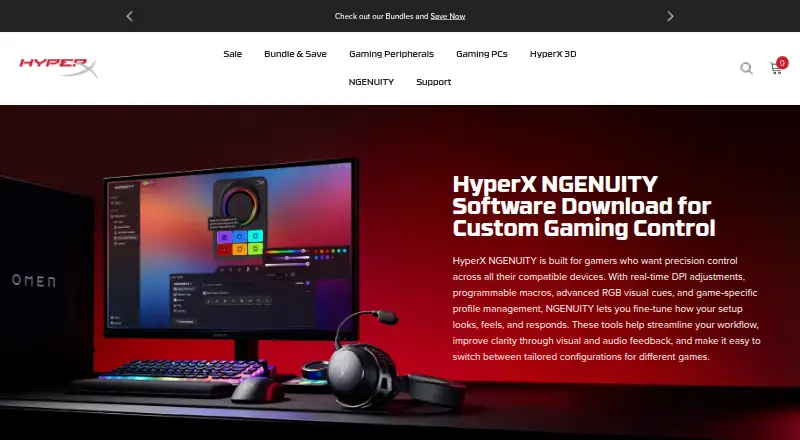
What HyperX NGENUITY is
HyperX NGENUITY is free Windows software for configuring compatible HyperX gaming peripherals, including supported headsets, microphones, keyboards, mice, and controllers. It offers microphone and playback settings, plus audio tools such as 12-channel Spatial Audio, parametric and graphic EQ, AI Noise Reduction, a compressor, and a limiter. Users can create macros that trigger multiple actions with one key or button, adjust mouse sensor settings, and choose built-in or custom RGB lighting effects. Lighting profiles and game lighting effects are supported. NGENUITY can be used with OMEN Gaming Hub, but HyperX recommends using only one app for RGB lighting to avoid conflicts. HyperX says the software is in active development and that some features are not fully implemented. NGENUITY and NGENUITY Legacy are available only for Windows. Legacy has limited support and maintenance after August 2025, and custom lighting cannot currently be used with Instant Pair. HyperX directs users to its Care Teams for product support and troubleshooting.
Who it suits
It suits Windows users configuring compatible HyperX peripherals, especially those who want audio settings, macros, mouse tuning, or lighting controls.
What it does well
- Free for compatible HyperX devices
- Audio controls include EQ and AI Noise Reduction
- Macros can trigger multiple actions with one key
- Offers built-in and custom RGB lighting effects
What to know first
- Available only for Windows
- Some features are not fully implemented
- Custom lighting cannot currently be used with Instant Pair
- Legacy support and maintenance are limited after August 2025
Limits
NGENUITY is limited to Windows and compatible HyperX devices. NGENUITY Legacy has limited support and maintenance after August 2025; custom lighting cannot currently be used with Instant Pair.
Plans
| Plan | Billed and limits | Price |
|---|---|---|
| NGENUITY | Windows only · Compatible HyperX devices | Free |
As hyperx.com lists them, read 5 Oct 2026. The maker's own page has the final word.
Getting started
- Open https://hyperx.com/pages/ngenuity on a Windows device.
- Install NGENUITY for compatible HyperX peripherals.
- Adjust the available audio, macro, mouse, and lighting settings for supported devices.
- Contact HyperX Care Teams for product support or troubleshooting.
HyperX NGENUITY is free Windows software for configuring compatible HyperX gaming peripherals. It suits players who want one place for lighting, audio, macros, and mouse tuning, provided their hardware appears in the current compatibility list. Its broad controls are useful, but active development and Windows-only availability make compatibility checks essential.
Overview
NGENUITY brings peripheral settings into a single utility for HyperX controllers, headsets, keyboards, mice, and microphones supported by the current release. You can manage microphone and playback behavior, tune a mouse sensor, set lighting, and assign multi-action macros. The audio engine is aimed at detailed control rather than basic volume changes, while peripheral profiles and lighting settings help keep a setup consistent.
The software is in active development, and HyperX says some functions are not fully implemented. That makes it a sensible choice for owners of supported, newer HyperX gear who want expanding controls, but a less dependable fit if every advertised function must already be complete.
Key features
Audio controls
NGENUITY includes microphone and playback settings with an audio engine offering 12-channel Spatial Audio, Parametric and Graphic EQ, AI Noise Reduction, a compressor, and a limiter. These controls give headset and microphone users room to shape positional sound and voice processing, from competitive play to clearer communications. They also create a steeper learning curve than a simple preset selector.
Macros and device tuning
Macros can trigger multiple actions from one button or key, which is useful for repeated game or workflow sequences. Mouse owners can adjust sensor settings directly, giving them more control over tracking behavior than lighting-only utilities provide.
RGB lighting
You can select built-in effects or create custom lighting, with addressable RGB control, lighting profiles, and game lighting effects. NGENUITY can work alongside OMEN Gaming Hub, but HyperX recommends using only one app for RGB lighting to prevent conflicts. Custom lighting also cannot currently be used with Instant Pair, limiting that combination.
Device support
Support depends on the specific HyperX controller, headset, keyboard, mouse, or microphone. NGENUITY Legacy remains available but has limited support and maintenance after August 2025, so new users should favor the current application when their device is compatible.
Pricing
NGENUITY costs free on its free plan. The plan covers compatible HyperX devices on Windows, with no paid tier, seat allowance, quota, or trial term stated. That makes it appropriate for individual HyperX owners who want the full utility without a subscription. The trade-off is scope: it does not serve unsupported hardware, and the Windows requirement excludes macOS and Linux users.
Platforms
NGENUITY and NGENUITY Legacy are available only for Windows. HyperX directs product support and troubleshooting to its Care Teams. HP's US privacy statement says reasonable physical, technical, and administrative procedures are used to safeguard collected and processed information.
Who it's for
Choose NGENUITY if you own compatible HyperX peripherals and want audio processing, RGB profiles, macros, and mouse sensor controls in one free application. It is especially relevant to headset and microphone users who will use EQ, Spatial Audio, noise reduction, compression, or limiting. It is not a fit for users on macOS or Linux, owners of unsupported models, or anyone who needs a finished feature set rather than software still being expanded.
Pros and cons
- Pro: The free Windows plan combines lighting, macros, mouse tuning, and substantial audio controls without a subscription.
- Pro: Parametric and Graphic EQ, 12-channel Spatial Audio, AI Noise Reduction, compressor, and limiter offer fine-grained sound and voice adjustment.
- Pro: Custom effects, lighting profiles, and game lighting effects support detailed RGB setups.
- Con: Compatibility is limited to supported HyperX peripherals, so the utility cannot act as a universal controller.
- Con: Windows is the only supported platform.
- Con: Some features are still incomplete, and custom lighting is unavailable with Instant Pair.
- Con: Running it with OMEN Gaming Hub requires choosing one app for RGB lighting to avoid conflicts.
Alternatives
For broader brand coverage, compare the Gaming Peripheral Software directory. If lighting is your priority, see RGB Lighting Software; for keyboard and mouse-focused tools, browse Keyboard and Mouse Customization Software.
Logi Options+ is the better choice for supported Logitech devices when you need Windows 10 or later or macOS 12 or later. be quiet! IO Center suits users seeking a free utility with Linux, macOS, web, and Windows availability. Pick Logitech G HUB for Logitech G gaming mice, LIGHTSYNC RGB customization, device presets, and game profiles.
SteelSeries GG is a free Windows 10+ or macOS option for SteelSeries users. Rebind fits users who want a freemium, cross-platform tool with a Luau scripting runtime and no account required in its free mode. Choose Glorious CORE for supported Glorious products, noting that cloud profile saving requires a Glorious ID. Akko Cloud Driver is an option for compatible Akko models on Windows or Mac, while Fnatic OP Software targets supported Fnatic gear in early access.
Verdict
HyperX NGENUITY is the right pick for HyperX owners who want a free, centralized way to shape audio, lighting, macros, and mouse behavior. Its strongest reason to choose it is the depth of its audio and peripheral controls at no cost. Look elsewhere if you need macOS or Linux support, broader device compatibility, or a utility whose feature set is no longer evolving.
Verdict
NGENUITY brings peripheral configuration, audio controls, macros, and lighting settings into free Windows software. Check device compatibility and note that some features remain in development.
Questions
How much does NGENUITY cost?
NGENUITY is free. Its listed plan costs nothing.
Which platforms support NGENUITY?
NGENUITY and NGENUITY Legacy are available only for Windows.
Which devices does it support?
The current version supports listed HyperX controllers, headsets, keyboards, mice, and microphones.
What settings can I change?
Available controls include audio settings, macros, mouse sensor settings, and RGB lighting effects. Audio features include 12-channel Spatial Audio, parametric and graphic EQ, AI Noise Reduction, a compressor, and a limiter.
Can NGENUITY be used with OMEN Gaming Hub?
Yes. HyperX says NGENUITY can be used with OMEN Gaming Hub and recommends using only one app for RGB lighting to avoid conflicts.
Who makes NGENUITY?
HyperX describes its mission as developing gaming products for gamers and the gaming community.
Facts from HyperX NGENUITY's own pages
- Audio controls
- The software offers microphone and playback settings, and its audio engine provides pro-level controls. · hyperx.com, 5 Oct 2026
- Audio features
- The page lists 12-channel Spatial Audio, Parametric and Graphic EQ, AI Noise Reduction, compressor, and limiter. · hyperx.com, 5 Oct 2026
- Development status
- HyperX says NGENUITY is in active development and some features are not fully implemented yet. · hyperx.com, 5 Oct 2026
- Free plan
- Yes · hyperx.com, 19 Sept 2026
- Instant Pair limitation
- Custom lighting cannot currently be used with Instant Pair, according to the FAQ. · hyperx.com, 5 Oct 2026
- Integration
- NGENUITY can be used with OMEN Gaming Hub, with a recommendation to use only one app for RGB lighting to avoid conflicts. · hyperx.com, 5 Oct 2026
- Legacy support
- NGENUITY Legacy is described as having limited support and maintenance after August 2025. · hyperx.com, 5 Oct 2026
- Macros
- Users can create macros that trigger multiple actions with one button or key. · hyperx.com, 5 Oct 2026
- Maker
- HyperX describes its mission as developing gaming products for gamers and the gaming community. · hyperx.com, 5 Oct 2026
- Mouse tuning
- The software lets users adjust mouse sensor settings. · hyperx.com, 5 Oct 2026
- Platform availability
- NGENUITY and NGENUITY Legacy are currently available only for Windows. · hyperx.com, 5 Oct 2026
- Privacy and security
- HP's US privacy statement says it uses reasonable physical, technical, and administrative procedures to safeguard collected and processed information. · hp.com, 5 Oct 2026
- Purpose
- NGENUITY provides settings to customize compatible HyperX gaming peripherals. · hyperx.com, 5 Oct 2026
- RGB lighting
- Users can choose built-in lighting effects or create their own lighting. · hyperx.com, 5 Oct 2026
- Support
- HyperX directs users to its Care Teams for product support and troubleshooting. · hyperx.com, 5 Oct 2026
- Supported devices
- The current version supports listed HyperX controllers, headsets, keyboards, mice, and microphones. · hyperx.com, 5 Oct 2026
Where HyperX NGENUITY stands on Freedom251
- Keyboard and Mouse Customization Software#18 of 105
- RGB Lighting Software#12 of 33
- Gaming Peripheral Software#15 of 39