Freedom251 › Keyboard and Mouse Customization Software
Dygma Bazecor
What Dygma Bazecor is
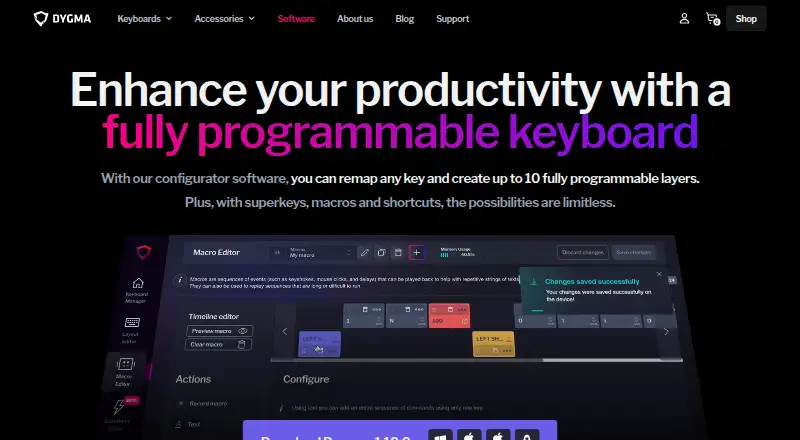
Dygma Bazecor is configurator software for Dygma’s programmable keyboards. Users can remap keys and create up to 10 programmable layers, including layouts that move frequently used keys to the thumb cluster. Key assignments include combo keys, dual-function keys, macros, mouse actions and shortcuts. Macros can replay sequences with keystrokes, mouse clicks and delays; mouse actions can assign movement, clicks and wheel controls to keys. Superkeys, which are marked beta, can assign up to five functions to one key through different tap and hold patterns. Bazecor also supports customizable per-key RGB lighting that can vary by layer. Dygma describes the software and its keyboard firmware as open source. Users can download Bazecor and experiment with a virtual keyboard without owning a keyboard. The software is free and listed for Linux, macOS and Windows. Dygma says its keyboards use a fork of Kaleidoscope firmware and can be programmed via RF or Bluetooth. The product page lists Bazecor 1.10.0, while GitHub lists v1.11.0 as a pre-release. The Layer Lens feature in version 1.10.0 was initially available only for Sonsei with English US layouts and required firmware v1.1.0. Dygma directs users to its support page or contact form for help, and also points to Discord and Reddit communities.
Who it suits
Bazecor suits Dygma keyboard owners who want to remap keys, build layers or customize lighting and input actions. It may also suit people considering Dygma’s programmable keyboards, since they can try the software’s virtual keyboard without owning a device.
What it does well
- Free configurator for Dygma programmable keyboards.
- Create up to 10 remappable layers.
- Supports macros, combo keys and dual-function keys.
- Assign mouse movement, clicks and wheel actions to keys.
- Customizable per-key RGB lighting can vary by layer.
- Open source, with a virtual keyboard available to try.
What to know first
- Designed for Dygma programmable keyboards.
- Superkeys are marked beta.
- Layer Lens in version 1.10.0 initially required Sonsei, English US layouts and firmware v1.1.0.
Limits
Layer Lens in version 1.10.0 was initially available only for Sonsei with English US layouts and required firmware v1.1.0. Superkeys are marked beta.
Plans
| Plan | Billed and limits | Price |
|---|---|---|
| Bazecor | Configurator for Dygma programmable keyboards; can be tried with a virtual keyboard | Free |
As dygma.com lists them, read 12 Oct 2026. The maker's own page has the final word.
Getting started
- Visit Dygma’s programmable keyboard page.
- Download Bazecor for Linux, macOS or Windows.
- Try the virtual keyboard without owning a keyboard, or configure a Dygma keyboard.
- Use the support page, contact form, Discord or Reddit for help.
Verdict
Choose Bazecor if you use or are considering a Dygma programmable keyboard and want control over key mappings, layers, macros or lighting. Its virtual keyboard offers a way to explore the configurator without owning a keyboard. Look elsewhere if you need a configurator for keyboards other than Dygma’s.
Questions
How much does Bazecor cost?
Bazecor is free: the listed plan price is free.
Can I try Bazecor without a Dygma keyboard?
Yes. Dygma says users can download the software and create a virtual keyboard without owning a keyboard.
Which operating systems does Bazecor support?
It is listed for Linux, macOS and Windows.
Is Bazecor open source?
Dygma describes Bazecor and its keyboard firmware as open source.
What can I configure with Bazecor?
It supports key remapping, up to 10 layers, macros, mouse actions, shortcuts and per-key RGB lighting. Superkeys are marked beta.
Where can I get help with Bazecor?
Dygma points users to its support page or contact form, as well as Discord and Reddit communities.
Facts from Dygma Bazecor's own pages
- Company privacy
- Dygma's privacy policy says personal data is used for order payment and shipment, newsletters, and replies to contact form inquiries. · dygma.com, 12 Oct 2026
- Downloads
- Dygma’s product page lists Bazecor 1.10.0, while the GitHub releases page lists v1.11.0 as a pre-release. · github.com, 12 Oct 2026
- Dual-function keys
- A dual-function key can perform different actions when tapped and held. · dygma.com, 12 Oct 2026
- Firmware
- Dygma keyboards use a fork of Kaleidoscope firmware, and the maker says they can be programmed via RF or Bluetooth. · dygma.com, 12 Oct 2026
- Free to try
- Dygma says users can download Bazecor and create a virtual keyboard without owning a keyboard. · dygma.com, 12 Oct 2026
- Intended users
- Dygma presents its programmable keyboards and configurator for people who want to customize typing workflows, including programmers and users seeking ergonomic keyboards. · dygma.com, 12 Oct 2026
- Key actions
- The software supports combo keys, dual-function keys, macros, mouse actions, and shortcuts. · dygma.com, 12 Oct 2026
- Key remapping and layers
- Users can remap keys and create up to 10 programmable layers. · dygma.com, 12 Oct 2026
- Layer Lens limit
- The v1.10.0 release says Layer Lens was initially available only for the Sonsei with English US layouts and required firmware v1.1.0. · github.com, 12 Oct 2026
- Layers
- Users can create up to 10 programmable layers and relocate frequently used keys to the thumb cluster. · dygma.com, 12 Oct 2026
- Lighting
- Bazecor supports customizable per-key RGB lighting that can vary by layer. · dygma.com, 12 Oct 2026
- Macros
- Macros can replay sequences that include keystrokes, mouse clicks, and delays. · dygma.com, 12 Oct 2026
- Macro support
- Yes · dygma.com, 22 Sept 2026
- Maker
- Dygma Lab S.L. identifies its registered office as Valencia, Spain; the About page says the project began in 2016. · dygma.com, 12 Oct 2026
- Mouse controls
- Bazecor can assign mouse movement, clicks, and wheel actions to keyboard keys. · dygma.com, 12 Oct 2026
- Onboard device memory
- Yes · dygma.com, 22 Sept 2026
- Open source
- Dygma describes Bazecor and its keyboard firmware as open source. · dygma.com, 12 Oct 2026
- Purpose
- Bazecor is Dygma’s configurator software for its programmable keyboards, letting users remap keys and create custom layers. · dygma.com, 12 Oct 2026
- RGB lighting
- The page describes customizable per-key RGB lighting that can vary by layer. · dygma.com, 12 Oct 2026
- Security
- Dygma’s product page does not state a security certification or compliance claim for Bazecor. · dygma.com, 12 Oct 2026
- Shortcuts
- Combo keys can combine modifiers with any key for shortcuts. · dygma.com, 12 Oct 2026
- Superkeys
- Superkeys are marked beta and can assign up to five functions to one key, activated by different tap and hold patterns. · dygma.com, 12 Oct 2026
- Support
- Dygma directs users to its support page or contact form for help, and also points to Discord and Reddit communities. · dygma.com, 12 Oct 2026
- Supported operating systems
- cross-platform · dygma.com, 22 Sept 2026