Freedom251 › Network Diagnostic Software

Globalping
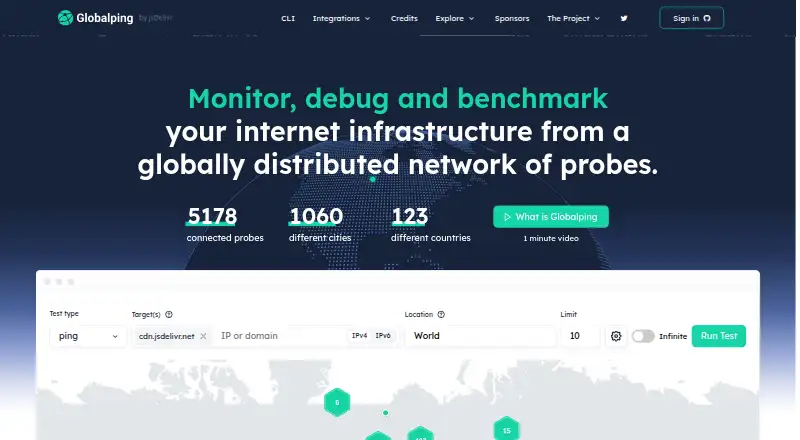
What Globalping is
Globalping runs network tests from globally distributed probes to help monitor, debug, and benchmark internet infrastructure. Tests include ping, traceroute, DNS, MTR, and HTTP. You can target locations by country, continent, city, US state, region, ASN, ISP, tag, or cloud region. Its free plan gives unregistered users 50 probes per measurement and 250 free tests per hour; registered users get 500 probes per measurement and 500 free tests per hour. Each credit pays for one additional test, and a measurement can request up to 500 probes. Globalping provides a REST API, a CLI for Linux, Mac, and Windows, and integrations including Slack, Discord, Zapier, n8n, TypeScript and Go libraries, Helm, Visual Studio Code, and GitHub Bot. The CLI can script and automate tests from a terminal. The maker describes the platform’s components as open source and says commercial use is supported within its terms. It also says probes limit public information and block harmful or abusive domains and IPs.
Who it suits
Globalping suits developers and organizations that need network measurements from selected locations, from individual tests to scripted workflows. Its stated audience ranges from solo developers to enterprise companies.
What it does well
- Tests include ping, traceroute, DNS, MTR, and HTTP
- Locations can be selected by country, city, ASN, or ISP
- Free plan includes up to 500 probes per measurement for registered users
- CLI supports scripting and test automation
- Maker describes every component as open source
What to know first
- Unregistered users receive 250 free tests per hour
- Registered users receive 500 free tests per hour
- Additional tests cost 1 credit each
Limits
Unregistered users on the free plan receive 250 tests per hour and can request up to 50 probes per measurement. Registered users receive 500 free tests per hour and can request up to 500 probes per measurement; additional tests cost one credit each.
Plans
| Plan | Billed and limits | Price |
|---|---|---|
| Free | No registration required · 250 free tests/hour · 50 probes/measurement unauthenticated; registered users get 500 tests/hour and 500 probes/measurement | Free |
| Sponsor donation | Monthly donation; the page also offers one-time donations · Base reward of 4,000 credits per $1 donated · cumulative bonus up to 1,500% · credits can fund additional tests | $10 a month |
| GitHub Sponsor | Donation · Credits for tests beyond free limits · $25/month example shown · hosting a probe adds 150 tests/probe/day | $25 a month |
As globalping.io lists them, read 15 Oct 2026. The maker's own page has the final word.
Getting started
- Open https://globalping.io/.
- Use the web service or choose the API or CLI route.
- For CLI use, select Linux, macOS, or Windows.
- Choose test locations and a listed command such as ping, DNS, or HTTP.
- Register to receive the higher free hourly test allowance.
- Use credits for additional tests; a Sponsor donation is listed at $10 a month.
Overview
Globalping runs network measurements from a worldwide probe network, using familiar diagnostics to help pinpoint where connectivity or service behavior differs. It suits developers and teams that need location-specific checks across many networks, rather than a tool focused on a single device or local connection.
Its strongest advantage is breadth of vantage points: tests can target places and network types, and run through web, CLI, API, or integrations. The free allowance makes it practical to start, while hourly quotas and credit costs matter if you expect frequent or broad measurements.
Key features
Measurements across locations
Globalping supports ping, traceroute, DNS, MTR, and HTTP tests. Location filters include countries, continents, cities, US states, regions, ASNs, ISP names, tags, and cloud region names. That flexibility is useful when an issue appears only for a particular geography, provider, or cloud region. A single measurement can request up to 500 probes, enabling wide comparisons, though the free plan's hourly test cap may constrain repeated checks.
The range of tests covers reachability, routes, name resolution, and HTTP behavior. DNS diagnostics and packet-loss analysis are supported, making Globalping relevant to both troubleshooting and ongoing infrastructure checks.
Ways to work and automate
Use the web interface, REST API, or CLI; the CLI supports Linux, Mac, and Windows and includes the same core DNS, HTTP, MTR, ping, and traceroute commands. Integrations include Slack, Discord, Zapier, n8n, MCP Server, TypeScript and Go libraries, Helm, Visual Studio Code, and GitHub Bot. The API can underpin free or commercial tools, while the CLI can script terminal-based tests. This breadth is a practical strength for teams that want to incorporate measurements into existing workflows, but users seeking only a simple local network utility may not need it.
The maker describes all Globalping components as open source and actively developed with its community. It says probe hardware exposes no access to a user's LAN, opens no ports, blocks malicious and abusive endpoints, and uses open-source firmware; it also says the platform limits public information exposed by probes and blocks harmful domains and IPs. Commercial use is supported within the terms of service.
Pricing
Free: free. Unregistered users can request up to 50 probes per measurement and run 250 free tests per hour. Registration raises the per-measurement ceiling to 500 probes and the hourly allowance to 500 free tests; additional tests cost 1 credit each. There is no free trial, but the free plan is a substantial way to evaluate the service and handle modest test volumes. The lower unregistered caps are less suited to large comparisons or frequent monitoring.
Sponsor donation: $10 a month, billed Monthly donation. One-time donations are also offered. Donations earn a base reward of 4,000 credits per $1 donated, with a cumulative bonus of up to 1,500%; credits can fund additional tests. This is a donation-based route to more test capacity, not a conventional fixed-volume subscription, so costs depend on donation and credit use.
Globalping is a hybrid deployment. Its intended range runs from solo developers to enterprise companies, but the published plans described here center on free use and donations rather than seat-based tiers.
Platforms
Globalping supports web, Windows, macOS, Linux, API, Docker, and Kubernetes. The CLI is available for Linux, Mac, and Windows, while the API and integrations provide options for automation and embedding tests in other tools.
Who it's for
Globalping is a good fit for developers, operations teams, and companies investigating internet-facing services from multiple locations or providers. It is especially compelling when tests need to be scripted, triggered through integrations, or compared across many probes. People who need only a local speed check or a narrowly focused diagnostic may be better served by a more specialized tool.
Pros and cons
Pros
- Broad location and network filters make it possible to target more than just a country or city.
- Up to 500 probes per measurement on the registered free plan supports wide geographic or network comparisons.
- CLI, API, and numerous integrations give technical teams several routes to automate tests.
- Open-source components and stated probe safeguards are useful considerations for teams evaluating transparency and security.
Cons
- The free allowance is capped hourly, and tests beyond it consume credits, so sustained monitoring requires attention to usage.
- Unregistered use is limited to 50 probes per measurement and 250 tests per hour.
- The donation option funds credits rather than offering a stated conventional subscription quota, which may be less predictable for budgeting.
Alternatives
For a broader set of network diagnostic options, browse Network Diagnostic Software.
Choose nPerf instead if speed and latency tests, app navigation and streaming tests, and a last-10-tests history are a better match than Globalping's distributed probe measurements. PingPlotter is worth considering when its free one-connection monitoring with a 10-minute history is sufficient, or when its Professional Edition fits the need for more. For DNS-focused web analysis, DNSViz is a free, open-source option.
NetSpot is another freemium choice, with a free macOS and Windows edition for personal and evaluation use. Consider Nmap for free end-user use when its license terms fit; its free end-user license does not permit redistribution within commercial software or hardware products. SoftPerfect Bandwidth Manager offers a free Lite edition with five rules or streams, usage reports, live usage monitoring, and penalties for heavy downloads and uploads. Angry IP Scanner is a free, GPLv2 option for users who want that open-source scanner. Buddi is a free GPLv2 budgeting application, rather than a network diagnostic tool.
Verdict
Choose Globalping if you need network diagnostics from varied geographic, provider, or cloud vantage points and want to automate them through a CLI, API, or integrations. Its combination of location targeting and a generous registered free allowance is the main reason to start here. Look elsewhere if you need a local or specialized utility, or if hourly limits and credit-based extra tests make ongoing volume hard to budget.
Verdict
Globalping combines location-based network measurements with command-line, API, and third-party integration options. Consider the free test limits and credit cost when estimating ongoing use.
Questions
Is Globalping free?
Yes. The free plan is priced at $0 and includes an hourly test allowance.
What are the free plan limits?
Unregistered users get 250 tests per hour and up to 50 probes per measurement. Registered users get 500 tests per hour and up to 500 probes per measurement.
What platforms does Globalping support?
It lists web, Windows, macOS, Linux, API, Docker, and Kubernetes. The CLI supports Linux, Mac, and Windows.
Is Globalping open source?
The maker describes every Globalping component as open source and actively developed with its community and users.
What does a Sponsor donation cost?
The listed Sponsor donation is $10 a month. The page also offers one-time donations; donations provide credits, with a base reward of 4,000 credits per $1 donated and cumulative bonuses up to 1,500%.
Can Globalping be used commercially?
The credits FAQ says commercial use is supported within the limits of the terms of service.
Facts from Globalping's own pages
- API authentication
- API calls can be unauthenticated, use bearer tokens, or use OAuth2 for applications running measurements for end users. · github.com, 15 Oct 2026
- Automation
- The integrations page describes using the API to build free or commercial tools and the CLI to script and automate tests from a terminal. · globalping.io, 29 Sept 2026
- CLI
- The CLI runs on Linux, macOS and Windows and supports ping, HTTP, DNS, MTR, traceroute, JSON output, CI mode and probe limits. · globalping.io, 15 Oct 2026
- Commercial use
- The credits FAQ says commercial use is supported within the limits of the terms of service. · globalping.io, 29 Sept 2026
- Company facts
- LinkedIn lists Globalping as privately held, founded in 2023, with 2–10 employees. · linkedin.com, 15 Oct 2026
- Documentation depth
- The API specification documents endpoints, schemas, authentication, rate limits, client guidelines and asynchronous measurement behavior. · github.com, 15 Oct 2026
- Hardware probe security
- The maker says hardware probes do not allow access to a user's LAN, block malicious and abusive endpoints, open no ports, and use open-source firmware. · globalping.io, 29 Sept 2026
- Headquarters
- The legal registered office is Suite 2a1, Northside House, Mount Pleasant, Barnet, England, EN4 9EB. · globalping.io, 15 Oct 2026
- Integrations
- Official integrations include Slack, Discord, Zapier, n8n, MCP Server, VS Code, GitHub Bot and Helm. · globalping.io, 15 Oct 2026
- Intended users
- The about page says the platform is designed for solo developers through enterprise companies and aims to keep it useful to most users for free. · globalping.io, 29 Sept 2026
- Legal maker
- The service is operated by Volentio JSD Limited, trading as Globalping, registered in England and Wales under company number 14984373. · globalping.io, 15 Oct 2026
- Licence
- The official globalping.io website repository is marked OSL-3.0 licensed. · github.com, 15 Oct 2026
- Limit: high volume
- A single measurement is capped at 500 probes, so thousands of tests require multiple measurements and static location selection. · github.com, 15 Oct 2026
- Limit: probe targeting
- Probes do not expose stable UUIDs for direct targeting; users must rely on location filters or prior measurement IDs. · github.com, 15 Oct 2026
- Limit: rate limits
- Unauthenticated users are limited to 250 tests per hour and 50 probes per measurement; registered users receive 500 tests per hour and 500 probes per measurement. · github.com, 15 Oct 2026
- Limit: result certainty
- Requested probe counts are best effort, so the API does not guarantee returning the exact number requested. · github.com, 15 Oct 2026
- Limits
- Each credit equals one test, and a single measurement can request up to 500 probes. · globalping.io, 29 Sept 2026
- Limit: security testing
- Terms prohibit vulnerability scanning, penetration testing and exploit validation when those activities are likely to trigger abuse complaints or blocking. · globalping.io, 15 Oct 2026
- Location selection
- Locations can be selected with countries, continents, cities, regions, ASNs, ISP names, eyeball or datacenter tags and cloud regions. · globalping.io, 15 Oct 2026
- Magic location API
- Globalping integrations use a magic location field that interprets natural location descriptions and selects suitable probes. · globalping.io, 15 Oct 2026
- Maker
- The homepage says the Globalping platform is developed by the jsDelivr team. · globalping.io, 29 Sept 2026
- Monitoring integrations
- Uptime Kuma, Upptime, UptimeFlare, Doggo DNS, Checkmate and CraftCMS Cache Igniter use Globalping as a feature. · globalping.io, 15 Oct 2026
- Notable news
- Globalping announced planned API limit changes on October 3, 2024, moving users toward account-based limits and 500 tests per hour for registered users. · blog.globalping.io, 15 Oct 2026
- Open source
- The maker describes every Globalping component as open source and actively developed on GitHub with its community and users. · globalping.io, 29 Sept 2026
Where Globalping stands on Freedom251
- Network Diagnostic Software#1 of 37