Freedom251 › Port Scanner Software
Angry IP Scanner
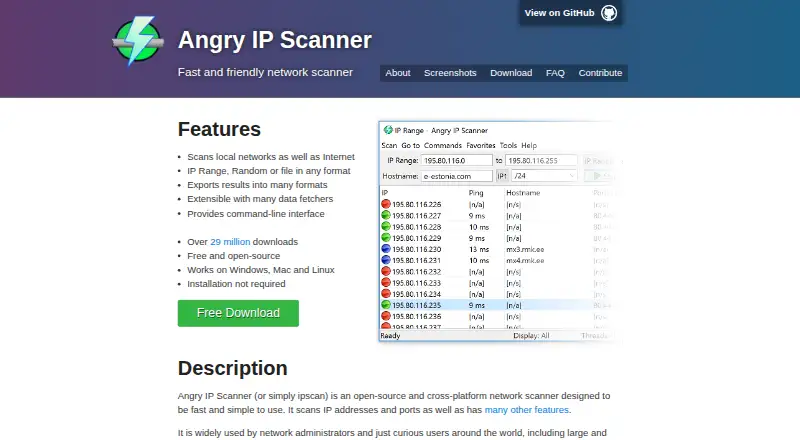
What Angry IP Scanner is
Angry IP Scanner is free, open-source desktop software for scanning IP addresses and ports. It accepts IP ranges, random addresses, or files in any format as scan input. The tool checks whether hosts respond to pings and can optionally resolve hostnames, find MAC addresses, and scan ports. Other features include NetBIOS information, saved favorite ranges, web server detection, and customizable openers. Java plugins can extend scanning and data gathering with fetchers, pingers, exporters, and feeders. Results can be saved in CSV, TXT, XML, or IP-Port list formats, and a command-line interface is available. The software runs on Windows, macOS, and Linux under the GPLv2 license. The maker says installation is not required and that the software can be copied and used anywhere. It is described as most useful for network administrators monitoring and managing networks. The FAQ notes that some antivirus vendors flagged the older ipscan.exe as potentially unwanted or a risky hacktool, while stating that version 3.x is not detected.
Who it suits
Angry IP Scanner is suited to network administrators who need to scan address ranges and gather host details. Its command-line interface and plugin support may also suit users who want to extend or script scanning work.
What it does well
- Free and open-source under GPLv2.
- Scans ranges, random addresses, or input files.
- Exports results in four listed formats.
- Available for Windows, macOS, and Linux.
- Java plugins can extend scanning and data gathering.
What to know first
- Some antivirus vendors flagged the older ipscan.exe.
- The maker says the software is mainly useful to network administrators.
Plans
| Plan | Billed and limits | Price |
|---|---|---|
| Angry IP Scanner | Free and open-source · GPLv2 | Free |
As angryip.org lists them, read 4 Oct 2026. The maker's own page has the final word.
Getting started
- Visit https://angryip.org/.
- Get the desktop software for Windows, macOS, or Linux.
- Copy and use it; the maker says installation is not required.
- Choose IP ranges, random addresses, or an input file as scan targets.
- Save scan results as CSV, TXT, XML, or IP-Port list files.
Angry IP Scanner is a desktop tool for scanning IP addresses and ports, with optional host and network details. It is best suited to network administrators who want a free scanner they can extend or run from the command line. Its broad input options and export formats make it useful for network inventory; readers seeking a more focused workflow should compare the alternatives.
Overview
The scanner accepts IP ranges, random addresses, or files in any format, and checks whether hosts respond to pings. Optional hostname resolution, MAC address lookup, and port scanning let administrators gather more context without making every scan depend on the same checks.
Angry IP Scanner is free and open source under GPLv2. It requires no installation, according to its maker, and can be copied and used anywhere. That combination suits administrators who want a portable desktop utility rather than a paid service or a setup-heavy deployment.
Key features
Alongside ping checks and optional hostname and MAC lookups, the scanner supports NetBIOS information, web server detection, favorite IP ranges, and customizable openers. This makes it more useful for recurring network checks than a tool limited to a basic list of responding addresses.
Java plugins can add fetchers, pingers, exporters, and feeders, extending both scanning and data gathering. Results can be saved as CSV, TXT, XML, or IP-Port list files, while a command-line interface supports users who prefer to run scans without relying solely on the desktop interface.
The maker describes the software as fast and simple to use, but the feature set is geared toward network administration. The choice to make hostname resolution, MAC lookup, and port scanning optional offers flexibility, though users need to decide which checks suit their task.
Pricing
Angry IP Scanner costs nothing. The free plan is the product: it is free and open-source under GPLv2, with no separate trial required. That makes it a straightforward fit for individuals and administrators who need a desktop scanner without a subscription.
There is no paid tier described. Users who need a different scanning workflow or platform should compare alternatives rather than expect a higher-priced Angry IP Scanner plan.
Platforms
Angry IP Scanner runs on Windows, macOS, and Linux as desktop software. Its command-line interface adds another way to use it, but the product is not presented as a web or hosted service. The no-installation claim may appeal to users who want to copy and run it where needed.
Who it's for
Network administrators monitoring and managing their networks are the clearest fit. They can scan chosen ranges or address inputs, gather optional host details, save results in common text and structured formats, and extend the workflow with Java plugins.
It is less suited to readers who want a web-based scanner or a packaged service with a defined hosted workflow. The configurable checks and plugin approach are strengths for users who value control, but may be unnecessary for someone who only needs a narrowly defined scan.
Pros and cons
- Pros: Free and open source under GPLv2, with no installation requirement according to its maker; a practical choice for users who want a portable desktop scanner.
- Pros: Accepts ranges, random addresses, or files as input and exports results to CSV, TXT, XML, or IP-Port lists, giving administrators flexibility in how they scan and retain results.
- Pros: Optional host checks, plugin extension points, and a command-line interface support workflows beyond basic ping responses.
- Cons: It is desktop software for Windows, macOS, and Linux, not a web or hosted scanning service.
- Cons: The maker's FAQ says some antivirus vendors flagged the older ipscan.exe as potentially unwanted or a risky hacktool. It says version 3.x is not detected, but the warning may still prompt caution in managed environments.
Alternatives
For a broader port scanner software shortlist or a network diagnostic software shortlist, compare the available tools by platform and licensing needs.
- Naabu is a free, MIT-licensed port scanning tool for Linux, macOS, Windows, API, and self-hosted use; choose it if that platform mix or license fits better.
- NetsCLI is free and MIT-licensed, with its library and MCP server published on crates.io for Rust projects; it may suit Rust developers looking for those components.
- RustScan is a free open-source port scanner with Android, Linux, macOS, Windows, and self-hosted platform support; consider it if Android support matters.
- Masscan is free software under the GNU Affero General Public License v3 and supports Linux, Windows, and self-hosted use; choose it if that licensing and platform combination suits your needs.
- Nmap offers free end-user use, but its listed license does not allow redistribution within commercial software or hardware products; consider it if that restriction works for your use.
- ScanSearch is a freemium internet scanner for API, Linux, and web. Its paid Internet Scanner plan is $0.30 a month, billed per kpps/month, with 100–10,000 kpps, unlimited results per scan, full CSV/JSON export, and a queue of up to 10 scans; consider it when a web or API option fits better.
- Unicornscan is free GPL software with downloadable packages and source, and supports Linux, macOS, self-hosted, web, and API platforms; compare it if those formats or platforms are a better match.
- Pentest-Tools Port Scanner has a free tier for open ports and services discovery and a NetSec plan starting at $95 a month. Consider it if a web or API scanner is preferable and its paid starting price fits.
Verdict
Choose Angry IP Scanner if you are a network administrator who wants a free, open-source desktop scanner with flexible address inputs, optional host checks, export choices, and plugin support. Its main limitation is that it remains a desktop tool rather than a hosted service, and the older-executable antivirus warning may matter in managed environments. If those constraints fit, it is a capable no-cost option for monitoring and managing networks.
Verdict
Angry IP Scanner offers network scanning across three desktop platforms without an installation requirement, according to its maker. The antivirus note applies to the older ipscan.exe; the FAQ says version 3.x is not detected.
Questions
How much does Angry IP Scanner cost?
It is free and open-source under GPLv2. Its listed plan is free.
Is there a free plan or trial?
The product is free, and a free plan is listed. There is no free trial.
Which platforms does it support?
It runs on Windows, macOS, and Linux.
What can it scan?
It scans IP addresses and ports. Targets can be IP ranges, random addresses, or files in any format.
Can its features be extended?
Yes. Java plugins can add fetchers, pingers, exporters, and feeders.
Who makes Angry IP Scanner?
The listed website is https://angryip.org/. The maker welcomes source-code forks and pull requests and directs contributors to bug reports for ideas.
Facts from Angry IP Scanner's own pages
- Additional features
- It supports NetBIOS information, favorite IP ranges, web server detection, and customizable openers. · angryip.org, 4 Oct 2026
- Command line
- The product provides a command-line interface. · angryip.org, 4 Oct 2026
- Export formats
- Scanning results can be saved as CSV, TXT, XML, or IP-Port list files. · angryip.org, 4 Oct 2026
- Extensibility
- Java plugins can add fetchers, pingers, exporters, and feeders to extend scanning and data gathering. · angryip.org, 4 Oct 2026
- Host details
- It checks whether hosts respond to pings and can optionally resolve hostnames, determine MAC addresses, and scan ports. · angryip.org, 4 Oct 2026
- Installation
- The maker says installation is not required and the software can be freely copied and used anywhere. · angryip.org, 4 Oct 2026
- Intended users
- The maker says it is mostly useful for network administrators monitoring and managing their networks. · angryip.org, 4 Oct 2026
- License
- The software is free and open-source under GPLv2. · angryip.org, 4 Oct 2026
- Platforms
- The maker lists Windows, Mac, and Linux downloads; current Mac bundles include ARM and Intel versions. · angryip.org, 4 Oct 2026
- Purpose
- Angry IP Scanner scans IP addresses and ports and is designed to be fast and simple to use. · angryip.org, 4 Oct 2026
- Scan targets
- It can scan IP addresses in any range and can take IP ranges, random addresses, or files in any format as input. · angryip.org, 4 Oct 2026
- Security note
- The FAQ says some antivirus vendors have identified the older ipscan.exe as potentially unwanted or a risky hacktool, while stating version 3.x is not detected. · angryip.org, 4 Oct 2026
- Support and contributions
- The maker welcomes source-code forks and pull requests, and directs users to bug reports for contribution ideas. · angryip.org, 4 Oct 2026
Where Angry IP Scanner stands on Freedom251
- Port Scanner Software#3 of 26
- Network Diagnostic Software#6 of 37