Freedom251 › Network Discovery Software
Fing Security
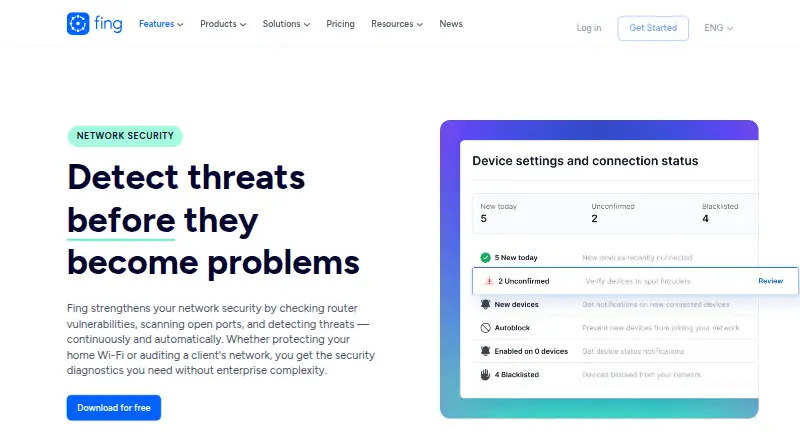
What Fing Security is
Fing Security monitors networks and checks routers for vulnerabilities, open ports, and threats. Scheduled router checks look for known vulnerabilities, outdated firmware, DNS hijacking risks, and exposed management interfaces. Fing can alert users when an unknown device joins and report its brand, model, and type. It also searches connected Wi-Fi networks for cameras and spy devices using a database of over 12 million known camera models. Fing Agent can run on Raspberry Pi, Docker, or NAS for ongoing automated checks. Integrations include Home Assistant, IFTTT, and the Fing Local API for presence data, network events, and custom automation. Fing identifies IT consultants, MSPs, and small businesses as users who can audit client networks and monitor security. The free plan allows up to three scans per day, while scheduled vulnerability scans and continuous threat detection require a subscription. Premium costs $7.99 a month for two monitored networks; Professional is $16.99 a month and includes three or more monitored networks, shared workspaces, multi-user collaboration, and advanced reporting. Fing says it is SOC 2 Type II certified.
Who it suits
Fing may suit home users who want to see devices on their network, as well as IT consultants, MSPs, and small businesses auditing or monitoring client networks. Its Agent and integrations may suit users seeking automated checks or network-event workflows.
What it does well
- Alerts identify unknown devices by brand, model, and type
- Checks router firmware and DNS hijacking risks
- Camera scanning uses a database of over 12 million models
- Fing Agent supports Raspberry Pi, Docker, or NAS
- Integrations include Home Assistant and IFTTT
What to know first
- Free plan allows up to three scans per day
- Scheduled vulnerability scans require a subscription
- Continuous threat detection requires a subscription
- Fing Desktop is not currently available for Linux
Limits
The Free plan allows up to 3 scans per day. Scheduled vulnerability scans and continuous threat detection require a subscription; Premium covers 2 monitored networks, while Professional covers 3 or more.
Plans
| Plan | Billed and limits | Price |
|---|---|---|
| Free | Up to 3 scans per day · Internet speed tests · Network and ISP reporting · Troubleshooting tools | Free |
| Professional | yearly · 3+ monitored networks · Shared workspaces · Multi-user collaboration · Advanced search and reporting | $179.99 a year |
| Professional | monthly · 3+ monitored networks · Shared workspaces · Multi-user collaboration · Advanced search and reporting | $19.99 a month |
| Premium | yearly · 2 monitored networks · Continuous monitoring · Full event timeline · Mobile and email notifications · Advanced security checks | $79.99 a year |
| Premium | monthly · 2 monitored networks · Continuous monitoring · Full event timeline · Mobile and email notifications · Advanced security checks | $8.99 a month |
As fing.com lists them, read 15 Oct 2026. The maker's own page has the final word.
Getting started
- Visit the Fing website.
- Choose the Free plan or a monthly Premium or Professional plan.
- Use Fing on Android, iOS, Linux, macOS, web, or Windows.
- For always-on checks, run Fing Agent on Raspberry Pi, Docker, or NAS.
- Connect Home Assistant, IFTTT, or the Fing Local API if needed.
Fing Security is a network discovery and security service for people who want visibility into connected devices as well as router risks. It suits home users, IT consultants and small businesses; its free scans are useful for occasional checks, while ongoing monitoring requires a paid plan.
Overview
Fing combines asset inventory and network discovery with checks for router vulnerabilities, open ports and network threats. When an unfamiliar device connects, it can identify its brand, model and type, giving users more context than a simple connection alert. Hybrid discovery and network scope, scheduled discovery and SNMP support also make it relevant to network administrators, not only households.
The key trade-off is between visibility on demand and protection that runs continuously. Free includes up to three scans per day, but scheduled vulnerability scans and continuous threat detection require a subscription. That makes the free tier a way to inspect a network periodically, rather than a substitute for always-on monitoring.
Key features
Router checks and device alerts
Scheduled router checks look for known vulnerabilities, old firmware, DNS hijacking risks and exposed management interfaces. These checks focus on issues that can be addressed through router maintenance or configuration, while alerts about new devices help users investigate unexpected connections. Their practical value depends on choosing a paid subscription for scheduled checks.
Camera scanning and continuous monitoring
Fing scans connected Wi-Fi networks for cameras and spy devices against a database of more than 12 million known camera models. This can help people who want an extra check on a Wi-Fi network, but the scan is limited to connected networks and relies on known camera models.
For automated, always-on checks, Fing Agent can run on Raspberry Pi, Docker or NAS. Home Assistant, IFTTT and the Fing Local API support presence data, network events and custom automation. These options give technically confident users ways to connect network information to other tools; they are less compelling for someone who only needs an occasional scan.
Desktop, professional and security support
Fing Desktop is available for Windows and macOS, but not currently for Linux. The maker identifies IT consultants, MSPs and small businesses as users who can audit client networks and monitor security. Shared workspaces, multi-user collaboration and advanced reporting are included in Professional, making it the more relevant tier for collaborative client work. Fing says it is SOC 2 Type II certified.
Pricing
Fing uses a freemium model, with monthly paid plans and a free option. The difference that matters most is whether a reader needs occasional scans or scheduled and continuous monitoring.
- Free — free: Up to 3 scans per day, internet speed tests, network and ISP reporting, and troubleshooting tools. It is a reasonable starting point for periodic checks, but the scan cap and lack of scheduled vulnerability scans and continuous threat detection rule it out for ongoing security monitoring.
- Premium — $7.99 a month, billed monthly: Covers 2 monitored networks, continuous scans, advanced security and network control. This is the fit for an individual or household seeking ongoing coverage across up to two networks.
- Professional — $16.99 a month, billed monthly: Covers 3 + monitored networks, shared workspaces, multi-user collaboration and advanced reporting. It is better suited to consultants or small teams that need to work across networks together, though it costs more than Premium.
Fing says payment data is encrypted and sent directly to its PCI DSS-compliant payment processor, Stripe; Fing does not collect or store bank or card details.
Platforms
Fing supports Android, iOS, Linux, macOS, web and Windows, as well as API and self-hosted options. Desktop support is narrower than that platform list suggests: Fing Desktop is available for Windows and macOS, not Linux. Fing Agent’s Raspberry Pi, Docker and NAS options provide a route to 24/7 automated checks for people prepared to run a device or service on their network.
Who it's for
Fing is a good fit for households that want to identify new devices, inspect router risks and scan Wi-Fi for known cameras. Premium makes more sense when those users want continuous scans on up to two monitored networks. IT consultants, MSPs and small businesses have a stronger case for Professional when shared workspaces, collaboration and reporting matter; those wanting only basic inventory or occasional scans may not need its ongoing subscription.
Pros and cons
- Pros: Device alerts include brand, model and type, helping users distinguish an unfamiliar connection from a vague notification.
- Pros: Router checks cover firmware, DNS hijacking risks and exposed management interfaces, while camera scanning draws on a database of over 12 million known models.
- Pros: Fing Agent can support 24/7 automated checks on Raspberry Pi, Docker or NAS, and integrations support network-event automation.
- Cons: Free is capped at three scans per day and excludes scheduled vulnerability scans and continuous threat detection, limiting its usefulness for persistent protection.
- Cons: Desktop support does not include Linux, despite Fing's broader Linux platform support.
- Cons: Professional costs more than Premium; its additional networks and collaboration tools matter most to multi-user teams, not individual users.
Alternatives
For more options, browse Network Discovery Software or Network Monitoring.
- LOGINventory is worth considering for a freemium inventory tool with a free plan capped at 20 devices and a free trial.
- OCS Inventory may suit readers who specifically want open-source software developed as a community project.
- runZero is an option for readers who can work within a free Community Edition capped at 100 assets, one organization, 10 recurring tasks and 30 days of data retention.
- Domotz may suit readers who prefer per-device pricing; its listed option is $1.50 a month per managed device, billed in bundles of 10.
- Infoblox Cloud Network Automation is a paid alternative with token-based licensing and custom pricing.
- LanTopoLog is a paid alternative with a one-time 50.00 USD price for LanTopoLog 2.
- LANState is a freemium Windows option with paid host-based editions.
- AutoScan-Network is a free alternative for Linux, macOS and Windows.
Verdict
Choose Fing if you want device identification and router checks in one service, with a path to continuous scans and team tools as needs grow. Its clearest limitation is that the free tier cannot provide scheduled vulnerability checks or continuous threat detection; readers who need those protections must budget for a subscription, while those seeking occasional scans can start free.
Verdict
Fing combines device identification with router checks and camera scanning. The free tier is limited, and scheduled scans and continuous threat detection require a subscription.
Questions
Is Fing Security free?
Yes. Its Free plan costs nothing and allows up to 3 scans per day, plus internet speed tests, network and ISP reporting, and troubleshooting tools.
What do the paid plans cost?
Premium costs $7.99 a month, billed monthly. Professional costs $16.99 a month, billed monthly.
Which platforms does Fing support?
The listed platforms are Android, API, iOS, Linux, macOS, self-hosted, web, and Windows. Fing Desktop is available for Windows and macOS, and is not currently available for Linux.
Can Fing monitor a network continuously?
Continuous threat detection and scheduled vulnerability scans require a subscription. Fing Agent can run on Raspberry Pi, Docker, or NAS for 24/7 automated security checks.
What integrations are available?
Fing lists Home Assistant, IFTTT, and the Fing Local API for presence data, network events, and custom automation.
Who makes Fing Security?
Fing says it was founded in 2009 by Carlo Medas and Marco De Angelis, and became part of Lansweeper in 2020. Its headquarters are in Dublin 6, Ireland.
Facts from Fing Security's own pages
- Agent subscription requirement
- Fing Agent requires a paid subscription; Premium supports two agents and Professional supports three or more. · fing.com, 15 Oct 2026
- Alerts
- Monitoring can send alerts when devices join or leave and when connectivity or security events occur. · fing.com, 15 Oct 2026
- Always-on monitoring
- Fing Agent can run on Raspberry Pi, Docker, or NAS for 24/7 automated security checks. · fing.com, 29 Sept 2026
- API authentication
- Local API endpoints require an API key supplied in the auth query parameter and the key is generated in Fing Desktop settings. · fing.com, 15 Oct 2026
- Cloud API
- The Device Recognition Cloud API uses an X-API-KEY and offers a four-week development license before a production license agreement. · get.fing.com, 15 Oct 2026
- Company founded
- Fing was founded in 2009 by Carlo Medas and Marco De Angelis. · fing.com, 15 Oct 2026
- Company history
- Fing says it was founded in 2009 by Carlo Medas and Marco De Angelis and became part of Lansweeper in 2020. · fing.com, 29 Sept 2026
- Company ownership
- Lansweeper announced its acquisition of Fing on October 14, 2020. · fing.com, 15 Oct 2026
- Company scale
- Fing says its app has been downloaded more than 100 million times, performs over one million scans daily and serves over 50 million users. · fing.com, 15 Oct 2026
- Desktop requirements
- Fing Desktop supports Windows versions still within extended support and current macOS; Windows Server is excluded. · help.fing.com, 15 Oct 2026
- Desktop support
- Fing Desktop is available for Windows and macOS; the maker says it is not currently available for Linux. · fing.com, 29 Sept 2026
- Device discovery
- The service lists connected devices with IP address, MAC address, manufacturer, model and operating-system information. · fing.com, 15 Oct 2026
- Device recognition
- Fing uses a large recognition database and machine-learning engine to classify device brands, models and categories. · fing.com, 15 Oct 2026
- Documentation and support
- Support consists of a Help Center knowledge base, direct support tickets, Reddit community and video tutorials. · fing.com, 15 Oct 2026
- Event timeline
- Paid monitoring plans provide a history of device changes, outages and test results in an event timeline. · fing.com, 15 Oct 2026
- Fingbox funding history
- The 2016 Fingbox Indiegogo campaign reached 40,000 homes and raised more than $1.7 million. · fing.com, 15 Oct 2026
- Founded
- 2009 · fing.com, 28 Sept 2026
- Free tier limit
- The Free plan includes up to 3 scans per day; the security FAQ says scheduled vulnerability scans and continuous threat detection require a subscription. · fing.com, 29 Sept 2026
- Headquarters
- Dublin 6, Ireland · fing.com, 28 Sept 2026
- Hidden cameras
- Fing scans connected Wi-Fi networks for cameras and spy devices using a database of over 12 million known camera models. · fing.com, 29 Sept 2026
- Home Assistant integration
- Home Assistant can consume real-time Fing presence data through the Fing Local API for presence-based automations. · fing.com, 15 Oct 2026
- IFTTT integration
- IFTTT applets can trigger notifications, smart-home actions or other workflows from Fing network events. · fing.com, 15 Oct 2026
- Integrations
- The maker lists Home Assistant, IFTTT, and the Fing Local API for presence data, network events, and custom automation. · fing.com, 29 Sept 2026
- ISP analysis
- The product records download, upload and latency results, compares ISP performance and reports outages. · fing.com, 15 Oct 2026
Where Fing Security stands on Freedom251
- Network Discovery Software#3 of 35
- Network Troubleshooting Software#2 of 18
- Network Monitoring#7 of 55