Freedom251 › IT Asset Management Software

LOGINventory
by LOGINventory
What LOGINventory is
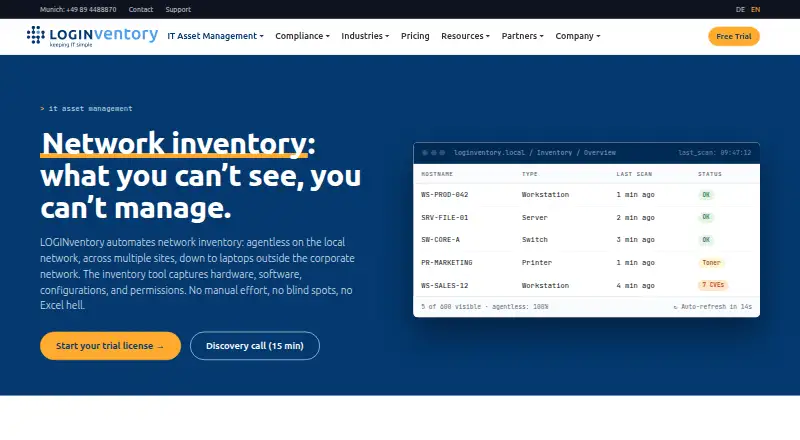
LOGINventory discovers and documents hardware, software, configurations and permissions across an IT network. Its core discovery is agentless, using WMI/RPC, SNMP or SSH; an Offline Agent can cover Windows, Linux and macOS devices outside the local network. Supported environments include Windows, Linux/Unix, macOS, SNMP network devices, hypervisors, Microsoft cloud services, AWS virtual machines and Exchange. The Inventory Edition focuses on inventory, while the SAM Edition adds license management, software usage measurement, target-versus-actual comparisons and compliance reports. The software runs on the customer's infrastructure and stores inventory data in a local SQL database; the maker says that inventory data is not sent to it. The optional LIA assistant processes requests through Azure OpenAI with automatic anonymization and can be disabled. The server requires Windows 10/11 or Windows Server 2016–2025 (x64) and SQL Server 2012 SP4 or later. Pricing includes a Forever-Free plan for 20 devices, Inventory360 at €6.50 a year, excluding VAT, and a 30-day trial with full features at full network size.
Who it suits
LOGINventory is described for IT managers in the German-speaking mid-market and for organizations from small businesses to enterprises. It may suit teams that need on-premises discovery and inventory across supported systems.
What it does well
- Agentless discovery uses WMI/RPC, SNMP or SSH.
- Offline Agent covers devices outside the local network.
- Inventory data stays in a local SQL database.
- 30-day trial includes full features and needs no credit card.
- SAM Edition adds software asset management and compliance reports.
What to know first
- The server requires Windows 10/11 or supported Windows Server.
- SQL Server 2012 SP4 or later is required.
- Neither LOGINventory nor its maker is ISO 27001 certified.
- Listed paid prices exclude VAT.
Limits
Forever-Free covers up to 20 devices. Inventory Edition and SAM Edition are licensed per asset; rates vary by asset tier, and purchases at 5,000 or more assets have individual terms.
Plans
| Plan | Billed and limits | Price |
|---|---|---|
| Forever-Free | No time limit. · Up to 20 devices | Free |
| Inventory Edition | Per asset per year, excl. VAT: €6.50 (0–249 assets), €5.90 (250–499), €5.20 (500–999), €4.50 (1,000–2,499), €3.70 (2,500–4,999); 5,000+ individually priced · Network, hardware, software and cloud inventory · licensed in steps of 25 assets · 30-day trial at full network size | €6.50 a year |
| SAM Edition | Per asset per year, excl. VAT: €8.60 (0–249 assets), €7.40 (250–499), €6.80 (500–999), €6.00 (1,000–2,499), €4.70 (2,500–4,999); 5,000+ individually priced · Everything in Inventory plus software asset management (licences owned vs in use) | €8.60 a year |
As loginventory.de lists them, read 30 Sept 2026. The maker's own page has the final word.
Getting started
- Visit the LOGINventory network inventory website.
- Install the server on Windows 10/11 or Windows Server 2016–2025 (x64) with SQL Server 2012 SP4 or later; the installer can include SQL Server Express.
- Choose the Forever-Free edition for up to 20 devices, or select Inventory Edition or SAM Edition.
- Run agentless discovery through WMI/RPC, SNMP, or SSH, or use an Offline Agent for supported devices outside the LAN.
- Start the 30-day full-feature trial without a credit card, if you want to evaluate it at full network size.
LOGINventory is an on-premises network discovery and IT inventory product with separate inventory and software asset management editions. It suits organizations that need broad coverage across endpoints, network devices, and cloud services while keeping inventory records on their own infrastructure. The key trade-off is that its server depends on Windows and SQL Server.
Overview
LOGINventory discovers hardware, software, configurations, and permissions across an IT network. Its agentless approach can collect information using WMI/RPC, SNMP, or SSH, with an Offline Agent for Windows, Linux, and macOS devices outside the LAN. That combination can simplify collection across a mixed environment, but agentless discovery still depends on the necessary network access and protocols.
Coverage spans Windows, Linux/Unix, macOS, SNMP network devices, multiple hypervisors, Microsoft cloud services, AWS virtual machines, and Exchange. The maker says a Windows device can yield up to 1,117 individual values by default, which gives administrators detailed material for documenting an estate.
Inventory data stays in a local SQL database on the customer's infrastructure; the maker says it is not transmitted to LOGINventory. The optional LIA AI assistant is a separate consideration: requests pass through Azure OpenAI with automatic anonymization, and the assistant can be disabled. Neither LOGINventory nor Schmidt’s LOGIN GmbH is ISO 27001 certified, a point organizations with certification requirements should weigh; the product does include a manually completed control template.
Key features
Discovery and integrations
Alongside the core scanning methods, an Offline Agent extends collection to devices beyond the LAN. Integration options include REST API with JSON, PowerShell, CSV, custom scan scripts, and direct connections for MDM and ITSM/CMDB products. Named integrations include Microsoft Intune, baramundi, APPTEC360, Sophos Mobile, Kyberna ky2help, iET ITSM, helpLine, and i-net HelpDesk. These options give teams several routes to connect inventory workflows, though the breadth of integrations will matter most where compatible systems are already in use.
Inventory or software asset management
The Inventory Edition centers on discovery and documentation. The SAM Edition adds license management, target-versus-actual comparisons, software usage measurement, and compliance reports. Organizations that need to track software entitlements and use have a clear reason to choose SAM; teams focused on inventory can avoid paying for those additional capabilities.
Pricing
LOGINventory uses a freemium model, with annual per-asset pricing for its paid editions. Prices exclude VAT. The Forever-Free plan costs nothing and is capped at 20 devices, making it a small-estate option rather than a broad deployment tier.
- Inventory360: €6.50 a year, billed annually, for 0–249 assets. It is the entry paid inventory option.
- SAM360: €8.60 a year, billed annually, for 0–249 assets. It is the corresponding entry option for teams needing software asset management.
- Inventory Edition: Annual per-asset pricing: €6.50 for 0–249 assets, €5.90 for 250–499, €5.20 for 500–999, €4.50 for 1,000–2,499, and €3.70 for 2,500–4,999. Pricing for 5,000 or more assets is on request.
- SAM Edition: Annual per-asset pricing: €8.60 for 0–249 assets, €7.40 for 250–499, €6.80 for 500–999, €6.00 for 1,000–2,499, and €4.70 for 2,500–4,999. Pricing for 5,000 or more assets is on request.
The 30-day trial includes the full feature set at the customer's full network size, requires no credit card, and includes personal support. Maintenance includes updates and major releases, business-day technical support by email and phone, one hour of remote consulting per year, and helpdesk access.
Platforms
LOGINventory is deployed on premises. The server requires Windows 10/11 or Windows Server 2016–2025 (x64) and SQL Server 2012 SP4 or later; the installer can include SQL Server Express. That requirement makes it a better fit for organizations able to operate a Windows server environment than for teams seeking a platform-independent hosted service.
Who it's for
The maker describes LOGINventory as serving IT managers in the German-speaking mid-market, with use across organizations from small businesses to enterprises. In practice, its discovery breadth and two-edition structure suit teams documenting varied infrastructure, while the local SQL storage appeals to organizations that want inventory data kept on their own systems. The Windows-and-SQL server requirement and lack of ISO 27001 certification may rule it out for teams with different infrastructure or certification needs.
Pros and cons
- Pros: Agentless discovery plus an Offline Agent covers both LAN devices and selected endpoints outside it.
- Pros: Coverage includes operating systems, network devices, hypervisors, Microsoft cloud services, AWS virtual machines, and Exchange.
- Pros: Local SQL storage keeps inventory records on the customer's infrastructure, according to the maker.
- Pros: The SAM Edition adds license management and usage and compliance capabilities for teams that need more than inventory.
- Cons: The server requires Windows and SQL Server, limiting suitability for organizations that cannot support that stack.
- Cons: The free tier stops at 20 devices; paid tiers are annual, per-asset, and exclude VAT.
- Cons: Neither the product nor its maker is ISO 27001 certified, which may conflict with procurement requirements.
Alternatives
OCS Inventory NG is a free option for readers prioritizing a free plan and wider listed mobile-platform coverage, including Android and iOS; LOGINventory instead offers named inventory and SAM editions with annual asset tiers.
CloudQuery may suit teams seeking cloud asset inventory in their own database: its free plan includes a 1M-row limit, MCP server, and 50+ sources. LOGINventory covers a broader stated mix of endpoint, network, hypervisor, and cloud environments.
Open-AudIT offers a free plan with unlimited devices and community support, so it may suit organizations for whom device caps matter more than LOGINventory's described edition split.
runZero may fit teams that can work within a free Community Edition capped at 100 assets, one organization, 10 recurring tasks, and 30 days of data retention; LOGINventory's free tier has a lower device cap.
IT Asset Tool offers a free Basic plan for up to 35 assets, making it a possible alternative for a small inventory; LOGINventory's free allowance is 20 devices.
rxInventory is another freemium inventory option, with listed Linux, macOS, and Windows platforms; choose it for consideration if those are the platforms you need.
GLPI may suit teams looking for a public-cloud service, with a listed plan at €19 a month per IT agent; LOGINventory is deployed on the customer's infrastructure.
Flexera One IT Asset Management is an alternative to consider for readers evaluating a separate IT asset management product.
Compare options in IT Asset Discovery Software, Network Documentation Software, Network Discovery Software, and IT Asset Management Software.
Verdict
Choose LOGINventory if your team wants detailed discovery across a varied IT estate, needs an inventory-only or SAM edition, and can run a Windows-and-SQL-based server on premises. Its strongest case is the combination of broad collection and locally stored inventory data. Look elsewhere if ISO 27001 certification is essential, the server requirements do not fit your environment, or the 20-device free ceiling is too restrictive.
Verdict
LOGINventory combines network discovery with inventory and software asset management editions, while keeping inventory data on the customer's infrastructure. Check the server requirements and certification status against your organization's needs.
Questions
Is LOGINventory free?
Yes. Forever-Free costs nothing with no time limit and covers up to 20 devices.
How much do paid editions cost?
Inventory Edition starts at €6.50 per asset per year excluding VAT for 0–249 assets, with lower listed rates at higher tiers. SAM Edition starts at €8.60 per asset per year excluding VAT for 0–249 assets; 5,000 or more assets are individually priced.
Is there a free trial?
Yes. The 30-day trial includes the full feature set at the customer's full network size, requires no credit card, and includes personal support.
What does the SAM Edition add?
It adds license management, target-versus-actual comparisons, software usage measurement, and compliance reports to the Inventory Edition.
Where is inventory data stored?
LOGINventory runs on the customer's infrastructure and stores inventory data in the customer's local SQL database. The maker says inventory data is not transmitted to it.
Does LOGINventory support agentless discovery?
Yes. Core discovery uses WMI/RPC, SNMP, or SSH. An Offline Agent is also available for Windows, Linux, and macOS devices outside the LAN.
Facts from LOGINventory's own pages
- AI data handling
- The optional LIA AI assistant processes requests through Azure OpenAI, with automatic anonymization, and can be disabled. · loginventory.de, 30 Sept 2026
- Asset limit
- No limit (licensed per asset; volume tiers up to 4,999 assets, individual terms from 5,000) · loginventory.de, 7 Oct 2026
- Audience
- The maker describes LOGINventory as serving IT managers in the German-speaking mid-market and lists use across organizations from small businesses to enterprises. · loginventory.de, 30 Sept 2026
- Certification limit
- The maker states that neither LOGINventory nor Schmidt’s LOGIN GmbH is ISO 27001 certified; the product includes a manually completed control template. · loginventory.de, 30 Sept 2026
- Coverage
- The product supports Windows, Linux/Unix, macOS, SNMP network devices, multiple hypervisors, Microsoft cloud services, AWS virtual machines, and Exchange. · loginventory.de, 30 Sept 2026
- Discovery
- Core network discovery is agentless and uses WMI/RPC, SNMP, or SSH; an Offline Agent is available for Windows, Linux, and macOS devices outside the LAN. · loginventory.de, 30 Sept 2026
- Editions
- The SAM Edition adds license management, target-versus-actual comparisons, software usage measurement, and compliance reports to the Inventory Edition. · loginventory.de, 30 Sept 2026
- Free plan
- Yes · loginventory.de, 20 Sept 2026
- Headquarters
- Munich, Germany · loginventory.de, 23 Sept 2026
- Hosting and data
- LOGINventory runs on the customer's own infrastructure and stores inventory data in the customer's local SQL database; the maker says inventory data is not transmitted to it. · loginventory.de, 30 Sept 2026
- Integrations
- Integration methods include REST API with JSON, PowerShell, CSV, custom scan scripts, and direct connections for MDM and ITSM/CMDB products. · loginventory.de, 30 Sept 2026
- Inventory data
- The maker says the product can capture up to 1,117 individual values per Windows device by default. · loginventory.de, 30 Sept 2026
- Named integrations
- Listed integrations include Microsoft Intune, baramundi, APPTEC360, Sophos Mobile, Kyberna ky2help, iET ITSM, helpLine, and i-net HelpDesk. · loginventory.de, 30 Sept 2026
- Platform requirement
- The LOGINventory server requires Windows 10/11 or Windows Server 2016–2025 (x64) and SQL Server 2012 SP4 or later; the installer can include SQL Server Express. · loginventory.de, 30 Sept 2026
- Purpose
- LOGINventory discovers and documents hardware, software, configurations, and permissions across an IT network. · loginventory.de, 30 Sept 2026
- Support
- Maintenance includes updates and major releases, business-day technical support by email and phone, one hour of remote consulting per year, and helpdesk access. · loginventory.de, 30 Sept 2026
- Trial
- The 30-day trial provides the full feature set at the customer's full network size, requires no credit card, and includes personal support. · loginventory.de, 30 Sept 2026
Where LOGINventory stands on Freedom251
- IT Asset Management Software#13 of 112
- Network Discovery Software#7 of 35
- Network Documentation Software#7 of 27
- IT Asset Discovery Software#8 of 26