Freedom251 › IT Asset Discovery Software

CloudQuery
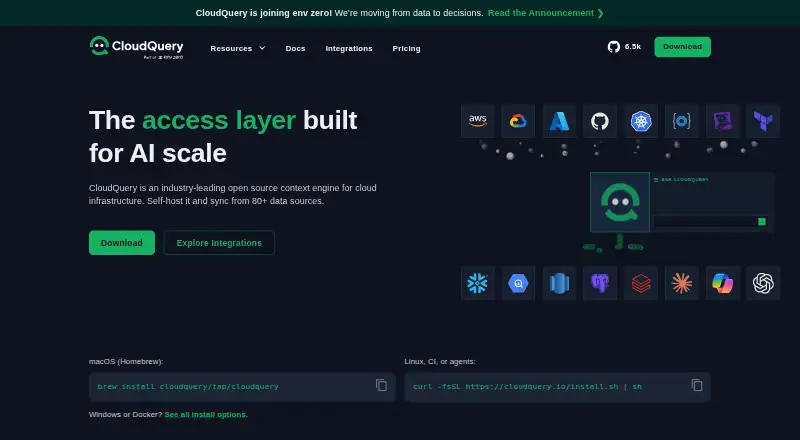
What CloudQuery is
CloudQuery is an open-source context engine for cloud infrastructure that syncs data from more than 80 sources. It standardizes information from AWS, GCP, Azure, GitHub, Okta and others into a relational schema that users can query with standard SQL. Data can be sent to destinations such as Postgres, BigQuery, Snowflake and S3. CloudQuery Platform supports more than 70 source integrations and processes synced data into a built-in ClickHouse database for inventory, SQL Console, policies and reports. An MCP server in PostgreSQL or Snowflake mode lets AI agents and internal systems query synced data without a Platform subscription. Users can run CloudQuery on infrastructure they control, with data staying within their network unless configured otherwise. Syncs are defined in version-controlled YAML, and SDKs for Go, Python, JavaScript and Java can be used to build unsupported sources. The free plan has a 1M-row limitation; billing counts each record every time it is synced toward annual rows. The CLI is available for macOS, Windows and Linux.
Who it suits
CloudQuery suits teams that need to collect and query cloud infrastructure data across multiple sources. It also fits users who want to run syncs on infrastructure they control or build integrations with SDKs.
What it does well
- Syncs data from more than 80 sources.
- Infrastructure data can be queried with standard SQL.
- Sync definitions can be version-controlled in YAML.
- MCP querying does not require a Platform subscription.
What to know first
- Free plan has a 1M-row limitation.
- Annual row billing counts records every time they sync.
- Cloud infrastructure credentials require securing the machine running CloudQuery.
Limits
The Free plan is limited to 1M rows. Billing counts each record every time it is synced, so repeated syncs contribute again to the yearly row total.
Plans
| Plan | Billed and limits | Price |
|---|---|---|
| Free | Forever · 1M rows limitation · cloud asset inventory in your database · MCP server · 50+ sources · DIY dashboards and querying | Free |
| Enterprise | Tailored to your organization · Everything in Free · 1M+ rows | On request |
As cloudquery.io lists them, read 1 Oct 2026. The maker's own page has the final word.
Getting started
- Open the CloudQuery website and choose the CLI or Platform route.
- Install the CLI on macOS, Windows, or Linux using Homebrew, precompiled binaries, or another installation method.
- Configure a sync in version-controlled YAML.
- Connect source integrations using read-only credentials, as CloudQuery recommends.
- Choose a supported destination such as Postgres, BigQuery, Snowflake, or S3.
- Run CloudQuery on infrastructure you control if you want to self-host.
CloudQuery is an open-source context engine that gathers cloud infrastructure data into a shared relational model. It suits teams that want to query inventory with SQL while choosing where data is stored and processed. Its flexibility is appealing, but annual row-based billing and the need to protect the machine holding cloud credentials deserve attention.
Overview
CloudQuery syncs data from more than 80 sources, including major cloud providers and business services, then standardizes it into a relational schema. That gives teams a common way to examine infrastructure across sources rather than handling each provider’s data separately. Standard SQL makes the result useful to teams already equipped to work with relational databases; it is less compelling for organizations without a plan to query or use the synced records.
Data can be sent to destinations such as Postgres, BigQuery, Snowflake, and S3. CloudQuery Platform takes a more integrated route: it writes synced data to S3, processes it into a built-in ClickHouse database, and uses that database for inventory, SQL Console, policies, and reports. The CLI and other destinations leave more of the surrounding pipeline under the user’s control.
Key features
Integrations and destinations
CloudQuery Platform supports more than 70 source integrations, including AWS, GCP, Azure, Kubernetes, Okta, Entra ID, GitHub, GitLab, Datadog, and PagerDuty. The breadth is useful for teams bringing cloud assets and connected services into one view. Users can also build unsupported sources with Go, Python, JavaScript, or Java SDKs, though that flexibility comes with the work of maintaining custom integrations.
Reviewable syncs and self-hosting
Each sync is defined in version-controlled YAML and can be reviewed through pull requests. That makes configuration changes easier to handle within an established code-review process. CloudQuery can run on infrastructure the user controls, keeping data within the user’s network unless configured otherwise; this favors teams with operational capacity and a preference for controlling their data path.
AI access and security
An MCP server in PostgreSQL or Snowflake mode lets AI agents and internal systems query synced data without a CloudQuery Platform subscription. CloudQuery recommends read-only integration credentials and securing the machine running the software, which contains cloud infrastructure credentials. Those safeguards are an important part of deployment, not an optional extra.
Pricing
CloudQuery uses freemium pricing, with charges based on rows synced per year. Each record counts every time it is synced, so frequently repeated syncs can consume the allowance faster than a count of unique assets suggests.
| Plan | Price and terms | What it includes |
|---|---|---|
| Free | free, billed Forever | 1M rows limitation, cloud asset inventory in your database, MCP server, 50+ sources, and DIY dashboards and querying |
| Enterprise | Custom pricing, billed Tailored to your organization | Everything in Free, plus 1M+ rows |
The Free plan is a practical starting point for smaller workloads or evaluation, but its 1M-row limit and DIY dashboards and querying leave less room for high-volume use or a built-in reporting workflow. Enterprise is the option for workloads above that cap, with pricing tailored to the organization. A free trial is available. CloudQuery also offers Free, Silver, Gold, and Platinum support plans; Platinum provides 24×7 support with a one-hour business-critical initial response SLA.
Platforms
CloudQuery is available for API, Linux, macOS, self-hosted, web, and Windows environments. The CLI is offered for macOS, Windows, and Linux through Homebrew, precompiled binaries, and other installation methods. Its hybrid deployment model and self-hosting option suit teams that want to run syncs on infrastructure they control.
Who it's for
CloudQuery is best suited to infrastructure and security teams that need to normalize data from multiple cloud and service providers, query it with SQL, and decide where it is processed. It is a weaker fit for teams seeking a finished dashboard without DIY work on the Free plan, or for organizations unwilling to secure a machine containing cloud credentials.
Pros and cons
- Pros: More than 80 sources and a normalized relational schema bring varied infrastructure data into a common SQL workflow.
- Pros: Self-hosting, configurable destinations, and version-controlled YAML let teams control data placement and review sync changes.
- Pros: The MCP server can expose synced data to AI agents and internal systems without a Platform subscription.
- Cons: The Free plan’s 1M-row limit can constrain recurring syncs because every synced record counts each time.
- Cons: DIY dashboards and querying mean Free users must supply more of their own analysis workflow.
- Cons: The host running CloudQuery requires careful security because it contains cloud infrastructure credentials.
Alternatives
For broader IT Asset Discovery Software choices, compare tools with CloudQuery’s cloud-data and SQL focus in mind.
- OCS Inventory NG is a free option for readers seeking an inventory product with broad platform coverage; FactorFX identifies itself as OCS Inventory’s editor and provides integration and support.
- Lansweeper is worth considering when a 14-day full trial followed by free use for up to 100 assets and unlimited user seats better matches the evaluation or asset limit.
- LOGINventory suits readers who want a stated forever-free tier capped at 20 devices, with a paid Inventory Edition also available.
- runZero is a fit for readers whose requirements align with its Community Edition caps: 100 assets, one organization, 10 recurring tasks, and 30 days of data retention.
- Open-AudIT is an option for readers prioritizing an unlimited-device free plan with community support.
- rxInventory may suit readers seeking a freemium alternative that supports Linux, macOS, and Windows.
- IT Asset Tool is relevant to readers who want a free tier capped at 35 assets and Linux, self-hosted, or Windows platforms.
- GLPI offers a public-cloud option at €19 a month per IT agent, starting with one billed agent.
Verdict
Choose CloudQuery if your team needs to bring infrastructure data from varied sources into a relational schema, query it with SQL, and retain control over deployment and destinations. Its strongest advantage is that combination of source breadth and flexible data handling. Look elsewhere if you need a turnkey dashboard on a small free tier, or if row-based charges and credential-host security are poor fits for your operating model.
Verdict
CloudQuery provides a flexible route to normalize and query infrastructure data, with self-hosting and custom integration options. Its row-based billing and credential security guidance are important considerations before deployment.
Questions
Is CloudQuery open source?
Yes. CloudQuery is described as an open-source context engine for cloud infrastructure.
What does the Free plan include?
It is free, billed Forever, and includes a 1M-row limitation, cloud asset inventory in your database, an MCP server, 50+ sources, and DIY dashboards and querying.
What platforms are supported?
CloudQuery lists API, Linux, macOS, self-hosted, web, and Windows. Its CLI is offered for macOS, Windows, and Linux.
Where can synced data go?
Supported destinations include Postgres, BigQuery, Snowflake, and S3.
Can AI agents query CloudQuery data without a Platform subscription?
Yes. Its MCP server in PostgreSQL or Snowflake mode lets AI agents and internal systems query synced data without a Platform subscription.
What support plans are available?
CloudQuery offers Free, Silver, Gold, and Platinum support plans. Platinum includes 24×7 support with a one-hour business-critical initial response SLA.
Facts from CloudQuery's own pages
- AI and MCP
- CloudQuery provides an MCP server in PostgreSQL or Snowflake mode so AI agents and internal systems can query synced data without a Platform subscription. · cloudquery.io, 1 Oct 2026
- Billing basis
- CloudQuery pricing is based on the number of rows synced per year, counting each record every time it is synced. · cloudquery.io, 1 Oct 2026
- Configuration
- Each sync is defined in version-controlled YAML and can be reviewed through pull requests. · cloudquery.io, 1 Oct 2026
- Custom integrations
- Users can build unsupported sources with CloudQuery's Go, Python, JavaScript, or Java SDKs. · cloudquery.io, 1 Oct 2026
- Data model
- CloudQuery standardizes data from AWS, GCP, Azure, GitHub, Okta, and other sources into one normalized relational schema. · cloudquery.io, 1 Oct 2026
- Download platforms
- The CloudQuery CLI is offered for macOS, Windows, and Linux through Homebrew, precompiled binaries, and other installation methods. · cloudquery.io, 1 Oct 2026
- Integrations
- CloudQuery Platform supports 70+ source integrations, including AWS, GCP, Azure, Kubernetes, Okta, Entra ID, GitHub, GitLab, Datadog, and PagerDuty. · cloudquery.io, 1 Oct 2026
- Platform pipeline
- CloudQuery Platform writes synced data to S3 and processes it into a built-in ClickHouse database powering inventory, SQL Console, policies, and reports. · cloudquery.io, 1 Oct 2026
- Product purpose
- CloudQuery is an open source context engine for cloud infrastructure that syncs data from 80+ sources. · cloudquery.io, 1 Oct 2026
- Security guidance
- CloudQuery recommends read-only integration credentials and securing the machine running CloudQuery because it contains cloud infrastructure credentials. · cloudquery.io, 1 Oct 2026
- Self-hosting
- CloudQuery runs on infrastructure the user controls, and data stays within the user's network unless configured otherwise. · cloudquery.io, 1 Oct 2026
- SQL querying
- CloudQuery lets users query synced infrastructure data with standard SQL. · cloudquery.io, 1 Oct 2026
- Support
- CloudQuery offers Free, Silver, Gold, and Platinum support plans; Platinum provides 24×7 support with a one-hour business-critical initial response SLA. · cloudquery.io, 1 Oct 2026
- Sync destinations
- CloudQuery can sync data into Postgres, BigQuery, Snowflake, S3, and other supported destinations. · cloudquery.io, 1 Oct 2026
Where CloudQuery stands on Freedom251
- IT Asset Discovery Software#3 of 26