Freedom251 › Port Scanner Software
RustScan
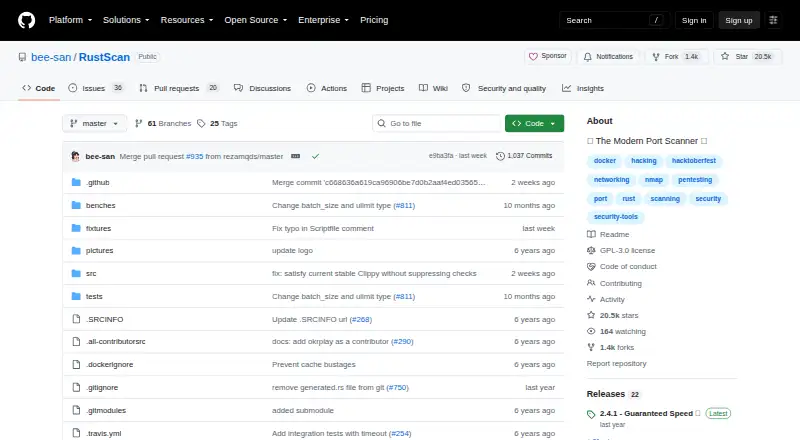
What RustScan is
RustScan is a free, open-source command-line tool for finding open network ports. The project says it can scan all 65,000 ports in 3 seconds and can pass discovered ports to Nmap for further analysis. It supports IPv6, CIDR ranges, and file input, with scripting in Python, Lua, and Shell. Listed capabilities include service detection, operating-system detection, and greppable-text output. RustScan describes adaptive learning that uses information about the scan environment and usage to improve over time. Cargo is its only officially supported installation method, though releases and package-manager options are also listed. The installation guide recommends Docker and says its image works across systems, including Windows. However, the guide says the maintainer had tested RustScan only on Linux and that macOS or Windows may have issues. It also notes that macOS's low open-file limit can significantly affect RustScan. The project is licensed under GPL-3.0 and directs users who encounter issues to open a GitHub issue.
Who it suits
RustScan suits command-line users who need to find open network ports and may want to pass results to Nmap. Users on macOS or Windows should note the installation guide's platform caveats.
What it does well
- Scans IPv6, CIDR ranges, and file input.
- Can pass discovered ports to Nmap.
- Supports Python, Lua, and Shell scripting.
- Lists service and operating-system detection.
- Free under GPL-3.0.
What to know first
- Cargo is the only officially supported installation method.
- Maintainer testing was limited to Linux.
- macOS and Windows may have issues.
- macOS open-file limits can affect scanning.
Limits
The free RustScan plan is listed as free. The facts list no free-plan quotas or feature limits; platform caveats include reported possible issues on macOS and Windows and a macOS open-file limit that can affect scanning.
Plans
| Plan | Billed and limits | Price |
|---|---|---|
| RustScan | Open-source port scanner | Free |
As github.com lists them, read 30 Sept 2026. The maker's own page has the final word.
Getting started
- Open the RustScan GitHub website.
- Choose Cargo, the officially supported installation method, or use a listed release or package-manager option.
- Consider the installation guide’s recommended Docker image, which it says works across systems, including Windows.
- Run scans across a network using supported options such as IPv6, CIDR, or file input.
- Pass discovered ports to Nmap for further analysis if needed.
- Open a GitHub issue if you encounter a problem.
RustScan is a command-line tool for finding open network ports, best suited to users comfortable with a CLI and a follow-on analysis workflow. Its strongest case is rapid discovery paired with automatic Nmap handoff; its main drawback is that the installation guide flags possible issues outside Linux.
Overview
RustScan focuses on identifying open ports rather than replacing a broader network-analysis workflow. The project says it can scan all 65,000 ports in three seconds, a speed claim that makes it appealing when quick initial discovery matters. Discovered ports can then pass automatically to Nmap for further analysis, giving users a way to extend the scan without treating RustScan as a complete analysis suite.
The tool is a free, GPL-3.0-licensed CLI with network scan scope. Its service and OS detection, plus greppable-text export, provide useful results for command-line workflows. Users who need a graphical interface should look elsewhere.
Key features
- Port discovery: RustScan is built to find open ports quickly, and the project cites a three-second scan of all 65,000 ports. That is a compelling stated target for rapid discovery, though real-world scan times can depend on the environment.
- Nmap handoff: Automatically piping discovered ports into Nmap connects fast discovery with further analysis. This is a practical fit for users who already include Nmap in their workflow.
- Flexible scan inputs: IPv6, CIDR, and file input support accommodate different address ranges and input workflows.
- Scripting: Python, Lua, and Shell support let users build scripting into their use of the scanner. That flexibility favors technical users over people seeking a point-and-click tool.
- Adaptive learning: RustScan says its adaptive features use information about the scan environment and usage to improve over time. The project also checks in continuous integration for significant slowdowns against the previous version and says its testing aims to ensure accessibility.
Pricing
RustScan is free: its RustScan plan costs nothing and describes an open-source port scanner. There are no paid tiers to weigh against feature limits. The project is GPL-3.0 licensed, so readers evaluating it for redistribution should consider that license.
Platforms
RustScan is listed for Android, Linux, macOS, self-hosted use, and Windows, but installation guidance makes Linux the more confident choice: the maintainer says RustScan has been tested only on Linux and warns macOS or Windows may have issues. Cargo is the only officially supported installation method; releases and package-manager options are also provided. The guide recommends Docker and says its image works on all systems, including Windows, which is not officially supported.
macOS users face an additional practical concern: a low open-file limit can significantly affect scans. If installation or operation runs into trouble, the guide directs users to open a GitHub issue.
Who it's for
RustScan suits technically capable users who want quick port discovery, use a command line, and value a direct route from discovered ports into Nmap. Its scan inputs and scripting support add room for varied workflows. It is a weaker fit for users who need a polished graphical experience, dependable support across operating systems, or a scanner that handles broader analysis without a separate tool.
Pros and cons
- Pro: The project’s stated 65,000-port, three-second scan target makes speed a clear reason to consider it for initial discovery.
- Pro: Automatic Nmap handoff joins port discovery with a route to further analysis.
- Pro: IPv6, CIDR, file input, and Python, Lua, and Shell scripting support a range of command-line workflows.
- Con: Cargo is the only officially supported installation route, which may be less convenient for users who prefer other setup methods.
- Con: The maintainer’s testing has been limited to Linux, and macOS and Windows may have issues; macOS’s low open-file limit can also affect scans significantly.
Alternatives
Compare port scanner software if you want to consider a broader set of tools. Choose Naabu instead for another free port-scanning option, available on Linux, macOS, Windows, API, and self-hosted platforms. Angry IP Scanner is another free, open-source option for Linux, macOS, or Windows. Choose Nmap if you want a free scanner in its own right rather than RustScan’s Nmap handoff. ScanSearch offers a freemium Internet Scanner plan priced at $0.30 a month, billed per kpps/month, with 100–10,000 kpps, unlimited results per scan, full CSV/JSON export, and a queue of up to 10 scans. Unicornscan is a free GPL option with downloadable packages and source. Pentest-Tools Port Scanner has a free tier for open-port and service discovery, with free-tier limits unspecified. NetsCLI is MIT-licensed and offers a library and MCP server on crates.io for Rust projects. Nmap Online Scan is a web-based freemium alternative.
Verdict
RustScan is a strong choice for CLI users who want quick port discovery and an automatic path into Nmap. Its free, focused toolset is attractive, but choose another option if cross-platform confidence, a graphical interface, or broader analysis in one tool matters more than speed and handoff.
Verdict
RustScan pairs port scanning with Nmap handoff and scripting options. Its installation guidance flags possible issues on macOS and Windows, and a low macOS open-file limit can affect scans.
Questions
How much does RustScan cost?
The RustScan plan is listed as free.
Is RustScan open source?
Yes. It is licensed under GPL-3.0.
Which platforms are listed?
Android, Linux, macOS, self-hosted, and Windows are listed. The installation guide says the maintainer tested only on Linux and that macOS or Windows may have issues.
How can RustScan be installed?
Cargo is its only officially supported installation method. Releases and package-manager options are also provided, and the guide recommends Docker.
Can RustScan send results to Nmap?
Yes. It can automatically pass discovered ports to Nmap for further analysis.
Facts from RustScan's own pages
- Accessibility
- The project says its continuous integration testing aims to ensure accessibility. · github.com, 30 Sept 2026
- Adaptive learning
- RustScan says its adaptive learning features use information about the scan environment and usage to improve over time. · github.com, 30 Sept 2026
- Docker
- The installation guide recommends Docker and says its image works on all systems, including Windows, which it does not officially support. · github.com, 30 Sept 2026
- Install methods
- The project lists Cargo as its only officially supported installation method and also provides releases and package-manager options. · github.com, 30 Sept 2026
- License
- The repository identifies GPL-3.0 as the project license. · github.com, 30 Sept 2026
- Nmap
- RustScan can automatically pipe discovered ports into Nmap for further analysis. · github.com, 30 Sept 2026
- Performance checks
- The project says its continuous integration checks whether RustScan becomes significantly slower than the previous version. · github.com, 30 Sept 2026
- Platform limitation
- The installation guide says the maintainer had tested RustScan only on Linux and that macOS or Windows may have issues. · github.com, 30 Sept 2026
- Purpose
- RustScan is a modern port scanner that finds open ports quickly. · github.com, 30 Sept 2026
- Resource limit
- The installation guide notes that macOS has a low open-file limit that can significantly affect RustScan. · github.com, 30 Sept 2026
- Scan options
- The README lists IPv6, CIDR, and file input support. · github.com, 30 Sept 2026
- Scripting
- Its scripting engine supports Python, Lua, and Shell. · github.com, 30 Sept 2026
- Speed
- The README says RustScan can scan all 65,000 ports in 3 seconds. · github.com, 30 Sept 2026
- Support
- The installation guide directs users who encounter issues to open a GitHub issue. · github.com, 30 Sept 2026
Where RustScan stands on Freedom251
- Port Scanner Software#9 of 26