Freedom251 › Port Scanner Software
Masscan
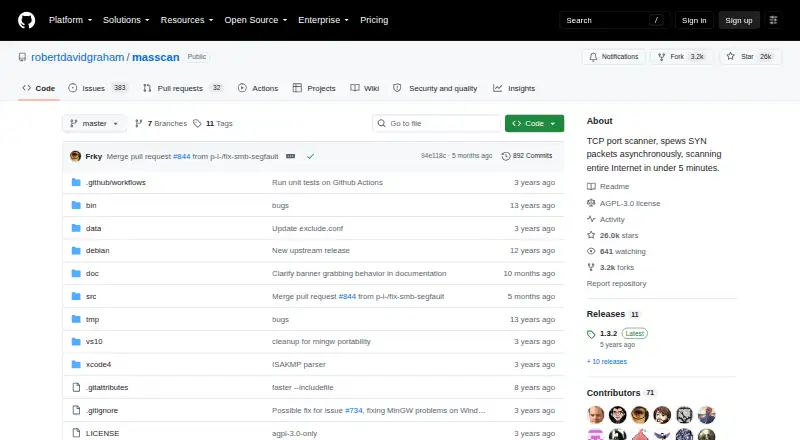
What Masscan is
Masscan is a command-line TCP port scanner for scanning many machines across wide address ranges. The project says it can transmit 10 million packets per second from one machine and supports asynchronous transmission with user-defined port and address ranges. It scans IPv4 and IPv6 together, without requiring a separate IPv6 mode, and offers banner checks for services including FTP, HTTP, SSH, SMTP, RDP, and VNC. Results can be written as XML, binary, grepable, JSON, or list output. Its usage and output are designed to be familiar to Nmap users, with some Nmap-compatible options. Masscan runs on Linux, macOS, and Windows, and supports self-hosting. It is free under the GNU Affero General Public License version 3; the license notice states there is no warranty. Users must specify ports, and targets must be IP addresses or simple ranges, not DNS names. Its custom TCP/IP stack may conflict with the local stack; the README describes using a separate source IP or firewalling the source port to address this.
Who it suits
Masscan suits users scanning many machines across broad IP ranges. It may be a fit for people who can specify ports and IP targets and account for possible local network stack conflicts.
What it does well
- Can transmit 10 million packets per second from one machine
- Scans IPv4 and IPv6 together
- Supports multiple output formats, including JSON and XML
- Offers banner checks for a range of services
What to know first
- Requires users to specify ports
- Does not accept DNS names as targets
- Custom TCP/IP stack may conflict with the local stack
Limits
Masscan requires ports to be specified and accepts IP addresses or simple ranges rather than DNS names. Its custom TCP/IP stack can conflict with the local stack; the README describes using a separate source IP or firewalling its source port.
Plans
| Plan | Billed and limits | Price |
|---|---|---|
| Masscan | Free software under the GNU Affero General Public License v3 | Free |
| Free | Internet-scale scanning · arbitrary IP and port ranges · command-line use | Free |
As github.com lists them, read 5 Oct 2026. The maker's own page has the final word.
Getting started
- Open the Masscan project website.
- Use the command-line deployment on Linux, macOS, or Windows, or deploy it as self-hosted software.
- Specify the ports to scan and provide IP addresses or simple address ranges as targets.
- Choose an output format: XML, binary, grepable, JSON, or list.
- For the described PF_RING ZC use, indicate the adapter name as required by Masscan.
Overview
Masscan is a command-line TCP port scanner for operators scanning many machines across broad address ranges. It is best suited to users who can define targets and ports precisely and manage network-level configuration. Its high-volume focus is a strong fit for broad coverage, but DNS-name targeting and unadjusted coexistence with the local TCP/IP stack are poor fits.
Key features
Broad, asynchronous scans
Masscan accepts arbitrary port and address ranges and transmits asynchronously. The project says one machine can transmit 10 million packets per second, a target that makes it compelling when scan breadth matters more than intensive inspection of one host. That pace does not make target selection optional: users must specify ports, and targets must be IP addresses or simple ranges rather than DNS names.
Service checks, IPv6 and exports
Banner checks cover FTP, HTTP, IMAP4, memcached, POP3, SMTP, SSH, SSL, SMBv1, SMBv2, Telnet, RDP and VNC. IPv4 and IPv6 can be scanned together without a separate IPv6 mode. XML, binary, grepable, JSON and list output give teams several ways to route results into their workflows.
Nmap familiarity and packet transmission
Masscan's usage and output are designed to be familiar to Nmap users, with some Nmap-compatible options. PF_RING DNA support and use of PF_RING ZC when the adapter name indicates it address high-speed packet transmission, making these useful considerations for operators with compatible setups rather than general-purpose conveniences.
Operational and security considerations
The README warns that Masscan's custom TCP/IP stack can conflict with the local stack; it describes using a separate source IP or firewalling Masscan's source port as mitigations. That configuration burden matters on machines doing other network work. The project also describes a vulnerability bounty and use of functions such as safe_strcpy() instead of strcpy(). Masscan is free software under the GNU Affero General Public License version 3, whose license notice states that it comes with no warranty.
Pricing
Masscan is free software under the GNU Affero General Public License version 3. Its Masscan plan costs nothing. With no paid tier or trial, the trade-off is straightforward: there is no purchase decision, but users take on the setup and operational demands of running the command-line tool themselves.
Platforms
Masscan supports Linux, macOS and Windows, and is self-hosted. Its command-line deployment suits operators comfortable running scans in their own environment.
Who it's for
Choose Masscan when the job is scanning many machines across wide ranges and high throughput is central. It is less suitable when targets are supplied as DNS names, when a scan needs detailed attention on one machine or a small range, or when an operator cannot accommodate the custom-stack conflict risk.
Pros and cons
- Pro: Arbitrary port and address ranges, asynchronous transmission and a stated 10-million-packet-per-second capacity suit broad scanning workloads.
- Pro: IPv4 and IPv6 can be scanned together, and five output formats support varied result-handling workflows.
- Pro: Banner checks cover a broad set of common services, including SSH, HTTP, SMB, RDP and VNC.
- Con: Users must specify ports and provide IP addresses or simple ranges; DNS names are not accepted as targets.
- Con: The custom TCP/IP stack may conflict with the local stack, requiring network configuration such as a separate source IP or source-port firewalling.
- Con: Its wide-range focus is not the stated design priority for intensive scanning of a single machine or small range.
Alternatives
For other options, browse Port Scanner Software. Pick Naabu if you want a free, MIT-licensed port-scanning tool with API support as well as Linux, macOS, self-hosted and Windows platforms. NetsCLI is another free option for Linux, macOS and Windows; its MIT-licensed library and MCP server are published on crates.io for Rust projects.
Choose RustScan if Android support matters; it is a free open-source port scanner also available for Linux, macOS, self-hosted and Windows. Angry IP Scanner is a free GPLv2 option for Linux, macOS and Windows.
Nmap is the more fitting choice for intensive scanning of one machine or a small range; its free end-user license costs nothing and does not allow redistribution within commercial software or hardware products. Choose ScanSearch if a paid Internet-scanning plan with a stated kpps range and CSV/JSON export is a better match: its Internet Scanner plan is $0.30 a month, billed per kpps/month, for 100–10,000 kpps, unlimited results per scan and a queue of up to 10 scans.
Unicornscan is another free option, with downloadable packages and source under the GPL. Pentest-Tools Port Scanner offers a free web/API tier for open-port and service discovery, plus a NetSec plan starting from $95 a month.
Verdict
Masscan is a strong choice for operators who need fast, broad TCP port scans and can supply explicit IP ranges, ports and careful network configuration. Its high-volume orientation and flexible exports are the reasons to choose it; look elsewhere if you need DNS targets, intensive single-host scanning, or a workflow that cannot tolerate adjustments around its custom TCP/IP stack.
Verdict
Masscan focuses on high-speed scanning across many machines, with multiple output formats and service banner checks. Its targeting requirements and possible local stack conflict are important operational considerations.
Questions
How much does Masscan cost?
The listed Masscan plan is free. It is free software under the GNU Affero General Public License version 3.
Which platforms does Masscan support?
It supports Linux, macOS, and Windows, and is available for self-hosted deployment.
What targets can it scan?
It supports arbitrary port and address ranges and can scan IPv4 and IPv6 together. Targets must be IP addresses or simple ranges, and users must specify ports.
What output formats are supported?
Masscan supports XML, binary, grepable, JSON, and list output.
Does Masscan check service banners?
Yes. Supported banner checks include FTP, HTTP, IMAP4, memcached, POP3, SMTP, SSH, SSL, SMBv1, SMBv2, Telnet, RDP, and VNC.
What license does Masscan use?
It is free software under the GNU Affero General Public License version 3. The license notice states that it comes with no warranty.
Facts from Masscan's own pages
- Address and port ranges
- Masscan accepts arbitrary IP address ranges and port ranges, including IPv4 and IPv6 examples. · github.com, 15 Oct 2026
- Asynchronous scanning
- It sends SYN packets asynchronously and uses a design comparable to scanrand, Unicornscan and ZMap. · github.com, 15 Oct 2026
- Banner checks
- Banner checking is supported for FTP, HTTP, IMAP4, memcached, POP3, SMTP, SSH, SSL, SMBv1, SMBv2, Telnet, RDP, and VNC. · github.com, 5 Oct 2026
- Banner-grab hazard
- The host stack can send reset packets after SYN-ACK responses, terminating connections before Masscan captures banners. · github.com, 15 Oct 2026
- Banner protocols
- Banner checking is documented for FTP, HTTP, IMAP4, memcached, POP3, SMTP, SSH, SSL, SMBv1, SMBv2, Telnet, RDP and VNC. · github.com, 15 Oct 2026
- Build requirements
- The basic Linux build requires Git, Make and a C compiler such as GCC or Clang, with no other major dependencies described. · github.com, 15 Oct 2026
- Compatibility
- Masscan's usage and output are designed to be familiar to Nmap users, with some Nmap-compatible options. · github.com, 5 Oct 2026
- Configuration export
- The --echo option prints the current configuration so it can be saved and reused as an input configuration file. · github.com, 15 Oct 2026
- Copyright date
- The licence notice identifies copyright as 2013 Robert David Graham. · github.com, 15 Oct 2026
- Custom TCP/IP stack
- Masscan includes its own ad hoc TCP/IP stack, which can conflict with the host operating system stack. · github.com, 15 Oct 2026
- Distributed scans
- The Debian manual documents --shard for dividing a scan across machines and resume indexes for assigning chunks to workers such as Amazon EC2 instances. · manpages.debian.org, 15 Oct 2026
- High-speed integration
- PF_RING ZC can be used beyond about two million packets per second with a compatible Intel 10-gigabit adapter and drivers. · github.com, 15 Oct 2026
- Integrations
- The project describes PF_RING DNA support for high-speed packet transmission and says Masscan can use PF_RING ZC when the adapter name indicates it. · github.com, 5 Oct 2026
- Intended users
- The README describes Masscan as tuned for scanning many machines across wide ranges, while Nmap is described as designed for intensive scanning of a single machine or small range. · github.com, 5 Oct 2026
- IPv6
- IPv4 and IPv6 can be scanned together, without a separate IPv6 mode. · github.com, 5 Oct 2026
- Kali package
- Kali lists Masscan as a TCP port scanner installable with sudo apt install masscan, with an installed size of about 516 KB and libc6 and libpcap dependencies. · kali.org, 15 Oct 2026
- Licence
- Masscan is released under the GNU Affero General Public License version 3. · github.com, 15 Oct 2026
- License
- Masscan is free software under the GNU Affero General Public License version 3, with no warranty stated in the license notice. · github.com, 5 Oct 2026
- Limit: command-line interface
- The same review lists the lack of a graphical interface and the need for command-line operation as disadvantages. · scanitex.com, 15 Oct 2026
- Limit: documentation depth
- A university evaluation found Masscan's documentation mainly consisted of its README and C source, with less documentation than ZMap. · net.in.tum.de, 15 Oct 2026
- Limit: host inspection
- The same evaluation records that Masscan does not provide operating-system detection and offers a smaller capability set than Nmap. · net.in.tum.de, 15 Oct 2026
- Limit: network overload
- A Masscan usage review warns that setting the transmission rate too high can overload networks or cause IP blocking. · scanitex.com, 15 Oct 2026
- Limit: shallow vulnerability coverage
- A 2025 IoT-security paper describes Masscan and similar scanners as broad discovery tools that do not detect deeper firmware or device-specific vulnerabilities. · preprints.org, 15 Oct 2026
- Limit: virtual networking
- A BSides security-crawler presentation reports that Masscan performed poorly with some virtual network configurations, leading the team to build a custom asynchronous TCP scanner. · markevich.org, 15 Oct 2026
Where Masscan stands on Freedom251
- Port Scanner Software#2 of 26