Freedom251 › SD card recovery software
Glary Undelete
What Glary Undelete is
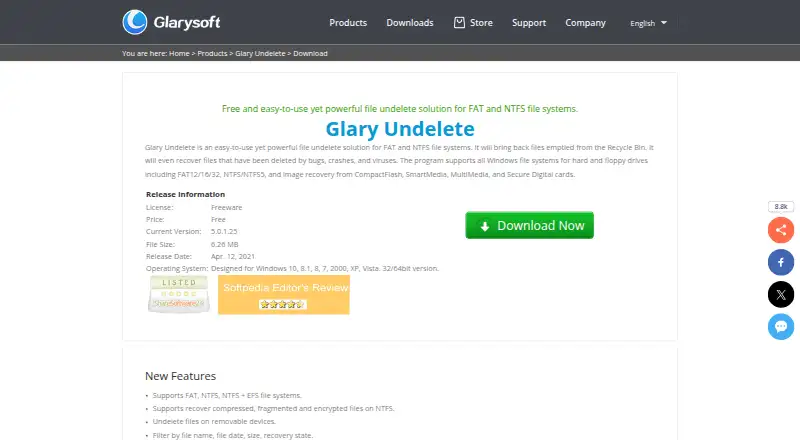
Glary Undelete is a free Windows utility for bringing back files removed from the Recycle Bin or lost after software bugs, crashes, or viruses. It works with FAT12, FAT16, FAT32, NTFS, NTFS5, and NTFS with EFS. Recovery can target local disks, external devices, floppy drives, and removable media such as CompactFlash, SmartMedia, MultiMedia, and Secure Digital cards. The product also describes recovery of compressed, fragmented, and encrypted files on NTFS, along with undeleting files from removable devices. A quick scan produces results that can be narrowed by filename, date, size, or recovery state. Each result receives a recovery estimate: Very Good, Good, Medium, Overwritten, or Poor. Glarysoft says overwritten files cannot be recovered. Recovered items can be written to a folder selected by the user. The download page lists version 5.0.1.25 as a 6.26 MB release for Windows 10, 8.1, 8, 7, 2000, XP, and Vista, with 32-bit and 64-bit versions. Glarysoft identifies itself as a Windows utility developer and says email questions usually receive a reply within one or two business days.
Who it suits
Glary Undelete suits Windows users who need to retrieve deleted files from internal, external, or removable storage. It is also relevant when files use FAT or NTFS variants, including compressed, fragmented, or encrypted NTFS files.
What it does well
- Free Windows file recovery utility
- Supports FAT12/16/32, NTFS, NTFS5, and NTFS + EFS
- Recovers from local, external, floppy, and card media
- Filters results by filename, date, size, and recovery state
- Provides recovery-condition estimates
- Saves recovered files to a chosen folder
What to know first
- Windows only
- Overwritten files cannot be recovered
- No free trial is offered
Limits
The freeware plan is Windows-only and cannot recover files marked Overwritten. No trial period is provided because the listed plan is free.
Plans
| Plan | Billed and limits | Price |
|---|---|---|
| Freeware | File undelete for FAT and NTFS file systems · Recovery from removable devices · Filtering by filename, date, size, and recovery state | On request |
| Glary Undelete | Freeware · Windows only · FAT12/16/32, NTFS/NTFS5, NTFS + EFS | Free |
| Glary Undelete Freeware | Windows only · FAT/NTFS/NTFS+EFS · 32/64-bit | Free |
As glarysoft.com lists them, read 20 Sept 2026. The maker's own page has the final word.
Getting started
- Open the Glary Undelete download website
- Download the Windows version for your system
- Install and launch the utility
- Run a quick scan on a supported drive or device
- Filter the results and review each recovery estimate
- Save selected files to a user-defined folder
Verdict
Choose Glary Undelete for free recovery on supported Windows systems and storage formats. Its removable-media coverage, filtering, and recovery estimates are useful when searching many deleted items. Look elsewhere if you need a non-Windows version or recovery of overwritten data.
Questions
Is Glary Undelete free?
Yes. The Glary Undelete plan is listed as free, with a Freeware plan.
Which systems does it support?
It supports Windows 10, 8.1, 8, 7, 2000, XP, and Vista in 32-bit and 64-bit versions.
What storage can it scan?
Recovery sources include local disks, external devices, floppy drives, CompactFlash, SmartMedia, MultiMedia, and Secure Digital cards.
Which file systems are supported?
Supported systems are FAT12/16/32, NTFS, NTFS5, and NTFS + EFS.
Can it recover overwritten files?
The tool labels overwritten files as unrecoverable.
Where can recovered files be saved?
Recovered files can be saved to a folder chosen by the user.
Facts from Glary Undelete's own pages
- Company
- Glarysoft says it specializes in developing utility software for Windows systems. · glarysoft.com, 11 Oct 2026
- Company activity
- Glarysoft describes itself as a software developer focused on multimedia, system, and network applications. · glarysoft.com, 15 Oct 2026
- Company legal name
- Crunchbase identifies the legal name as Glarysoft Ltd. · crunchbase.com, 15 Oct 2026
- Company size
- Crunchbase lists Glarysoft in the 1–10 employee size range. · crunchbase.com, 15 Oct 2026
- Compressed files
- The product can recover compressed files stored on NTFS. · glarysoft.com, 15 Oct 2026
- Current listed release
- The download page lists version 5.0.1.25, a 6.26 MB file released April 12, 2021. · glarysoft.com, 11 Oct 2026
- Current version
- The official download page lists version 5.0.1.25. · glarysoft.com, 15 Oct 2026
- Documentation depth
- Official support provides general FAQs, a knowledge base, how-to links, and download instructions, with no product-specific API or SDK documentation shown. · glarysoft.com, 15 Oct 2026
- Encrypted files
- The product advertises recovery of encrypted NTFS files. · glarysoft.com, 15 Oct 2026
- File types
- The product page says it can recover compressed, fragmented, and encrypted files on NTFS. · glarysoft.com, 11 Oct 2026
- Filtering
- Search results can be filtered by filename, date, size, and recovery state. · glarysoft.com, 15 Oct 2026
- Founded
- Glarysoft’s blog states that Glarysoft Ltd. was established in 2004. · blog.glarysoft.com, 15 Oct 2026
- Fragmented files
- The product advertises recovery of fragmented NTFS files. · glarysoft.com, 15 Oct 2026
- Headquarters
- Crunchbase lists Beijing, Beijing, China as the headquarters location. · crunchbase.com, 15 Oct 2026
- Installation
- The maker supplies browser-specific instructions for downloading and running gunsetup.exe. · glarysoft.com, 15 Oct 2026
- Installer size
- The official listing gives a 6.26 MB download size. · glarysoft.com, 15 Oct 2026
- Interface
- The maker describes the interface as simple and user-friendly. · glarysoft.com, 15 Oct 2026
- Limit: company support and billing
- Trustpilot complaints include poor support, upgrade upselling, recurring-charge disputes, and reports of system problems; these concern Glarysoft products generally rather than Glary Undelete specifically. · trustpilot.com, 15 Oct 2026
- Limit: crashes and errors
- Freesoft100 users report freezes during large scans, zero-division errors on an external drive, and installation failures on some systems. · freesoft-100.com, 15 Oct 2026
- Limit: dated interface
- TechRadar says the user interface needs modernization. · techradar.com, 15 Oct 2026
- Limit: external media
- Handy Recovery reports less reliable performance with external devices and says advanced search filters are limited. · handyrecovery.com, 15 Oct 2026
- Limit: operating systems
- TechRadar notes that the program does not support macOS or Linux. · techradar.com, 15 Oct 2026
- Limit: recovery reliability
- TechRadar recovered only about one-quarter of discovered files; most others were marked overwritten and produced empty output. · techradar.com, 15 Oct 2026
- Limit: unmountable drives
- TechRadar’s test could not detect or recover from an unmountable USB drive that was visible in Windows Disk Management. · techradar.com, 15 Oct 2026
Where Glary Undelete stands on Freedom251
- SD card recovery software#11 of 52
- Photo Recovery Software#10 of 44
- Photo recovery software#11 of 46
- SD Card Recovery Software#14 of 54