Freedom251 › Book Layout Software

Folio Studio
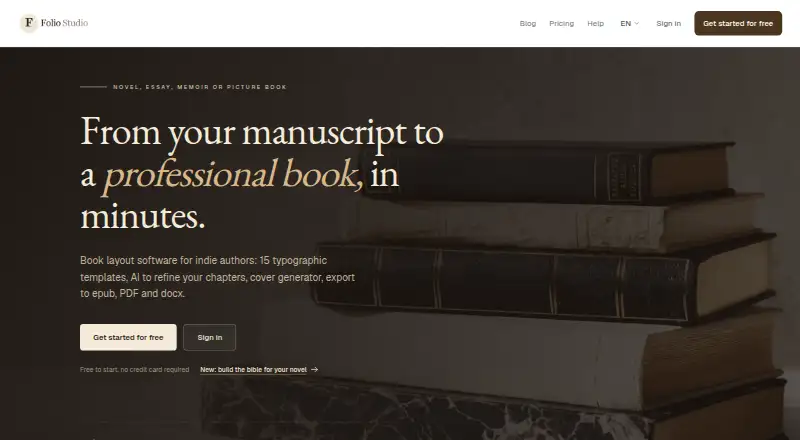
What Folio Studio is
Folio Studio is browser-based book layout software for independent authors creating novels, essays, memoirs, and picture books. It imports Markdown, DOCX, ODT, and PDF manuscripts and detects chapters to help structure a book. Authors can choose from 15 typographic templates, preview layouts in real time, and use chapter tools for summaries, style analysis, opening rewrites, and proofreading. The Pro manuscript bible organizes characters and relationships and flags possible inconsistencies with source passages for review. Exports include epub, PDF, and DOCX; the site says epub export is free, while DOCX and print-ready exports are available from Starter. The cover studio offers 2D and 3D previews and can produce print-ready PDFs with calculated spine width, bleed, and a reserved barcode zone. The app runs in modern browsers without installation. The Free plan costs nothing and includes one active project. Pro costs €9 a month; Starter costs €499 a month.
Who it suits
It suits independent authors who want to lay out books in a browser and export ebooks or print-ready files. Authors producing illustrated books should note the different project and page allowances across plans.
What it does well
- Imports Markdown, DOCX, ODT, and PDF.
- Offers 15 templates with real-time preview.
- Free plan includes epub export.
- Cover tools calculate spine width and bleed.
- Runs in modern browsers without installation.
What to know first
- Free plan allows one active project.
- Starter costs €499 a month.
- Illustrated-book allowances vary by plan.
Limits
Free allows one active project, one introductory AI action, and one full-page illustration. Imports are limited to 5 MB (1 MB extracted content); the plan includes Classic and Minimal templates and epub and watermark-free PDF exports. Pro allows unlimited illustrated projects up to 100 pages each, while Starter includes one illustrated project up to 30 pages.
Plans
| Plan | Billed and limits | Price |
|---|---|---|
| Free | 1 active project · Classic and Minimal templates · epub and watermark-free PDF · 1 introductory AI action · 1 full-page illustration · import files up to 5 MB (1 MB extracted content) | Free |
| Starter | 10 projects · DOCX and print-ready exports · 100 AI credits/month · 1 illustrated book project up to 30 pages | €499 a month |
| Pro | Unlimited projects · 200 AI credits/month · manuscript bible · 10 AI cover credits/month · unlimited illustrated projects up to 100 pages each | €9 a month |
As foliostudio.app lists them, read 30 Sept 2026. The maker's own page has the final word.
Getting started
- Open https://foliostudio.app/en in a modern browser such as Chrome, Firefox, Safari, or Edge.
- Choose a plan: Free, Pro at €9 a month, or Starter at €499 a month.
- Import a manuscript in Markdown, DOCX, ODT, or PDF format.
- Select a typographic template and review the real-time layout preview.
- Use the available chapter tools, then export in a supported format.
Folio Studio is a browser-based book layout tool for independent authors preparing novels, essays, memoirs, or picture books. It best suits writers who want manuscript formatting and cover preparation in one workflow, but plan limits and export access make the tier choice important.
Overview
Folio Studio combines manuscript structuring, page layout, cover design, and publishing exports. It runs in modern browsers without installation, making it a practical option for authors who prefer a web workflow across Linux, macOS, and Windows.
Its strongest case is for authors taking a manuscript toward ebook and print formats: it imports common document types, detects chapters, and offers cover and layout tools. The free tier supports basic EPUB and PDF output, while DOCX and print-ready exports require the unusually costly Starter plan.
Key features
Manuscript layout and editorial tools
Markdown, DOCX, ODT, and PDF imports are structured into chapters automatically, reducing setup before layout. Fifteen typographic templates cover novels, poetry, thrillers, and fantasy, with a real-time preview. Free users get only Classic and Minimal, so authors wanting the broader template range need a paid tier.
Chapter tools can summarize, analyze style, rewrite openings, and proofread. Their monthly credit allowances vary by plan, so they are bounded aids rather than an unlimited editorial workflow. Pro also adds a manuscript bible that organizes characters and relationships and flags possible inconsistencies alongside source passages; authors still need to review those flags.
Exports, covers, and illustrated books
EPUB export is free, and Free includes watermark-free PDF. DOCX and print-ready exports begin with Starter, a meaningful dividing line for authors preparing files for publishers or printers. Folio Studio says its print PDFs meet specifications for Amazon KDP, IngramSpark, and local printers.
The cover studio provides 2D and 3D previews and can produce a 300 DPI print-ready PDF with calculated spine width, bleed, and a reserved barcode zone. For illustrated books, Starter permits one project up to 30 pages; Pro permits unlimited projects up to 100 pages each in Fixed Layout EPUB or high-resolution PDF. These caps make Pro the more suitable tier for picture-book authors developing multiple titles.
Pricing
| Plan | Price | What it includes |
|---|---|---|
| Free | free | 1 active project; Classic and Minimal templates; EPUB and watermark-free PDF; 1 introductory AI action; 1 full-page illustration; imports up to 5 MB (1 MB extracted content). |
| Pro | €9 a month | Unlimited projects; 200 AI credits/month; manuscript bible; 10 AI cover credits/month; unlimited illustrated projects up to 100 pages each. |
| Starter | €499 a month | 10 projects; DOCX and print-ready exports; 100 AI credits/month; 1 illustrated book project up to 30 pages. |
Free is a useful starting point for a single active project, but its import-size ceiling and narrow template selection constrain larger or more developed books. Pro is the clearest fit for authors who need more projects, the manuscript bible, or several illustrated titles. Starter unlocks DOCX and print-ready output, but its 10-project limit and €499 a month price make it difficult to justify for most independent authors; compare export needs carefully before choosing it.
Platforms
Folio Studio is a web application for modern versions of Chrome, Firefox, Safari, and Edge, with no installation required. It is listed for Linux, macOS, and Windows as well as web use.
Who it's for
Independent authors who want chapter structuring, book layout, and cover preparation together will find a focused workflow, especially if EPUB and watermark-free PDF meet their needs. Authors needing frequent DOCX or print-ready exports should weigh Starter's price against their publishing workflow; those producing illustrated books should compare the page and project limits on Starter and Pro.
Pros and cons
- Pros: Imports four common manuscript formats and detects chapters, cutting down manual structuring.
- Pros: Free EPUB and watermark-free PDF exports let authors produce basic ebook and PDF files without a paid plan.
- Pros: Cover PDFs include calculated spine width, bleed, and a barcode zone, useful for preparing print covers.
- Cons: Free is limited to one active project, two templates, and small import files, which can restrict a full-length workflow.
- Cons: DOCX and print-ready exports are tied to Starter at €499 a month, a steep threshold for authors who need those outputs.
- Cons: AI features use plan-based credit allowances, so their use is capped.
Alternatives
Book Layout Software is a useful place to compare other tools in the category. Choose Coverfairy if the priority is cover creation: its free plan offers four one-time AI image credits and watermarked cover drafts, with a Week Pass at $6, paid once, billed 7 days, for unlimited non-AI Cover and Inter. Storyloft suits writers looking for worldbuilding and manuscript work, with a free tier covering one manuscript up to 5,000 words and unlimited worldbuilding.
Blurb BookWright is worth considering for desktop book design and offline editing; its software price is custom pricing. Bookmint offers web-based template and design tools, with free print PDF and EPUB exports that carry a watermark unless activated. Folius may suit authors who want unlimited books and chapters on a free web plan, with Word import and EPUB, Markdown, and backup exports.
Layoutly is a web alternative for readers prioritizing collaboration: its Pro plan includes real-time collaboration and unlimited books and exports at $29 a month. typesetting.ai offers a free route to its tools and output formats, with three adjustments and files kept for 24 hours. Koberger is another freemium option available on web, Windows, macOS, and Linux.
Verdict
Folio Studio is a good fit for independent authors who want manuscript structuring, layout, and cover preparation in one browser-based tool, particularly when free EPUB and PDF exports are enough. Its main drawback is the high Starter price for DOCX and print-ready output; authors who need those formats should compare alternatives before committing.
Verdict
Folio Studio brings manuscript structuring, layout, and cover preparation into a browser-based workflow. Compare the plan limits and export needs before choosing a tier.
Questions
Is Folio Studio free?
Yes. The Free plan costs nothing and includes one active project, epub and watermark-free PDF exports, and one introductory AI action.
What do the paid plans cost?
Pro is listed at €9 a month. Starter is listed at €499 a month.
Which platforms does Folio Studio support?
It is browser-based and works in modern browsers including Chrome, Firefox, Safari, and Edge. The listed platforms are Linux, macOS, web, and Windows.
Can it export print-ready files?
Yes. Print-ready exports are available from Starter. The cover studio can create a 300 DPI print-ready PDF with calculated spine width, bleed, and a reserved barcode zone.
Who publishes Folio Studio?
The legal notice identifies Adrien Daniel Claude Maillard EI, a French individual entrepreneur trading as Folio Studio, with an address in Rouen, France.
Facts from Folio Studio's own pages
- AI tools
- Chapter tools include summaries, style analysis, opening rewrites, and proofreading; the plan page specifies different monthly credit allowances. · foliostudio.app, 30 Sept 2026
- Cover design
- The cover studio offers 2D and 3D previews and can export a 300 DPI print-ready PDF with calculated spine width, bleed, and a reserved barcode zone. · foliostudio.app, 30 Sept 2026
- Data rights
- The homepage states “Your rights, your data,” and the legal notice says user-imported content remains the user's property under the Terms of Service. · foliostudio.app, 30 Sept 2026
- Exports
- Exports include epub, PDF, and DOCX, with DOCX and print-ready exports available from Starter; the site says epub export is free. · foliostudio.app, 30 Sept 2026
- Headquarters
- France · foliostudio.app, 23 Sept 2026
- Hosting
- The legal notice names Vercel Inc. as the hosting provider for the websites and application. · foliostudio.app, 30 Sept 2026
- Illustrated books
- Starter includes one illustrated book project up to 30 pages, while Pro allows unlimited illustrated projects up to 100 pages each in Fixed Layout epub or high-resolution PDF. · foliostudio.app, 30 Sept 2026
- Maker and location
- The legal notice identifies the publisher as Adrien Daniel Claude Maillard EI, a French individual entrepreneur trading as Folio Studio, with an address in Rouen, France. · foliostudio.app, 30 Sept 2026
- Manuscript bible
- The Pro manuscript bible organises characters and relationships and flags possible inconsistencies with source passages for the author to review. · foliostudio.app, 30 Sept 2026
- Manuscript import
- It imports Markdown, DOCX, ODT, and PDF files and automatically detects and structures chapters. · foliostudio.app, 30 Sept 2026
- Publishing compatibility
- The site says print-ready PDF exports meet specifications for Amazon KDP, IngramSpark, and local printers. · foliostudio.app, 30 Sept 2026
- Purpose
- Folio Studio is book layout software for independent authors making novels, essays, memoirs, and picture books. · foliostudio.app, 30 Sept 2026
- Templates
- The service offers 15 typographic templates, including layouts for novels, poetry, thrillers, and fantasy, with real-time preview. · foliostudio.app, 30 Sept 2026
- Web access
- Folio Studio is a browser-based web application for modern browsers including Chrome, Firefox, Safari, and Edge, with no installation required. · foliostudio.app, 30 Sept 2026
Where Folio Studio stands on Freedom251
- Book Layout Software#5 of 28