Freedom251 › Book Layout Software
Koberger
What Koberger is
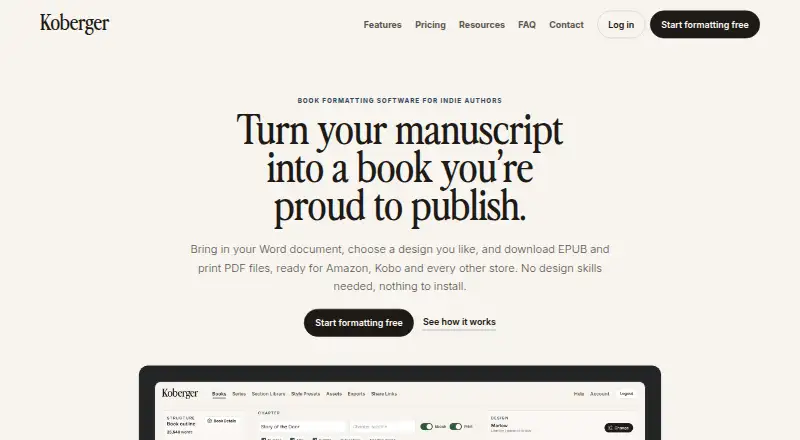
Koberger formats manuscripts into EPUB and print PDF files for indie authors. It imports work from Word, Pages, and Google Docs, then identifies chapters, headings, and section breaks. Authors can customize ready-made designs, typography, spacing, chapter headings, and ornaments, and save presets for reuse. Page blocks cover elements such as title, copyright, dedication, acknowledgements, glossary, and bibliography. You can preview ebook and paperback pages and share a private, read-only link with editors or beta readers. Koberger Pro exports EPUB, Print PDF, and DOCX, supports bulk export for multiple books, and can create watermarked advance review EPUBs. Saved sections and designs can be reused across a series, with tools to check consistency. Koberger says its EPUB output passes store checks and includes accessibility information, and it offers checks for common ebook issues before export. It runs in a browser on Windows, Mac, Linux, or Chromebook without installation. A free account includes formatting, design, layout, and preview, but exporting finished files requires Pro. Pro Monthly is $9.99 a month for one book; Pro Annual is $59.94 a year for a catalogue.
Who it suits
Koberger suits indie authors preparing ebook and print layouts, especially those who want to reuse designs across books or share previews with reviewers. The free account supports preparation and preview, while exporting requires Pro.
What it does well
- Imports Word, Pages, and Google Docs manuscripts.
- Customizable designs and reusable presets.
- Private read-only preview links for reviewers.
- Bulk export and watermarked review EPUBs with Pro.
- Runs in a browser without installation.
What to know first
- Free account cannot export finished files.
- Pro Monthly is $9.99 a month.
- No free trial.
Limits
The free account supports formatting, design, layout, and preview, but finished-file exports require Pro. Pro Monthly is for a single book; Pro Annual covers a catalogue.
Plans
| Plan | Billed and limits | Price |
|---|---|---|
| Free account | $0/forever · Formatting, design, layout and preview; exporting finished files requires Pro | Free |
| Koberger Pro Annual | $59.94/year · Unlimited exports; for your whole catalogue; 30-day money-back guarantee | $59.94 a year |
| Koberger Pro Monthly | $9.99/month · Unlimited exports; for a single book; pause anytime | $9.99 a month |
As koberger.app lists them, read 5 Oct 2026. The maker's own page has the final word.
Getting started
- Open the Koberger website in a browser on Windows, Mac, Linux, or Chromebook.
- Create a free account to format, design, lay out, and preview a book.
- Import a manuscript from Word, Pages, or Google Docs.
- Adjust a ready-made design and review the ebook or paperback preview.
- Choose Pro Monthly or Pro Annual to export finished files.
Koberger is a browser-based manuscript formatter for indie authors preparing ebooks and print editions. It suits writers who want to shape a book’s layout, review it with others, and reuse designs across a catalogue. Its free account covers formatting and previews, but finished-file exports require a paid plan.
Overview
Koberger brings manuscript import, page design, preview, and file export into one workflow. It accepts manuscripts from Word, Pages, and Google Docs, then detects chapters, headings, and section breaks. That structure gives authors a starting point for layout, while customizable designs leave room to adjust the book’s appearance.
The free plan’s export restriction is the key trade-off: authors can prepare and preview a book without paying, but must subscribe to download finished files. That makes Koberger less suitable for someone seeking a free end-to-end publishing tool, and more compelling for authors who value its design and series workflow enough to pay when they are ready to publish.
Key features
Design and book structure
Authors can adapt ready-made designs by changing typography, spacing, chapter headings, and ornaments, then save presets for later. Layout blocks cover pages including title, copyright, dedication, acknowledgements, glossary, and bibliography. This gives writers meaningful control without requiring them to build every page element themselves.
Preview, sharing, and series consistency
Previews show ebook and paperback pages, and a private read-only link lets editors or beta readers review a project. Authors can reuse saved sections and designs across books and check consistency throughout a series. That is particularly useful for a multi-book catalogue; writers producing a one-off title may get less benefit from the reuse features.
Export and store preparation
Pro exports EPUB, Print PDF, and DOCX, with bulk export for multiple books. Koberger says its EPUBs pass store checks and include accessibility information, and it runs pre-export checks for common ebook issues. It also exports watermarked advance review EPUBs for reviewers and launch teams. Its files are intended to work with Amazon KDP, IngramSpark, Apple Books, and Kobo. These checks and compatibility targets can support a smoother handoff, but the finished files still need an author’s own review.
Privacy and support
Koberger says manuscript content is not used to train AI models or provided to AI training systems. Manuscripts and project files are processed for formatting, preview, and export; content is not intentionally collected for analytics or monitoring. Payments are processed by Stripe, and Koberger says it does not store full card numbers on its servers. Account and export questions go to email support; the contact page asks users to include their account email, browser, operating system, and the task they were attempting.
Pricing
Koberger uses a freemium model, with no free trial. The Free account costs $0/forever and includes formatting, design, layout, and preview. It does not include finished-file export, so it is best for preparing a project or assessing the workflow before committing to Pro.
Koberger Pro Monthly costs $9.99/month and includes unlimited exports for a single book, with the option to pause anytime. It suits an author working on one title who wants export access without an annual commitment. Koberger Pro Annual costs $59.94/year and includes unlimited exports for the whole catalogue, plus a 30-day money-back guarantee. It is the better fit for authors exporting multiple books or maintaining a series. The monthly plan’s single-book scope is an important limit; the annual plan is the one that covers a catalogue.
Platforms
Koberger runs in a browser on Windows, Mac, Linux, or Chromebook and requires no installation. Its web-based approach suits authors who want to work across supported computers without setting up desktop software.
Who it's for
Koberger is a strong fit for indie authors who need EPUB and print PDF formatting, want to adjust a ready-made design, and value previews or reusable layouts across a series. It is less suited to authors who require free finished-file exports, or who are looking only for a drafting tool rather than manuscript formatting and output.
Pros and cons
- Pro: Imports from Word, Pages, and Google Docs and detects common manuscript structure, reducing the need to start book layout from a blank page.
- Pro: Customizable designs, reusable presets, and saved sections support consistent presentation across a catalogue.
- Pro: Ebook and paperback previews, private review links, and watermarked advance review EPUBs support feedback before release.
- Con: The free account cannot export finished files, so publishing requires a paid plan.
- Con: Monthly Pro is limited to a single book; authors exporting across a catalogue need the annual plan.
Alternatives
For cover-focused work rather than manuscript formatting, Coverfairy offers a free plan with four one-time AI image credits and watermarked cover drafts, plus a seven-day Week Pass for $6.00 with unlimited non-AI cover work.
Folio Studio may suit authors who want a free plan with one active project, EPUB and watermark-free PDF export, and a limited introductory AI action and illustration. Storyloft is an alternative for writers whose starting point is a manuscript up to 5,000 words, with image credits, AI conversations, and worldbuilding included in its free plan.
Blurb BookWright is worth considering for desktop book design, templates, layout suggestions, and offline editing; its listed softcover photo book price is $12.00. Bookmint offers free access to 55 templates and design tools with print PDF and EPUB output, though free exports are watermarked unless activated.
Folius may fit authors seeking a free browser editor with unlimited books and chapters, Word import, live print preview, and EPUB, Markdown, and backup exports. Layoutly is a browser alternative with a free allowance of one book per month and five exports, while its $29.00/month Pro plan adds unlimited books and exports plus real-time collaboration.
PRINGEN may appeal to authors who want a free plan with three projects, monthly AI generations, multiple book types, and watermarked exports, or a Pro plan priced at $29.00 per month.
Browse more options in Book Layout Software or eBook Creation Software.
Verdict
Choose Koberger if you are an indie author who wants manuscript formatting, review previews, and repeatable designs in one browser workflow, especially across a series. Its strongest reason to choose it is the combination of editable layouts and catalogue-wide reuse; its main reason to look elsewhere is that finished-file export is paid, with monthly Pro restricted to one book.
Verdict
Koberger combines manuscript formatting, previews, and reusable series layouts in a browser-based workflow. Note that finished-file export requires a paid Pro plan.
Questions
How much does Koberger cost?
A free account is available. Pro Monthly costs $9.99 per month for a single book, and Pro Annual costs $59.94 per year for a catalogue.
Can I export books with a free account?
No. A free account supports formatting, design, layout, and preview; finished-file exports require Pro.
Which file types can Koberger export?
Pro exports EPUB, Print PDF, and DOCX files. Bulk export is available for multiple books.
What platforms does Koberger support?
Koberger runs in a browser on Windows, Mac, Linux, or Chromebook and requires no installation.
Which stores are Koberger exports intended to work with?
Koberger names Amazon KDP, IngramSpark, Apple Books, and Kobo as stores its exported files are intended to work with.
Does Koberger use manuscript content to train AI models?
Koberger says it does not use manuscript content to train AI models or provide manuscript content to AI training systems.
Facts from Koberger's own pages
- Book parts
- It provides layouts and blocks for pages such as title, copyright, dedication, acknowledgements, glossary, and bibliography. · koberger.app, 5 Oct 2026
- Data handling
- The privacy policy says manuscripts and project files are processed to provide formatting, preview, and export, and manuscript content is not intentionally collected for analytics or monitoring. · koberger.app, 5 Oct 2026
- Design
- Authors can customize ready-made designs, typography, spacing, chapter headings, and ornaments, and save reusable presets. · koberger.app, 5 Oct 2026
- Integrations
- The site names Amazon KDP, IngramSpark, Apple Books, and Kobo as stores its exported files are intended to work with. · koberger.app, 5 Oct 2026
- Manuscript import
- It imports manuscripts from Word, Pages, and Google Docs and detects chapters, headings, and section breaks. · koberger.app, 5 Oct 2026
- Output formats
- Koberger Pro exports EPUB, Print PDF, and DOCX files, with bulk export available for multiple books. · koberger.app, 5 Oct 2026
- Payments
- The pricing page says payments are processed securely by Stripe; the privacy policy says Koberger does not store full payment card numbers on its servers. · koberger.app, 5 Oct 2026
- Platform
- Koberger runs in a browser on Windows, Mac, Linux, or Chromebook and requires no installation. · koberger.app, 5 Oct 2026
- Preview and sharing
- Users can preview ebook and paperback pages and share a private read-only preview link with editors and beta readers. · koberger.app, 5 Oct 2026
- Purpose
- Koberger formats manuscripts into EPUB and print PDF files for indie authors. · koberger.app, 5 Oct 2026
- Review copies
- It can export watermarked advance review EPUBs for reviewers and launch teams. · koberger.app, 5 Oct 2026
- Security and manuscript use
- Koberger says it does not use manuscript content to train AI models or provide manuscript content to AI training systems. · koberger.app, 5 Oct 2026
- Series workflow
- Authors can reuse saved sections and designs across books and check consistency across a series. · koberger.app, 5 Oct 2026
- Store compatibility
- Koberger says its EPUB passes store checks and includes accessibility information, with pre-export checks for common ebook issues. · koberger.app, 5 Oct 2026
- Support
- Support for account and export questions is available by email, and the contact page suggests including account email, browser, operating system, and the task being attempted. · koberger.app, 5 Oct 2026
Where Koberger stands on Freedom251
- Book Layout Software#6 of 28
- eBook Creation Software#9 of 28