Freedom251 › Book Layout Software
Layoutly
What Layoutly is
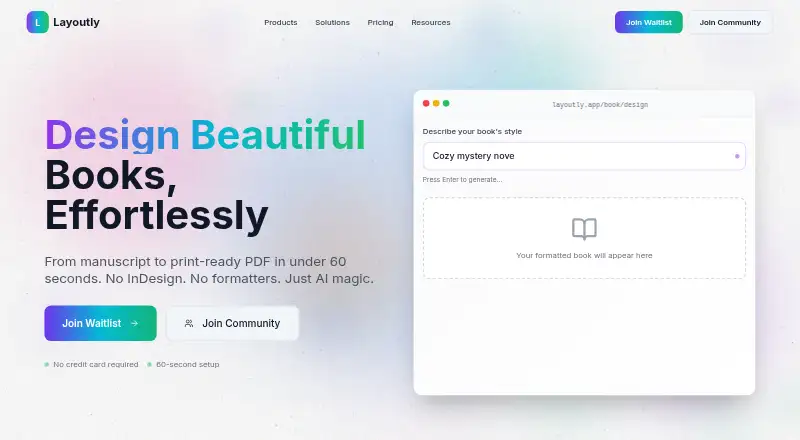
Layoutly is web-based book formatting software that uses AI to prepare manuscripts as layouts for print and ebooks. Users can describe a style in a prompt, and the AI selects typography and applies formatting rules. Natural-language voice commands can change a layout, and the site says they work in any language. A reference PDF can be uploaded so the AI can detect its fonts, colors, and spacing and apply that layout to a manuscript. The service describes real-time collaboration through live cursors, presence, and page-specific comment threads. It accepts DOCX, TXT, and Markdown uploads up to 5 MB. Listed layout support includes complex tables, footnotes and endnotes, children's books, indexes, tables of contents, and multi-column pages. PDF and EPUB exports are available, and Amazon KDP, IngramSpark, and Draft2Digital are named. Bleed settings are supported. The Free plan costs nothing and includes 1 book/month and 5 exports. Pro is $29 a month for unlimited books and exports, plus real-time collaboration. Layoutly also offers a template marketplace where creators can sell or freely offer templates and receive automatic royalty payments.
Who it suits
Layoutly may suit indie authors, publishers, agencies, academic institutions, content creators, and professional formatters. Its manuscript formatting and collaboration tools can support both print and ebook workflows.
What it does well
- Free plan includes 1 book/month and 5 exports
- Pro includes unlimited books and exports
- Accepts DOCX, TXT, and Markdown manuscripts
- Exports PDF and EPUB files
- Supports page-specific comment threads
What to know first
- Manuscript uploads are limited to 5 MB
- Free plan limits exports to 5
- Pro costs $29 a month
Limits
The Free plan costs nothing and allows 1 book/month and 5 exports. Pro costs $29 a month and provides unlimited books and exports, plus real-time collaboration.
Plans
| Plan | Billed and limits | Price |
|---|---|---|
| Free | 1 book/month · 5 exports | Free |
| Pro | Unlimited books and exports · Real-time collaboration | $29 a month |
As layoutly.io lists them, read 2 Oct 2026. The maker's own page has the final word.
Getting started
- Open https://www.layoutly.io/ in a web browser.
- Choose the Free plan or Pro plan.
- Upload a DOCX, TXT, or Markdown manuscript up to 5 MB.
- Describe a style in a prompt or upload a reference PDF to guide the layout.
- Use voice commands or collaboration tools to make and discuss changes.
- Export the finished layout as PDF or EPUB.
Verdict
Layoutly offers AI-assisted formatting, collaboration, and PDF or EPUB exports through a web interface. The free tier has limits on books and exports, while Pro removes those limits for $29 a month.
Questions
Is Layoutly free?
Yes. The Free plan costs nothing and includes 1 book/month and 5 exports.
How much does Pro cost?
Pro costs $29 a month and includes unlimited books and exports, plus real-time collaboration.
Which platforms does Layoutly support?
Layoutly is available on the web.
What file types can I upload?
The upload section lists DOCX, TXT, and Markdown files, up to 5 MB.
Can Layoutly export ebooks and print PDFs?
Yes. It supports EPUB and PDF exports, and bleed settings are available.
Who is Layoutly intended for?
It is presented for indie authors, publishing companies, agencies and studios, academic institutions, content creators, and professional formatters.
Facts from Layoutly's own pages
- AI formatting
- Users can describe a book’s style in a prompt, and the AI selects typography and applies formatting rules. · layoutly.io, 2 Oct 2026
- Collaboration
- The site describes real-time collaboration with live cursors, presence, and comment threads on specific pages. · layoutly.io, 2 Oct 2026
- Exports and integrations
- The site names Amazon KDP, IngramSpark, and Draft2Digital, and says users can export PDF or EPUB files. · layoutly.io, 2 Oct 2026
- Intended users
- The site presents Layoutly for indie authors, publishing companies, agencies and studios, academic institutions, content creators, and professional formatters. · layoutly.io, 2 Oct 2026
- Layout cloning
- Users can upload a reference PDF so the AI can detect its fonts, colors, and spacing and apply the layout to their manuscript. · layoutly.io, 2 Oct 2026
- Manuscript support
- The upload section lists DOCX, TXT, and Markdown files, with a maximum upload size of 5 MB. · layoutly.io, 2 Oct 2026
- Product
- Layoutly describes itself as AI-powered book formatting software that turns manuscripts into print-ready layouts. · layoutly.io, 2 Oct 2026
- Security and compliance
- The opened homepage does not state security certifications or compliance claims. · layoutly.io, 2 Oct 2026
- Specialized layouts
- The site lists support for complex tables, footnotes and endnotes, children's books, indexes and tables of contents, and multi-column layouts. · layoutly.io, 2 Oct 2026
- Support
- The homepage advertises 24/7 support. · layoutly.io, 2 Oct 2026
- Template marketplace
- The site says creators can sell book templates, set a price or offer them free, and receive automatic royalty payments. · layoutly.io, 2 Oct 2026
- Voice controls
- Users can give natural-language voice commands to change a layout, and the page says voice commands work in any language. · layoutly.io, 2 Oct 2026
Where Layoutly stands on Freedom251
- Book Layout Software#16 of 28