Freedom251 › Digital Textbook Platforms
Kotobee Author
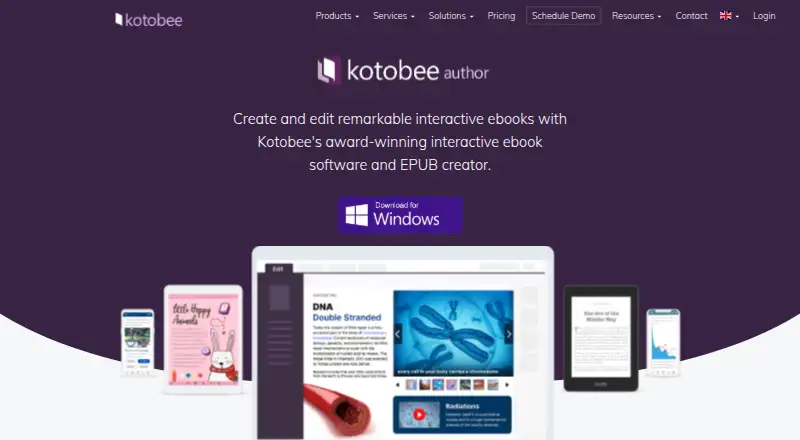
What Kotobee Author is
Kotobee Author is an ebook creation and editing product for interactive publications. Authors can start by importing PDF, HTML, Word, or EPUB files, then add video, audio, image click animations, self-assessment questions, and book widgets. Its AI tools can generate text, images, questions, and voice narration. For learning use cases, authors can add auto-graded questions and track learners’ scores, and connect ebooks with an organization’s learning management system through SCORM, LTI, or Tin Can.
The product exports to more than 12 ebook formats, including mobile apps, and its listed formats include EPUB, MOBI, PDF, and Word. Authors can add HTML, CSS, and JavaScript for custom functionality and integrations. Ebook apps can use an organization’s colors and logo and remove Kotobee mentions. Kotobee says exported files belong to the customer and do not collect data from their users, though some formats that rely on Kotobee servers require an active subscription. The product supports Android, iOS, Linux, macOS, web, and Windows. Its maker, Vijua, describes itself as an Egypt-rooted software company founded in 2011, specializing in interactive ebook technology and digital publishing. Kotobee Author has a free plan; the Free plan is listed as free, and the paid starting price is $150.
Who it suits
Kotobee Author suits educators, digital publishers, and training teams creating interactive ebooks, assessments, or branded ebook apps. It is also relevant to organizations that need LMS connections or custom code in their ebooks.
What it does well
- Imports PDF, HTML, Word, and EPUB files for editing.
- Adds video, audio, animations, assessments, and book widgets.
- Exports to more than 12 ebook formats, including mobile apps.
- Supports SCORM, LTI, and Tin Can LMS integration.
- Available on Android, iOS, Linux, macOS, web, and Windows.
What to know first
- Some formats that rely on Kotobee servers require an active subscription.
- Prices for the listed Basic, Premium, Mobile App Credits, and Institutional options are not included in the plan details.
Limits
Some export formats that rely on Kotobee servers require an active subscription. The Free plan is listed as free; the listed paid starting price is $150.
Plans
| Plan | Billed and limits | Price |
|---|---|---|
| Free | — | Free |
| Premium | Monthly or annually (save over 15%) | On request |
| Basic | Monthly or annually (save over 15%) | On request |
| Mobile App Credits | — | On request |
| Institutional | Contact Kotobee for customized solutions | On request |
As kotobee.com lists them, read 9 Oct 2026. The maker's own page has the final word.
Getting started
- Visit the Kotobee Author product page.
- Start with the Free plan or review the paid options.
- Import a PDF, HTML, Word, or EPUB file, or create an ebook.
- Add interactive content, assessments, or custom HTML, CSS, and JavaScript as needed.
- Choose an export format, including EPUB, MOBI, PDF, Word, or a mobile app.
Kotobee Author is an interactive ebook editor for education, publishing, and training work. It is strongest when a book needs assessments, LMS connections, or custom interactive elements, rather than just a clean digital edition. Its broad export range is useful, but some outputs depend on an active subscription.
Overview
Authors can create books in Kotobee Author or import PDF, HTML, Word, and EPUB files, then export to more than 12 ebook formats, including mobile apps. Both fixed and reflowable layouts are supported, and EPUB projects can be opened in other EPUB editors. That combination gives publishing teams flexibility in how they build and distribute books, while the subscription requirement for some server-dependent formats is an important constraint for teams seeking a one-time export workflow.
Key features
Interactive authoring
Books can include video, audio, image click animations, widgets, and self-assessment questions. AI tools can generate text, images, questions, and voice narration, which may help teams produce varied learning content. Authors with bespoke requirements can add HTML, CSS, and JavaScript; that flexibility is valuable for custom functionality, though it calls for more technical capability than a basic ebook project.
Assessment and LMS integration
Auto-graded questions can be embedded in ebooks and learner scores tracked. SCORM, LTI, and Tin Can integrations connect the content to an organization’s LMS, making Kotobee Author a more natural fit for coursework and training than a tool limited to book layout. Teams that do not need learner assessment or LMS workflows may find this scope unnecessary.
Branding, ownership, and support
Users can apply their color scheme and logo to ebook apps and remove Kotobee mentions, which suits organizations publishing under their own identity. Kotobee says exported files belong to customers and do not collect data from their users, although some server-dependent formats need an active subscription. Account information is stored on secure servers in London, with daily database backups on Amazon-based servers; Kotobee also says it is committed to GDPR compliance and describes rights to access, correct, restrict, or delete personal data. Support options include live-agent chat, scheduled meetings, a help center, and Kotobee Academy.
Pricing
Kotobee Author uses a freemium model. The Free plan costs nothing, giving prospective authors a way to begin without an upfront charge. The paid starting price is $150, but plan-specific prices are not published for Premium, Basic, Mobile App Credits, or Institutional, so those options have custom pricing.
Premium and Basic are billed monthly or annually, with annual billing saving over 15%. Institutional is positioned for customized solutions and requires contacting Kotobee. Mobile App Credits are a separate plan, but its price is custom pricing. The plan names alone do not establish which features or quotas each includes, so teams should confirm the terms that apply to their intended exports and use. In particular, the active-subscription requirement for some server-dependent formats matters if ongoing access is part of the publishing plan.
Platforms
Kotobee Author supports Android, iOS, Linux, macOS, web, and Windows. That wide platform coverage helps teams working across varied devices, while its exports span formats including EPUB, MOBI, PDF, and Word.
Who it's for
Kotobee Author suits educators, digital publishers, and training teams creating interactive books or course materials that need assessment, learner score tracking, LMS integration, or branded ebook apps. It is also a fit for authors who need multiple export formats or custom behavior. A team producing a simple text ebook, with no need for tracking or interactive content, should weigh whether this broader toolkit and its subscription-dependent outputs are worth adopting.
Pros and cons
- Pros: Imports common document formats and exports to more than 12 ebook formats, including mobile apps, giving teams several routes from source material to distribution.
- Pros: Combines auto-graded questions, score tracking, and SCORM, LTI, and Tin Can support for instructional use.
- Pros: Offers custom code and branded ebook apps for organizations with specific design or functionality needs.
- Cons: Some formats rely on Kotobee servers and require an active subscription, limiting the independence of those exports.
- Cons: Paid plan prices are custom pricing, so buyers cannot compare Premium, Basic, credits, and Institutional costs from the stated prices alone.
- Cons: Its assessment, integration, and coding breadth may be unnecessary for straightforward text-only publishing.
Alternatives
For a reading app rather than ebook-authoring software, VitalSource Bookshelf offers a free-to-install Bookshelf app; eTextbook content may require purchase or an active license, and its free plan allows up to two computers and two mobile devices.
ePathshala is a free service if you want no-cost access rather than an authoring tool. LibreTexts is another free-starting option, with textbook access, instructor ADAPT access, general-use textbooks, and H5P and ADAPT authoring included; its core platform allows up to five custom textbooks per institution.
CK-12 FlexBook 2.0 is worth considering for a free online customizable digital textbook, with content varying by subject and book. DIKSHA is a free option built using Sunbird, which is MIT-licensed open-source technology. The Interactive Textbooks Digital Library provides free digital schoolbooks and related learning materials for primary and secondary education.
OpenStax offers free online textbook access and PDF downloads, with low-cost print editions; OpenStax Assignable costs $15, paid once. Choose it when free textbook access matters more than building your own interactive ebook. Pearson Live Response is a web-based alternative with MyLab & Mastering included access at no additional charge to students, or a standalone option with custom pricing.
Verdict
Choose Kotobee Author if your organization needs to turn existing documents or new material into interactive ebooks, particularly when assessments, LMS integrations, branding, or varied exports matter. The main reason to choose it is the breadth of publishing and instructional features in one authoring workflow. Look elsewhere for simple access to existing textbooks or a basic reading experience, and confirm subscription terms before relying on server-dependent formats.
Verdict
Educators, publishers, and training teams should consider Kotobee Author if they need interactive ebook authoring, assessments, and multiple export formats. Its free plan offers a way to start, while the paid starting price is $150. Check the subscription requirement if you plan to use formats that depend on Kotobee servers.
Questions
Is Kotobee Author free?
Yes. It has a free plan, with the Free plan listed as free. The paid starting price is $150.
Which platforms does Kotobee Author support?
It supports Android, iOS, Linux, macOS, web, and Windows.
What formats can I import and export?
You can import PDF, HTML, Word, or EPUB files. Listed export formats include EPUB, MOBI, PDF, and Word, and the product exports to more than 12 ebook formats, including mobile apps.
Does it connect to learning management systems?
Yes. It supports SCORM, LTI, and Tin Can integration with an organization’s LMS.
Who makes Kotobee Author?
Vijua makes Kotobee Author. Vijua describes itself as an Egypt-rooted software company founded in 2011 that specializes in interactive ebook technologies and digital publishing solutions.
Do exported files collect data from readers?
Kotobee says exported files belong to the customer and do not collect data from their users. Some formats that rely on Kotobee servers require an active subscription.
Facts from Kotobee Author's own pages
- AI tools
- Its AI content generation tools can generate text, images, questions, and voice narration. · kotobee.com, 9 Oct 2026
- Assessments
- Users can add auto-graded questions to ebooks and track learners’ scores. · kotobee.com, 9 Oct 2026
- Audience
- Vijua describes its target industries as education, digital publishing, and training. · vijua.com, 9 Oct 2026
- Branding
- Users can brand ebook apps with their color scheme and logo and remove mentions of Kotobee. · kotobee.com, 9 Oct 2026
- Compatible formats
- Export formats listed include EPUB, MOBI, PDF, and Word, and EPUB projects can be opened in other EPUB editors. · kotobee.com, 9 Oct 2026
- Custom code
- Users can add HTML, CSS, and JavaScript to ebooks for custom functionality and integrations. · kotobee.com, 9 Oct 2026
- Data handling
- Kotobee says account information is stored on secure servers in London and database backups are made daily on Amazon-based servers. · kotobee.com, 9 Oct 2026
- Exports
- Kotobee Author exports to more than 12 ebook formats, including mobile apps. · kotobee.com, 9 Oct 2026
- Interactive content
- It supports video, audio, image click animations, self-assessment questions, and book widgets in ebooks. · kotobee.com, 9 Oct 2026
- LMS integrations
- The product supports SCORM, LTI, and Tin Can integration with an organization’s LMS. · kotobee.com, 9 Oct 2026
- Maker
- Vijua says it is an Egypt-rooted software company founded in 2011 and specialized in interactive ebook technologies and digital publishing solutions. · vijua.com, 9 Oct 2026
- Privacy compliance
- Kotobee states that it is committed to complying with GDPR and describes user rights to access, correct, restrict, or delete personal data. · kotobee.com, 9 Oct 2026
- Purpose
- Kotobee Author creates and edits interactive ebooks, including by importing PDF, HTML, Word, or EPUB files. · kotobee.com, 9 Oct 2026
- Security and privacy
- Kotobee says exported files belong to the customer and do not collect data from their users; some formats that rely on Kotobee servers require an active subscription. · kotobee.com, 9 Oct 2026
- Support
- The site offers a live agent chat, meeting scheduling, a help center, and Kotobee Academy. · kotobee.com, 9 Oct 2026
Where Kotobee Author stands on Freedom251
- Digital Textbook Platforms#5 of 28
- Book Layout Software#7 of 28
- eBook Creation Software#10 of 28