Freedom251 › AI Book Cover Generators

Coverfairy
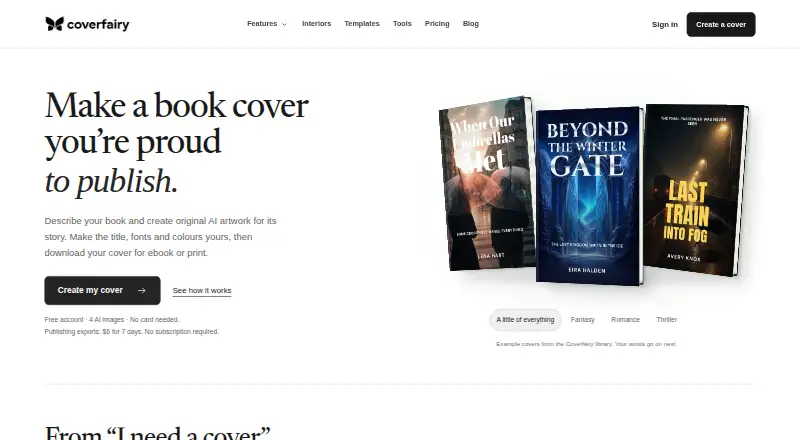
What Coverfairy is
Coverfairy is an independent book cover studio for self-publishers, with tools for cover design, manuscript formatting, print files, and launch materials. Titles, subtitles, author names, spine text, and back-cover copy remain editable typography layers. Users can generate artwork, pick suggested options, or upload artwork they own or license. Word and EPUB manuscripts can be imported and exported as EPUB, print-ready PDF, or large-print PDF. For print covers, Coverfairy calculates wraps and spines for KDP, IngramSpark, Lulu, and Barnes & Noble Press. It also creates book, e-reader, café, bookshop, and social launch mockups. Exports include ebook JPG or PNG, a 300 DPI print PDF, a 2,400 × 2,400 ACX audiobook JPG, and launch images. Each delivered generated image, variation, or edit uses one AI credit; failed generations do not. The service runs in a browser on Windows, Mac, Linux, and Chromebook. The free plan includes four one-time AI image credits and watermarked drafts. The Week Pass costs $6.00 USD once for seven days with no renewal; Monthly costs $12 a month.
Who it suits
Coverfairy suits self-publishers who need cover design, interior formatting, and launch assets in a browser. It can also help authors preparing print covers for the listed publishing services.
What it does well
- Cover text remains editable as typography.
- Imports Word and EPUB manuscripts.
- Calculates print wraps and spines for four listed services.
- Free plan includes four one-time AI image credits.
- Creates mockups and several print and digital export formats.
What to know first
- Free drafts are watermarked.
- The Week Pass costs $6.00 USD once for seven days.
- Monthly costs $12 a month.
- Each delivered generated image, variation, or edit uses one AI credit.
Limits
The free plan provides four one-time AI image credits and watermarked cover drafts. The Week Pass costs $6.00 USD once for seven days and includes 20 AI image credits; Monthly costs $12 a month and includes 40 AI image credits per billing period. Both paid plans include unlimited non-AI cover, interior and mockup exports.
Plans
| Plan | Billed and limits | Price |
|---|---|---|
| Start for free | 4 one-time AI image credits · watermarked cover drafts | Free |
| Monthly | monthly · unlimited non-AI Cover, Interior, and mockup exports · 40 AI image credits per billing period · cancel anytime | $12 a month |
| Week Pass | 7 days · unlimited non-AI Cover, Interior, and mockup exports · 20 AI image credits · no renewal | $6, paid once |
As coverfairy.com lists them, read 1 Oct 2026. The maker's own page has the final word.
Getting started
- Open coverfairy.com in a browser on Windows, Mac, Linux or Chromebook.
- Start with the free plan, which includes four one-time AI image credits and watermarked drafts.
- Choose generated or suggested artwork, or upload artwork you own or license.
- Import a Word or EPUB manuscript if you need interior formatting.
- Select the Week Pass or Monthly plan for its exports and AI credits.
- Export the cover, interior files or mockups in the available formats.
Overview
Coverfairy is a browser-based book production studio for self-publishers who want to prepare a cover, format an interior, and make launch visuals in one place. Its strongest case is for authors who need both ebook and print files; it is less compelling if you only want a standalone cover generator.
Key features
Cover design and artwork
Titles, subtitles, author names, spine text, and back-cover copy stay editable as typography rather than being baked into the artwork. That makes later wording changes more practical. Artwork can be generated, selected from suggestions, or uploaded when you own or have licensed it. Each delivered generated image, variation, or edit consumes one AI credit; failed generations do not.
Interior and print preparation
Import a Word or EPUB manuscript and export EPUB, print-ready PDF, or large-print PDF. Coverfairy calculates print wraps and spines for KDP, IngramSpark, Lulu, and Barnes & Noble Press. If KDP rejects an unchanged export because Coverfairy calculated the technical dimensions incorrectly, it will correct the file at no charge or refund the affected pass. That is a useful, specific safeguard for authors preparing print-on-demand editions.
Exports and launch materials
Exports include ebook JPG or PNG, 300 DPI print PDF, a 2,400 × 2,400 ACX audiobook JPG, and launch images. Mockups cover books, e-readers, cafés, bookshops, and social posts, giving authors several presentation formats without making mockups a separate workflow. An active pass can also provide a Canva-ready PPTX or flattened PDF for manual import into Canva; this is a download-and-import process, not a direct Canva connection.
Pricing
Start for free: free. It includes four one-time AI image credits and watermarked cover drafts. This is enough to explore the design workflow, but the watermark and small, nonrenewing credit allowance make it a preview rather than a production plan.
Week Pass: $6, paid once, billed 7 days, with no renewal. It provides unlimited non-AI cover, interior, and mockup exports plus 20 AI image credits. It suits a short, focused project: the one-time term avoids an ongoing charge, but the seven-day window means it is a poor fit for work that needs a longer schedule.
Monthly: $12 a month, billed monthly, with 40 AI image credits per billing period and unlimited non-AI cover, interior, and mockup exports. It can suit authors working across a longer production cycle or expecting more AI iterations. It can be cancelled anytime, but the credits are period-based rather than a stated one-time allocation.
Both paid options remove the free plan's watermarked-draft constraint and include non-AI exports across cover, interior, and mockup work. AI remains metered even on paid plans, so repeated generated variations and edits draw down the allowance.
Platforms
Coverfairy runs in a browser on Windows, Mac, Linux, and Chromebook. Its browser-based availability makes it usable across those desktop environments without a separate platform-specific app.
Who it's for
It is best suited to independent authors who need cover typography they can revise, manuscript formatting, print-ready files, and promotional mockups together. Authors preparing files for the named print-on-demand services benefit from calculated wraps and the KDP dimension-error remedy. Someone seeking only AI cover concepts, or needing extensive AI generation beyond the paid credit quotas, should compare more focused tools.
Pros and cons
- Pros: Editable cover wording allows copy changes without replacing the artwork.
- Pros: Cover, interior, print setup, and mockups are combined, with exports for ebook, print, large-print, and audiobook-cover use.
- Pros: The Week Pass is a one-time $6.00 USD charge with no renewal, useful for a short production sprint.
- Cons: The free plan's four one-time AI credits and watermarked drafts are not enough for unrestricted finished production.
- Cons: Paid plans still cap AI image work at 20 credits per Week Pass or 40 per monthly billing period.
- Cons: Canva preparation requires manual download and import rather than a direct handoff.
Alternatives
For a different mix of book-cover and publishing tools, browse AI Book Cover Generators or Book Layout Software.
BookCover AI is a web-based option with a free plan offering 10 credits, up to 10 covers, four basic styles, and a 1K high-resolution download; choose it when that cover-generation allowance matters more than Coverfairy's combined interior and print workflow. Cover Studio AI offers a free Draft plan with paperback, hardcover, and ebook layouts, artwork uploads, trim and spine calculations, and PDF and Kindle exports; it is a reasonable alternative when those cover-specific functions are the priority. CoverForge has a free Try it tier with unlimited previews and watermarked 1024px exports, and a $14.00 USD one-time Single cover plan; consider it for a single-cover purchase instead of Coverfairy's broader production set.
getvivix is a freemium web, Android, and iOS app with a free trial. BookCoverDesign.ai, Entangled Text AI Book Cover Generator, Publbee Cover Studio, and C2Story are also alternatives.
Verdict
Choose Coverfairy if you are self-publishing and want one browser-based workflow for editable covers, interiors, print setup, and launch mockups, especially if the KDP dimension correction promise matters. Look elsewhere if you need a larger AI-generation allowance or only want a dedicated cover-generation tool rather than the broader production workflow.
Verdict
Coverfairy combines cover work, interior formatting, print setup, and launch mockups for self-publishers. The free plan has watermarked drafts, while paid options provide more AI credits and non-AI exports.
Questions
Is there a free plan?
Yes. Start for free costs nothing and includes four one-time AI image credits and watermarked cover drafts.
How much do the paid plans cost?
The Week Pass costs $6.00 USD once, billed for seven days with no renewal. Monthly costs $12 a month and can be cancelled anytime.
Which platforms does Coverfairy support?
Coverfairy is browser-based on Windows, Mac, Linux and Chromebook.
Can it format a book interior?
Yes. Import Word or EPUB manuscripts and export EPUB, print-ready PDF or large-print PDF.
What file types can I export?
Exports include ebook JPG or PNG, 300 DPI print PDF, a 2,400 × 2,400 ACX audiobook JPG, and launch images.
How are AI credits used?
Each delivered generated image, variation or edit uses one AI credit. Failed generations are not charged.
Facts from Coverfairy's own pages
- AI metering
- Each delivered generated image, variation, or edit uses one AI credit, while failed generations are not charged. · coverfairy.com, 1 Oct 2026
- Artwork options
- Users can generate artwork, choose suggested artwork, or upload artwork they own or license. · coverfairy.com, 1 Oct 2026
- Browser platforms
- Coverfairy is browser-based on Windows, Mac, Linux, and Chromebook. · coverfairy.com, 1 Oct 2026
- Canva integration
- An active pass provides a Canva-ready PPTX or exact flattened PDF for import into Canva, with a manual download workflow. · coverfairy.com, 1 Oct 2026
- Editable design
- Titles, subtitles, author names, spine text, and back-cover copy remain editable typography layers. · coverfairy.com, 1 Oct 2026
- Export formats
- Exports include ebook JPG or PNG, 300 DPI print PDF, a 2,400 × 2,400 ACX audiobook JPG, and launch images. · coverfairy.com, 1 Oct 2026
- Interior formatting
- Users can import Word or EPUB manuscripts and export EPUB, print-ready PDF, and large-print PDF files. · coverfairy.com, 1 Oct 2026
- Mockups
- The service creates book, e-reader, café, bookshop, and social launch mockups. · coverfairy.com, 1 Oct 2026
- Print covers
- Coverfairy calculates print wraps and spines for KDP, IngramSpark, Lulu, and Barnes & Noble Press. · coverfairy.com, 1 Oct 2026
- Print guarantee
- If KDP rejects an unchanged export because Coverfairy calculated technical dimensions incorrectly, Coverfairy will correct the file without charge or refund the affected pass. · coverfairy.com, 1 Oct 2026
- Product
- Coverfairy is an independent book cover studio for self-publishers. · coverfairy.com, 1 Oct 2026
- Security and processors
- The privacy notice lists Supabase for authentication, hosting, and storage; Stripe for payments; and states that Coverfairy does not store full card numbers. · coverfairy.com, 1 Oct 2026
- Support
- Support targets are one UK business day for security reports and paid-export outages, two days for billing, refund, privacy, IP, and print cases, and five days for general questions. · coverfairy.com, 1 Oct 2026
Where Coverfairy stands on Freedom251
- AI Book Cover Generators#2 of 26
- Book Layout Software#4 of 28