Freedom251 › AI Book Cover Generators

BookCoverDesign.ai
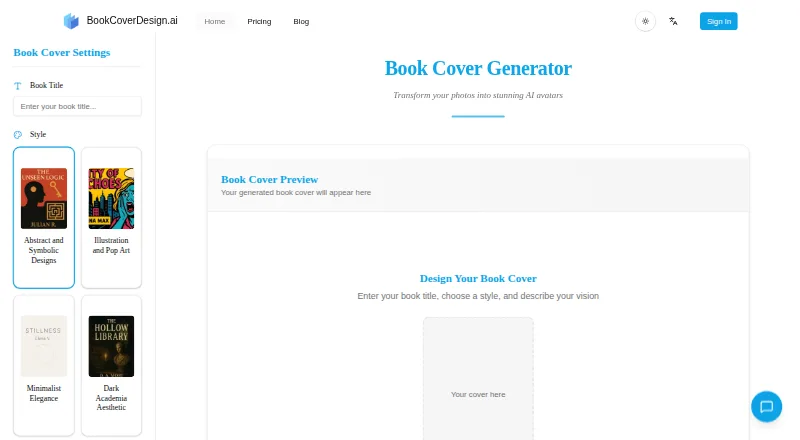
What BookCoverDesign.ai is
BookCoverDesign.ai is a web-based generator that creates book cover options from a title, genre, and description of the user's vision. It lists styles including abstract and symbolic, illustration and pop art, minimalist elegance, dark academia, retro and vintage, and handwritten and doodle. Available sizes include Kindle 1600 × 2560 px, 6×9 print 1800 × 2700 px, A5 eBook 1240 × 1748 px, and square 2000 × 2000 px. JPG is offered as a smaller-file choice and PNG as a higher-quality output. The About page describes delivery for Kindle e-books and high-resolution print files. Each high-quality image costs 5 credits. Credits from subscriptions renew monthly and do not roll over, while credit-pack credits do not expire. Generated images using subscription or purchased credit-pack credits include a full commercial license. The free plan gives 5 credits for one image, with watermarked downloads. Standard costs $9.99 a month, billed annually, and includes 500 monthly credits, fast and batch generation, watermark-free downloads, and commercial use.
Who it suits
The tool is aimed at authors, publishers, and creators, including independent authors and small publishers. It may suit users looking for cover options in digital or print dimensions and who want commercial-use rights.
What it does well
- Generates options from title, genre, and vision description.
- Lists dimensions for ebook, print, and square covers.
- Offers JPG and PNG exports.
- Commercial license included for subscription or purchased credit-pack images.
- Free plan includes 5 credits for one image.
What to know first
- Free-plan downloads are watermarked.
- Subscription credits do not carry over.
- Each high-quality image uses 5 credits.
- Service terms do not guarantee uninterrupted, secure, or error-free operation.
Limits
The Free plan provides five credits for one image and watermarked downloads. A high-quality image costs five credits. Standard includes 500 monthly credits and Pro includes 1,800; subscription credits reset monthly without carrying over.
Plans
| Plan | Billed and limits | Price |
|---|---|---|
| Free | 5 credits at registration (1 image) · standard speed · watermarked downloads · commercial use · Nano Banana model · customer support | Free |
| Pro | annual billing; $39.99 shown as the higher monthly price · 1,800 monthly credits (360 images) · priority queue · fast and batch generation · Nano Banana · priority support · watermark-free downloads · commercial use | $29.99 a month |
| Standard | annual billing; $12.99 shown as the higher monthly price · 500 monthly credits (100 images) · priority queue · fast and batch generation · Nano Banana · watermark-free downloads · commercial use | $9.99 a month |
As bookcoverdesign.ai lists them, read 15 Oct 2026. The maker's own page has the final word.
Getting started
- Open https://bookcoverdesign.ai/.
- Register to receive the Free plan’s five credits.
- Enter a book title, genre, and description of your vision.
- Choose a listed cover size and JPG or PNG format.
- Choose a paid plan if you need more monthly credits or watermark-free downloads.
BookCoverDesign.ai turns a book title, genre, and creative direction into cover concepts for authors, publishers, and other creators. It suits writers and small publishers who want to compare visual approaches for digital or print editions. Its main appeal is quick concept generation; its recurring-credit plans make best sense when you expect to produce covers regularly.
Overview
The workflow starts with a title, genre, and description of the look you want, then produces multiple cover options in minutes. That is useful for exploring directions before settling on a design, especially for independent authors who need a starting point without commissioning a finished cover immediately. The generator spans abstract and symbolic, illustration and pop art, minimalist elegance, dark academia, retro and vintage, and handwritten and doodle styles.
It supports both e-book and print projects, with presets for Kindle at 1600 × 2560 px, 6×9 print at 1800 × 2700 px, A5 eBook at 1240 × 1748 px, and square at 2000 × 2000 px. JPG is the smaller-file choice, while PNG is positioned as higher quality. These options suit common cover formats, but the described workflow focuses on generating artwork rather than preparing a complete print layout.
Key features
- Brief-based concept generation: A title, genre, and description guide the generator. Multiple options in minutes make it useful for comparing visual ideas, but the feature is geared toward ideation rather than a guaranteed, finished design.
- Print and digital dimensions: Presets include Kindle, 6×9 print, A5 eBook, and square canvases. That range covers several common destinations; readers who need other dimensions should check whether the listed choices fit their project.
- JPG and PNG exports: Choose a smaller JPG or higher-quality PNG, depending on the intended use.
- Commercial use: Images made with subscription or purchased credit-pack credits include a full commercial license. The free plan also permits commercial use, although its downloads carry a watermark.
- Credit system: One high-quality image costs 5 credits. Subscription credits reset monthly and do not roll over, while credit-pack credits do not expire—an important difference for occasional users.
Pricing
The Free plan provides 5 registration credits for one image, standard generation speed, watermarked downloads, commercial use, Nano Banana model support, and customer support. It is enough to try one concept, but the watermark makes it a poor fit for a final cover download.
Standard costs $9.99 a month, with $12.99 shown crossed out. It includes 500 monthly credits (100 images), priority queue, fast and batch generation, watermark-free downloads, and commercial use. This is the more suitable subscription for an author with recurring cover work; the monthly reset means unused credits are lost.
Pro costs $29.99 a month, with $39.99 shown crossed out. Its 1,800 monthly credits (360 images) come with the same generation and download benefits as Standard, plus priority customer support. That larger allowance is aimed at heavier production needs; for a single occasional cover, the monthly quota is unlikely to be the deciding advantage.
Both paid tiers include commercial use and watermark-free downloads. Credit packs are another option for less regular work because their credits never expire, though their prices are custom pricing. The service accepts major credit and debit cards through Stripe, PayPal, Alipay, and WeChat Pay.
Platforms
BookCoverDesign.ai runs on the web, making it accessible through a browser. The service is provided as is and does not guarantee uninterrupted, secure, or error-free operation.
Who it's for
This is a good fit for independent authors, small publishers, and creators who want to explore several cover directions quickly and export in common digital or print dimensions. It is less compelling for someone who needs a fully prepared print layout, or who generates only occasionally and would not use a monthly credit allowance before it resets.
Pros and cons
- Pro: Multiple concepts in minutes can help authors compare directions without beginning from a blank canvas.
- Pro: Kindle, 6×9 print, A5 eBook, and square presets cover a useful spread of common formats.
- Pro: Paid plans provide watermark-free commercial-use downloads, and credit-pack credits do not expire.
- Con: The free allowance is only one image, and its download is watermarked.
- Con: Subscription credits reset monthly without carryover, which penalizes sporadic use.
- Con: The workflow generates cover artwork, rather than offering a complete print-layout preparation process.
Alternatives
For other tools in this category, see AI Book Cover Generators.
- Coverfairy is another freemium option, with four one-time image credits and watermarked drafts on its free plan.
- getvivix is a freemium web, Android, and iOS option with three signup credits, a clip credit, access to all models, and watermarked free outputs.
- BookClad offers 15 free credits for Quick mode drafts, but its free plan does not include KDP export.
- BookCover AI gives free users 10 credits, up to 10 covers, four basic styles, a 1K high-resolution download, and brief-based and prompt-based generators.
- Cover Studio AI may suit readers prioritizing layout tools: its free Draft plan includes paperback, hardcover, and eBook layouts, artwork uploads, trim and spine calculations, and PDF and Kindle exports.
- CoverForge offers unlimited watermarked 1024px previews on its free plan, including all eight genres and fonts.
- Entangled Text AI Book Cover Generator is an alternative with a free plan and no free trial.
- Publbee Cover Studio is a freemium alternative available as a web app and extension.
Verdict
Choose BookCoverDesign.ai if you are an author, publisher, or creator who wants fast cover concepts in common print and e-book dimensions, with a commercial-use path to watermark-free downloads. Its strongest case is regular production on a paid plan; look elsewhere if you need full print-layout preparation or expect to use credits too irregularly to justify monthly expiry.
Verdict
BookCoverDesign.ai offers varied styles, listed cover dimensions, and JPG or PNG output, with a free credit available to start. Check the watermarked free downloads and monthly credit reset terms against your expected use.
Questions
Is BookCoverDesign.ai free?
Yes. The Free plan provides five credits upon registration, listed as enough for one image. Downloads on that plan are watermarked.
How much do paid plans cost?
Standard costs $9.99 per month, billed annually. Pro costs $29.99 per month.
Which file formats and cover sizes are available?
The generator offers JPG and PNG. Listed sizes include Kindle, 6×9 print, A5 eBook, and square dimensions.
Can I use generated covers commercially?
The pricing FAQ says images generated with subscription or purchased credit-pack credits include a full commercial license. The Free plan also lists commercial use allowed.
Do credits expire?
Subscription credits reset monthly and do not carry over. Credit-pack credits never expire.
Who is the product for?
The site describes it as intended for authors, publishers, and creators, including independent authors and small publishers.
Facts from BookCoverDesign.ai's own pages
- A5 size
- An A5 eBook preset is 1240 × 1748 pixels. · bookcoverdesign.ai, 15 Oct 2026
- API and SDKs
- The official product, pricing, about and legal pages reviewed do not present a public API or SDK. · bookcoverdesign.ai, 15 Oct 2026
- App stores
- The official site presents the product as a web interface and does not link to Apple App Store, Google Play, Chrome Web Store or Microsoft Store apps. · bookcoverdesign.ai, 15 Oct 2026
- Color control
- Users can choose a primary color theme or leave the selection random. · bookcoverdesign.ai, 15 Oct 2026
- Commercial license
- The pricing FAQ says images generated with subscription or purchased credit-pack credits come with a full commercial license. · bookcoverdesign.ai, 28 Sept 2026
- Commercial rights
- The pricing FAQ says images made with subscription or purchased credit-pack credits include a full commercial license. · bookcoverdesign.ai, 15 Oct 2026
- Company description
- The about page says the product targets authors, publishers and creators, including independent authors and small publishers. · bookcoverdesign.ai, 15 Oct 2026
- Company mission
- The maker says it aims to remove cost and complexity barriers to professional-looking covers and eventually build more author-publishing tools. · bookcoverdesign.ai, 15 Oct 2026
- Cover sizes
- The generator lists Kindle 1600 × 2560 px, 6×9 print 1800 × 2700 px, A5 eBook 1240 × 1748 px, and square 2000 × 2000 px sizes. · bookcoverdesign.ai, 28 Sept 2026
- Credit cost
- One high-quality generated image consumes five credits. · bookcoverdesign.ai, 15 Oct 2026
- Credit expiry
- Subscription credits reset monthly without rollover, while one-time credit-pack credits do not expire. · bookcoverdesign.ai, 15 Oct 2026
- Credit use
- The pricing page says one high-quality image costs 5 credits. · bookcoverdesign.ai, 28 Sept 2026
- Documentation depth
- The maker publishes a pricing FAQ and blog articles, but no separate developer documentation or help-center portal was identified on the reviewed pages. · bookcoverdesign.ai, 15 Oct 2026
- Formats
- The generator offers JPG as a smaller file and PNG as a higher-quality output. · bookcoverdesign.ai, 28 Sept 2026
- Founded
- 2025 · bookcoverdesign.ai, 28 Sept 2026
- Genre shortcuts
- Quick prompt buttons are provided for fantasy, romance, nonfiction, thriller, minimalist and historical covers. · bookcoverdesign.ai, 15 Oct 2026
- Genre styles
- The generator lists abstract and symbolic, illustration and pop art, minimalist, dark academia, retro and vintage, and handwritten or doodle styles. · bookcoverdesign.ai, 15 Oct 2026
- High-resolution output
- The site describes its files as high-resolution and ready for print and digital distribution. · bookcoverdesign.ai, 15 Oct 2026
- Independent directory listing
- Awesome Indie places BookCoverDesign.ai in its product-exploration catalog under AI Book Cover Design. · awesomeindie.com, 15 Oct 2026
- Independent listing
- Awesome Indie lists AI Book Cover Design as a product named BookCoverDesign.ai with a displayed score of 66 and zero votes. · awesomeindie.com, 15 Oct 2026
- Independent review availability
- The independent listing shows no user votes, so it provides no substantive reviewer praise or complaint pattern. · awesomeindie.com, 15 Oct 2026
- Integrations
- The official pages reviewed list payment providers but do not describe publishing-platform integrations. · bookcoverdesign.ai, 15 Oct 2026
- Intended users
- The About page describes the product as intended for authors, publishers, and creators, including independent authors and small publishers. · bookcoverdesign.ai, 28 Sept 2026
- Kindle size
- A Kindle-cover preset is 1600 × 2560 pixels. · bookcoverdesign.ai, 15 Oct 2026
Where BookCoverDesign.ai stands on Freedom251
- AI Book Cover Generators#6 of 26