Freedom251 › AI Book Cover Generators
CoverForge
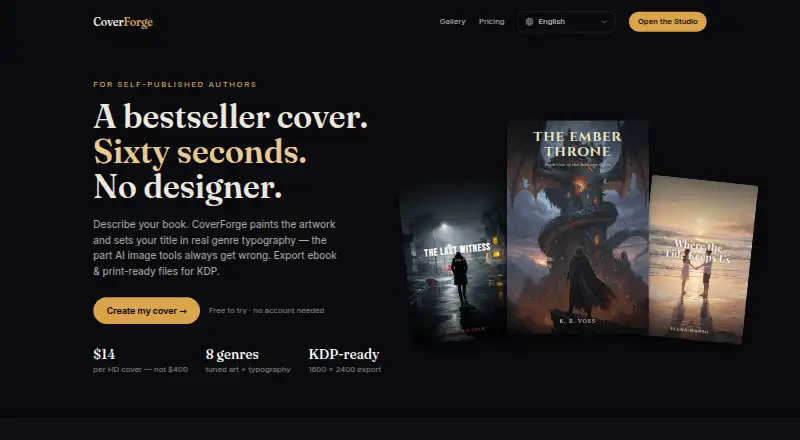
What CoverForge is
CoverForge is a web-based AI book-cover generator for self-published authors preparing ebook or print files. Its workflow asks you to choose a genre, describe a scene in one sentence, and select a mood. The image model creates original artwork in about 20 seconds, and genre-specific art direction and font pairings arrange the title and author name. Listed genres include fantasy, romance, thriller, science fiction, horror, cozy mystery, literary fiction, and non-fiction.
The free Try it plan costs nothing and includes unlimited previews and a watermarked 1024px export. A one-time Single cover export costs 14.00 USD and provides a 1600 × 2400 PNG; the site says it meets ebook-cover requirements for Amazon KDP, Kobo Writing Life, Apple Books, Google Play Books, and Draft2Digital. For $29, paid once, Print + eBook adds a wrap PDF with bleed and an ISBN barcode zone. Paid exports include a commercial license, and artwork can be regenerated before export without charge.
Who it suits
CoverForge suits self-published authors who need ebook covers or paperback wraps and want genre-specific artwork and typography. Its listed genres range from fiction categories to non-fiction.
What it does well
- Creates original artwork in about 20 seconds
- Unlimited artwork regeneration before export
- Paid exports include a full commercial license
- Print pack includes a wrap PDF with bleed
What to know first
- Free export is watermarked and 1024px
- Print + eBook pack costs $29, paid once
Limits
The free Try it plan provides unlimited previews and a watermarked 1024px export. A 1600 × 2400 HD export and full commercial license come with the one-time Single cover export at $14, paid once; the paperback wrap PDF is included in the one-time $29, paid once Print + eBook pack.
Plans
| Plan | Billed and limits | Price |
|---|---|---|
| Try it | Unlimited design previews · watermarked 1024px export · all 8 genres & fonts | Free |
| Single cover | 1600 × 2400 HD export · full commercial license · KDP/Kobo/IngramSpark ready · unlimited regenerations | $14, paid once |
| Print + eBook pack | Single-cover features · paperback wrap · spine width from page count · print-ready PDF with bleed · ISBN barcode zone | $29, paid once |
As coverforge.studio lists them, read 30 Sept 2026. The maker's own page has the final word.
Getting started
- Visit the CoverForge website.
- Choose a genre from the eight listed options.
- Write one sentence describing the scene and choose a mood.
- Preview the generated artwork and regenerate it as desired.
- Choose the free Try it plan, the Single cover export, or the Print + eBook pack.
- Export a PNG for an ebook cover or PDF for the print wrap, depending on the plan.
CoverForge is an AI cover-making service for independent authors who need a finished ebook image or a KDP paperback wrap. It suits writers who prefer guided, genre-specific design over a blank canvas. The strongest case is a single book or occasional release where unlimited previews and one-time export fees matter more than broad customization.
Overview
The process asks for three decisions: a genre, a one-sentence scene description, and a mood. A production image model then creates original artwork in roughly 20 seconds. CoverForge applies a matching art direction and font pairing for the chosen genre, placing the title and author name into a composed cover rather than leaving typography entirely to the user.
Eight genres are supported: fantasy, romance, thriller, science fiction, horror, cozy mystery, literary fiction, and non-fiction. That range covers many commercial categories, but authors outside those labels have less control over the visual starting point. Artwork can be regenerated as often as needed before export, so experimentation does not consume a paid download.
Key features
The ebook file is a 1600 × 2400 pixel PNG in a 2:3 ratio, matching Amazon KDP's recommended ebook-cover specification. CoverForge also states that this PNG meets requirements for Kobo Writing Life, Apple Books, Google Play Books, and Draft2Digital, useful for authors distributing the same edition across several stores.
The Print pack produces one PDF containing the back cover, spine, and front cover. It includes bleed and an ISBN barcode zone, making it substantially more useful for a printer than an ebook image alone. Its spine calculator uses Amazon thickness formulas for white and cream paper and derives spine width from page count and paper type; authors still need accurate book specifications for the calculation to be meaningful.
Paid exports carry a full commercial license. The generated artwork is exclusive to the customer and is not shared with other users, an important distinction for authors selling covers commercially. PNG and PDF exports cover the stated ebook and print workflows, but the guided genre system is not intended to replace a full layout application.
Pricing
Try it — free: unlimited design previews, all eight genres and fonts, and a watermarked 1024px export. This is enough to judge the visual direction, but the watermark and lower resolution rule it out for a final publication file.
Single cover — $14, paid once: a 1600 × 2400 HD export, full commercial license, KDP/Kobo/IngramSpark-ready output, and unlimited regenerations. It fits an ebook-first release or a paperback author who already has another way to prepare the wrap. The one-time charge avoids a recurring subscription.
Print + eBook pack — $29, paid once: everything in Single cover, plus a paperback wrap, page-count spine sizing, print-ready PDF with bleed, and an ISBN barcode zone. Choose it when the same title needs both digital and physical editions; the extra fee buys production-oriented packaging rather than more image-generation capacity.
A free trial path exists through the preview workflow, while paid plans charge per export rather than per regeneration. Paid rights apply to paid exports, so the free watermarked file is best treated as a draft.
Platforms
CoverForge runs on the web. Its stated exports target KDP and, for the ebook PNG, Kobo Writing Life, Apple Books, and Google Play Books; the Single cover plan also names IngramSpark readiness.
Who it's for
It is a good fit for self-published authors who can express a concept briefly, want genre-consistent typography, and are producing one or a few titles. The Print + eBook pack is particularly practical for writers who need a paperback wrap without calculating bleed and spine dimensions themselves. It is less suitable for teams needing multiple seats, authors requiring genres beyond the eight listed, or designers seeking unrestricted art direction and detailed manual editing.
Pros and cons
Pros
- Unlimited pre-export regeneration lets authors explore concepts without paying for each attempt.
- Genre-specific art direction and font pairing produce a coherent starting layout from a short brief.
- Paid exports include commercial rights and customer-exclusive artwork.
- The print pack combines wrap, bleed, spine sizing, and barcode space in one PDF.
- One-time pricing suits occasional releases better than a continuing subscription.
Cons
- The free export is watermarked and only 1024px, so it cannot serve as a final cover.
- Only eight genres are offered, which may constrain unusual or cross-genre projects.
- The workflow is guided rather than a general design editor, limiting manual creative control.
- Authors must choose the correct paid pack; ebook-only export does not include the paperback wrap.
Alternatives
AI Book Cover Generators is the broader comparison for readers weighing several AI cover tools.
Coverfairy is worth considering if you need Linux, macOS, Windows, or web access, or prefer a $6.00 USD once-off week pass; its free tier provides four one-time AI image credits and watermarked drafts.
getvivix suits users who want Android or iOS alongside the web and a model-oriented free tier with signup and clip credits, though outputs are watermarked.
BookClad is a better fit for monthly-volume work: its $9 a month Starter plan includes 100 credits and all quality modes, while the free tier has no KDP export.
BookCover AI offers a free allowance of 10 credits and up to 10 covers with basic styles, making it an alternative for users comparing credit-based generation.
BookCoverDesign.ai is aimed at subscribers who want 500 monthly credits, batch generation, and watermark-free downloads for $9.99 a month.
Cover Studio AI is preferable when a free draft plan with paperback, hardcover, and ebook layouts, trim and spine calculations, and PDF and Kindle exports is the priority.
Entangled Text AI Book Cover Generator is another web freemium option, but it does not offer a free trial.
Publbee Cover Studio is an alternative for web or extension use with a free plan and free trial.
Verdict
Choose CoverForge if you are an independent author who wants a genre-led cover, unlimited concept iterations, and a commercially licensed file for a one-time fee. Its $29.00 USD Print + eBook pack is the clearest value for authors releasing both formats. Look elsewhere if you need extensive manual design control, a different genre than the eight supported, or a workflow built around mobile apps, recurring credit plans, or team production.
Verdict
CoverForge offers a free preview path and paid ebook or print exports, with commercial rights included in paid exports. Check which export format and plan you need before choosing.
Questions
Does CoverForge have a free plan?
Yes. Try it costs nothing and includes unlimited design previews and a watermarked 1024px export.
How much do the paid plans cost?
Single cover costs $14, paid once. Print + eBook pack costs $29, paid once.
What platforms and file formats does it support?
CoverForge is listed for web. Export formats are PNG and PDF.
What does the Single cover export include?
It includes a 1600 × 2400 HD export, full commercial license, KDP/Kobo/IngramSpark readiness, and unlimited regenerations.
What does the Print + eBook pack add?
It adds a paperback wrap, spine width based on page count, a print-ready PDF with bleed, and an ISBN barcode zone.
Can I use the artwork commercially?
Paid exports include a full commercial license. The artwork is generated exclusively for the customer and is not shared with other users.
Facts from CoverForge's own pages
- Artwork
- A production image model creates original, royalty-free cover artwork in about 20 seconds. · coverforge.studio, 30 Sept 2026
- Ebook export
- CoverForge exports a 1600 × 2400 pixel, 2:3 PNG that meets the recommended Amazon KDP ebook-cover specification. · coverforge.studio, 30 Sept 2026
- Genres
- The site lists fantasy, romance, thriller, science fiction, horror, cozy mystery, literary fiction, and non-fiction. · coverforge.studio, 30 Sept 2026
- Paperback wraps
- The Print pack creates a single PDF containing back cover, spine, and front cover, with bleed and an ISBN barcode zone. · coverforge.studio, 30 Sept 2026
- Product
- CoverForge is an AI book-cover generator for self-published authors that exports ebook and print-ready files for KDP. · coverforge.studio, 30 Sept 2026
- Regeneration
- Users can regenerate artwork as many times as they like before exporting, and only the export is paid. · coverforge.studio, 30 Sept 2026
- Rights
- Paid exports include a full commercial license, and the artwork is generated exclusively for the customer and is not shared with other users. · coverforge.studio, 30 Sept 2026
- Spine calculation
- The spine calculator uses Amazon thickness formulas for white and cream paper and sizes the spine from page count and paper type. · coverforge.studio, 30 Sept 2026
- Store compatibility
- The site says its PNG also meets requirements for Kobo Writing Life, Apple Books, Google Play Books, and Draft2Digital. · coverforge.studio, 30 Sept 2026
- Support
- The site lists [email protected] as its contact email. · coverforge.studio, 30 Sept 2026
- Typography
- Each genre includes its own art direction and professional font pairing, with the title and author name laid out in curated genre fonts. · coverforge.studio, 30 Sept 2026
- Workflow
- Users pick a genre, write one sentence describing the scene, and choose a mood. · coverforge.studio, 30 Sept 2026
Where CoverForge stands on Freedom251
- AI Book Cover Generators#10 of 26