Freedom251 › Virtual Study Room Apps
Focusmate
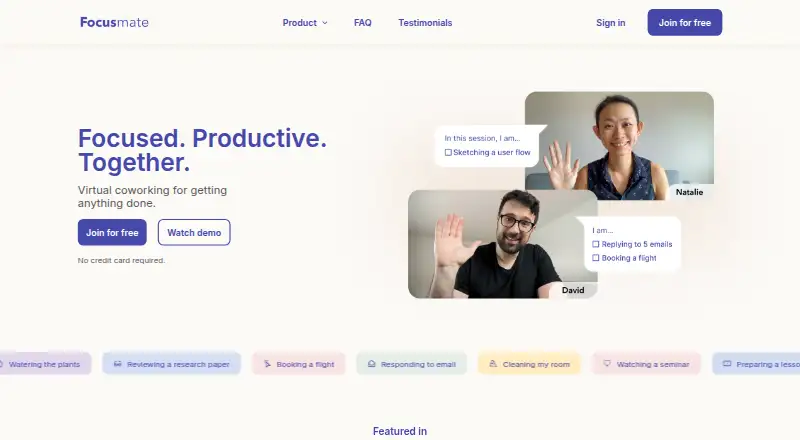
What Focusmate is
Focusmate pairs people for live virtual coworking sessions with an accountability partner. Sessions run 25, 50, or 75 minutes, and members can favorite partners for future sessions. Task modes include Desk Mode, Moving, and Anything; Quiet Mode supports working without a microphone, including in shared offices, cafes, or libraries. Video add-ons include virtual backgrounds, screensharing, and video effects. Focusmate runs in a browser, where users can book and join without installing software. Calendar invites work with most major calendars, including Apple, Google, and Outlook; listed integrations include Google Calendar, Beeminder, and a Developer API. The Free plan costs nothing and includes 3 sessions per week, with no credit card required. Plus costs $8 a year when billed annually or $12 a month when billed monthly; both offer unlimited sessions. Business is for enterprises, small businesses, and learning communities. An internet-connected device and camera are required, while a microphone is preferred. Sessions are not recorded, and users can report a session or partner.
Who it suits
Focusmate suits students, freelancers, homemakers, solopreneurs, remote workers, and office workers who want structured coworking with an accountability partner. Its Quiet Mode may suit people working where microphone use is impractical.
What it does well
- Sessions are available in three lengths
- Members can favorite partners
- Quiet Mode works without a microphone
- Free plan includes 3 sessions per week
What to know first
- A camera and internet-connected device are required
- There is no mobile app
- Free sessions are limited to 3 per week
Limits
The Free plan provides 3 sessions per week. Plus plans include unlimited sessions: $8 a year billed annually or $12 a month billed monthly.
Plans
| Plan | Billed and limits | Price |
|---|---|---|
| Free | 3 sessions per week · no credit card required | Free |
| Plus (monthly billing) | $12/mo. billed monthly · Unlimited sessions | $12 a month |
| Plus (annual billing) | $8/mo. billed annually · Unlimited sessions | $8 a month |
| Business | For enterprises, small businesses, learning communities, and more | On request |
As focusmate.com lists them, read 5 Oct 2026. The maker's own page has the final word.
Getting started
- Open Focusmate in a browser and create an account.
- Use the website to book a 25, 50, or 75 minute session.
- Choose a task mode such as Desk Mode, Moving, or Anything.
- Join using an internet-connected device and camera; a microphone is preferred.
- Add calendar invites to a supported calendar, or add the site to an Android or iOS home screen for app-like access.
Overview
Focusmate is a virtual coworking service that pairs people for timed work sessions with an accountability partner. It is best suited to people who focus better with another person present, especially students and independent or remote workers. Flexible session lengths and repeat-partner matching are useful strengths, but regular users will need a paid plan once three weekly sessions are not enough.
Key features
Users can book 25-, 50- or 75-minute sessions, making it possible to choose a short work block or a longer stretch. Favoriting partners and choosing to work with them again can add consistency; it is a meaningful advantage for people who value a familiar working rhythm, but less useful to anyone seeking a purely solo timer or an anonymous room.
Desk Mode, Moving and Anything accommodate different kinds of tasks. Quiet Mode allows a session without a microphone, which helps in a library, cafe or shared office. It does not remove the camera requirement: users need an internet-connected device and camera, with a microphone preferred. That makes Focusmate a poor fit for people who cannot or do not want to appear on camera.
Video add-ons include virtual backgrounds, screensharing and effects. Calendar invites work with major calendars such as Apple, Google and Outlook; integrations include Google Calendar, Beeminder and a Developer API. These options can fit the service into an existing schedule or workflow, though they are secondary to its central promise of live accountability. Focusmate also has live coworking and private rooms, video presence, a focus timer and accountability tools.
Sessions run in a browser, and users can book and join through the website without installing software. There is no mobile app; Android and iOS users can add the site to a home screen for an app-like experience. That is workable for occasional mobile access, but less convenient than a native app. Sessions are not recorded, account deletion removes data according to GDPR standards, and users can report a session or partner if concerned about activity.
Pricing
The Free plan costs nothing and allows three sessions per week, with no credit card required. It is a sensible way to try the partner-based format or use it occasionally, but the cap is restrictive for anyone relying on daily coworking.
Plus offers unlimited sessions for $8 a year (billed $8/mo. billed annually) with annual billing, or $12 a month (billed $12/mo. billed monthly) with monthly billing. The annual option costs less per month but commits the user to annual billing; monthly billing costs more and avoids that longer billing commitment. Either is the relevant upgrade for frequent users who would otherwise hit the free weekly limit.
Business has custom pricing and is aimed at enterprises, small businesses and learning communities. It is the plan to consider for an organization rather than an individual, but it does not have a published price to compare against Plus.
Platforms
Focusmate supports web, Android, iOS and API. Its browser-based booking and sessions mean desktop users need no separate installation. On phones and tablets, the service is accessed in a browser or through a home-screen shortcut, not a dedicated mobile app.
Who it's for
Focusmate suits students, freelancers, homemakers, solopreneurs, remote workers and office workers who benefit from a scheduled session and another person's presence. It is particularly compelling when accountability and the option to reconnect with preferred partners matter more than working entirely alone. It is not the right choice for camera-free sessions, or for users who want a native mobile app.
Pros and cons
- Pros: Three session lengths give users room to match the session to the task.
- Pros: Partner favorites and repeat sessions can support a more consistent routine than an open, anonymous room.
- Pros: Quiet Mode removes the need for a microphone, while browser access avoids a software installation.
- Cons: A camera and internet-connected device are required, which rules out camera-free use.
- Cons: The free plan's three-session weekly cap is limiting for a daily habit.
- Cons: Mobile access is browser-based or via a home-screen shortcut rather than a native app.
Alternatives
For a broader directory of options, see Virtual Study Room Apps.
Choose Cosmos Video if you need video calls for up to four people in a space, file uploads, or recording retention; its free plan allows four online users and retains recordings for seven days. Choose FLOWN if community sessions are a better fit: its free plan includes four sessions per month, all on Fridays, and access to private community sessions.
Kaizen may suit users who want task and habit tracking alongside focus rooms; its free plan includes seven tasks, five habits, app blocking for three apps and 30 days of statistics. StudyStream is another option for people who prefer focus rooms, with a free plan limited to one hour daily.
WhumbleZone is a free alternative with core features and no subscription or hidden paywall; its terms state there is no uptime SLA. ClassLab offers a free student account with communities, chat, study rooms, focus tracking, mind maps and an AI study assistant. Momo offers unlimited tasks in The Pile and timed sessions on its free plan, while paid Friend sessions are available for users who want that option.
Verdict
Choose Focusmate if another person's live presence is the accountability cue that helps you get work done, and you want session lengths and repeat partners to shape that routine. Its three-session free tier is useful for occasional use, while unlimited sessions make Plus the practical choice for regular users. Look elsewhere if you need camera-free work, a native mobile app, or a free plan that supports daily sessions.
Verdict
Focusmate offers live coworking with flexible session lengths and a free weekly option. Users need a camera and internet-connected device, and mobile use is through a browser or home-screen shortcut rather than an app.
Questions
Is Focusmate free?
Yes. The Free plan costs nothing, includes 3 sessions per week, and does not require a credit card.
How much does Plus cost?
Plus costs $8 a year billed annually, or $12 a month billed monthly. Both options include unlimited sessions.
Does Focusmate have a mobile app?
No. Focusmate can be added to an Android or iOS home screen for an app-like experience.
What devices do I need for a session?
Focusmate lists an internet-connected device and camera as requirements. A microphone is preferred.
Which calendars and integrations are listed?
Calendar invites are supported on most major calendars, including Apple, Google, and Outlook. Listed integrations include Google Calendar, Beeminder, and a Developer API.
Are Focusmate sessions recorded?
Focusmate says sessions are not recorded.
Facts from Focusmate's own pages
- Browser use
- Focusmate runs in a browser and lets users book and join sessions on its website without installing another app or software. · support.focusmate.com, 5 Oct 2026
- Calendar support
- Calendar invites are supported on most major calendars, including Apple, Google, and Outlook. · focusmate.com, 5 Oct 2026
- Camera requirement
- The Help Center lists an internet-connected device and camera as requirements, with a microphone preferred. · support.focusmate.com, 5 Oct 2026
- Founded
- 2015 · focusmate.com, 28 Sept 2026
- Integrations
- The feature page lists Google Calendar, Beeminder, and a Developer API as integrations. · focusmate.com, 5 Oct 2026
- Mobile availability
- The Help Center says there is no mobile app, but Focusmate can be added to an Android or iOS home screen for an app-like experience. · support.focusmate.com, 5 Oct 2026
- Partner matching
- Members can favorite partners and choose who they work with again. · focusmate.com, 5 Oct 2026
- Quiet Mode
- Quiet Mode supports focusing without using a microphone, including in libraries, cafes, and shared offices. · focusmate.com, 5 Oct 2026
- Security and privacy
- Focusmate says sessions are not recorded and account deletion removes data according to GDPR standards. · support.focusmate.com, 5 Oct 2026
- Session lengths
- Sessions are available in 25, 50, and 75 minute lengths. · focusmate.com, 5 Oct 2026
- Support and safety
- Users can report a session or partner if they have concerns about their activity. · support.focusmate.com, 5 Oct 2026
- Task modes
- Task modes include Desk Mode, Moving, and Anything. · focusmate.com, 5 Oct 2026
- Video tools
- Video add-ons include virtual backgrounds, screensharing, and video effects. · focusmate.com, 5 Oct 2026
- What it does
- Focusmate pairs people for live virtual coworking sessions with an accountability partner. · focusmate.com, 5 Oct 2026
- Who it is for
- Focusmate describes its audience as students, freelancers, homemakers, solopreneurs, remote workers, and office workers. · focusmate.com, 5 Oct 2026
Where Focusmate stands on Freedom251
- Virtual Study Room Apps#7 of 37
- Focus Tools#4 of 19