Freedom251 › Virtual Study Room Apps

Cosmos Video
What Cosmos Video is
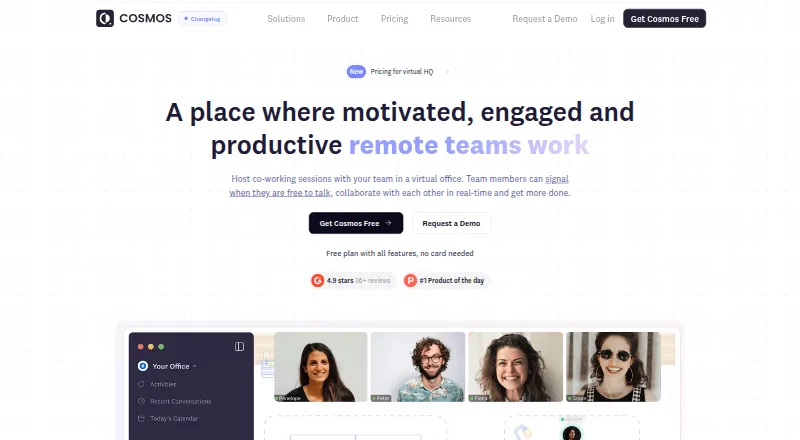
Cosmos Video is an always-on virtual office for remote teams, combining video presence, spatial conversation and team messaging. People use avatars to move closer to teammates and join conversations, then step away to end them. Teams can set up personal, meeting, focus and game rooms, along with spatial networking areas. The product also includes live coworking rooms, private rooms, a focus timer and accountability tools.
Messaging covers public and private channels, direct messages, persistent meeting chat, threads and file sharing. Cosmos Replay records meetings and creates AI-powered transcripts and summaries. Google Calendar, Outlook, Slack and Spotify are listed as integrations; Miro, Figma and Google Docs are embedded apps. Game rooms include 12 built-in multiplayer games.
The Free plan supports up to four online users in a space, calls for up to four people, uploads up to 25 MB and seven-day recording retention. The site says the plan is available without a credit card. Premium supports up to 150 online users and calls of up to 150 participants; Enterprise supports up to 500 online users and calls of up to 500 people. Enterprise also lists SSO, dedicated video servers and a support SLA. Cosmos lists Android, iOS, macOS, Windows, web and extension availability. Cosmos Video Limited is UK-based; its site states GDPR and SOC II compliance and AES-256 encryption for video calls.
Who it suits
Cosmos Video suits remote teams that want ongoing video presence, team chat and rooms for meetings, focus or coworking. Its Free plan is sized for spaces of up to four online users, while larger teams can consider Premium or Enterprise.
What it does well
- Avatar proximity lets teammates join or leave conversations by moving.
- Rooms include meeting, focus, game and personal spaces.
- Replay records meetings and creates AI-powered transcripts and summaries.
- Twelve multiplayer games are built into game rooms.
- Integrations include Google Calendar, Outlook, Slack and Spotify.
What to know first
- The Free plan allows up to four online users in a space.
- Free calls are limited to four people.
- Free uploads are limited to 25 MB.
- Free recordings are retained for seven days.
Limits
The Free plan supports four online users in a space and calls of up to four people, with 25 MB uploads and seven-day recording retention. Premium supports up to 150 online users and call participants; Enterprise supports up to 500.
Plans
| Plan | Billed and limits | Price |
|---|---|---|
| Free | 4 online users in a space · calls up to 4 people · 25 MB uploads · 7-day recording retention | Free |
| Recording storage add-on | 15 USD / month for 50 hrs · 50 hours additional recording storage | $15 a month |
| Premium | Billed annually; the page does not show a legible price. · Up to 150 online users · calls up to 150 participants · 150 MB uploads · 3 hours recording storage per user × space capacity | On request |
| Cosmos Enterprise | Contact sales · Up to 500 online users · calls up to 500 people · SSO · dedicated video servers · support SLA | On request |
As cosmos.video lists them, read 28 Sept 2026. The maker's own page has the final word.
Getting started
- Visit the Cosmos Video website.
- Start with the Free plan, which is available without a credit card, or review Premium and Enterprise.
- Open Cosmos on the web or use its Android, iOS, macOS, Windows or extension version.
- Create or join a space and use its personal, meeting, focus or game rooms.
- Use the listed integrations or embedded apps as needed.
Overview
Cosmos Video brings a remote team into a shared virtual office, with spatial video, chat and rooms for different kinds of work. It suits teams that want informal, visible coworker presence as much as scheduled meetings. Its strongest case is that blend of rooms and proximity video; the main trade-off is that useful capacity and recording storage depend on the plan.
Key features
Rooms and proximity video
People move their avatars closer to join a conversation and step away to leave, making brief exchanges less dependent on arranging a call. Personal, meeting and focus rooms cover work settings, while game rooms and spatial networking areas offer more social spaces. The game rooms include 12 multiplayer games. Although the stated room capacity is 150 users, plan limits differ: Free permits four online users, while Enterprise goes up to 500.
Chat and meeting records
Public and private channels, direct messages, threads, file sharing and persistent meeting chat keep team communication alongside the virtual office. Cosmos Replay records meetings and adds AI-powered transcription and summaries, useful for revisiting discussions. Free recordings are retained for seven days; Premium includes three hours of storage per user multiplied by space capacity. Teams needing more can buy 50 additional hours for $15 a month.
Integrations and security
Named integrations include Google Calendar, Outlook, Slack and Spotify; Miro, Figma and Google Docs are embedded apps. That provides links to familiar work tools, though the selection given does not establish support for other services. Cosmos says it is GDPR and SOC II compliant and uses AES-256 encryption for video calls. Its Security Centre has GDPR and SOC 2 compliance sections and offers security documentation.
Pricing
Cosmos uses a freemium model, with a 14-day trial. The free plan costs nothing and requires no credit card, but it caps a space at four concurrent users and calls at four people, allows 25 MB uploads and retains recordings for seven days. It is a practical starting point for a small team, not a roomy free tier for a growing office.
Premium is billed annually, with custom pricing. It raises the limits to 150 online users and 150 call participants, allows 150 MB uploads and includes three hours of recording storage per user multiplied by space capacity. This is the relevant step up for larger teams that need more room and recording capacity, but the annual billing term and unpublished price make cost comparison difficult.
Cosmos Enterprise has custom pricing and is billed through contact with sales. It supports up to 500 online users and call participants, and adds SSO, secure access, a custom URL and floor plan, dedicated video servers, an uptime SLA, VIP onboarding and migration. The package is aimed at organizations that need scale and managed security or support, rather than teams seeking a low-cost upgrade. Human support response times are seven days for Free, 24 hours for Premium and six hours for Enterprise.
The separate Recording storage add-on costs $15 a month for 50 hours of additional storage. It can help a team that otherwise fits Free, but it does not increase that plan’s user, call or upload caps.
Platforms
Cosmos is available on Android, iOS, macOS, Windows and the web, as well as an extension. Its mobile apps make it accessible beyond desktop, though the listed room capacity and plan limits still govern participation.
Who it's for
Cosmos is best for distributed teams that want an always-present shared workspace, including rooms for focused work and informal contact. Focus timers and accountability tools may also suit coworking groups. Teams primarily seeking a simple one-to-one focus session, or unwilling to depend on a paid tier for more than four participants, should compare alternatives.
Pros and cons
- Pro: Proximity video and several room types support spontaneous conversation without making every interaction a scheduled meeting.
- Pro: Chat, meeting recordings, transcripts and summaries keep collaboration and follow-up in one product.
- Pro: Enterprise offers dedicated video servers, SSO and a six-hour human support response time for organizations with stricter operational needs.
- Con: Free limits both a space and calls to four people, so it is restrictive for teams beyond a small group.
- Con: Premium’s annual billing and custom pricing leave teams without a published figure for budgeting.
- Con: Free uploads are capped at 25 MB, and recordings last only seven days.
Alternatives
For a lighter focus-room approach, Kaizen has a free plan with seven tasks, five habits, blocking for three apps, Focus Room access and 30 days of statistics; its Premium Monthly plan is 3.99. Focusmate is a better fit for session-based accountability: Free allows three sessions per week, while Plus offers unlimited sessions for $8 a year, billed at $8/mo. billed annually. For community study sessions, FLOWN offers four free sessions per month, all on Fridays, and lets free users attend private community sessions but not host public ones.
StudyStream provides focus rooms with a one-hour daily free limit; Basic Monthly is $3.99 a month and Premium Monthly is $6.99 a month. Those limits may suit someone who needs a daily study room rather than an always-on team office. WhumbleZone is free, with core features and no subscription or hidden paywall, but its terms state there is no uptime SLA. ClassLab offers a free student account with communities, chat, study rooms, focus tracking, mind maps and an AI study assistant.
On mobile, Momo has a free plan with unlimited tasks in The Pile, timed sessions and task and history syncing across devices; Friend sessions cost $9.99 a month. Pomoroom has a free version and a monthly Premium plan at $2.99 a month. Browse the Virtual Study Room Apps list for more options.
Verdict
Choose Cosmos Video if your team wants a shared, spatial office that combines informal video presence, multiple room types and persistent communication. The free tier is a useful small-team entry point, but its four-person ceiling, brief recording retention and small upload allowance make a paid plan necessary as the team grows. Look elsewhere if you need a straightforward focus-session tool or require transparent Premium pricing before committing.
Verdict
Choose Cosmos Video if your remote team wants an always-on office with spatial video, messaging and dedicated room types. The Free plan has a four-user space and call limit, while larger teams can look to Premium or Enterprise. Enterprise adds SSO, dedicated video servers and a support SLA.
Questions
Is Cosmos Video free?
Yes. The Free plan costs nothing and is available without a credit card.
What does the Free plan include?
It supports four online users in a space, calls for up to four people, 25 MB uploads and seven-day recording retention.
Which platforms are available?
Cosmos lists Android, extension, iOS, macOS, web and Windows.
What integrations and embedded apps does it list?
Google Calendar, Outlook, Slack and Spotify are integrations. Miro, Figma and Google Docs are embedded apps.
What does Enterprise include?
Enterprise lists a custom URL and floor plan, SSO, secure access, an uptime SLA, VIP onboarding and migration, and dedicated video servers.
What security details does Cosmos provide?
The site states GDPR and SOC II compliance and AES-256 encryption for video calls. It also offers a Security Centre with compliance sections and access to security documentation.
Facts from Cosmos Video's own pages
- Company
- The website identifies the maker as Cosmos Video Limited and describes it as UK-based. · cosmos.video, 28 Sept 2026
- Enterprise
- The Enterprise plan lists custom URL and floor plan, SSO, secure access, an uptime SLA, VIP onboarding and migration, and dedicated video servers. · cosmos.video, 28 Sept 2026
- Free plan limit
- The free plan supports up to four concurrent users and the site says it is available without a credit card. · cosmos.video, 28 Sept 2026
- Games
- Game rooms include 12 built-in multiplayer games. · cosmos.video, 28 Sept 2026
- Headquarters
- London, United Kingdom · cosmos.video, 28 Sept 2026
- Integrations
- The features page names Google Calendar, Outlook, Slack and Spotify as integrations, and Miro, Figma and Google Docs as embedded apps. · cosmos.video, 28 Sept 2026
- Messaging
- Team messaging includes public and private channels, direct messages, persistent meeting chat, threads and file sharing. · cosmos.video, 28 Sept 2026
- Product
- Cosmos is an always-on virtual office for remote teams with presence, spatial video and team chat. · cosmos.video, 28 Sept 2026
- Proximity video
- People can move their avatars closer to join conversations and step away to end them. · cosmos.video, 28 Sept 2026
- Recording
- Cosmos Replay records meetings and provides AI-powered transcription and summaries. · cosmos.video, 28 Sept 2026
- Rooms
- The product offers personal rooms, meeting rooms, focus rooms, game rooms and spatial networking areas. · cosmos.video, 28 Sept 2026
- Security
- The pricing FAQ says Cosmos is GDPR and SOC II compliant and uses AES-256 encryption for video calls. · cosmos.video, 28 Sept 2026
- Security review
- Cosmos provides a Security Centre with GDPR and SOC 2 compliance sections and offers access to security documentation. · security.cosmos.video, 28 Sept 2026
- Support
- The pricing comparison lists human support response times of 7 days for Free, 24 hours for Premium and 6 hours for Enterprise. · cosmos.video, 28 Sept 2026
Where Cosmos Video stands on Freedom251
- Virtual Study Room Apps#2 of 37