Freedom251 › Virtual Study Room Apps
WhumbleZone
What WhumbleZone is
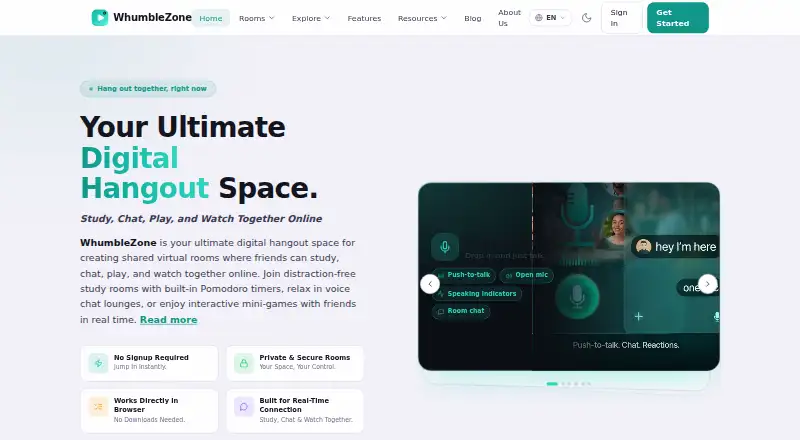
WhumbleZone is a free browser-based platform for shared watch parties, study rooms, voice audio rooms, multiplayer games, and public mood rooms. It synchronizes YouTube videos and playlists, Twitch live streams and VOD, and Spotify playback for participants in the same room. People can join through a shared link without making an account or installing an app or browser extension. Users can create private rooms or discover public ones, and floating emoji reactions appear over video for room participants simultaneously. Netflix, Disney+, and Prime Video are not supported; the About page says they require platform-specific extensions. The listed platforms are Android, iOS, and web, although the mobile app field says no. The service names long-distance couples, friend groups, students, families, remote teams, and content creators among its audiences. Guest room use does not collect personally identifiable information and uses a temporary session identifier. Room metadata is removed within 24 hours after a session ends, chat messages are not permanently stored, and server logs may remain for up to 90 days. The free tier has no guaranteed uptime SLA.
Who it suits
It may suit friend groups, couples, students, families, remote teams, and content creators who want shared rooms for synchronized media or other group activities. Guests can join by link without an account or installation.
What it does well
- Synchronizes YouTube, Twitch, and Spotify playback.
- Participants can join shared links without an account or installation.
- Offers private rooms and discoverable public rooms.
- Guest use does not collect personally identifiable information.
- Room metadata is removed within 24 hours after sessions end.
What to know first
- Netflix, Disney+, and Prime Video are not supported.
- The free tier has no guaranteed uptime SLA.
- Chat messages are not permanently stored.
- Server logs may be retained for up to 90 days.
Limits
The free tier has no guaranteed uptime SLA. Netflix, Disney+, and Prime Video are unsupported.
Plans
| Plan | Billed and limits | Price |
|---|---|---|
| Free | Core features free; no subscription or hidden paywall; terms state no uptime SLA | Free |
As whumblezone.com lists them, read 4 Oct 2026. The maker's own page has the final word.
Getting started
- Visit the WhumbleZone website in a browser.
- Create a private room or discover a public room.
- Share the room link with participants.
- Join through the shared link without creating an account or installing an app or extension.
WhumbleZone is a browser-based place for shared viewing, study sessions, voice rooms, games, and public mood rooms. It suits groups that want to bring people in by link, especially when participants use different devices. The trade-off is a broad free service whose supported streaming catalog and service availability are narrower than a dedicated, guaranteed platform.
Overview
One room can support several kinds of social activity: synchronized media, collaborative study, voice conversation, multiplayer games, or a public mood space. Hosts can create private rooms for an invited group or open rooms that others can discover. That range is useful for friend groups, families, students, remote teams, long-distance couples, and creators who want one meeting point rather than separate watch-party and coworking tools. It is less compelling if you only need a single-purpose focus timer.
Joining is deliberately low friction. A shared link lets people enter without an account, app installation, or browser extension. Guests receive a temporary session identifier, and guest use does not collect personally identifiable information. Signed-in users authenticate through Clerk; sign-in with Google, Facebook, or TikTok sends WhumbleZone the user's name, email address, and profile picture. Room metadata is removed within 24 hours after a session ends, chat messages are not permanently stored, and server logs may remain for up to 90 days.
Key features
Media rooms and reactions
Playback synchronization covers YouTube videos and playlists, Twitch live streams and VOD, and Spotify playback. Floating emoji reactions appear over the video for participants at the same time, giving groups a lightweight shared response without interrupting playback. Netflix, Disney+, and Prime Video are not supported; the service's own explanation is that those platforms require platform-specific extensions. Groups whose viewing centers on those catalogs should choose a different watch-party solution.
Study and social rooms
Live coworking rooms combine video presence, a focus timer, and accountability tools, making the free service more useful for recurring study or work sessions than a basic media room. Voice rooms provide audio-first conversation, while multiplayer games and public mood rooms broaden the use beyond productivity. The combination favors informal communities that want to move between activities in one space.
Privacy and service terms
WhumbleZone says it uses HTTPS for transmission and Clerk authentication, following infrastructure security best practices. The service is provided as is and as available, with no guaranteed uptime SLA on the free tier. That is acceptable for casual gatherings, but a poor fit for sessions where dependable availability is a requirement.
Pricing
| Plan | Price | What it means |
|---|---|---|
| Free | free | Core features free, with no subscription or hidden paywall; no uptime SLA |
There is no free trial because the product is free rather than trial-led. The Free plan is the clear choice for occasional watch parties, study groups, and communities that can tolerate service interruptions. It gives up the assurance of a service-level commitment, not a published feature quota or seat allowance. Users needing contractual reliability should look elsewhere.
Platforms
WhumbleZone runs on the web and is listed for Android and iOS. In practice, the browser-based room link is the most inclusive route because guests do not need an installation or extension. A mobile listing helps participants who prefer phones, while web access keeps mixed-device groups together.
Who it's for
Choose WhumbleZone for long-distance couples, friend groups, families, students, remote teams, and content creators who want shared media plus optional coworking, voice, game, or mood spaces. Private-room controls suit invited groups; public rooms suit communities seeking discovery. Avoid making it your primary destination for Netflix, Disney+, or Prime Video sessions, or for meetings that cannot risk an outage.
Pros and cons
Pros
- Link-based guest access removes account, installation, and extension friction.
- YouTube, Twitch, and Spotify synchronization covers video, live streams, VOD, and music in one room.
- Private and public rooms support both closed groups and open communities.
- Study features include video presence, a focus timer, live coworking, and accountability tools.
- Guest sessions avoid personally identifiable information collection, with short room-metadata retention.
Cons
- Netflix, Disney+, and Prime Video are unsupported, excluding major use cases.
- The free tier has no uptime SLA, so reliability is not guaranteed.
- Signed-in social authentication shares profile details with the service through Clerk.
- The many room formats may be unnecessary for people seeking only a dedicated study timer.
Alternatives
Cosmos Video is a better fit when you need desktop and extension coverage, calls for up to four people, uploads, and recording retention; its free plan allows four online users and seven-day recordings. Pick FLOWN instead for structured community sessions, especially if Friday access and four free sessions per month meet your schedule. Kaizen suits users who prioritize task and habit limits, app blocking, focus rooms, and 30 days of statistics over media watch parties. Focusmate is the more focused choice for scheduled accountability, with three free sessions per week and unlimited sessions on its annual Plus plan. StudyStream fits straightforward focus-room use with one free hour daily. ClassLab is preferable for a student account combining communities, chat, study rooms, focus tracking, mind maps, and an AI study assistant. Momo targets task piles and timed sessions on Android and iOS. Pomoroom is another mobile Pomodoro-oriented option.
Verdict
WhumbleZone is a strong free choice for mixed groups that want synchronized YouTube, Twitch, or Spotify alongside study and social rooms, with guests joining by link. Its breadth and zero price are the main reasons to choose it. Look elsewhere if your group depends on Netflix, Disney+, or Prime Video, or if an uptime commitment matters more than an all-purpose room.
Verdict
WhumbleZone combines synchronized media rooms with study, voice, game, and mood-room options at no subscription cost. Note that three named streaming services are unsupported and the free tier has no uptime guarantee.
Questions
Is WhumbleZone free?
Yes. Its Free plan is listed as free, with core features and no subscription or hidden paywall.
Which platforms does it support?
WhumbleZone lists Android, iOS, and web. Its mobile app field says no.
Can guests join without an account?
Yes. Participants can use a shared room link without creating an account or installing an app or browser extension.
Which media services work in rooms?
WhumbleZone synchronizes YouTube videos and playlists, Twitch live streams and VOD, and Spotify playback. Netflix, Disney+, and Prime Video are unsupported.
What happens to guest data?
The privacy policy says guest room use does not collect personally identifiable information and uses a temporary session identifier. Room metadata is removed within 24 hours after a session ends; chat messages are not permanently stored, and server logs may be retained for up to 90 days.
Is there a guaranteed uptime SLA?
No. The Terms say the free tier has no guaranteed uptime SLA.
Facts from WhumbleZone's own pages
- Account data
- When users sign in through Google, Facebook, or TikTok using Clerk, WhumbleZone says it receives their name, email address, and profile picture. · whumblezone.com, 4 Oct 2026
- Audience
- The About page names long-distance couples, friend groups, students, families, remote teams, and content creators as users. · whumblezone.com, 4 Oct 2026
- Data retention
- Room metadata is removed within 24 hours after a session ends, chat messages are not permanently stored, and server logs may be retained for up to 90 days. · whumblezone.com, 4 Oct 2026
- Founded
- 2025 · whumblezone.com, 28 Sept 2026
- Guest privacy
- The privacy policy says guest room use does not collect personally identifiable information and uses a temporary session identifier for the room session. · whumblezone.com, 4 Oct 2026
- Headquarters
- Pakistan · whumblezone.com, 28 Sept 2026
- Integrations
- The Terms list Clerk for authentication and YouTube, Twitch, Spotify, Google, Facebook, and TikTok among its third-party integrations. · whumblezone.com, 4 Oct 2026
- Media sync
- It synchronizes YouTube videos and playlists, Twitch live streams and VOD, and Spotify playback for room participants. · whumblezone.com, 4 Oct 2026
- Purpose
- WhumbleZone is a free browser-based platform for shared watch parties, study rooms, voice audio rooms, multiplayer games, and public mood rooms. · whumblezone.com, 4 Oct 2026
- Reactions
- Floating emoji reactions appear over the video for room participants simultaneously. · whumblezone.com, 4 Oct 2026
- Room access
- People can join a room from a shared link without creating an account or installing an app or browser extension. · whumblezone.com, 4 Oct 2026
- Room types
- Users can create private rooms or discover and join public rooms. · whumblezone.com, 4 Oct 2026
- Security
- The privacy policy says WhumbleZone uses HTTPS for data transmission and authentication via Clerk, and follows infrastructure security best practices. · whumblezone.com, 4 Oct 2026
- Service availability
- The Terms say the service is provided as is and as available and that the free tier has no guaranteed uptime SLA. · whumblezone.com, 4 Oct 2026
- Support
- The About page directs users with questions, feedback, or partnership ideas to its contact page or email. · whumblezone.com, 4 Oct 2026
- Unsupported services
- Netflix, Disney+, and Prime Video are not supported, and the About page says they require platform-specific extensions. · whumblezone.com, 4 Oct 2026
Where WhumbleZone stands on Freedom251
- Virtual Study Room Apps#26 of 37