Freedom251 › Virtual Study Room Apps

ClassLab
What ClassLab is
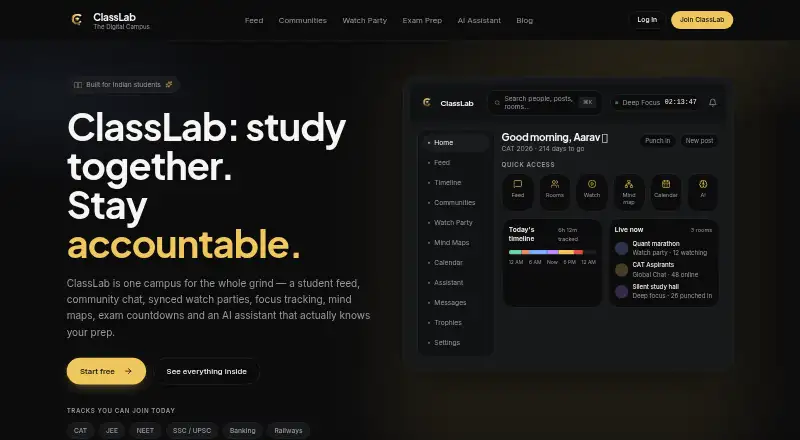
ClassLab is a student workspace that brings study planning and group activity together in one digital campus. Its feed, communities, chat and private study rooms support student groups, while live coworking rooms give students a place to study alongside others. The free student account also includes focus tracking, mind maps, an exam calendar and an AI study assistant. Focus tracking records Deep Focus, Class or Break sessions, displays a daily timeline and tracked hours, and lets students set daily goals. Students can map a syllabus, connect topics and pin YouTube videos to a mind map. Watch parties sync YouTube videos or playlists for participants, with live chat and a shared queue; hosts can manage participants, and the community is moderated. The assistant uses a student's exam and preparation profile, focus sessions, tasks and milestones to tailor plans, explanations and quizzes. ClassLab says account data personalizes that user's assistant responses and is not used to train models. Users can also connect assistants such as Claude or ChatGPT to their ClassLab tasks. Onboarding offers CAT, JEE, NEET, SSC/UPSC, Banking and Railways tracks. ClassLab is available on Android, iOS and the web, and works in mobile browsers with push notifications for messages, mentions and events.
Who it suits
ClassLab suits competitive-exam aspirants, college students, self-study groups and students studying alone. Its focus tools, planning features and shared rooms support both individual study and group routines.
What it does well
- Free account includes feed, chat, study rooms and AI study assistant.
- Tracks Deep Focus, Class and Break sessions with goals and a daily timeline.
- Watch parties sync YouTube videos or playlists with chat and a shared queue.
- Mind maps connect syllabus topics and allow pinned YouTube videos.
- Available on Android, iOS, web and mobile browsers.
What to know first
- Watch party rooms have no stated participant cap.
- Email support replies usually take a day or two.
Limits
The free student account includes the listed feed, communities, chat, study rooms, focus tracking, mind maps and AI study assistant. Watch party rooms are described for study groups and full class groups, but no participant cap is given.
Plans
| Plan | Billed and limits | Price |
|---|---|---|
| Free student account | Feed · communities · chat · study rooms · focus tracking · mind maps · AI study assistant | Free |
As classlab.in lists them, read 11 Oct 2026. The maker's own page has the final word.
Getting started
- Open the ClassLab website or use the Android or iOS app.
- Create a free student account.
- Choose an exam track during onboarding, if applicable.
- Use the feed, communities, chat, study rooms, focus tracking, mind maps or AI assistant.
ClassLab is a free digital campus for students who want planning, focus tracking, collaborative study and exam-oriented assistance in one workspace. It suits competitive-exam aspirants, college students, self-study groups and solo learners who move between individual routines and peer sessions. Its breadth is the main attraction; students who need only a specialist timer or a dedicated video-room service may find it more than they need.
Overview
ClassLab combines a student feed, communities, chat and study rooms with an exam calendar, focus tools, mind maps and an AI study assistant. That makes it a practical home base for preparation involving scheduling, accountability and discussion, instead of a single-purpose timer. Live coworking, private rooms and accountability tools support both independent work and group routines.
Community moderation and host controls add structure to shared sessions. Email support at [email protected] usually replies within a day or two, giving users a direct route for help.
Key features
Focus tracking and accountability
Students can log Deep Focus, Class or Break sessions, review a daily timeline and total tracked hours, and set daily goals. This is more informative than a basic countdown for learners who want to understand how their day is divided and whether they are meeting a target. The focus timer and live coworking rooms also suit people who stay consistent when others are working alongside them.
Watch parties and study rooms
Watch parties synchronize YouTube videos or playlists, with live chat and a shared queue. Hosts can manage participants, and the browser-based feature requires no installation. Rooms are described as suitable for study-group or full-class use, but no participant cap is given, so organisers needing a guaranteed room size should choose a service with an explicit limit.
Mind maps and exam planning
A mind map lets students arrange a syllabus, connect topics and pin YouTube videos to the board. This is useful for turning a broad course into a visible set of relationships and resources. Onboarding includes CAT, JEE, NEET, SSC/UPSC, Banking and Railways tracks, making the planning context especially relevant to competitive-exam preparation.
AI study assistant and integrations
The assistant uses exam information, a preparation profile, focus sessions, tasks and milestones to tailor plans, explanations and quizzes. ClassLab says this account data personalizes only the user's assistant responses and is not used to train models. Users can also connect assistants such as Claude or ChatGPT to ClassLab tasks, which will appeal to students already working with those tools.
Pricing
| Plan | Price | Includes |
|---|---|---|
| Free student account | free | Feed, communities, chat, study rooms, focus tracking, mind maps and AI study assistant |
The single free plan covers the core social, planning, focus and AI functions, with no paid tier needed for the stated feature set. It is a strong fit for students who want one workspace without a subscription decision. There are no published seat quotas or paid-plan terms to weigh, while the unspecified watch-party capacity remains the main practical uncertainty for larger groups.
Platforms
ClassLab runs on Android, iOS and the web. It works in any mobile browser and can send push notifications for messages, mentions and events. Watch parties run directly in a browser with no install, so mixed-device groups can join without standardising hardware.
Who it's for
Competitive-exam aspirants get dedicated onboarding tracks and an assistant that can use exam and milestone context. College students and solo learners benefit from the calendar, focus history, mind maps and daily goals. Self-study groups can use chat, private rooms, coworking and moderated watch parties. It is less appropriate for teams that require a documented maximum room size or a narrowly specialised video-meeting workflow.
Pros and cons
Pros
- Broad free toolkit: Planning, communities, study rooms, focus tracking, mind maps and AI assistance are combined in one 0.00 USD plan.
- Useful focus history: Separate Deep Focus, Class and Break records, timelines and goals show more than elapsed time.
- Flexible group access: Live coworking, private rooms and browser watch parties work across mobile and web.
- Exam-aware assistance: Supported competitive-exam tracks and personalised plans, explanations and quizzes target structured preparation.
- Clear AI privacy position: Account data is used to personalise the user's responses, not to train models.
Cons
- No stated watch-party cap: Larger classes cannot confirm capacity before choosing the service.
- Wide scope may be excessive: Students wanting only a timer or video room may not need the feed, communities and planning layers.
Alternatives
Pick Virtual Study Room Apps for a broader directory of room-focused choices. Cosmos Video is better when you need desktop applications, calls for up to four people, uploads and seven-day recording retention. Choose FLOWN if scheduled community sessions matter and four free sessions per month is sufficient. Kaizen suits users who want task and habit limits, app blocking and Focus Rooms, with its free plan retaining 30 days of statistics. Focusmate is the clearer choice for one-to-one accountability when three free sessions per week is enough. StudyStream fits users seeking dedicated focus rooms with a one-hour daily free allowance. WhumbleZone offers core features free without a subscription or hidden paywall. Momo is an option for unlimited task piles and timed sessions on Android and iOS. Pomoroom is a mobile alternative with a free version and a 2.99 USD monthly premium plan.
Verdict
Choose ClassLab if you want a no-cost student workspace that unites exam planning, measurable focus sessions, mind maps, AI study help and moderated group rooms across Android, iOS and the web. Its strongest case is breadth without a subscription. Look elsewhere if your priority is a defined watch-party capacity or a specialist service built around one kind of focus or video session.
Verdict
Choose ClassLab if you want a free student workspace with study planning, focus tracking and group rooms across mobile and web. Look elsewhere if you need a stated participant limit for watch parties; ClassLab describes room sizes broadly without giving a cap.
Questions
How much does ClassLab cost?
The Free student account costs nothing.
What does the free account include?
It includes feed, communities, chat, study rooms, focus tracking, mind maps and the AI study assistant.
Which platforms can I use?
ClassLab is available on Android, iOS and the web. It also works in mobile browsers.
Can I connect other AI assistants?
ClassLab says users can connect assistants such as Claude or ChatGPT to their ClassLab tasks.
Does ClassLab use account data to train AI models?
ClassLab says account data personalizes only the user's assistant responses and is not used to train models.
How can I contact support?
ClassLab lists email support at [email protected] and says replies usually arrive within a day or two.
Facts from ClassLab's own pages
- AI assistant
- The assistant uses a student's exam, prep profile, focus sessions, tasks and milestones to personalize plans, explanations and quizzes. · classlab.in, 11 Oct 2026
- AI data use
- The AI assistant page states that account data personalizes only the user's assistant responses and is not used to train models. · classlab.in, 11 Oct 2026
- Browser-based
- The Watch Party page says the feature runs in the browser with no installs required. · classlab.in, 11 Oct 2026
- Focus tracking
- Students can track Deep Focus, Class or Break sessions, see a daily timeline and tracked hours, and set daily goals. · classlab.in, 11 Oct 2026
- Integrations
- ClassLab says users can connect assistants such as Claude or ChatGPT to their ClassLab tasks. · classlab.in, 11 Oct 2026
- Mind maps
- Students can organize a syllabus on a mind map, connect topics and pin YouTube videos to the board. · classlab.in, 11 Oct 2026
- Mobile access
- ClassLab says it works in any mobile browser and can send push notifications for messages, mentions and events. · classlab.in, 11 Oct 2026
- Notable limit
- The watch party page describes rooms as suitable for study-group sizes and a full class group but gives no specific participant cap. · classlab.in, 11 Oct 2026
- Product
- ClassLab describes itself as a digital campus for students, combining a feed, community chat, watch parties, focus tracking, mind maps, an exam calendar and an AI study assistant. · classlab.in, 11 Oct 2026
- Room moderation
- Watch party hosts can manage participants, and ClassLab says its community is moderated. · classlab.in, 11 Oct 2026
- Support
- ClassLab lists email support at [email protected] and says replies usually arrive within a day or two. · classlab.in, 11 Oct 2026
- Supported exam tracks
- Onboarding offers CAT, JEE, NEET, SSC/UPSC, Banking and Railways tracks. · classlab.in, 11 Oct 2026
- Watch parties
- Watch parties sync YouTube videos or playlists for participants and include live chat and a shared queue. · classlab.in, 11 Oct 2026
- Who it is for
- ClassLab identifies competitive-exam aspirants, college students, self-study groups and solo students as intended users. · classlab.in, 11 Oct 2026
Where ClassLab stands on Freedom251
- Virtual Study Room Apps#1 of 37