Freedom251 › Pomodoro Timer Apps
Focus Keeper
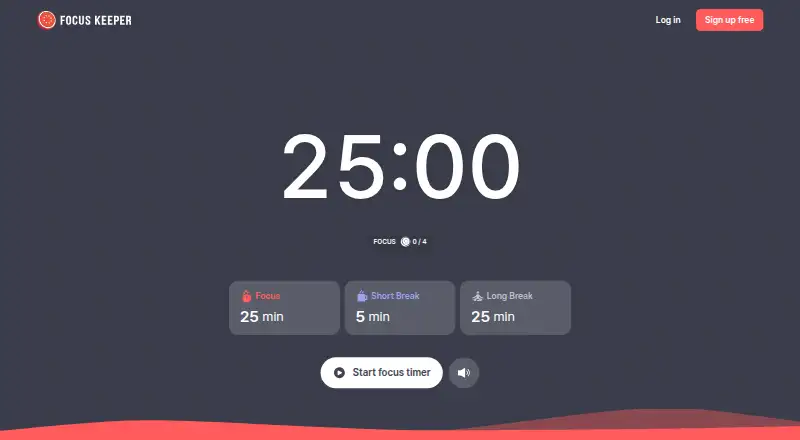
What Focus Keeper is
Focus Keeper is a Pomodoro timer and productivity service for scheduling focus sessions, tracking work and organizing tasks. Its web timer displays 25-minute focus periods, five-minute short breaks and 25-minute long breaks; custom intervals and automatic break starts are also listed. A built-in task list works alongside automatic work-session logging, and charts show focus time and work patterns. The service describes identifying focus patterns and tracking habits, while focus statistics provide another view of progress. Sessions and tasks are saved automatically, with history available on any device. Focus Keeper is web-based and listed for Android, iOS and macOS. A free plan and free signup option are available; premium features may involve subscription payments. Users can cancel a subscription at any time and keep premium access through the current billing period, but the current cycle is not refunded. The privacy policy says account and usage data may include names, email addresses, passwords, task details, session durations, settings, IP addresses and browser activity. The service says it takes reasonable security measures but cannot guarantee absolute security.
Who it suits
Focus Keeper may suit people who want a timer, task list and work-session charts in one productivity service. Its cross-device session history may also suit users who switch between devices.
What it does well
- Timer includes focus and break periods
- Custom intervals and automatic break starts are listed
- Automatically logs sessions and displays charts
- Tasks and session history sync across devices
- Available on web, Android, iOS and macOS
What to know first
- Premium features may require a subscription
- Current billing cycle is not refunded after cancellation
- Absolute data security is not guaranteed
Overview
Focus Keeper is a cross-platform Pomodoro timer with a built-in task list and productivity tracking. It suits people who want a record of focused work alongside their timer; its value is less clear if all you need is a basic countdown.
The default rhythm is 25 minutes of focus, a 5-minute short break and a 25-minute long break. Custom intervals and automatic break starts make that structure adaptable, while automatically saved sessions and tasks keep history accessible across devices. Charts track focus time and work patterns, with habit tracking and focus-pattern identification aimed at people who will use that history to shape their routines.
Key features
- Timer controls: Custom intervals let users move beyond the displayed Pomodoro schedule, and automatic break starts reduce manual transitions. This is useful for a routine that needs some structure without requiring each session to follow a fixed template.
- Tasks and logging: A built-in task list connects timed work to priorities, while automatic session logging avoids having to record each work period separately.
- Charts and history: Charts show focus time and work patterns; the service also describes focus-pattern identification and habit tracking. These are more useful to people who review trends over time than to someone who only wants to run a timer.
- Cross-device access: Focus sessions and tasks are saved automatically, and history can be accessed on any device. That supports moving between supported platforms without leaving the record tied to one device.
Pricing
Focus Keeper is freemium, with a free plan and a free signup option. Premium features may require a subscription, but no premium price is stated, so compare the free offering against your needs before committing.
Subscriptions can be canceled at any time, with premium access continuing through the current billing period. The current cycle is not refunded, so canceling does not recover the cost of time already paid for.
Platforms
Focus Keeper is available on Android, iOS, macOS and the web. Its web service is intended for personal or professional use, and cross-device history makes it a practical fit for people who switch among supported devices.
Who it's for
Choose Focus Keeper if you want a timer, task list and work history in one service, particularly if you expect to review charts or track habits over time. It is a weaker fit for someone seeking only a simple timer, or for anyone unwilling to share task and session information with an online service.
The privacy policy says account and usage data may include a name, email, password, task details, session durations, custom settings, IP address and browser activity. Focus Keeper says it takes reasonable measures to protect personal information but cannot guarantee absolute security. Users retain ownership of personal data, but permanently deleted data cannot be recovered.
Pros and cons
- Pros: Custom intervals and automatic breaks accommodate different routines; automatic logging, charts and synced history make work patterns easier to review; the built-in task list ties sessions to planned work.
Alternatives
Pomofocus is another freemium timer option, with a free plan offering estimated finish times, templates, visual reports and custom settings; choose it if those features or its Linux and Windows support better match your needs.
Brainscape is a freemium flashcard service rather than a timer; its Basic plan includes 2,500 pre-loaded flashcards, making it a more relevant choice for flashcard study.
EstudyLog offers limited tracking and core study-tracking tools on its free plan, while its $3.99 per month Monthly plan includes unlimited sessions and up to 20 courses. Choose it if course-based study tracking is the priority.
StudiesTimer has a free plan with limits including three labels, one weekly goal, up to three study groups and one to-do list of five items. It is a better fit for someone who wants study groups and study-planning features within those limits.
Study Bunny is a free app with ads and in-app purchases; consider it if that model and its Android, iOS or macOS support suit your preference.
Be Focused offers Pro plans at $2.99 per month or $19.99 per year for iPhone, iPad and Mac. Choose it if you want a paid Pro option across that Apple device set.
Bentodoro is a free timer with two timer modes and study-tracking features, an alternative for people who prefer a free option.
Focusami offers a free plan with core features, private groups, standard themes and metric analytics, and a $2.99 per month Premium plan. Consider it if private groups or those themes and analytics are a better match.
For more options, browse Study Timer Apps or Pomodoro Timer Apps.
Verdict
Focus Keeper is a sound choice for people who want configurable timed sessions linked to tasks, automatic logging and cross-device history. Its strongest reason to choose it is the combination of those tools; look elsewhere if premium pricing transparency, a refund for the current billing cycle, or a lighter data footprint is essential.
Verdict
Focus Keeper pairs timed work sessions with tasks, charts and cross-device history. Consider its stated data collection and subscription refund terms before using premium features.
Facts from Focus Keeper's own pages
- Automatic logging
- The homepage says work sessions are logged automatically and displayed in charts. · focuskeeper.co, 30 Sept 2026
- Cancellation
- The terms say users may cancel subscriptions at any time, retain premium access through the current period, and receive no refund for that billing cycle. · focuskeeper.co, 29 Sept 2026
- Charts
- Smart Charts show focus time and work patterns so users can identify trends. · focuskeeper.co, 30 Sept 2026
- Company
- The website footer identifies PIXO Inc. · focuskeeper.co, 29 Sept 2026
- Data collected
- The privacy policy says account information may include name, email, and password, and productivity data may include task details, session durations, and custom settings. · focuskeeper.co, 30 Sept 2026
- Data rights
- The privacy policy says users may access, correct, update, or delete personal information held by Focus Keeper. · focuskeeper.co, 30 Sept 2026
- Data sync
- The homepage says focus sessions and tasks are automatically saved and history can be accessed on any device. · focuskeeper.co, 30 Sept 2026
- Focus timer
- The maker says its focus timer uses scientifically proven focus techniques. · focuskeeper.co, 30 Sept 2026
- Free signup
- The homepage links to an option labeled “Sign up free.” · focuskeeper.co, 29 Sept 2026
- Headquarters
- Seoul, Republic of Korea · focuskeeper.co, 23 Sept 2026
- Mobile platforms
- The maker’s homepage says Focus Keeper is available on iOS and Android. · focuskeeper.co, 29 Sept 2026
- Platforms
- The maker states Focus Keeper is available as a web version and on iOS and Android devices. · focuskeeper.co, 30 Sept 2026
- Pomodoro timer
- The homepage shows a timer set to 25 minutes of focus, a 5-minute short break, and a 25-minute long break. · focuskeeper.co, 30 Sept 2026
- Privacy and security
- The privacy policy says Focus Keeper takes reasonable measures to protect personal information, while noting it cannot guarantee absolute security. · focuskeeper.co, 30 Sept 2026
- Privacy data
- The privacy policy says account and usage data may include name, email, password, task details, session durations, custom settings, IP address, and browser activity. · focuskeeper.co, 29 Sept 2026
- Productivity features
- The site describes automatic work-session logging, charts, focus-pattern identification, and habit tracking. · focuskeeper.co, 29 Sept 2026
- Purpose
- Focus Keeper is a web-based productivity and time-management service for setting timers, tracking progress, and improving focus. · focuskeeper.co, 30 Sept 2026
- Security
- The privacy policy says the service takes reasonable measures to protect personal information but cannot guarantee absolute security. · focuskeeper.co, 29 Sept 2026
- Session storage
- The site says focus sessions and tasks are automatically saved and history can be accessed on any device. · focuskeeper.co, 29 Sept 2026
- Subscriptions
- The terms say premium features may involve subscription payments, subscriptions can be canceled at any time, and refunds are not issued for the current billing cycle. · focuskeeper.co, 30 Sept 2026
- Support
- The site lists [email protected] for support inquiries. · focuskeeper.co, 30 Sept 2026
- Task management
- The maker describes Focus Keeper as combining a timer, tasks, and analytics to help users prioritize tasks and build productivity habits. · focuskeeper.co, 30 Sept 2026
- Timer
- The web timer shows 25-minute focus sessions, 5-minute short breaks, and 25-minute long breaks. · focuskeeper.co, 29 Sept 2026
- Web access
- The terms describe Focus Keeper as a web-based platform for personal or professional use. · focuskeeper.co, 29 Sept 2026
Where Focus Keeper stands on Freedom251
- Pomodoro Timer Apps#7 of 28
- Study Timer Apps#13 of 43
- Focus Tools#10 of 19