Freedom251 › Pomodoro Timer Apps
FocusTide
What FocusTide is
FocusTide is a browser-based Pomodoro timer for structuring work sessions and breaks. The work timer starts at 25 minutes, and you can change session lengths, select built-in presets, and choose how often long breaks occur. At the end of a section, the timer can stop, continue, or advance to the next one. Breaks can start automatically, and overtime tracking can show time spent past a timer’s expiration. Display options show time in seconds, in minutes, or as a percentage.
A space-key shortcut starts or pauses the timer. Adaptive ticking reduces how often it ticks while the app is in the background. You can turn on sounds and desktop notifications for section endings, with Musical and Sharp sound sets available. An optional task list can limit the number of active tasks shown and remove completed tasks when a new section begins. FocusTide runs on the web and can be installed through a browser as a Progressive Web App, though installation is not required. Its source code is public, and the project welcomes contributions and issues. The site identifies AnotherPomodoro as the app’s former name and another-pomodoro.app as its old domain.
Who it suits
FocusTide suits people who want a browser-based timer with adjustable work and break schedules, overtime tracking, and optional task management. It can also suit users who want an open-source timer or prefer to install a web app through their browser.
What it does well
- Free plan costs nothing.
- Adjustable sessions, presets, and long-break frequency.
- Timer can stop, continue, or advance between sections.
- Optional task list includes active-task limits.
- Public source code welcomes issues and contributions.
What to know first
- Web is the listed platform coverage.
Limits
The Free plan is browser based and self-hostable. The facts list no quotas or feature restrictions for the free plan.
Plans
| Plan | Billed and limits | Price |
|---|---|---|
| Free | Browser based · self-hostable | Free |
As focustide.app lists them, read 8 Oct 2026. The maker's own page has the final word.
Getting started
- Open https://focustide.app/ in a browser.
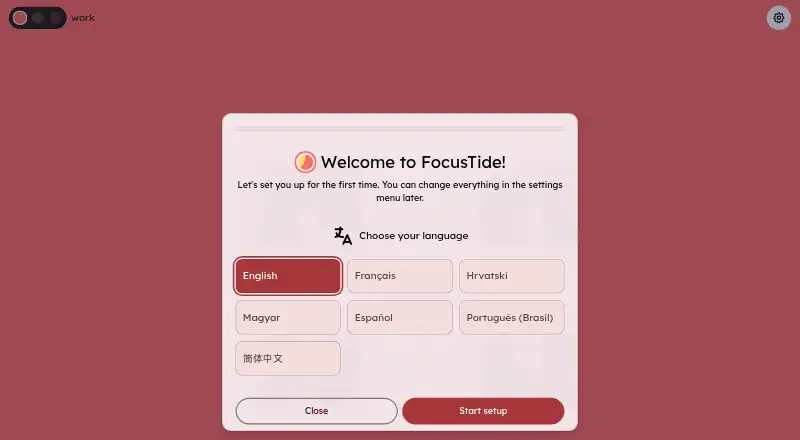
- Choose a language on the setup screen.
- Set session lengths, presets, and long-break frequency.
- Choose timer display and section-ending behavior.
- Enable sounds, notifications, or the task list as needed.
- Install it through the browser as a Progressive Web App if desired.
Verdict
Choose FocusTide if you want a free browser timer with flexible schedules, section-ending alerts, and an optional task list. Its public source code may appeal to users who want more control. Look elsewhere if you need a platform beyond web.
Questions
How much does FocusTide cost?
The Free plan is listed as free.
Which platforms does FocusTide support?
Its platform coverage is web. It can also be installed through a browser as a Progressive Web App.
Does FocusTide require installation?
No. The project says no installation is required to use it, though a browser install option is available.
Is FocusTide open source?
Yes. Its source code is public, and the project welcomes issues and contributions.
What is FocusTide’s former name?
The site identifies AnotherPomodoro as its former name and another-pomodoro.app as its old domain.
Facts from FocusTide's own pages
- Alerts
- Users can enable audio and notifications when a section ends. · focustide.app, 8 Oct 2026
- Background ticking
- An adaptive ticking setting makes the timer tick less frequently while the app is in the background. · focustide.app, 8 Oct 2026
- Completed tasks
- Users can choose to remove completed tasks when a new section begins. · focustide.app, 8 Oct 2026
- Current interface
- The app settings page offers adaptive ticking, keyboard shortcuts, sound choices, notifications, and a task list. · focustide.app, 8 Oct 2026
- Focus timer
- FocusTide provides a work timer set to 25 minutes by default. · focustide.app, 8 Oct 2026
- Former name
- The site says AnotherPomodoro is now FocusTide and identifies another-pomodoro.app as its old domain. · focustide.app, 8 Oct 2026
- Install option
- The app is a Progressive Web App that can be installed through a browser, and the project says no installation is required to use it. · github.com, 8 Oct 2026
- Languages
- The project README says the app is translated into five languages. · github.com, 8 Oct 2026
- Notifications
- The app can play sounds and send desktop notifications when a section ends. · github.com, 8 Oct 2026
- Open source
- The source code is public, and the project welcomes issues and contributions. · github.com, 8 Oct 2026
- Overtime tracking
- The timer can track time spent beyond the timer’s expiration. · github.com, 8 Oct 2026
- Privacy
- The project says the app itself does not collect data, while production deployments may use third-party tools to measure site performance. · github.com, 8 Oct 2026
- Purpose
- FocusTide is a Pomodoro timer application that runs in the browser. · github.com, 8 Oct 2026
- Schedules
- Users can adjust session lengths, choose built-in presets, and set how often long breaks occur. · github.com, 8 Oct 2026
- Settings
- Users can download current settings, load settings from a file, and reset settings. · focustide.app, 8 Oct 2026
- Shortcuts
- The app offers a keyboard shortcut to start or pause the timer with the space key. · focustide.app, 8 Oct 2026
- Sounds
- The app offers Musical and Sharp sound sets for section endings. · focustide.app, 8 Oct 2026
- Task list
- The to-do list supports separate tasks for work, pause, and long-pause sections, and remembers tasks across sessions. · github.com, 8 Oct 2026
- Timer behavior
- When a section ends, the timer can continue, stop, or advance to the next section. · focustide.app, 8 Oct 2026
- Timer styles
- The timer can show time with second precision, minute precision, or as a percentage. · github.com, 8 Oct 2026
Where FocusTide stands on Freedom251
- Pomodoro Timer Apps#8 of 28