
Bentodoro
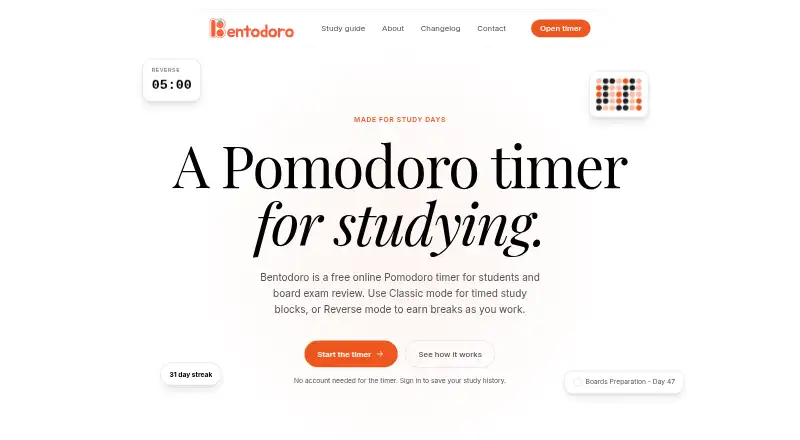
What Bentodoro is
Bentodoro is a free Pomodoro timer for students and board exam reviewers, with Classic and Reverse modes. Classic counts down from a chosen work duration; Reverse counts up as you study and builds break time. You can use the timer without an account, but signing in is needed to save study activity and plans. Signed-in users can track subjects and topics, set study goals, and schedule review tasks on a calendar. Progress statistics include streaks, weekly activity, a heatmap, subject breakdowns, session modes, a most productive day, and monthly trends. On supported browsers, a Mini timer opens a Picture-in-Picture window; the changelog identifies Chrome and Edge. Google Sign-In is available. Supabase handles account sign-in and stores saved study data, while timer settings, layout, appearance, and sign-in information remain in the browser. The privacy policy says collected information may include contact details, sessions, tasks, settings, timestamps, and analytics data. The maker says the project began for board exam review and invites messages about problems or suggestions. Its Free plan costs nothing and includes both timer modes and study tracking features.
Who it suits
Bentodoro suits students and board exam reviewers who want timed study sessions and records of their progress. Those who want saved activity or review plans need to sign in.
What it does well
- Two timer modes, including reverse timing.
- Track subjects, topics, and study goals.
- Schedule review tasks on a calendar.
- Statistics include streaks and monthly trends.
- Usable without an account.
What to know first
- Saving activity and plans requires sign-in.
- Mini timer support is limited to Chrome and Edge.
- Collected information can include sessions and analytics data.
- Absolute security is not guaranteed.
Plans
| Plan | Billed and limits | Price |
|---|---|---|
| Free | Both timer modes · study tracking features | Free |
As bentodoro.com lists them, read 2 Oct 2026. The maker's own page has the final word.
Getting started
- Visit https://www.bentodoro.com/ or use Bentodoro on Android or iOS.
- Start a timer without an account, or sign in to save study activity and plans.
- Choose Classic countdown or Reverse count-up mode.
- Track subjects and topics, and add review tasks to the calendar after signing in.
- Use Mini timer in Chrome or Edge for its Picture-in-Picture window.
Bentodoro is a study-oriented Pomodoro timer for students and board-exam reviewers who want timed work connected to subjects, tasks, and progress history. Its combination of flexible timing and review analytics suits structured revision better than a bare countdown, while account-free timing keeps occasional use simple.
Overview
Classic mode counts down from a chosen work duration, giving conventional Pomodoro sessions a clear endpoint. Reverse mode counts upward and earns break time as you continue, which is better for users who prefer to stop after a natural amount of work rather than commit to a preset block. Custom break settings and study goals let you adapt either approach to different subjects and workloads.
The timer works without an account. Sign-in is required to save study activity, preserve subject and topic records, and put review tasks on a calendar. That division is practical for a quick session, but anyone building a long-term study history must use an account.
Key features
Study records and planning
Signed-in users can label sessions by subject and topic, then schedule review tasks on a calendar. This makes the app useful for exam preparation where knowing what was covered matters as much as knowing how long you worked. Study goals add a target to the routine rather than leaving progress as a series of disconnected timers.
Statistics
Bentodoro’s statistics page combines streaks, a weekly overview, an activity heatmap, subject breakdowns, session modes, your most productive day, and a monthly trend. These views can reveal consistency, preferred timing styles, and which subjects receive attention. They are a meaningful advantage over timers that offer no history, although the saved record depends on signing in.
Mini timer and media
On supported browsers, Mini timer opens a small Picture-in-Picture window, so the countdown can remain visible while another page is in use. The changelog identifies Chrome and Edge as supported browsers. Spotify is named as a focus-music player; embedded media may connect to its providers and use cookies or identifiers.
Pricing
Free — free
- Both timer modes
- Study tracking features
- Custom break settings
- Study goals
- Progress statistics
- Subject or task labels
There is no paid tier or stated usage quota. The free plan is therefore a straightforward choice for students who want the complete timer and tracking feature set without a subscription. Its practical condition is account storage: sessions and plans you want to keep require sign-in, while the basic timer does not.
Platforms
Bentodoro is available on Android, iOS, and the web. The Mini timer is a browser feature, with Chrome and Edge identified as supported. A web-first workflow suits study at a computer, while the mobile apps cover sessions away from a desk.
Who it's for
Bentodoro is aimed at students, particularly board-exam reviewers, and at anyone who wants study time organized by subjects, topics, and scheduled tasks. It is a good fit when progress trends and consistency are motivating. It is less suitable for someone who only needs an offline stopwatch or who does not want saved study data tied to an account.
Pros and cons
- Pro: Classic and Reverse modes support both fixed Pomodoro blocks and open-ended work.
- Pro: Subject labels, topic records, calendar tasks, and goals connect timing to an actual revision plan.
- Pro: Heatmaps, streaks, subject breakdowns, and monthly trends provide more useful feedback than elapsed time alone.
- Pro: The timer can be used without signing in.
- Con: Saving sessions and plans requires an account, limiting the no-sign-in experience to temporary use.
- Con: Supabase stores account and saved study data, and the privacy policy says collected information can include email, usernames, sessions, tasks, settings, timestamps, and analytics.
- Con: Embedded focus media can involve provider connections and cookies or identifiers.
Alternatives
For a broader starting point, see Study Timer Apps.
- Pomozen is the better pick for open-source, offline timing with session logs and preferences kept on the device, and it runs on more desktop platforms.
- Brainscape suits learners who want flashcards, including 2,500 pre-loaded cards on Basic and unlimited AI card creation on its $7.99 a year Pro plan.
- EstudyLog is worth choosing for broader course tracking; its $3.99 a month plan adds unlimited sessions and up to 20 courses.
- Pomofocus fits users seeking browser and desktop Pomodoro tools with estimates, templates, visual reports, and custom settings on its free plan.
- Study Bunny is an alternative mobile study app whose free download contains ads, with features and backup varying by purchase.
- YPT - Yeolpumta is another mobile freemium option, free to download with ads and in-app purchases.
- Cloud Outliner is for users prioritizing structured outlines and paid sync across iPhone, iPad, and Mac.
- FlashPrep is a free Android and web study tool with a smart timer, Study Momentum, and daily goals.
Verdict
Bentodoro is a strong choice for students and board-exam reviewers who want one free tool for timed sessions, study labeling, review scheduling, and meaningful progress views. Choose it when seeing subject-level history and trends matters; look elsewhere if you need offline, account-free record keeping or prefer flashcards and course management over timer-centered revision.
Verdict
Bentodoro offers a free timer alongside study tracking, scheduling, and detailed progress statistics. Check the sign-in requirement for saved plans and the stated data collection before using those features.
Questions
How much does Bentodoro cost?
The Free plan costs nothing.
Can I use Bentodoro without an account?
Yes. The timer can be used without an account; saving study activity and plans requires sign-in.
Which platforms is Bentodoro available on?
Bentodoro is available on Android, iOS, and the web.
What do the free plan features include?
The free plan includes both timer modes and study tracking features.
Which browsers support Mini timer?
Mini timer is available on supported browsers, and the changelog names Chrome and Edge.
What information may Bentodoro collect?
Its privacy policy says collected information can include email, username if provided, Pomodoro sessions, tasks, settings, timestamps, and analytics data.
Facts from Bentodoro's own pages
- Account requirement
- The timer can be used without an account; saved activity and plans require sign-in. · bentodoro.com, 2 Oct 2026
- Data collected
- The privacy policy says collected information can include email address, username if provided, Pomodoro sessions, tasks, settings, timestamps, and analytics data. · bentodoro.com, 2 Oct 2026
- Integrations
- The privacy policy names Spotify as a focus music player and says embedded media can connect to its providers and use cookies or identifiers. · bentodoro.com, 2 Oct 2026
- Intended users
- The maker says Bentodoro began as a personal project for board exam review and is also used by other students and board exam reviewers. · bentodoro.com, 2 Oct 2026
- Mini timer
- On supported browsers, Mini timer opens a small Picture-in-Picture window; the changelog says it works in Chrome and Edge. · bentodoro.com, 2 Oct 2026
- Platforms
- Bentodoro works in desktop and mobile browsers, and its initial release notes say it is installable as a PWA on any device. · bentodoro.com, 2 Oct 2026
- Privacy and storage
- Supabase handles account sign-in and stores saved study data, while timer settings, layout, appearance, and sign-in information are stored in the browser. · bentodoro.com, 2 Oct 2026
- Purpose
- Bentodoro is a free online Pomodoro timer made for students and board exam review. · bentodoro.com, 2 Oct 2026
- Security
- Bentodoro says it uses commercially acceptable measures to protect personal data but cannot guarantee absolute security. · bentodoro.com, 2 Oct 2026
- Sign-in
- Google Sign-In is available on the sign-in and sign-up screens. · bentodoro.com, 2 Oct 2026
- Statistics
- The statistics page includes streaks, a weekly overview, an activity heatmap, subject breakdowns, session modes, a most productive day, and a monthly trend. · bentodoro.com, 2 Oct 2026
- Study records
- Signed-in users can save study activity, track subjects and topics, and put review tasks on a calendar. · bentodoro.com, 2 Oct 2026
- Support
- The maker invites users to message him about problems or suggestions and lists [email protected] for privacy questions. · bentodoro.com, 2 Oct 2026
- Timer modes
- Classic counts down from a set work time, while Reverse counts up as you work and earns break time. · bentodoro.com, 2 Oct 2026
Where Bentodoro stands on Freedom251
- Study Timer Apps#2 of 43