EstudyLog
What EstudyLog is
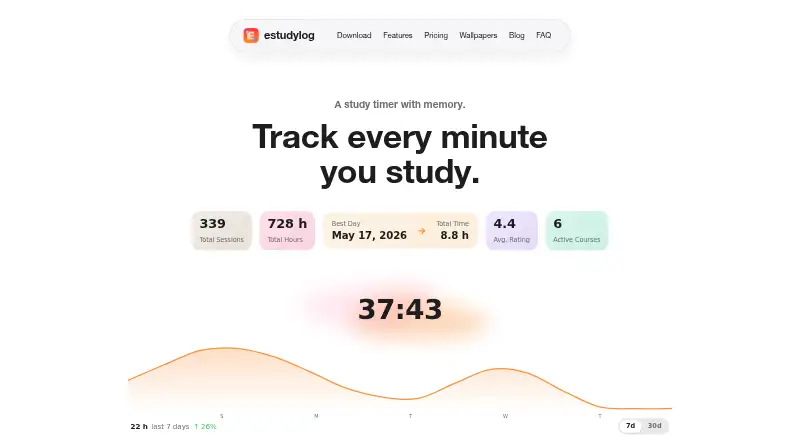
EstudyLog is a study tracker and timer for students who want to organize courses and understand their study habits. Sessions can be tied to courses, topics, notes, one of four session types, and a focus rating from 1 to 5; the timer can be paused and resumed. Insights cover peak study hours, focus by weekday, personal records, study volume, and a calendar of daily totals and streaks. Users can enter course topics or paste a syllabus for topic extraction, then connect covered topics to sessions. An optional timetable import reads courses, days, times, and locations from a screenshot, with two imports per 60 days. Optional connections include device calendar sync, HomeKit and Govee lights, and Discord. Offline sessions queue on the device until the connection returns. EstudyLog has a free plan with limited tracking; paid plans cost $3.99 a month or $19.99 a year. It is listed for Android, iOS, and macOS, with availability in 85 countries and regions on the App Store.
Who it suits
EstudyLog suits students who want to organize courses, log study sessions, and review patterns in their study habits. It may also suit students who use course topics, focus ratings, or study goals to structure their tracking.
What it does well
- Links sessions to courses, topics, notes, and focus ratings
- Insights include study volume and peak hours
- Syllabus paste can extract course topics
- Offline sessions upload when a connection returns
What to know first
- Free plan has limited tracking
- Timetable import is limited to two per 60 days
- App Store availability varies by country and region
Limits
The Free plan provides limited tracking. Monthly and Annual plans include unlimited sessions but support up to 20 courses; screenshot timetable import allows two imports per 60 days.
Plans
| Plan | Billed and limits | Price |
|---|---|---|
| Free | Limited tracking · core study tracking tools | Free |
| Annual | $19.99 per year · Unlimited sessions · up to 20 courses · all current EstudyLog features | $19.99 a year |
| Monthly | $3.99 per month · Unlimited sessions · up to 20 courses · all current EstudyLog features | $3.99 a month |
As estudylog.com lists them, read 3 Oct 2026. The maker's own page has the final word.
Getting started
- Visit the EstudyLog website.
- Choose Android, iOS, or macOS availability for your device.
- Start with the Free plan or select Monthly or Annual.
- Add courses and topics manually, or paste a syllabus for topic extraction.
- Optionally connect a timetable screenshot or supported integrations.
EstudyLog is a study timer and course-based study log for students who want more context than a record of time spent. It is a stronger fit for people tracking several subjects and reflecting on their habits than for anyone seeking only a simple countdown.
Its session notes, topic links, and pattern insights make study records more useful for review. The main trade-offs are limited tracking on the free plan, a cap on timetable imports, and availability in 85 countries and regions on the App Store.
Overview
Each session can be paused and resumed, assigned one of four types, annotated with a note, and rated for focus on a five-point scale. That context helps distinguish what a student worked on and how focused they felt, rather than treating every logged minute as equivalent. It does require keeping courses and topics organized, so the extra structure may be unnecessary for students who only want a timer.
Topics can be entered manually or extracted from pasted syllabus text, then connected to sessions. An optional screenshot importer extracts course names, days, times, and locations from a timetable; its allowance of two imports per 60 days makes it a useful occasional shortcut, not a tool for frequent schedule changes. Sessions saved offline queue on the device and upload when the connection returns.
Key features
Insights include peak study hours, focus by weekday, personal records, study volume, and a calendar with daily totals and streaks. Along with study goals and progress statistics, these views give students ways to check consistency and identify when they tend to study. Focus ratings supply a personal measure alongside time totals, but they reflect the user's own assessment.
Optional integrations cover device calendar sync, HomeKit lights, Govee smart lights, and Discord linking. These are useful additions for students who already use those services, but the core appeal is the course-linked session record rather than the integrations.
EstudyLog says it does not sell personal information or share it for cross-context behavioral advertising, and that it has no advertising SDKs or ad tracking. Its privacy policy says data is encrypted in transit with TLS and at rest in Google Cloud, and passwords are stored as salted hashes by Firebase Authentication. Users can request account deletion in the app; deletion is scheduled with a default seven-day grace period.
Pricing
The Free plan costs nothing and provides limited tracking with core study tracking tools. It is a reasonable way to try the course-based workflow, but the tracking limit makes it less suitable for regular use if study sessions accumulate quickly.
Monthly costs $3.99 a month, billed $3.99 per month, and includes unlimited sessions, up to 20 courses, and all current EstudyLog features. It fits students who need the full feature set but prefer a monthly commitment. Annual costs $19.99 a year, billed $19.99 per year, with the same session allowance, course cap, and features. It is the lower-cost option for a student planning to use EstudyLog throughout the year; both paid plans cap courses at 20.
Platforms
EstudyLog is available on iOS and Android, with macOS also named as a platform. The maker says it is available in 85 countries and regions on the App Store and identifies places where it is not yet available, so prospective iOS users should check access in their region.
Who it's for
EstudyLog suits students who want to organize courses, connect topics to study sessions, set goals, and examine study habits over time. It is less compelling for someone who needs only a basic timer, or whose course load exceeds the 20-course paid-plan limit.
Pros and cons
- Pro: Notes, session types, focus ratings, and topic links add useful context to logged time.
- Pro: Insights combine study volume and consistency views with focus patterns and personal records.
- Pro: Offline sessions queue for upload, helping preserve logs when a connection is unavailable.
- Con: The free plan limits tracking, which can constrain students who want to use it regularly.
- Con: Timetable import is limited to two screenshot imports per 60 days.
- Con: Paid plans include at most 20 courses, and App Store availability does not cover every region.
Alternatives
For a wider set of study-timer options, browse Study Timer Apps. Choose Brainscape instead if flashcards are the priority: its Basic plan includes 2,500 pre-loaded flashcards, while Pro adds unlimited AI flashcard creation and certified flashcards for $7.99 a year. Pomofocus is a better fit for desktop and web users seeking timer settings, templates, and visual reports on its free plan; Premium adds projects, yearly reports, and CSV downloads.
Study Bunny is another free-download option, with ads and in-app purchases and features and data backup varying by purchase. Bentodoro may suit someone looking for a free timer with both timer modes and study-tracking features. FlashPrep offers a free smart study timer, study momentum, and daily goals. FLIP is a free-download alternative with ads and in-app purchases; its Monthly Premium Membership costs $0.99 a month and includes unlimited goals, groups, and to-do lists. Focusami offers a free plan with core features, private groups, standard themes, and metric analytics, or a Premium plan at $2.99 a month. StudiesTimer has a free plan with three labels, one weekly goal, access to up to three study groups, 10 AI credits each month, and one to-do list with five items.
Verdict
Choose EstudyLog if you want a structured record connecting study sessions to courses and topics, with insights that help you review your habits. Its strongest reason to choose is the added context around each session; look elsewhere if limited free tracking, the 20-course paid cap, or regional availability does not fit your needs.
Verdict
EstudyLog combines session logging with course and topic organization, plus insights into study patterns. Its free tier is limited, while paid plans include unlimited sessions and up to 20 courses.
Questions
Is EstudyLog free?
Yes. Its Free plan costs nothing and includes limited tracking.
What do the paid plans cost?
Monthly costs $3.99 a month. Annual costs $19.99 a year. Both include unlimited sessions, up to 20 courses, and all current features.
Which platforms are listed?
Android, iOS, and macOS are listed. The maker says App Store availability covers 85 countries and regions.
Can EstudyLog import a timetable?
An optional import extracts courses, days, times, and locations from a screenshot. It allows two imports per 60 days.
What integrations are available?
Optional integrations include device calendar sync, HomeKit lights, Govee smart lights, and Discord.
Who makes EstudyLog?
EstudyLog Inc. identifies itself as a Canadian company based in Toronto, Ontario.
Facts from EstudyLog's own pages
- Account deletion
- Users can request account deletion in the app; deletion is scheduled with a default seven-day grace period. · estudylog.com, 3 Oct 2026
- AI timetable import
- The optional timetable import extracts courses, days, times, and locations from a screenshot, with two imports per 60 days. · estudylog.com, 3 Oct 2026
- Availability limit
- The maker says the app is available in 85 countries and regions on the App Store and lists countries where it is not yet available. · estudylog.com, 3 Oct 2026
- Course topics
- Users can add course topics manually or paste a syllabus for topic extraction, then connect covered topics to study sessions. · estudylog.com, 3 Oct 2026
- Headquarters
- Toronto, Ontario, Canada · estudylog.com, 28 Sept 2026
- Integrations
- Optional integrations include device calendar sync, HomeKit lights, Govee smart lights, and Discord linking. · estudylog.com, 3 Oct 2026
- Intended users
- The app is described as built for students who want to organize courses, log study sessions, and understand study habits. · estudylog.com, 3 Oct 2026
- Maker and location
- EstudyLog Inc. identifies itself as a Canadian company based in Toronto, Ontario. · estudylog.com, 3 Oct 2026
- Offline use
- Sessions saved without a connection are queued on the device and uploaded when the network returns. · estudylog.com, 3 Oct 2026
- Platforms
- The maker lists iPhone, iPad, Mac, and Android apps that share an account and study data. · estudylog.com, 3 Oct 2026
- Privacy
- The maker says it does not sell personal information or share it for cross-context behavioral advertising, and that the app has no advertising SDKs or ad tracking. · estudylog.com, 3 Oct 2026
- Product
- EstudyLog is a study tracker and timer that connects study sessions to courses, topics, notes, session types, and focus ratings. · estudylog.com, 3 Oct 2026
- Security
- The privacy policy says traffic is encrypted in transit using TLS, data at rest in Google Cloud is encrypted, and passwords are stored as salted hashes by Firebase Authentication. · estudylog.com, 3 Oct 2026
- Session tracking
- The timer supports pause and resume, four session types, session notes, and a 1-to-5 focus rating. · estudylog.com, 3 Oct 2026
- Study insights
- Insights include peak study hours, focus by day of week, personal records, study volume, and a calendar with daily totals and streaks. · estudylog.com, 3 Oct 2026
- Support
- The contact page says support responds within one business day and invites educators to contact the maker about classroom pilots or study-skills workshops. · estudylog.com, 3 Oct 2026
Where EstudyLog stands on Freedom251
- Study Timer Apps#4 of 43