StudiesTimer
What StudiesTimer is
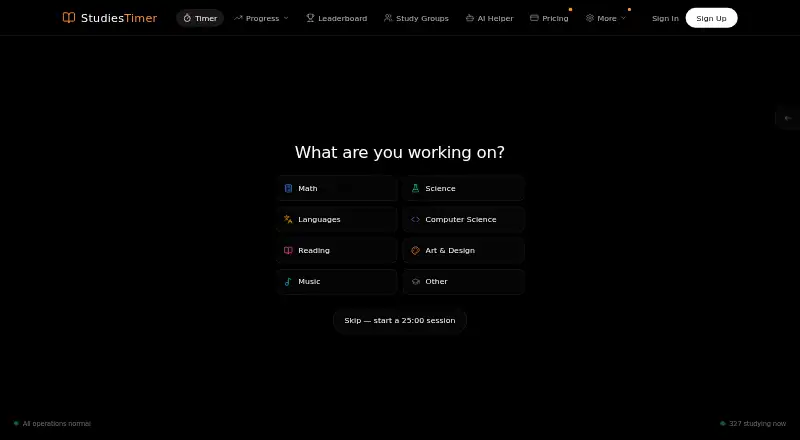
StudiesTimer is a study and productivity platform centered on a Pomodoro timer. You can choose focus durations, use automatic breaks or stopwatch mode, and have sessions saved automatically. Subject labels organize study time, while charts, graphs, and trends show progress. Study groups include real-time chat, and a searchable global leaderboard and live count of active students add a community view. Study goals and habits are also available. The pricing page lists AI quizzes, flashcards, and PDFs that use monthly AI credits.
The timer runs in desktop, mobile, and tablet browsers and works without an account. The Free plan includes three labels, one weekly goal, access to three study groups, ten monthly AI credits, one five-item to-do list, image exports, and 14 days of visible session history. Older sessions are retained and can be viewed again with Premium. Premium costs $47.99 per year after a seven-day free trial. The maker lists Schools & Workplaces with custom pricing, bulk pricing, admin dashboards, and dedicated support. The maker describes its iPhone and iPad app as open for pre-order and its Android app as coming soon.
Who it suits
StudiesTimer suits students who want to track study sessions, organize subjects, and join study groups. Its browser timer may also suit remote workers, freelancers, writers, and developers who want customizable focus sessions.
What it does well
- Timer offers custom focus durations, automatic breaks, and stopwatch mode.
- Sessions save automatically for later review.
- Study groups provide real-time chat.
- Charts, graphs, and trends show productivity progress.
- Browser timer works without signing up.
What to know first
- Free accounts see only 14 days of session history.
- Free plan limits users to three labels and one weekly goal.
- The iOS app is only open for pre-order; Android is coming soon.
Limits
The Free plan provides three labels, one weekly goal, up to three study groups, ten AI credits per month, and one to-do list with five items. It shows 14 days of session history; older sessions are retained and visible again with Premium full-history access. Premium costs $47.99 per year after a seven-day free trial.
Plans
| Plan | Billed and limits | Price |
|---|---|---|
| Free | forever · 3 labels · 1 weekly goal · join up to 3 study groups · 10 AI credits each month · 1 to-do list with 5 items · 14-day visible session history · image exports | Free |
| Premium | $47.99 per year after a 7-day free trial, renewing until you cancel · 50 labels · unlimited weekly habits and goals · create up to 30 and join up to 15 study groups · 500 AI credits each month · advanced analytics and heat maps · PDF, CSV, and image exports · full retained history | $47.99 a year |
| Schools & Workplaces | Custom pricing · Bulk pricing · admin dashboards · dedicated support | On request |
As studiestimer.com lists them, read 30 Sept 2026. The maker's own page has the final word.
Getting started
- Open the StudiesTimer website in a desktop, mobile, or tablet browser.
- Start using the timer without signing up, or create an account for saved study tools.
- Choose a focus duration, automatic breaks, or stopwatch mode.
- Add subject labels and set a study goal to organize sessions.
- Try Premium with its seven-day free trial, then continue at $47.99 per year if desired.
Verdict
Choose StudiesTimer if you want a browser-based focus timer alongside study tracking, goals, and a student community. The free plan has useful core tools, while Premium is $47.99 per year after a seven-day trial. Look elsewhere if you need distraction blocking or an installable mobile app now.
Questions
Is StudiesTimer free?
Yes. Its Free plan is billed forever at 0.00 USD.
What does Premium cost?
Premium is $47.99 per year after a seven-day free trial, and renews until canceled.
Which platforms can I use?
The timer works in web browsers on desktop, mobile, and tablet. The iPhone and iPad app is open for pre-order, and the Android app is coming soon.
Can I use the timer without an account?
Yes. The web timer can be used without signing up.
What is limited on the Free plan?
Free includes three labels, one weekly goal, up to three study groups, ten monthly AI credits, one five-item to-do list, image exports, and 14 days of visible session history.
Does StudiesTimer offer a plan for organizations?
Yes. Schools & Workplaces has custom pricing and lists bulk pricing, admin dashboards, and dedicated support.
Facts from StudiesTimer's own pages
- AI features
- The pricing page lists AI quizzes, flashcards and PDFs, which use monthly AI credits. · studiestimer.com, 30 Sept 2026
- Analytics
- Users can organize study time with subject labels and view productivity charts, graphs and trends. · studiestimer.com, 30 Sept 2026
- Audience
- The maker describes the platform as built for students and says its timer can also suit remote workers, freelancers, writers and developers. · studiestimer.com, 30 Sept 2026
- Data and payments
- The privacy policy says data is stored on Railway servers, encrypted in transit with HTTPS/TLS, and full card details are handled by Stripe or app stores rather than stored by StudiesTimer. · studiestimer.com, 30 Sept 2026
- Flexible timer
- The timer supports customizable focus durations, automatic breaks and stopwatch mode, and saves sessions automatically. · studiestimer.com, 30 Sept 2026
- Free history limit
- Free accounts can view 14 days of session history; older sessions remain retained and become visible again with Premium full-history access. · studiestimer.com, 30 Sept 2026
- Mobile apps
- The maker’s mobile page says the iPhone and iPad app is open for pre-order and not yet installable, while the Android app is coming soon. · studiestimer.com, 30 Sept 2026
- Privacy controls
- The policy says users can request access, correction, deletion and export of their data, and that StudiesTimer does not sell personal information. · studiestimer.com, 30 Sept 2026
- Product
- StudiesTimer describes itself as an online productivity platform built for students, with study tracking, habits, study groups and a global leaderboard alongside its free Pomodoro timer. · studiestimer.com, 30 Sept 2026
- Study community
- Study groups include real-time chat, and the site offers a searchable global leaderboard and a live online counter of active students. · studiestimer.com, 30 Sept 2026
- Support
- The contact page says the team responds to every message within 24 hours and provides a contact form and email support. · studiestimer.com, 30 Sept 2026
- Third-party services
- The maker lists Clerk for authentication, Stripe for web payments, Railway for database and backend hosting, Vercel for frontend hosting, and Expo for mobile push notifications. · studiestimer.com, 30 Sept 2026
- Web access
- The timer works in desktop, mobile and tablet browsers, and can be used without signing up. · studiestimer.com, 30 Sept 2026
Where StudiesTimer stands on Freedom251
- Study Timer Apps#22 of 43