Freedom251 › Kitchen Display System Software
FloCafe KDS
What FloCafe KDS is
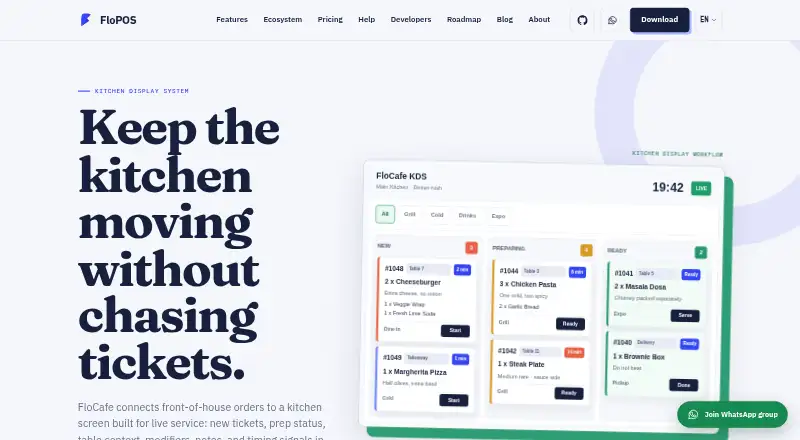
FloCafe KDS sends front-of-house restaurant orders to a kitchen screen, where staff can follow live tickets, preparation status, table context, and timing. Tickets can show the table, order type, items, modifiers, notes, and elapsed time. Kitchen teams can use a full board or filter tickets by prep station, such as grill, cold, drinks, or expo. The KDS is included in FloCafe, a restaurant POS covering dine-in, takeaway, delivery, tables, printing, menus, and local data. Operators can run it on infrastructure they manage, including a local device, desktop environment, or local network. The maker says it does not operate a central cloud database for restaurant data, and that business records stay under the operator’s control. Anonymous launch and usage pings are on by default; they can be disabled in Settings and exclude business data. FloCafe is free, open-source software under the MIT license, with no subscription fee; hardware and operating costs are separate. Desktop downloads are listed for Linux, macOS, and Windows.
Who it suits
FloCafe KDS is intended for restaurant businesses and staff who need to route and track kitchen tickets. It may suit operators who value open-source code, local data control, and the ability to adapt the system.
What it does well
- Displays live tickets and preparation status
- Tickets can include modifiers, notes, and elapsed time
- Staff can filter tickets by prep station
- Free open-source software under the MIT license
- Runs on operator-controlled infrastructure
What to know first
- Supplied without warranty
- Operators are responsible for testing, backups, and access control
- Anonymous launch and usage pings are on by default
- Hardware and operating costs are separate
Limits
FloCafe costs nothing, with no subscription fee. Hardware and operating costs are separate, and the software is provided without warranty.
Plans
| Plan | Billed and limits | Price |
|---|---|---|
| FloCafe | No subscription fee · Free open-source software · MIT license · hardware and operating costs are separate | Free |
As flopos.com lists them, read 3 Oct 2026. The maker's own page has the final word.
Getting started
- Visit the FloCafe KDS website.
- Choose a desktop download or store install for Linux, macOS, or Windows from the download page.
- Run FloCafe on a local device, desktop environment, local network, or other deployment you manage.
- Configure the kitchen board or filter tickets by preparation station.
- Test kitchen order ticket printing, network recovery, and reprint behavior; printing can serve as a backup.
Overview
FloCafe KDS is the kitchen-display part of the FloCafe restaurant POS, connecting front-of-house orders to live kitchen tickets. It best suits restaurants that want local, operator-controlled deployment and are willing to manage the technology themselves. The core proposition is strong kitchen context at no license cost, balanced by significant responsibility for production operation.
FloCafe is MIT-licensed open-source software founded in 2016. It is designed for businesses and staff that value inspectable code, local control, and the ability to adapt the system. That flexibility is most useful to technically capable operators; restaurants seeking a fully managed service should look elsewhere.
Key features
Tickets can display the table, order type, items, modifiers, notes, and elapsed time. In practice, that gives cooks the context needed to handle special requests and prioritize aging orders instead of working from item names alone. Order-status tracking and timing signals help teams follow progress through preparation.
Staff can use a complete kitchen board or filter work by prep station, including grill, cold, drinks, or expo. Station routing and a dedicated expo screen fit kitchens with divided responsibilities and handoff points. A small kitchen with one preparation area may gain less from that structure.
The KDS sits inside a wider POS covering dine-in, takeaway, delivery, tables, printing, menus, and local data. Optional OrderFlow can bring Zomato, Swiggy, and other aggregator orders into the same workflow, which is useful for restaurants combining counter, table, and marketplace demand. Offline mode is included, but the operator still needs to validate how its own network behaves.
FloCafe runs on infrastructure the operator controls, such as a local device, desktop environment, or local network. The maker says restaurant sales, customer, menu, inventory, and business-report data remain under that control rather than in a central cloud database. Anonymous launch and usage pings are enabled by default, can be disabled in Settings, and exclude business data such as orders, menus, customers, staff, and payment details.
Printing remains an important operational fallback. The maker recommends checking kitchen-order-ticket printing, network recovery, and reprint behavior, and notes that many teams retain printing as backup. That advice is a practical warning: the software's value depends on an operator validating hardware and failure procedures before relying on it during service.
Pricing
FloCafe has one published plan:
| Plan | Price | Includes |
|---|---|---|
| FloCafe | free | No subscription fee; free open-source software under the MIT license. Hardware and operating costs are separate. |
There is no free trial because the software is already free, and no recurring subscription charge is attached to this plan. The trade-off is that the zero license price does not remove costs for compatible devices, printers, networking, deployment, backups, or staff time. It is a good fit for operators able to run infrastructure themselves, not for buyers budgeting for vendor-managed implementation.
Platforms
FloCafe supports Linux, macOS, Windows, and self-hosted deployment. The download page provides GitHub releases and store installations for the three desktop operating systems. This range helps mixed-device venues, while self-hosting gives operators control over where the system runs. It also means hardware compatibility and update management sit with the restaurant.
Who it's for
Choose FloCafe for a restaurant that needs station-based kitchen tickets, an expo view, offline capability, and a broader POS rather than a standalone display. It is particularly suitable for teams that want local data ownership, open-source licensing, and the freedom to adapt deployment.
It is a weaker choice for operators without technical capacity for backups, access control, legal compliance, hardware checks, and recovery planning. The software is provided as is without warranty, and production use remains the operator's responsibility. Email support is available at [email protected], with support-ticket submission possible through an optional cloud connection.
Pros and cons
Pros
- Free MIT-licensed software: no subscription fee lowers licensing cost and permits adaptation.
- Useful ticket context: modifiers, notes, table, order type, and elapsed time support informed kitchen decisions.
- Station and expo workflow: routing views suit kitchens that divide preparation and final coordination.
- Local control: operator-managed deployment keeps core restaurant data under the venue's control.
- Broader POS scope: dine-in, takeaway, delivery, tables, menus, printing, and optional aggregator intake reduce the need for separate systems.
Cons
- Operational burden: the operator must handle testing, backups, access control, compliance, hardware compatibility, and production readiness.
- No warranty: teams wanting contractual vendor accountability may find the model unsuitable.
- Hardware and network responsibility: printing, recovery, and reprints require venue-level validation and contingency planning.
- Telemetry defaults on: anonymous launch and usage pings need to be disabled manually if the operator does not want them.
Alternatives
Baresto Manager is another free, MIT-licensed local system for Linux, macOS, Windows, and web, with optional paid installation support; choose it when web access or installation help matters more than FloCafe's stated KDS workflow.
NodeDR OrderRestro is a free product spanning self-hosted, desktop, web, API, Linux, macOS, and Windows; consider it when that broader platform coverage is the priority.
Odoo Restaurant offers a free one-app plan with unlimited users and a paid all-apps option; pick it when an Odoo Online ecosystem is preferable to operator-managed open-source deployment.
Slant KDS has a free tier capped at 100 orders per month and a paid plan at $32 a year, making it an option for teams that prefer a defined hosted-style limit and support structure.
Brisk Table Kitchen View is a free kitchen-view product for Android, iOS, and web; choose it when those platforms fit and a narrower kitchen view is sufficient.
eat·orbit Kitchen Display System provides a free starter plan for one restaurant and one staff account with POS billing and table and menu management; it suits a small venue wanting a constrained starter package.
HungerRush has a qualifying free starter offer for one location and one POS terminal, plus custom pricing; consider it when vendor qualification and a managed commercial offering are more important than open-source control.
Ordering.Tools has a free plan limited to 20 orders per month and paid tiers; select it when that order-focused model and its usage limits match the operation.
For a wider shortlist, see Kitchen Display System Software.
Verdict
FloCafe KDS is a strong choice for technically capable restaurants that want free, open-source kitchen displays integrated with a locally controlled POS. Its detailed tickets, station routing, expo screen, offline mode, and aggregator pathway cover real kitchen workflows. Look elsewhere if you need a warranted, fully managed system: FloCafe's zero license fee comes with responsibility for deployment, safeguards, hardware, recovery, and production use.
Verdict
FloCafe KDS combines kitchen ticket views with a wider restaurant POS and operator-controlled deployment. Before using it in production, account for the operator’s responsibilities and test kitchen printing, network recovery, and reprint behavior; the maker notes many teams keep printing as backup.
Questions
How much does FloCafe KDS cost?
The FloCafe plan is free, with no subscription fee. Hardware and operating costs are separate.
Is FloCafe open source?
Yes. FloCafe is MIT-licensed open-source software.
Which platforms are available?
The listed platforms are Linux, macOS, self-hosted, and Windows. Desktop downloads are listed for Linux, macOS, and Windows.
Can staff filter kitchen tickets by station?
Yes. Staff can use the full kitchen board or filter tickets by stations such as grill, cold, drinks, or expo.
Where is restaurant data stored?
FloCafe is designed for operator-controlled infrastructure. Its maker says it does not operate a central cloud database for restaurant data and that the data stays under the operator’s control.
What support is available?
The site lists email support at [email protected]. FloCafe can also raise a support ticket through an optional cloud connection.
Facts from FloCafe KDS's own pages
- Data control
- The maker says it does not operate a central cloud database for restaurant data, and that sales, customer, menu, inventory, and business report data stay under the operator’s control. · flopos.com, 3 Oct 2026
- Deployment
- FloCafe is designed to run on operator-controlled infrastructure, including a local device, desktop environment, local network, or deployment the operator manages. · flopos.com, 3 Oct 2026
- Desktop downloads
- The download page lists GitHub releases and store installs for macOS, Windows, and Linux. · flopos.com, 3 Oct 2026
- Founded
- 2016 · flopos.com, 28 Sept 2026
- Integrations
- The optional OrderFlow service brings orders from Zomato, Swiggy, and other aggregators into the POS workflow. · flopos.com, 3 Oct 2026
- Intended users
- FloCafe is intended for businesses and their staff, and the maker says it is a fit for teams that value open-source code, local control, and the ability to adapt the system. · flopos.com, 3 Oct 2026
- KDS purpose
- FloCafe connects front-of-house orders to a kitchen screen showing live tickets, prep status, table context, modifiers, notes, and timing signals. · flopos.com, 3 Oct 2026
- License and warranty
- FloCafe is MIT-licensed open-source software provided as is without warranty, and operators are responsible for testing, backups, access control, legal compliance, hardware compatibility, and production use. · flopos.com, 3 Oct 2026
- Optional telemetry
- Anonymous launch and usage pings are enabled by default in FloCafe, can be turned off in Settings, and exclude business data such as sales, orders, menus, customers, staff, and payment details. · flopos.com, 3 Oct 2026
- Printer fallback
- The maker recommends testing the KDS together with kitchen order ticket printing, network recovery, and reprint behavior, and notes that many teams keep kitchen printing as a backup. · flopos.com, 3 Oct 2026
- Product scope
- FloCafe is a restaurant POS that includes kitchen display alongside dine-in, takeaway, delivery, tables, printing, menus, and local data. · flopos.com, 3 Oct 2026
- Station views
- Kitchen staff can use a full kitchen board or filter tickets by prep station, such as grill, cold, drinks, or expo. · flopos.com, 3 Oct 2026
- Support
- The site lists email support at [email protected] and says FloCafe can raise a support ticket through an optional cloud connection. · flopos.com, 3 Oct 2026
- Ticket details
- The KDS can show table, order type, items, modifiers, notes, and elapsed time on tickets. · flopos.com, 3 Oct 2026
Where FloCafe KDS stands on Freedom251
- Kitchen Display System Software#4 of 49