Freedom251 › Kitchen Display System Software

Baresto Manager
What Baresto Manager is
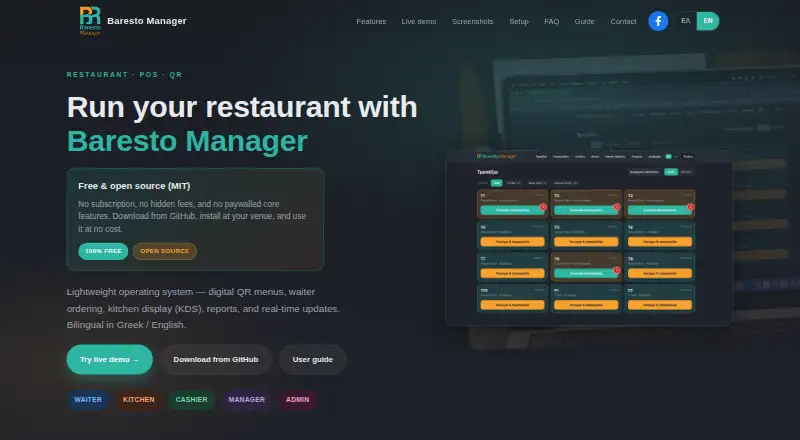
Baresto Manager is a locally run restaurant system for QR menus, waiter ordering, kitchen display, cashier workflows and reports. Staff can manage tables and floor plans, place mobile orders, send items to the kitchen, mark them delivered and close tables with payment. The kitchen display groups tickets by table, tracks dish status, filters kitchen, bar and grill stations, and provides real-time alerts. Guests can use a Greek- or English-language QR menu with allergen and availability details, call a waiter, and access a table-specific or shared code. Managers can review revenue, order and top-item reports and export them as CSV. Password and four-digit PIN login are available, with admin, manager, waiter, kitchen and cashier roles. Cashiers can accept cash or card and print receipts. Daily service runs on venue LAN or Wi-Fi without always-on internet; downloads and updates need internet. The software is free to run, with no license fee or SaaS subscription. Windows setup uses a GitHub ZIP and launcher; macOS and Linux require Python 3.11 or later. Optional paid installation support is available.
Who it suits
Baresto Manager suits restaurants that want local tools for table service, kitchen tickets, cashier tasks and guest QR menus. It is also relevant to venues that can run the system on their LAN or Wi-Fi.
What it does well
- Daily service does not need always-on internet.
- Guest menus include allergen and availability details.
- Reports cover revenue, orders and top items.
- Cashiers can close with cash or card.
- The software has no license fee or SaaS subscription.
What to know first
- macOS and Linux setup requires Python 3.11 or later.
- Downloads and updates require internet access.
- Optional installation support is paid.
Limits
The software itself is free to run, with no license fee or SaaS subscription. Optional installation support is paid; Windows setup uses a GitHub ZIP and launcher, while macOS and Linux require Python 3.11 or later.
Plans
| Plan | Billed and limits | Price |
|---|---|---|
| Baresto Manager | QR menus · waiter ordering · KDS · cashier · reports · no SaaS subscription | Free |
As barestomanager.eu lists them, read 15 Oct 2026. The maker's own page has the final word.
Getting started
- Choose the setup route for your platform: Windows uses a GitHub ZIP and launcher; macOS and Linux require Python 3.11 or later.
- Install and run the software locally; it runs on port 8765.
- Connect staff through the venue's LAN or Wi-Fi for daily service.
- Set up password or four-digit PIN login and assign admin, manager, waiter, kitchen, or cashier roles.
- Use the bilingual staff guide for waiter, kitchen, cashier, manager, and administrator workflows.
- Contact the site through its form for optional paid installation support if needed.
Overview
Baresto Manager is a locally run restaurant system for venues that want guest menus, floor service, kitchen coordination, checkout, and reporting in one tool. It is best suited to operators comfortable managing a local installation; the absence of a license fee is appealing, but setup requirements vary by operating system.
Daily service can run on the venue’s LAN or Wi-Fi without an always-on internet connection. The software runs locally on port 8765; Windows setup uses a GitHub ZIP and launcher, while macOS and Linux require Python 3.11 or later. Internet access is needed for downloads and updates. Optional paid installation support can help with Windows setup, networking, and initial configuration. The live demo is shared and may be reset periodically, so it is not appropriate for real customer data.
Key features
Floor service and kitchen coordination
Waiters can work from table and floor-plan views, place mobile orders, send items to the kitchen, mark them delivered, and close tables with payment. The kitchen display groups tickets by table, supports dish-status updates, and filters work by kitchen, bar, or grill station, with real-time alerts. This breadth can help a venue coordinate front and back of house, though teams wanting only a kitchen screen may find the wider system unnecessary.
Guest menus and checkout
Guests can use a Greek- or English-language QR menu with allergen and availability information, call a waiter, and access either per-table or shared QR codes. Cashiers can close a bill with cash or card and print a receipt. These are useful core service functions, but the stated checkout workflow is limited to those payment types.
Roles and reports
Password and four-digit PIN login support admin, manager, waiter, kitchen, and cashier roles. Managers can review revenue, orders, and top items, then export reports to CSV. The bilingual staff guide covers those same roles, which can help teams orient staff across service responsibilities.
Pricing
Baresto Manager: free. It is open source under the MIT license and runs locally at the venue, with no license fee or SaaS subscription. This is a strong fit for operators willing to handle installation and local operation. Optional paid installation support is separate; there is no recurring software charge.
Platforms
Baresto Manager supports Linux, macOS, web, and Windows, with on-premise deployment and offline mode. The locally hosted service means daily operation need not depend on an always-on internet connection, but installation is not identical across desktop systems: macOS and Linux require Python 3.11 or later, while Windows uses a ZIP and launcher.
Who it's for
It suits independent venues seeking a no-subscription system that covers guest QR menus, waiter ordering, kitchen display, cashier checkout, and manager reporting on a local network. It is less suitable for operators who want to avoid local setup or whose checkout needs go beyond the stated cash and card workflow.
Pros and cons
- Pros: One locally run system spans guest menus, table service, kitchen tickets, checkout, and reporting, reducing the need to assemble separate tools for these workflows.
- Pros: Local-network service can continue without always-on internet, useful where continuous connectivity is not assured.
- Pros: The MIT-licensed software has no license fee or SaaS subscription.
- Cons: Setup calls for a venue-managed installation, and macOS and Linux require Python 3.11 or later.
- Cons: The shared demo may be reset, making it unsuitable for real customer data.
- Cons: Checkout is described for cash or card, limiting its stated payment scope.
Alternatives
Kitchen Display System Software is a useful category starting point if the kitchen screen, rather than an integrated restaurant workflow, is the main buying need.
Odoo Restaurant is worth considering for a broader app suite: its One App Free plan costs nothing with one app and unlimited users, while Standard covers all apps on Odoo Online.
Ordering.Tools may suit operators focused on online ordering: its Free plan costs nothing and capped at 20 orders/month, with AI usage limits; Starter is €30 per mon.
FloCafe KDS is another free, open-source, self-hosted option for a venue primarily seeking a kitchen display; its hardware and operating costs are separate.
HungerRush is an alternative to compare for web and mobile restaurant workflows; its Starter plan is from $0 / Month, subject to qualification criteria, for one location and one POS terminal.
NodeDR OrderRestro, Slant KDS, Brisk Table Kitchen View, and eat·orbit Kitchen Display System are other options to compare.
Verdict
Baresto Manager is a sensible choice for a venue that wants broad restaurant workflows without a software subscription and can manage a local installation. Its main reason to choose it is the combination of front-of-house, kitchen, checkout, and reporting functions on the venue’s network; look elsewhere if hands-off setup or a wider stated payment workflow matters more.
Verdict
Baresto Manager brings front-of-house, kitchen and reporting functions into a locally run restaurant system. Check its setup requirements for the venue’s operating system before planning a deployment.
Questions
How much does Baresto Manager cost?
The Baresto Manager plan costs nothing to run, with no license fee or SaaS subscription. Optional installation support is paid.
Which platforms are listed?
Linux, macOS, web, and Windows are listed. Windows setup uses a GitHub ZIP and launcher; macOS and Linux require Python 3.11 or later.
Does it work without internet?
Daily service can run on the venue's LAN or Wi-Fi without always-on internet. Internet is needed for downloads and updates.
Is Baresto Manager open source?
Yes. It is open source under the MIT license.
What restaurant workflows does it cover?
It includes QR menus, waiter ordering, kitchen display, cashier workflows, and reports. Cashiers can close with cash or card and print receipts.
Can I try the live demo with real customer information?
The live demo is shared, and the site advises users not to enter real customer data because data may be reset periodically.
Facts from Baresto Manager's own pages
- Android app function
- The AppAgg listing describes Waiter Baresto365 as a free waiter app for selecting or scanning tables, adding orders, checking pending orders and entering comments or modifiers. · appagg.com, 15 Oct 2026
- API authentication
- The repository identifies JWT authentication through SimpleJWT. · github.com, 15 Oct 2026
- API endpoint
- The repository documents a REST API at /api/v1/ and Django admin at /admin/. · github.com, 15 Oct 2026
- Apple app publisher
- Baresto Waiter is published by G.M Powersoft Computer Solutions Ltd., is free, is 160 MB and requires iOS/iPadOS 10 or later. · apps.apple.com, 15 Oct 2026
- Apple privacy statement
- The Apple listing states that the developer reports no data collection. · apps.apple.com, 15 Oct 2026
- Databases
- SQLite is used locally and PostgreSQL is supported for production deployments. · github.com, 15 Oct 2026
- Demo limitation
- The live demo is shared, may be reset periodically and warns users not to enter real customer data. · barestomanager.eu, 15 Oct 2026
- Documentation
- The bilingual staff guide covers login, roles, waiter and cashier workflows, KDS, management, QR menus, URL paths and troubleshooting. · barestomanager.eu, 15 Oct 2026
- Documentation depth
- The repository includes API paths, environment configuration, management commands, Docker instructions, tests and Windows launchers, but no separate SDK reference is listed. · github.com, 15 Oct 2026
- Floor plans
- Managers can create floors, edit table capacity and labels, drag tables on a floor plan and assign waiters. · barestomanager.eu, 15 Oct 2026
- Google Play publisher page
- Google Play has a Powersoft developer page listing the Waiter Baresto365 Powersoft app. · play.google.com, 15 Oct 2026
- Guest QR menu
- Guests can view bilingual menus with allergens and availability, use a call-waiter button, and access either shared or per-table QR codes. · barestomanager.eu, 15 Oct 2026
- Internet and network
- Daily service runs on the venue's LAN or Wi-Fi without always-on internet; internet is needed for downloads and updates. · barestomanager.eu, 30 Sept 2026
- Kitchen display
- The KDS shows tickets by table, dish status flow, station filters for kitchen, bar and grill, and real-time alerts. · barestomanager.eu, 15 Oct 2026
- Languages
- The interface and guest menus support Greek and English. · barestomanager.eu, 15 Oct 2026
- Limit: internet dependency
- Internet is required for downloads and updates even though normal service can run on the local network. · barestomanager.eu, 15 Oct 2026
- Limit: local WebSockets
- The guide says local development uses in-memory WebSockets and recommends refreshing or checking the server if KDS updates stall. · barestomanager.eu, 15 Oct 2026
- Limit: payment scope
- The documented payment workflow covers cash and credit card only. · barestomanager.eu, 15 Oct 2026
- Local deployment
- The application runs locally on port 8765 and daily service can operate over the venue LAN or Wi-Fi without continuous internet. · barestomanager.eu, 15 Oct 2026
- macOS and Linux setup
- macOS and Linux require Python, a virtual environment, dependency installation, migrations and a runserver command. · barestomanager.eu, 15 Oct 2026
- Maker attribution
- The official site and repository credit Antonis Tzounis as the copyright holder and project author. · github.com, 15 Oct 2026
- Menu administration
- Managers can edit bilingual dish names and descriptions, prices, allergens, dietary tags, modifiers and sold-out availability. · barestomanager.eu, 15 Oct 2026
- Open-source licence
- The code is released under the MIT License, allowing use, modification, distribution and sale with no warranty. · github.com, 15 Oct 2026
- Payments
- The documented checkout flow offers cash or credit-card payment and receipt printing. · barestomanager.eu, 15 Oct 2026
Where Baresto Manager stands on Freedom251
- Kitchen Display System Software#1 of 49