Freedom251 › Kitchen Display System Software
NodeDR OrderRestro
What NodeDR OrderRestro is
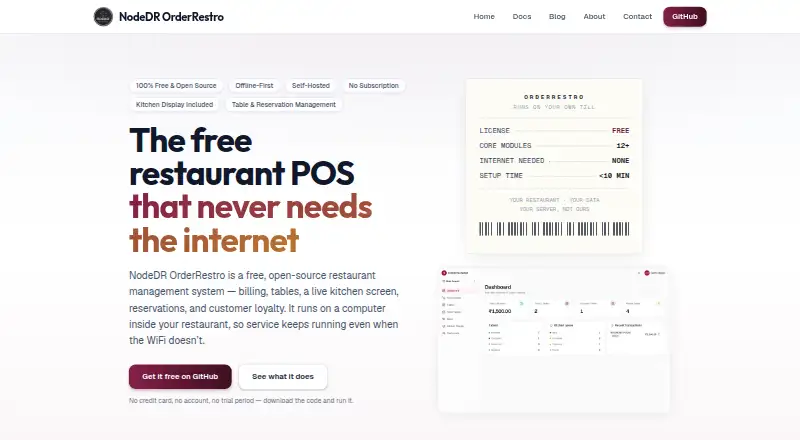
NodeDR OrderRestro is a free, open-source restaurant management system for orders, billing, tables, kitchen display, reservations, and customer loyalty. It runs on a computer at the restaurant, keeping order-taking, billing, kitchen display, and printing available on the local network without internet. Its POS supports dine-in, takeaway, and delivery, along with split or merged bills, discounts, gift cards, tips, mixed payments, refunds, and regional tax setups. A live kitchen display offers station routing, priority tickets, and timers; floor tools include a visual plan, reservations, and a waitlist. Guests can use a table QR code to see a live menu and order in English, Spanish, or French without installing an app. Inventory tools cover ingredients, recipe costing, purchase orders, batch and expiry tracking, waste logging, and automatic stock deduction when orders are billed. Customer profiles, loyalty points, gift cards, and role-based staff accounts are included. The server runs on Linux, macOS, or Windows, while other devices connect through a browser. Its AGPL-3.0 plan is free forever, with no subscription or per-seat fees.
Who it suits
OrderRestro may suit restaurants looking for self-hosted POS and management tools that can keep core local-network operations running without internet. It may also fit teams wanting QR ordering, inventory tracking, and role-based staff accounts.
What it does well
- Core order and billing functions run locally without internet.
- Supports dine-in, takeaway, and delivery.
- Includes kitchen routing and floor planning.
- QR ordering needs no guest app installation.
- Free forever with no per-seat fees.
What to know first
- Delivery management is listed as planned.
- Additional QR ordering controls are planned.
- Employee records and payroll are planned for a later phase.
- Accounting and branch management are planned for a later phase.
Limits
The plan is free forever under AGPL-3.0, with no subscription or per-seat fees. Delivery management and additional QR ordering controls are listed as planned; employee records, payroll, accounting, and branch management are planned for a later phase.
Plans
| Plan | Billed and limits | Price |
|---|---|---|
| Free / AGPL-3.0 | Free forever; no subscription or per-seat fees · Restaurant POS and management system · self-hosted · AGPL-3.0 | Free |
| Free | free forever; no subscription or per-order fee · AGPL-3.0 · self-hosted · kitchen display included | Free |
As orderrestro.nodedr.com lists them, read 4 Oct 2026. The maker's own page has the final word.
Getting started
- Visit the OrderRestro website.
- Choose a server running Linux, macOS, or Windows, or use a VPS or cloud server.
- Follow the maker's one-command installation and setup instructions.
- Connect tills, tablets, or phones through a browser on the same network.
- Use the free AGPL-3.0 plan; no trial is offered.
NodeDR OrderRestro is a free, open-source restaurant management system for operators who want to run point of sale, kitchen, floor, and stock tools on their own server. It is best suited to restaurants comfortable managing a local installation; its broad service toolkit is offset by delivery management and several back-office functions still being planned.
Overview
A computer at the venue runs OrderRestro, and tills, tablets, and phones on the same network use it through a browser. Order-taking, billing, kitchen display, and printing continue over the local network without internet. That resilience is valuable where connectivity is unreliable, but the restaurant takes responsibility for running the server rather than relying on a hosted service. Deployments can also run on a VPS or cloud server.
The POS covers dine-in, takeaway, and delivery orders, split or merged bills, discounts, gift cards, tips, mixed payments, and refunds. Regional tax setups include GST, US Sales Tax, EU VAT, and Spain IVA. The breadth should suit varied service and checkout patterns, although delivery orders do not amount to a complete delivery-management workflow: that capability is planned.
Key features
Kitchen and floor operations
The live kitchen display routes tickets by station and supports priorities, timers, and order-status tracking. A visual floor plan, reservations, and a waitlist connect table management with kitchen flow. This is a strong fit for venues that need more than a basic order screen, while those seeking a standalone kitchen display may prefer a narrower tool.
Guest ordering and inventory
Guests can scan a table QR code, see the live menu, and order in English, Spanish, or French without installing an app. Ingredient tracking, recipe costing, purchase orders, batch and expiry tracking, waste logging, and automatic stock deduction when bills are processed give operators a useful link between sales and stock. Additional QR ordering controls remain planned.
Customer, staff, and integrations
Customer profiles, loyalty points, gift cards, and role-based staff accounts support repeat business and access control. A website Integration API can send orders and bookings into the system. Its MCP server can also let Claude or another MCP-compatible AI use permitted order and reservation functions; the value of that connection depends on whether a venue wants those workflows.
Deployment and upkeep
The server runs on Linux, macOS, or Windows, while browser-based devices connect on the same network. The maker describes a one-command installation taking under 10 minutes, and a Settings-page button handles updates. S3-compatible backup and restore support gives operators a way to keep recoverable copies. The stated network design exposes port 1995, with the API and Swagger documentation reached through the web app proxy rather than published directly. These controls are relevant to a self-hosted deployment, but the venue still owns server operation and backup responsibility.
Pricing
Free / AGPL-3.0: free, billed Free forever. The plan is the self-hosted restaurant POS and management system, with no subscription or per-seat fees. There is no free trial because the product is free. The absence of seat charges suits teams that need multiple staff accounts, while the trade-off is operating the installation yourself. No usage quota is stated.
Platforms
OrderRestro supports API, Linux, macOS, self-hosted, web, and Windows. The server runs on Linux, macOS, or Windows; staff-facing tills, tablets, and phones access it in a browser on the same network. Offline mode is supported for core ordering, billing, kitchen display, and printing.
Who it's for
Independent restaurants and other venues that want local control, offline continuity, and a combined POS, kitchen, floor, and inventory system are the clearest fit. It is less suitable for operators who want delivery management, payroll, accounting, employee records, or branch management now: those are planned for later phases. Restaurants that do not want to maintain a server should also consider a hosted alternative.
Pros and cons
- Pro: Order-taking, billing, kitchen display, and printing work on the local network without internet, helping maintain service through a connection outage.
- Pro: POS, kitchen routing, floor planning, reservations, QR ordering, and stock tools cover a wide span of restaurant work in one system.
- Pro: Free forever with no subscription or per-seat fees makes the published plan straightforward for larger staff teams.
- Con: Self-hosting places server operation, backup, and upkeep on the restaurant rather than a hosted provider.
- Con: Delivery management, employee records, payroll, accounting, and branch management are not part of the current scope.
Alternatives
For venues focused on a kitchen display, Kitchen Display System Software is a category to compare with OrderRestro's broader restaurant-management approach.
Baresto Manager is another free, locally run open-source option for Linux, macOS, web, and Windows, with optional paid installation support; consider it if MIT licensing is preferable.
Odoo Restaurant offers a free one-app plan with unlimited users and a paid Standard plan for all apps on Odoo Online; choose it if that app-based hosted option better matches your setup.
Ordering.Tools has a free plan capped at 20 orders per month and a Starter plan at €30 a month, plus a free trial; it may suit a venue that wants an order-focused service rather than OrderRestro's self-hosted breadth.
FloCafe KDS is free, open-source kitchen display software for Linux, macOS, self-hosted, and Windows deployments, with hardware and operating costs separate; consider it for a kitchen-display-only need.
HungerRush has a qualifying Starter plan from $0 / Month for one location and one POS terminal, as well as custom pricing; it is an option for venues that meet those criteria and want to compare another POS offering.
PAR Ordering uses custom pricing and asks prospective customers to contact PAR for a demo and pricing details.
SterkChef is a paid restaurant software option for web, Windows, Linux, iOS, and Android.
Lightspeed Restaurant is a paid option with a Starter plan at $69 a month that includes a customizable POS, menu manager, floor plans, Advanced Insights, offline mode, and 24/7 support; consider it if those included services and support outweigh OrderRestro's free self-hosted model.
Verdict
Choose NodeDR OrderRestro if you want a free, broad restaurant system that keeps core service running locally without internet and are prepared to manage your own installation. Its main reason to choose is the combination of offline POS, kitchen and floor workflows, and inventory without subscription or per-seat fees. Look elsewhere if delivery management or the planned payroll, accounting, employee, and branch tools are essential today, or if you need a hosted system managed for you.
Verdict
OrderRestro covers a wide range of restaurant operations and can keep local order-taking, billing, kitchen display, and printing working offline. Several capabilities, including delivery management and accounting, are listed as planned rather than available.
Questions
How much does NodeDR OrderRestro cost?
The Free / AGPL-3.0 plan is free, billed free forever. It has no subscription or per-seat fees.
Is there a free plan or trial?
There is a free plan. No free trial is offered.
Is NodeDR OrderRestro open source?
Yes. Its free plan is under the AGPL-3.0 license.
Which platforms does it support?
The server runs on Linux, macOS, or Windows. Tills, tablets, and phones access it through a browser on the same network.
Can it work without internet?
Yes. Order-taking, billing, kitchen display, and printing can continue over the restaurant's local network without internet.
Who makes NodeDR OrderRestro?
NODEDR INFOTECH PRIVATE LIMITED makes and maintains it. The maker page identifies Raktim Ranjit as lead developer.
Facts from NodeDR OrderRestro's own pages
- Backups
- Administrators can back up and restore data to any S3-compatible bucket. · orderrestro.nodedr.com, 15 Oct 2026
- Backups and updates
- Users can connect an S3-compatible bucket for backups and restore, and the Settings page includes a one-click update button. · orderrestro.nodedr.com, 4 Oct 2026
- Cloud deployment
- The same installation can run on a VPS or cloud server such as DigitalOcean, Hetzner or AWS. · orderrestro.nodedr.com, 15 Oct 2026
- Company capital
- Tofler reports authorised capital of INR 15 lakh and paid-up capital of INR 1 lakh. · tofler.in, 15 Oct 2026
- Company directors
- Tofler lists Raktim Ranjit and Debabrata Das as the company’s two directors. · tofler.in, 15 Oct 2026
- Company incorporation
- Tofler lists NODEDR INFOTECH PRIVATE LIMITED as an active unlisted private company incorporated on 13 May 2026. · tofler.in, 15 Oct 2026
- Customer and staff tools
- The system provides customer profiles, loyalty points, gift cards, and staff accounts with role-based permissions. · orderrestro.nodedr.com, 4 Oct 2026
- Customer loyalty
- Customer profiles store visit history and loyalty balances, and the system supports gift cards and checkout redemption. · orderrestro.nodedr.com, 15 Oct 2026
- Deployment and devices
- The server runs on Linux, macOS, or Windows, while tills, tablets, and phones on the same network access it through a browser; deployments can also run on a VPS or cloud server. · orderrestro.nodedr.com, 4 Oct 2026
- Development status
- The maker lists delivery management and additional QR ordering controls as planned, and employee records, payroll, accounting, and branch management as planned for a later phase. · orderrestro.nodedr.com, 4 Oct 2026
- Email and messaging
- Email can use the restaurant’s SMTP server, while SMS and WhatsApp are connected through messaging-tool webhooks. · orderrestro.nodedr.com, 15 Oct 2026
- Installation
- The documented installation clones the GitHub repository, runs install.sh, builds Docker images, starts the stack and serves the app at port 1995. · orderrestro.nodedr.com, 15 Oct 2026
- Integrations
- A website Integration API can place orders and bookings into OrderRestro, and an MCP server lets Claude or another MCP-compatible AI access permitted order and reservation functions. · orderrestro.nodedr.com, 4 Oct 2026
- Inventory
- Ingredient inventory uses recipe costing, purchase orders, goods receipts, batch and expiry tracking, FIFO waste logging and automatic stock deduction. · orderrestro.nodedr.com, 15 Oct 2026
- Kitchen and floor
- It includes a live kitchen display with station routing, priority tickets, and timers, plus a visual floor plan, reservations, and waitlist. · orderrestro.nodedr.com, 4 Oct 2026
- Kitchen display
- Kitchen tickets are routed to stations and shown with priority flags and elapsed-time timers. · orderrestro.nodedr.com, 15 Oct 2026
- Licence
- The project is licensed under AGPL-3.0; modified versions offered as a network service must share their changes under the same licence. · orderrestro.nodedr.com, 15 Oct 2026
- Limit: barcode support
- The repository feature checklist marks barcode scanning as planned and says the restaurant app has no barcode field or scanner. · github.com, 15 Oct 2026
- Limit: hardware printing
- The repository roadmap states that direct USB ESC/POS printing and a dedicated PDF endpoint remain planned hardware work. · github.com, 15 Oct 2026
- Limit: ingredient units
- The documentation says unit conversion, such as buying kilograms while costing grams, is not yet built and each ingredient uses one base unit. · orderrestro.nodedr.com, 15 Oct 2026
- Limit: station views
- The repository roadmap says the kitchen display groups tickets by status rather than providing frontend station-specific columns or tabs. · github.com, 15 Oct 2026
- Maker
- The product is made and maintained by NODEDR INFOTECH PRIVATE LIMITED; the maker page identifies Raktim Ranjit as OrderRestro's lead developer. · nodedr.com, 4 Oct 2026
- MCP server
- The built-in MCP endpoint exposes 40 tools over Streamable HTTP and checks every request against the personal key holder’s permissions. · orderrestro.nodedr.com, 15 Oct 2026
- Offline operation
- After installation, billing, order-taking, kitchen display and printing continue on the local network without internet access. · orderrestro.nodedr.com, 15 Oct 2026
Where NodeDR OrderRestro stands on Freedom251
- Kitchen Display System Software#2 of 49