Freedom251 › Fire Protection Software
fireNspec
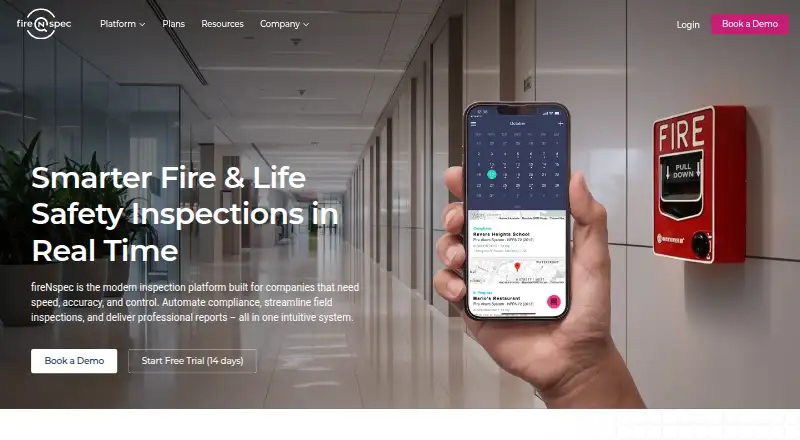
What fireNspec is
fireNspec is an inspection platform for fire and life safety companies managing inspections, compliance, and reporting. Its workflow covers inspections, deficiencies, work orders, and reporting. Technicians can record results, deficiencies, photos, comments, and asset data in the field, including offline, and sync records when they reconnect. Dashboards show inspection progress, team activity, deficiencies, and job status in real time. Listed inspection areas include fire alarms, sprinkler systems, fire pumps, extinguishers, suppression systems, emergency lighting, backflow, kitchen hoods, access control, and video/CCTV. The support page lists NFPA- and ULC-compliant templates, along with managed healthcare templates for Joint Commission, DNV, and CIHQ environments. Named integrations include Fieldhub, HubSpot, Compliance Engine, Potter, and SedonaOffice; additional integrations are in development. Pricing is available on request. The listed free plan lasts 14 days and includes unlimited inspections, barcode scans, and PDF reports, offline capability, mobile and web access, and in-app chat support. The platform is available on Android, iOS, and web.
Who it suits
fireNspec suits fire and life safety companies handling inspection and compliance documentation, including teams that need technicians to capture records offline. Its listed inspection areas span fire protection, life safety, and related systems.
What it does well
- Technicians can record inspection data offline
- Dashboards show job status in real time
- Includes NFPA- and ULC-compliant templates
- Free plan includes unlimited inspections and PDF reports
What to know first
- Pricing is available on request
- The listed free plan lasts 14 days
- Additional integrations are in development
Limits
Professional and Enterprise plan prices are available by request; the Professional plan lists scheduling, recurring inspections, deficiency management, and work orders, while Enterprise lists SSO, multi-branch support, and priority technical support.
Plans
| Plan | Billed and limits | Price |
|---|---|---|
| Free | 14 days · Unlimited inspections · Unlimited barcode scans · Full template manager · Real-time data sync · Unlimited PDF reports · Offline capability · Mobile + web access · In-app chat support | Free |
| Enterprise | Call for Pricing · Volume technician seat pricing · SSO · Data migration · Multi-branch support · Priority technical support · Training and onboarding · Dedicated account support | On request |
| Professional | Call for Pricing · Customizable templates · Scheduling · Recurring inspections · Deficiency management · Work orders · Unlimited customers, sites, customer portals, and admin seats · Integration ready · No long-term contract | On request |
As firenspec.com lists them, read 3 Oct 2026. The maker's own page has the final word.
Getting started
- Visit https://firenspec.com/.
- The Free plan is listed as free, with billing listed as 14 days; contact the company about Professional and Enterprise plans.
- Use the Android or iOS app for field work, or access the platform on the web.
- Record inspections and, when working offline, sync the saved information after reconnecting.
- Use structured onboarding for administrators and technicians if needed.
Overview
fireNspec is inspection and compliance software for fire and life safety contractors. It suits teams managing device-level testing across several inspection categories, particularly when technicians need to capture records without connectivity. Its joined-up inspection, deficiency, and work-order workflow is compelling, but custom pricing means buyers must request a quote.
The platform covers fire alarms, sprinklers, fire pumps, extinguishers, suppression systems, emergency lighting, backflow, kitchen hoods, access control, and video/CCTV. NFPA- and ULC-compliant templates and managed healthcare templates for Joint Commission, DNV, and CIHQ environments support organizations with those documentation requirements. Teams outside fire and life safety have less reason to choose this specialist tool.
For a wider look at this category, see Fire Protection Software.
Key features
Field capture and offline work
Technicians can record results, deficiencies, photos, comments, and asset data in the mobile app, then sync when connectivity returns. That makes the field workflow usable in locations where a live connection is unreliable, while keeping inspection information together for office follow-up.
Connected service workflow
Inspections, deficiencies, work orders, and reporting sit in one workflow. The practical benefit is a path from a recorded finding to follow-up work, rather than treating inspection documentation as an isolated task. Real-time dashboards surface inspection progress, team activity, deficiencies, and job status for managers tracking work across teams.
Integrations, security, and support
Integrations include Fieldhub, HubSpot, Compliance Engine, Potter, and SedonaOffice, with more in development. That is useful for businesses already working with those systems, though the named connections alone do not establish fit for other software stacks. The security architecture uses Firebase and Firestore, server-side access controls, and industry-standard encryption.
Administrators and technicians can receive structured onboarding, and data import and export are supported. The company also offers custom development for specialized workflows, reporting standards, and integrations. 24/7 live chat is available, with technical help through chat in the app or portal.
Pricing
Free
The Free plan costs nothing and is billed 14 days. It includes unlimited inspections and barcode scans, the full template manager, real-time data sync, unlimited PDF reports, offline capability, mobile and web access, and in-app chat support. This makes it a broad way to try field capture and reporting, but its 14-day term is a short evaluation window rather than an ongoing free tier.
Professional
Professional has custom pricing. It adds customizable templates, scheduling, recurring inspections, deficiency management, work orders, and unlimited customers, sites, customer portals, and admin seats. Integration readiness and no long-term contract make it the relevant plan for businesses that need an operational system without a stated contract commitment; technician seat terms and the price should be confirmed before comparing costs.
Enterprise
Enterprise also has custom pricing and is billed by calling for pricing. It adds volume technician-seat pricing, SSO, data migration, multi-branch support, priority technical support, training and onboarding, and dedicated account support. This is the better fit for larger or multi-branch organizations needing implementation and account-level help, but the quote is necessary to assess total cost.
Platforms
fireNspec supports Android, iOS, and web. Mobile access and offline capture serve technicians in the field, while web access and real-time dashboards support office teams.
Who it's for
Fire protection and life safety companies that manage inspections, compliance records, and device-level testing are the natural audience. Contractors with varied inspection scopes, offline field needs, or requirements for healthcare-related templates have a clear reason to consider it. It is less suitable for buyers who need predictable published pricing or a free plan beyond the 14-day period.
Pros and cons
- Pros: Offline capture includes results, photos, comments, deficiencies, and asset data, supporting field work when connectivity drops.
- Pros: Inspections can feed deficiency management and work orders, with dashboards for live progress and job status.
- Pros: Broad fire and life safety coverage and specialized NFPA, ULC, and healthcare templates suit varied compliance workflows.
- Cons: The Free plan lasts 14 days, so it does not provide a continuing no-cost option.
- Cons: Professional and Enterprise require custom quotes, making upfront budget comparisons difficult.
Alternatives
BuildingReports is worth considering for buyers seeking a freemium option or an API platform; its ScanSeries licensing can cover one application, multiple applications, or the entire suite, with pricing by request.
Fire Cloud is another freemium alternative, with web access.
Essential may suit teams that value month-to-month custom pricing after go-live, cancellation at any time, free implementation and data migration, and free office users; pricing is based on technician users.
Firebug EXT is a paid alternative for buyers considering a product available on web, Windows, iOS, and Android.
Uptick may suit teams wanting a paid platform with a monthly fee, monthly invoicing, cancellation at any time, and per-user pricing based on office and field colleagues.
FETS is another paid option, available on web, iOS, and Android.
FireLab Aries gives buyers a paid alternative with a free trial and published monthly plans, including Spark at $299 a month. Its Spark plan includes unlimited technicians, unlimited reports, and unlimited customer support.
ServiceTrade is a paid alternative whose Select plan includes unlimited office users, an Android and iOS technician app, dispatch board and map scheduler, service and job tracking, equipment history, and online quotes.
Verdict
Choose fireNspec if your fire and life safety business needs offline inspection capture linked to deficiencies, work orders, and reporting, especially across varied inspection scopes. Its strongest case is the continuity between field records and office follow-up, backed by relevant templates and dashboards. Look elsewhere if a continuing free tier or transparent upfront pricing is central to your decision.
Verdict
fireNspec brings inspection records, deficiencies, work orders, and reporting into one workflow, with offline field capture and real-time dashboards. Pricing requires a request, and the listed free plan is limited to 14 days.
Questions
How much does fireNspec cost?
The Free plan is listed as free, with billing listed as 14 days. Professional and Enterprise pricing is available on request.
Is there a free plan or trial?
Yes. A Free plan is listed, and pricing notes also list a 14-day trial.
Which platforms does fireNspec support?
It is available on Android, iOS, and the web.
Can technicians work offline?
Yes. Technicians can record inspection results and related information offline, then sync when back online.
What integrations are listed?
The listed integrations are Fieldhub, HubSpot, Compliance Engine, Potter, and SedonaOffice. Additional integrations are in development.
What do the Professional and Enterprise plans include?
Professional lists customizable templates, scheduling, recurring inspections, deficiency management, work orders, and integration readiness. Enterprise lists volume technician seat pricing, SSO, data migration, multi-branch support, priority technical support, training, and dedicated account support.
Facts from fireNspec's own pages
- Custom development
- fireNspec offers custom development for specialized workflows, reporting standards, and integration needs. · firenspec.com, 3 Oct 2026
- Dashboards
- Dashboards show inspection progress, team activity, deficiencies, and job status in real time. · firenspec.com, 3 Oct 2026
- Field app
- Technicians can record inspection results, deficiencies, photos, comments, and asset data, including offline, and sync when back online. · firenspec.com, 3 Oct 2026
- Headquarters
- Houston, Texas, United States · firenspec.com, 28 Sept 2026
- Inspection scope
- Listed inspection areas include fire alarms, sprinkler systems, fire pumps, extinguishers, suppression systems, emergency lighting, backflow, kitchen hoods, access control, and video/CCTV. · firenspec.com, 3 Oct 2026
- Integrations
- The integrations page lists Fieldhub, HubSpot, Compliance Engine, Potter, and SedonaOffice, and says additional integrations are in development. · firenspec.com, 3 Oct 2026
- Intended users
- The company says fireNspec was built for fire alarm inspections, life safety compliance documentation, and device-level testing workflows. · firenspec.com, 3 Oct 2026
- Purpose
- fireNspec is an inspection platform for fire and life safety companies to manage inspections, compliance, and reporting. · firenspec.com, 3 Oct 2026
- Security
- The support page says fireNspec uses Firebase and Firestore security architecture, server-side enforced access controls, and industry-standard encryption. · firenspec.com, 3 Oct 2026
- Support
- The contact page lists 24/7 live chat support, and the support page directs users to chat in the app or portal for technical help. · firenspec.com, 3 Oct 2026
- Templates and standards
- The support page says fireNspec provides NFPA- and ULC-compliant templates and managed healthcare templates for Joint Commission, DNV, and CIHQ environments. · firenspec.com, 3 Oct 2026
- Training and migration
- The support page says structured onboarding is available for administrators and technicians, and data import and export are supported. · firenspec.com, 3 Oct 2026
- Workflow
- The platform manages inspections, deficiencies, work orders, and reporting in one workflow. · firenspec.com, 3 Oct 2026
Where fireNspec stands on Freedom251
- Fire Protection Software#3 of 31