Freedom251 › Disk Space Analyzers

Filelight
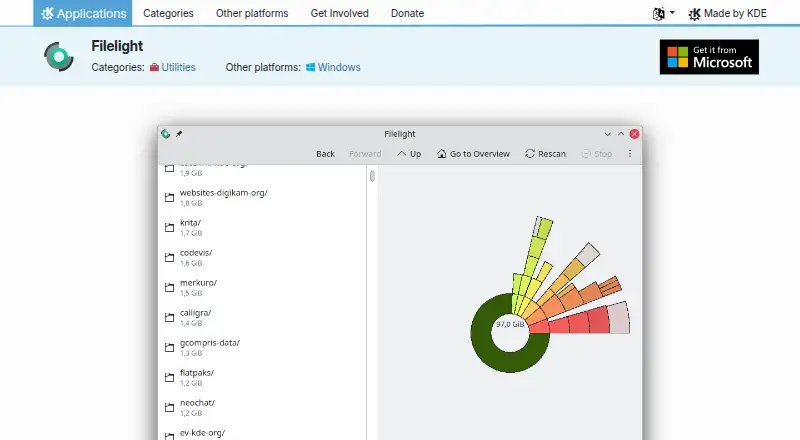
What Filelight is
Filelight is a free application for visualizing disk usage on Linux and Windows. It scans files and folders and displays the results as concentric rings, helping users inspect what is taking up space. Scans can include local, remote, or removable disks, and the application provides detailed information about files and folders. Users can delete files or folders from within Filelight. It integrates with the Dolphin, Konqueror, and Krusader file managers, and offers configurable color schemes along with scan and appearance settings. Selected folders, remote filesystems, and removable media can be excluded from scans. Filelight can also be launched from a command line with a folder name to scan that location. Linux users can install it through Discover or another AppStream store, a distribution package manager, or Flathub. KDE says its software generally does not send information from users’ devices unless they take an explicit action, though third-party distributors may modify software in ways that affect this policy. Scanning remote filesystems such as NFS or Samba mounts can generate high network traffic.
Who it suits
Filelight suits Linux and Windows users who want a visual view of file and folder disk usage. It can also serve people who need to scan removable or remote disks, with awareness of the network impact of remote scans.
What it does well
- Visualizes disk usage with concentric rings
- Scans local, remote, and removable disks
- Shows detailed file and folder information
- Can delete selected files and folders
- Integrates with three listed file managers
What to know first
- Does not show application sizes
- Remote filesystem scans can generate high network traffic
Plans
| Plan | Billed and limits | Price |
|---|---|---|
| Filelight | Free and open-source application · GPL-2.0+ | Free |
As apps.kde.org lists them, read 11 Oct 2026. The maker's own page has the final word.
Getting started
- Visit the KDE Filelight product page
- On Linux, install through Discover, another AppStream store, a distribution package manager, or Flathub
- On Windows, use the desktop application
- Start Filelight and choose a local, remote, or removable disk to scan
- Optionally start it from a command line with a folder name
Filelight turns disk usage into a ring-shaped map, helping you see which files and folders take up space. It is best suited to Linux and Windows users who want a visual way to locate large items and reclaim storage. Its free, open-source model makes it an approachable choice, though remote scans can be demanding on a network.
Overview
Filelight scans a selected folder or disk and represents its contents as concentric rings. The visual layout makes it easier to spot where storage is concentrated than a plain folder listing, while file and folder details help you identify what a segment represents. You can delete files or folders from the app, so the path from finding space to freeing it is direct.
It can scan local, removable, and remote disks. That breadth is useful for checking more than a computer’s internal drive, but remote scans of NFS or Samba mounts may generate high network traffic. Excluding remote filesystems, removable media, or selected folders gives users a way to limit scan scope.
Key features
- Concentric-ring treemap: The visual view helps locate space-heavy parts of a folder hierarchy; users who prefer a conventional size-sorted list may find this presentation less direct.
- Remote and removable scans: These extend analysis beyond local storage, but scanning network mounts can impose substantial traffic. Exclusions help avoid scanning those locations when that cost is not worthwhile.
- File manager integration: It integrates with Dolphin, Konqueror, and Krusader, which is particularly relevant to users of those Linux file managers.
- Appearance and scan controls: Configurable color schemes and settings let users adjust the display and scanning behavior. A folder can also be passed on the command line to start a scan.
Pricing
Filelight costs nothing. The free plan is the application itself, released as free and open-source software under GPL-2.0+. There is no paid tier or trial to weigh against it, so it suits users who want a no-cost disk analyzer without a subscription or license purchase.
Platforms
Filelight is available for Linux and Windows. Linux users can install it through Discover or another AppStream application store, a distribution package manager, or Flathub. The file manager integrations with Dolphin, Konqueror, and Krusader are most pertinent to Linux users. KDE says its software generally does not transfer information from users’ devices except following an explicit user action; third-party distributors may modify software in ways that affect that policy.
Who it's for
Filelight is a good fit for people who want to inspect disk usage visually, especially Linux users already working with one of its supported file managers. Its remote and removable scanning can help when storage spans more than a local drive, provided network traffic is considered. It is less suitable for users who need a size-sorted application-specific listing or who want to scan remote mounts without adding network load.
Pros and cons
- Pro: The ring-based view makes disk usage visually legible, helping users find space-heavy folders.
- Pro: Local, remote, and removable scanning, plus scan exclusions, give users control over which storage to inspect.
- Pro: File and folder deletion is built into the cleanup workflow.
- Pro: The free, GPL-2.0+ application has no paid plan to unlock its core use.
- Con: Remote scans of NFS or Samba mounts may create high network traffic, a meaningful drawback on constrained or shared connections.
- Con: Application sizes are not shown, so users looking specifically for a view centered on installed applications may need another approach.
Alternatives
For other options, browse Disk Space Analyzers.
- TreeSize is a Windows freemium option with a free plan and trial; its free edition is for private, non-commercial use.
- WizTree is a freemium alternative for Windows and macOS with a free plan; its Individual Supporter Code costs $25 a month, and supporter codes do not expire.
- WinDirStat is a free Windows option for personal or commercial use.
- Disk Usage Analyzer is a free Linux desktop option for disk usage scanning.
- FolderSizes is a Windows freemium alternative; its Personal Edition license costs $30, paid once for personal and home network use, and is unavailable to organizations.
- Disk Analyzer Pro is a macOS and Windows freemium option whose free personal edition includes local-drive usage reports, file and folder deletion, and duplicate-file reports.
- SizeTrend is a Windows freemium alternative with free local scans and an overview that includes cleanup and storage recommendations.
- QDirStat is a free, GPL V2 option for Linux, macOS, and self-hosted use.
Verdict
Choose Filelight if you want a free, open-source visual disk analyzer that can inspect local, removable, and remote storage and help you delete space-consuming items. Its clearest limitation is the potential network load from scanning remote filesystems; users who need to keep that traffic low should exclude those mounts or choose a tool better suited to their scanning needs.
Verdict
Filelight offers a free way to inspect disk usage visually and can include remote and removable storage. Its remote scans may generate substantial network traffic, so that limitation matters when scanning mounted filesystems.
Questions
Is Filelight free?
Yes. Filelight is a free, open-source application under GPL-2.0+.
Which platforms does Filelight support?
Its desktop platforms are Linux and Windows.
Can it scan external or removable drives?
Yes. Filelight can scan removable disks as well as local and remote disks.
Does Filelight show application sizes?
No. It displays disk usage for files and folders, but not application sizes.
Can I use Filelight from a command line?
Yes. You can start it with a folder name to scan that folder.
Where can Linux users install it?
Linux installation options include Discover or another AppStream application store, a distribution package manager, and Flathub.
Facts from Filelight's own pages
- Appearance
- It supports configurable color schemes and has settings for scanning and appearance. · apps.kde.org, 11 Oct 2026
- Application sizes
- No · apps.kde.org, 23 Sept 2026
- Command-line use
- Filelight can be started from a command line with a folder name to scan that folder. · docs.kde.org, 11 Oct 2026
- Disk scanning
- It can scan local, remote, or removable disks. · apps.kde.org, 11 Oct 2026
- Distribution
- Linux users can install it through Discover or another AppStream application store, a distribution package manager, or Flathub. · apps.kde.org, 11 Oct 2026
- External drive scans
- Yes · apps.kde.org, 23 Sept 2026
- File deletion
- It can delete files or folders that are taking up too much space. · apps.kde.org, 11 Oct 2026
- File details
- It shows detailed information about files and folders. · apps.kde.org, 11 Oct 2026
- File manager integrations
- It integrates into the Dolphin, Konqueror, and Krusader file managers. · apps.kde.org, 11 Oct 2026
- Founded
- 1996 · apps.kde.org, 28 Sept 2026
- Free plan
- Yes · apps.kde.org, 23 Sept 2026
- Headquarters
- Berlin, Germany · apps.kde.org, 28 Sept 2026
- Network impact
- The handbook warns that scanning remote filesystems such as NFS or Samba mounts can generate high network traffic. · docs.kde.org, 11 Oct 2026
- Platforms
- The product page offers installation on Linux and lists Windows as another platform. · apps.kde.org, 11 Oct 2026
- Privacy
- KDE says its software generally does not transfer information from users’ devices except as a result of an explicit user action; third-party distributors may modify software in ways that affect this policy. · kde.org, 11 Oct 2026
- Purpose
- Filelight visualizes computer disk usage as concentric rings to help users find space to free up. · apps.kde.org, 11 Oct 2026
- Scan exclusions
- Users can exclude selected folders, remote filesystems, or removable media from scans. · docs.kde.org, 11 Oct 2026
- Scan scope
- files_folders · apps.kde.org, 23 Sept 2026
- Support
- The product page links to the Filelight Handbook, UserBase Wiki, KDE Forum, and #kde-utils on Libera.chat for help. · apps.kde.org, 11 Oct 2026
- Treemap view
- Yes · apps.kde.org, 23 Sept 2026
Where Filelight stands on Freedom251
- Disk Space Analyzers#4 of 105