Freedom251 › Document Redaction Software
Excise
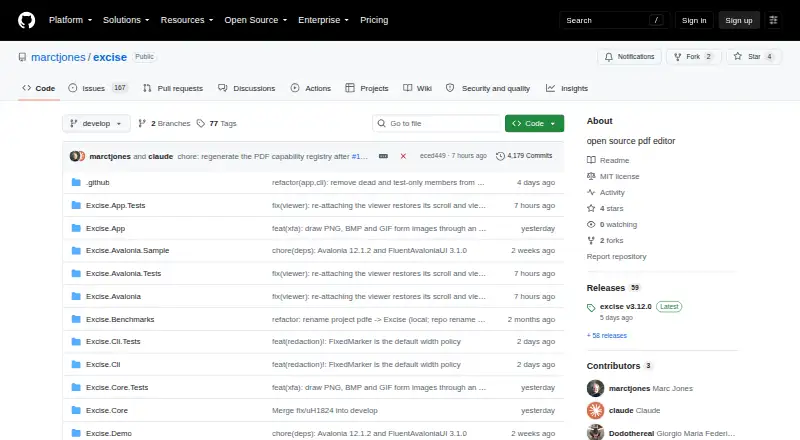
What Excise is
Excise is a free, open-source PDF editor for macOS, Windows, and Linux, with a graphical app and command-line tools. It supports searching, selecting and copying text, annotations, page organization, AcroForm filling and flattening, and Bates numbering. Its redaction engine removes text, images, and vector graphics from PDF content streams. By default, redaction also scrubs metadata, attachments, JavaScript, thumbnails, and hidden layers, and reports removals. Command-line audit tools can check whether redacted text still leaks or text is hidden beneath opaque overlays; batch workflows and stable JSON output are also available. Excise reads and writes AES-128 and AES-256 encryption and inspects digital signatures against the operating system trust store. Signature checks do not cover certificate revocation, timestamps, or long-term validation material. Dynamic XFA layouts are experimental and cannot be filled in Excise. The project says it is not a replacement for Acrobat Pro in several specialized workflows, including prepress, color-managed print production, JavaScript, portfolios, or certificate-authority trust decisions. Builds are unsigned and not notarized, and have no auto-update.
Who it suits
Excise suits people who need PDF editing and content-removing redaction on Windows, macOS, or Linux, including command-line batch workflows. Its stated limits matter for users who rely on dynamic XFA forms, signed builds, or specialized Acrobat Pro workflows.
What it does well
- Free and open source
- Redaction removes content rather than covering it
- Scrubs document metadata and hidden content by default
- Includes command-line batch workflows and audit checks
- Reads and writes AES-128 and AES-256 encryption
What to know first
- Dynamic XFA layouts are experimental and cannot be filled
- Builds are unsigned and not notarized
- No auto-update is provided
- Certificate revocation and timestamp validation are not checked
Limits
Excise is free under the Open source plan, with no paid tiers stated. Dynamic XFA layouts are experimental and cannot be filled; signature inspection does not check certificate revocation or timestamp and long-term validation material.
Plans
| Plan | Billed and limits | Price |
|---|---|---|
| Open source | MIT licensed · no paid tiers stated | Free |
As github.com lists them, read 8 Oct 2026. The maker's own page has the final word.
Getting started
- Open the Excise GitHub project page.
- Choose a package for Apple Silicon macOS, Windows 10/11 x64, Ubuntu/Debian, or x64 or ARM64 Linux.
- Verify a release asset using its SHA-256 file.
- Use the desktop app or command-line tool for PDF workflows.
Excise is an open-source PDF workbench for Windows, macOS, and Linux, with both a desktop app and command-line tools. It is best for people who need everyday PDF handling and content-removing redaction, especially when they want ways to audit the result. Its breadth is useful, but specialized print, JavaScript, and certificate-trust workflows call for another tool.
Overview
Excise combines common document tasks with redaction that removes content from the PDF rather than concealing it beneath a black rectangle. That makes it a stronger fit for sensitive-document cleanup than an editor whose redaction is only visual. It is not a text editor or a PDF converter, so readers who need to rewrite document text or change file formats should look elsewhere.
Key features
Redaction and audit
The redaction engine removes text, images, and vector graphics from PDF content streams. It also scrubs metadata, attachments, JavaScript, thumbnails, and hidden layers by default, and reports removals. The CLI adds two useful checks: unredact tests whether redacted text still leaks, while audit looks for text hidden under opaque overlays. Together, removal and auditing make Excise particularly relevant when disclosure risk matters, though these tools do not make it a substitute for workflows that depend on certificate-authority trust decisions.
Everyday document work
Excise supports viewing, search, text selection and copying, annotations, page organization, Bates numbering, and file-size reduction. It can fill and flatten AcroForms and create new fields. OCR uses the system's Tesseract, so it is a practical option when OCR is needed without a separate conversion feature. Excise does not support text editing or PDF conversion, which limits its usefulness for document revision and format-changing work.
Automation and development
The command-line tool supports batch workflows and stable JSON output, making Excise a better fit for repeatable processing than a desktop-only utility. The project also includes managed-code PDF core and rendering libraries, an Avalonia viewer control, and a C ABI over Excise.Core for other languages. That breadth may matter to developers integrating PDF handling; it is less consequential for someone who only needs occasional desktop edits.
Encryption, signatures, and XFA
Excise reads and writes AES-128 and AES-256 encryption and inspects digital signatures against the operating system trust store. Signature inspection does not check certificate revocation or evaluate timestamp and long-term validation material, so it should not anchor high-assurance signature decisions. Dynamic XFA layouts are experimental, may omit or move content, and cannot be filled in Excise; users with XFA forms should choose another workflow.
Pricing
Excise is free: the Open source plan is free and is MIT licensed, with no paid tiers stated. That suits individuals or teams seeking a no-cost PDF workbench, but the price does not bring an auto-update or signed installer: builds are not signed or notarized, and release assets include SHA-256 files for verification. Downloads are provided for Apple Silicon macOS, Windows 10/11 x64, Ubuntu/Debian, and x64 or ARM64 Linux.
Platforms
The desktop app supports Windows, macOS, and Linux. Self-contained packages cover Apple Silicon macOS, Windows 10/11 x64, Ubuntu/Debian, and x64 or ARM64 Linux. Builds are not signed or notarized and do not auto-update, so users must be comfortable verifying release assets with the supplied SHA-256 files and handling updates themselves.
Who it's for
Excise is well suited to people who want free desktop PDF tools, permanent content-removing redaction, and command-line auditing or batch processing across the three major desktop operating systems. Its libraries and API also make it relevant to developers building PDF functionality into other software. It is not the right choice for prepress, color-managed print production, JavaScript or portfolio workflows, XFA form filling, or decisions requiring certificate-authority trust validation.
Pros and cons
Pros
- Redaction removes text, images, and vector graphics from PDF content streams rather than merely covering them.
- Default cleanup reaches metadata, attachments, JavaScript, thumbnails, and hidden layers, and the CLI provides leak and overlay audits.
- Free, MIT-licensed software combines desktop tools with batch workflows and developer libraries.
- AcroForm creation, filling, and flattening complement search, annotations, page organization, and Bates numbering.
Cons
- No text editing or PDF conversion, which rules it out for users who need either task.
- Experimental XFA support cannot fill XFA fields and may omit or move content.
- Signature checks omit revocation and timestamp or long-term validation material.
- Unsigned, non-notarized builds and no auto-update mean installation verification and updates require user attention.
- It does not target prepress, color-managed print production, JavaScript workflows, portfolio workflows, or certificate-authority trust decisions.
Alternatives
Document Redaction Software and PDF editors are useful starting points for comparing tools by category.
Choose LocalRedact instead if a Python package or optional local HTTP service better suits your free, cross-platform redaction setup. Philter is an alternative for individual, non-commercial, or evaluation use that calls for full on-device redaction and GitHub community support on its free desktop plan.
BleachPDF is another free option for Linux and macOS users who want software that runs on their own computer without subscriptions. Choose PDFRedaction if a web-based tool with a free allowance of 10 documents per day for registered users, AI detection, OCR, image redaction, and local processing better matches the task.
PineThink Redact offers a free single-document personal-use plan and a 14-day trial before its Premium plan at $6.99 a month. Redactable may fit occasional web use: it allows three free documents total, then charges $7.50 per document on Pay-As-You-Go.
RedactFile is a web and API alternative whose free plan limits uploads to 2MB, 10 per day, and 500MB of storage, and excludes API access. RedactLaw has a free allowance of five documents per month, up to 10 pages per document, with one user.
Verdict
Choose Excise if you want a free, cross-platform PDF workbench whose redaction removes document content and whose CLI can check for leaks or process batches. Its everyday tools and developer interfaces make it broader than a single-purpose redactor. Look elsewhere if your work depends on XFA filling, robust signature validation, or specialized print and JavaScript workflows.
Verdict
Excise offers broad PDF editing and redaction tools across three desktop operating systems. Its stated boundaries around XFA, signatures, and specialized workflows should be considered before relying on it for those needs.
Questions
How much does Excise cost?
The Open source plan is free. No paid tiers are stated.
Which platforms does Excise support?
Packages are listed for Apple Silicon macOS, Windows 10/11 x64, Ubuntu/Debian, and x64 or ARM64 Linux.
Is Excise open source?
Yes. It is offered as open-source software under the MIT license.
Can Excise fill PDF forms?
It can create, fill, and flatten AcroForms. Dynamic XFA layouts are experimental and cannot be filled.
Does Excise inspect digital signatures?
It inspects signatures against the operating system trust store, but does not check certificate revocation or timestamp and long-term validation material.
What does Excise use for OCR?
The project documents OCR using the system Tesseract.
Facts from Excise's own pages
- Annotation tools
- Yes · github.com, 20 Sept 2026
- Audit
- The CLI provides `unredact` to test whether redacted text still leaks and `audit` to find text hidden under opaque overlays. · github.com, 8 Oct 2026
- Automation
- Excise includes a command-line tool with stable JSON output and batch workflows. · github.com, 8 Oct 2026
- Developer libraries
- The repository includes managed-code PDF core and rendering libraries, an Avalonia viewer control, and a C ABI over Excise.Core. · github.com, 8 Oct 2026
- Document cleanup
- Redaction scrubs metadata, attachments, JavaScript, thumbnails, and hidden layers by default and reports removals. · github.com, 8 Oct 2026
- Downloads
- Self-contained packages are listed for Apple Silicon macOS, Windows 10/11 x64, Ubuntu/Debian, and x64 or ARM64 Linux. · github.com, 8 Oct 2026
- Encryption and signatures
- Excise can read and write AES-128 and AES-256 encryption and inspect digital signatures against the operating system trust store. · github.com, 8 Oct 2026
- Form creation
- Yes · github.com, 20 Sept 2026
- Forms
- Excise can fill and flatten AcroForm fields and create new fields; dynamic XFA layouts are experimental and XFA fields cannot be filled. · github.com, 8 Oct 2026
- Free plan
- Yes · github.com, 20 Sept 2026
- Integrations
- The project documents OCR using the system Tesseract and lists mutool and pdftotext as independent tools used to check redaction results. · github.com, 8 Oct 2026
- Libraries and API
- The project includes managed PDF libraries, an Avalonia PDF viewer control, and a C ABI over Excise.Core for other languages. · github.com, 8 Oct 2026
- Maker
- The GitHub profile identifies the maintainer as Marc Jones and lists Hartford, Connecticut; it does not state a founding date. · github.com, 8 Oct 2026
- Notable limitation
- Excise describes its scope as an everyday PDF workbench and says it is not an Acrobat Pro replacement for prepress, color-managed print production, JavaScript workflows, portfolio workflows, or certificate-authority trust decisions. · github.com, 8 Oct 2026
- OCR
- Yes · github.com, 20 Sept 2026
- PDF conversion
- No · github.com, 20 Sept 2026
- PDF tools
- The app supports PDF viewing, search, text selection and copying, page organization, annotations, Bates numbering, and file size reduction. · github.com, 8 Oct 2026
- PDF workflows
- The app supports search, text selection and copying, annotations, page organization, AcroForm filling and flattening, and Bates numbering. · github.com, 8 Oct 2026
- Product
- Excise is an open-source, cross-platform PDF editor for macOS, Windows, and Linux. · github.com, 8 Oct 2026
- Redaction
- Its redaction engine removes text, images, and vector graphics from PDF content streams rather than covering them with a black box. · github.com, 8 Oct 2026
- Redaction audit
- The `excise unredact` command checks whether a supposedly redacted PDF still leaks text, and `excise audit` detects text hidden beneath opaque overlays. · github.com, 8 Oct 2026
- Release caveat
- Builds are not signed or notarized and have no auto-update; release assets include SHA-256 files for verification. · github.com, 8 Oct 2026
- Security features
- It reads and writes AES-128 and AES-256 encryption and inspects digital signatures against the operating system trust store. · github.com, 8 Oct 2026
- Security scope
- The project describes itself as not an Acrobat Pro replacement for prepress, color-managed print production, JavaScript workflows, portfolio workflows, or certificate-authority trust decisions. · github.com, 8 Oct 2026
Where Excise stands on Freedom251
- Document Redaction Software#2 of 27
- PDF editors#48 of 104