Freedom251 › Legal eDiscovery Software

Redactable
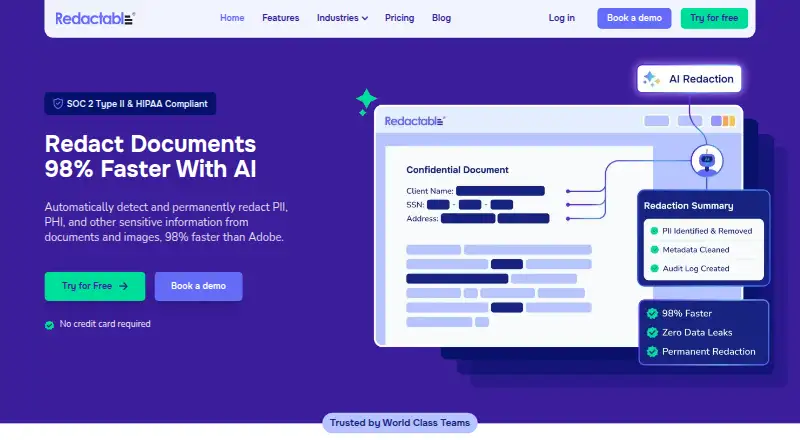
What Redactable is
Redactable is a cloud-based document and image redaction platform for finding and permanently removing sensitive information. Its AI detects patterns such as personal, health, and financial information. Built-in optical character recognition turns scanned documents and image-based PDFs into searchable text before redaction. The platform says it also removes hidden metadata, embedded objects, and residual data from redacted files. Users can upload PDF, TIFF, PNG, and JPG files from a device or supported services; finished redactions are produced as PDFs. Connections for importing documents and syncing redacted files include Google Drive, Dropbox, OneDrive, Box, SharePoint, and Clio.
For group workflows, Redactable provides shared workspaces, task assignments, comments, role-based permissions, activity logs, and version history. It can generate certificates and logs recording who redacted what and when. The company says it is SOC 2 Type II certified and HIPAA compliant, encrypts stored data with AES-256 and data in transit with TLS 1.2 or higher, and processes document content during the job without retaining it afterward or using it to train AI models. Its AWS-hosted infrastructure stores data in the United States. Redactable runs on the web and offers a free allowance, per-document billing, monthly subscriptions, and an enterprise plan.
Who it suits
Redactable suits individuals and teams that need to remove sensitive information from documents or images, including compliance-focused teams. Its shared workspaces, permissions, assignments, and audit records support collaborative redaction workflows.
What it does well
- AI detects personal, health, financial, and other sensitive patterns.
- OCR makes scanned documents and image-based PDFs searchable before redaction.
- Integrates with Google Drive, Dropbox, OneDrive, Box, SharePoint, and Clio.
- Team tools include permissions, assignments, comments, and version history.
- Generates redaction certificates and audit logs.
- Accepts files up to 500 MB and batches of up to 100 documents.
What to know first
- Free usage covers three documents total.
- Pay-as-you-go costs $7.50 per finalized document after the free documents.
- Starter is limited to 15 documents per month.
- The listed platform is web.
Limits
Free usage is limited to three documents total. After that, pay-as-you-go costs $7.50 per finalized document; Starter allows up to 15 documents per month, while Pro Plus allows up to 150 documents per month, with unlimited pages per document on both plans.
Plans
| Plan | Billed and limits | Price |
|---|---|---|
| Free usage | 3 documents total · no payment information required | Free |
| Starter | Monthly; page also shows $23 per month annual-display price · Up to 15 documents/month · unlimited pages/document · AI redaction · OCR · certificates/audit logs | $19 a month |
| Pay-As-You-Go | per document · After the 3 free documents · pay when you finalize a document | $7.50, paid once |
| Pro Plus | Monthly; page also shows $79 per month annual-display price · Up to 150 documents/month · unlimited pages/document · AI redaction · OCR · certificates/audit logs | $99 a month |
| Enterprise | High-volume redactions · unlimited OCR · SSO · priority support | On request |
As redactable.com lists them, read 7 Oct 2026. The maker's own page has the final word.
Getting started
- Open the Redactable website in a web browser.
- Start with the free allowance of three documents, which requires no payment information.
- Upload PDF, TIFF, PNG, or JPG files from your device, or import them through a supported service.
- Use AI detection and OCR to prepare files for redaction.
- Finalize a document with pay-as-you-go billing, or choose a subscription plan for ongoing use.
Redactable is a web-based platform for detecting and permanently removing sensitive information from documents and images. It is best suited to compliance-focused individuals and teams that need OCR, shared review, and audit records in one workflow. Document-based pricing makes occasional use easy to start, but recurring volume can make the monthly quota tiers important.
Overview
The product combines automated detection with collaboration and recordkeeping rather than treating redaction as a single-user editing task. It handles PDF, TIFF, PNG, and JPG files from device uploads or supported services, and produces PDF files. A native file viewer and automated redaction support a contained workflow, although the web-only platform may not suit buyers who require a different deployment approach.
Redactable says its infrastructure is hosted on AWS in the United States and does not allow data to leave the country. The company also says document content is processed during a redaction session, is not retained beyond the job, and is not used to train AI models. Those statements may matter to organizations evaluating sensitive workflows, but buyers should assess them against their own requirements.
Key features
AI detection looks for personally identifiable information, health information, financial data, and other sensitive patterns. Built-in OCR converts scanned documents and image-based PDFs into searchable text before redaction, extending the workflow to files that lack searchable text. Redactable says it removes hidden metadata, embedded objects, and residual data from redacted files, an important distinction when simply obscuring visible text would not suffice.
Shared workspaces, assignments, comments, role-based permissions, activity logs, and version history support team review. Redaction certificates and audit logs document who redacted what and when, giving compliance-focused teams a record of the work. Google Drive, Dropbox, OneDrive, Box, SharePoint, and Clio integrations support document import and syncing redacted files.
Redactable states that it is SOC 2 Type II certified and HIPAA compliant, with AES-256 encryption at rest and TLS 1.2 or higher in transit. Users can upload up to 100 documents at once, with each file up to 500 MB. That batch allowance is substantial for grouped work, though monthly plan quotas still determine how many documents can be finalized within a billing period.
Pricing
The free allowance is three documents total, with no payment information required. It is a practical way to assess a small job, not a continuing free tier for regular use. After those documents, Pay-As-You-Go costs $7.50 per document, charged when a document is finalized. This avoids a subscription for sporadic work, but repeated use can quickly favor a monthly plan.
Starter costs $19 per month billed annually or $23 per month billed monthly, and includes up to 15 documents per month with unlimited pages per document. It fits individuals or smaller workloads that recur, though its document cap can constrain teams handling frequent files. Pro Plus costs $79 per month billed annually or $99 per month billed monthly, with up to 150 documents per month and unlimited pages per document. It is the more suitable subscription for higher-volume work, but still sets a monthly document ceiling.
Enterprise has custom pricing and includes high-volume redactions, unlimited OCR processing, SSO, and priority support. It is aimed at enterprise workflows that need those capabilities; the lack of a published price means buyers must contact the company to assess cost.
Platforms
Redactable runs on the web and is offered as a private-cloud deployment. Supported inputs include device uploads and supported third-party services, with PDF, TIFF, PNG, and JPG formats; production output is PDF. The input range is useful for mixed document and image workflows, while buyers seeking desktop or mobile apps should look elsewhere.
Who it's for
Redactable is a strong fit for individuals and compliance-focused teams that need to redact sensitive files, including scans, while preserving a collaborative process and an audit trail. Its per-document option accommodates occasional jobs, and unlimited pages on Starter and Pro Plus make document counts, rather than page counts, the central quota to watch. Organizations processing high volumes or needing unlimited OCR may find Enterprise more appropriate.
It is less compelling for users who need a continuing free plan, a deployment outside the web/private-cloud model, or predictable subscription pricing without a document cap. Those with only occasional files can avoid a recurring fee, but $7.50 per finalized document is a meaningful cost to weigh against subscription options as usage grows.
Pros and cons
- Pros: OCR supports scans and image-based PDFs; AI detection covers several sensitive-data categories; permanent-removal claims address hidden as well as visible content.
- Pros: Collaboration tools and audit records support documented team workflows, while six named integrations help connect common document services.
- Pros: Three documents are free without payment information, and pay-as-you-go lets occasional users avoid a subscription.
- Cons: The free allowance is only three documents total, and subsequent pay-as-you-go use is charged per finalized document.
- Cons: Starter and Pro Plus both impose monthly document limits, even though they allow unlimited pages per document.
- Cons: Enterprise pricing is custom, and the web-only platform will not fit buyers who require another platform.
Alternatives
GoldFynch is worth considering for legal eDiscovery workflows where a free case allowance matters: its free case includes one case per new account, up to 512 MB stored and 1 GB processed, and expires after 90 days. RedactLaw may suit users who want API or self-hosted options alongside web access; its free plan covers five documents per month, up to 10 pages each, with one user and basic PII detection. Arctera eDiscovery is an alternative for buyers seeking broader platform availability, including mobile, desktop, API, and self-hosted options.
Beagle offers one-time AI document-review purchases, which may suit a bounded review project rather than ongoing redaction. Exterro eDiscovery is another paid eDiscovery option. iCONECT may be relevant to buyers looking for API or self-hosted availability. KLDiscovery Nebula uses annual subscriptions based on data capacity, with monthly payment and multi-year discounts. redactX is an alternative for buyers seeking Windows or Linux on-premises deployment.
For broader comparisons, see Document Redaction Software and Legal eDiscovery Software.
Verdict
Choose Redactable if you need automated redaction for sensitive documents and images, especially when OCR, team review, and audit records belong in the same workflow. Its strongest case is the combination of broad file handling, permanent-removal claims, and collaboration features. Look elsewhere if a three-document free allowance is too limited, your workload exceeds monthly quotas, or your organization needs a non-web deployment or published Enterprise pricing.
Verdict
Choose Redactable if you need to redact sensitive information from supported files and want OCR, collaboration tools, and audit records in the workflow. The free allowance covers three documents; larger recurring workloads require per-document payment or a subscription. Starter costs $19 per month billed annually or $23 monthly, while Enterprise pricing requires contacting the company.
Questions
Does Redactable have a free plan?
Yes. The free usage plan includes three documents total and does not require payment information.
How much do the paid plans cost?
Pay-as-you-go costs $7.50 per finalized document after the three free documents. Starter is $19 per month billed annually or $23 per month billed monthly; Pro Plus is $79 per month billed annually or $99 per month billed monthly.
Which file types can I use?
Redactable supports PDF, TIFF, PNG, and JPG files from device uploads and supported third-party services. Redacted output is PDF.
Which services does it integrate with?
The listed integrations are Google Drive, Dropbox, OneDrive, Box, SharePoint, and Clio.
What does the Enterprise plan include?
The listed Enterprise features are high-volume redactions, unlimited OCR processing, SSO, and priority support. Pricing is available by contacting the company.
Where is Redactable available?
Redactable is listed for the web. Its AWS-hosted infrastructure stores data in the United States.
Facts from Redactable's own pages
- AI data handling
- Redactable says document content is processed during the redaction job, not retained afterward and not used to train AI models. · redactable.com, 15 Oct 2026
- AI detection
- Its Redaction Wizard uses AI to identify PII, PHI, financial information and custom sensitive patterns for review. · redactable.com, 15 Oct 2026
- API access
- The pricing FAQ says high-volume customers can obtain API access and batch-redaction capabilities by contacting Redactable. · redactable.com, 15 Oct 2026
- API documentation
- The public help center lists many user guides but no public API reference or SDK documentation. · support.redactable.com, 15 Oct 2026
- Audit certificates
- Redactable generates redaction certificates and audit logs recording redaction activity. · redactable.com, 15 Oct 2026
- Audit records
- Redactable can generate redaction certificates and audit logs documenting who redacted what and when. · redactable.com, 7 Oct 2026
- CJIS alignment
- Its security controls are described as aligned with the FBI CJIS Security Policy. · redactable.com, 15 Oct 2026
- Clio workflow
- Clio users can browse case folders inside Redactable and receive a redacted duplicate back in the relevant case or folder. · redactable.com, 15 Oct 2026
- Cloud integrations
- Supported connections include Google Drive, Dropbox, OneDrive, Box, SharePoint and Clio. · redactable.com, 15 Oct 2026
- Collaboration
- Shared workspaces provide simultaneous editing, assignments, comments, permissions and activity tracking. · redactable.com, 15 Oct 2026
- Company size
- LinkedIn lists the company as privately held with 11–50 employees. · linkedin.com, 15 Oct 2026
- Data residency
- The security page says Redactable runs on AWS with US data residency and multi-zone redundancy. · redactable.com, 15 Oct 2026
- Documentation depth
- The help center contains guides for getting started, redaction features, collaboration, account administration, usage and security. · support.redactable.com, 15 Oct 2026
- Encryption
- Stored data uses FIPS 140-2 validated AES-256 and transfers use TLS 1.2 or higher. · redactable.com, 15 Oct 2026
- File and batch limits
- The features page says users can upload up to 100 documents at once, with files up to 500 MB each. · redactable.com, 7 Oct 2026
- File types
- The pricing page lists PDF, TIFF, PNG and JPG support with a 500 MB maximum file size per file. · redactable.com, 15 Oct 2026
- Founded
- LinkedIn lists Redactable as founded in 2018. · linkedin.com, 15 Oct 2026
- Founder and CEO
- Crunchbase identifies Amanda Levay as founder and chief executive officer. · crunchbase.com, 15 Oct 2026
- Funding profile
- Crunchbase lists Redactable as a private New York seed-stage company with six funding rounds and ten investors, while the total amount is obscured. · crunchbase.com, 15 Oct 2026
- Headquarters
- The company’s pricing page gives its address as 447 Broadway, 2nd Floor, New York, New York 10013. · redactable.com, 15 Oct 2026
- Independent coverage
- Airframe reports limited review volume and says no accessible direct TrustRadius or Gartner Peer Insights listing was found. · airframe.ai, 15 Oct 2026
- Independent fit limitation
- Airframe identifies poor fit for organizations needing air-gapped processing, broad PDF-suite features, multimedia redaction or consistently perfect OCR on poor scans. · airframe.ai, 15 Oct 2026
- Integrations
- The integrations page lists Google Drive, Dropbox, OneDrive, Box, SharePoint, and Clio for importing documents and syncing redacted files. · redactable.com, 7 Oct 2026
- Intended users
- The pricing page describes plans for individuals, teams, and enterprise workflows, and the features page calls it a tool for compliance-focused teams. · redactable.com, 7 Oct 2026
Where Redactable stands on Freedom251
- Legal eDiscovery Software#3 of 26
- Document Redaction Software#12 of 27