Eric
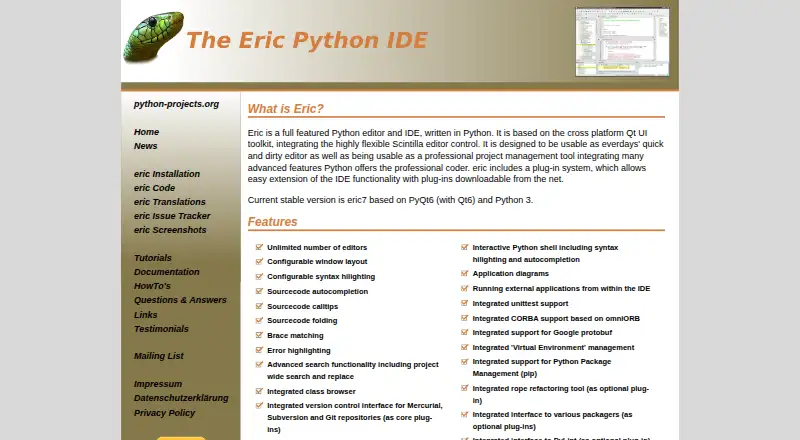
What Eric is
Eric is a Python editor and IDE built with Python, Qt, and Scintilla. Its maker describes it as suitable for quick editing as well as professional project management, and identifies eric7, based on PyQt6, Qt6, and Python 3, as the current stable version. Editing tools include syntax highlighting, autocompletion, calltips, source folding, brace matching, error highlighting, and project-wide search and replace. Development features include a Python debugger with multi-thread and multiprocessing support, profiling, code coverage, code checking, task management, and unittest support. It also has a class browser, an interactive Python shell, pip and virtual-environment management, and an optional rope refactoring plugin. Core plugins provide interfaces to Mercurial, Subversion, and Git. Users can load extensions from the Plugin Repository, and the site documents a plugin API. Eric includes chat and a shared editor as cooperation functions. It runs on Linux, macOS, and Windows, and can be installed through PyPI or a distribution archive; the maker recommends using a Python virtual environment. The interface is listed in English, German, Russian, and Spanish.
Who it suits
Eric suits Python developers looking for an editor with debugging, testing, profiling, project management, and version-control interfaces. It is available for Linux, macOS, and Windows.
What it does well
- Includes a debugger with multi-thread and multiprocessing support.
- Provides profiling, code coverage, and unittest support.
- Supports Mercurial, Subversion, and Git repositories.
- Offers pip and virtual-environment management.
- Plugins can be loaded from its repository.
What to know first
- Python virtual-environment installation is recommended.
- Windows users are directed to download a ZIP archive.
- Rope refactoring is an optional plugin.
Plans
| Plan | Billed and limits | Price |
|---|---|---|
| eric7 | No price or usage limits stated | Free |
As eric-ide.python-projects.org lists them, read 30 Sept 2026. The maker's own page has the final word.
Getting started
- Visit the Eric website.
- Install through PyPI or download a distribution archive.
- Use a Python virtual environment for the installation, as recommended.
- On Windows, download the ZIP archive.
- Load any needed extensions from the Plugin Repository.
Eric is a desktop IDE for Python developers who want project management and development tools alongside code editing. It suits people working across Linux, macOS, or Windows, especially when debugging and testing matter as much as writing code. Its broad, extensible toolkit is the draw; a lightweight editor may be a better fit for occasional scripts.
Overview
Written in Python and built on Qt and Scintilla, Eric aims to support both quick edits and professional project work. Its current stable version, eric7, is based on PyQt6, Qt6, and Python 3. That makes it a substantial Python-focused desktop workspace rather than a general-purpose editor, and its GPLv3 licensing and free plan remove a software charge for using it.
Editing includes syntax highlighting, autocompletion, calltips, source folding, brace matching, error highlighting, and project-wide search and replace. Together, these tools help with both code entry and navigating a project. The IDE is less compelling for someone who wants only a small editor for a few lines of Python, since its wider project and debugging toolkit may go unused.
Key features
Editing, debugging, and testing
Eric includes a Python debugger with multi-thread and multiprocessing support, an integrated test runner, profiling, code coverage, code checking, and unittest support. A class browser, task management, and interactive Python shell round out the project tools. This is a useful mix for developers who want to inspect, run, and assess Python code in one IDE; the emphasis remains firmly on Python rather than a broad multi-language workflow.
Python workflow and extensions
Built-in pip and virtual environment management help keep package and environment tasks close to the project. Optional integrations include rope refactoring and PyLint, while additional capabilities include Google protobuf and CORBA through omniORB. Eric also supports plugins loaded from its Plugin Repository and documents a plugin API, giving users a way to extend the IDE. That flexibility is valuable for developers willing to shape their setup, but it can mean more choices to manage than a fixed, simpler editor.
Project work and collaboration
Core plugins provide interfaces for Git, Mercurial, and Subversion repositories, so version-control tasks can sit alongside editing. Eric also includes chat and a shared editor as cooperation functions. These features broaden its role beyond an individual code editor, though the published capabilities do not establish how they compare with dedicated collaboration tools.
Pricing
Eric is free. Its eric7 plan costs nothing, and no usage cap or seat limit is stated. The included editor, debugger, test runner, profiler, and Python environment tools make it a full-featured option without a paid tier to unlock those core capabilities. There is no cheaper plan, and no paid plan is described.
Platforms
Eric supports Linux, macOS, and Windows. Downloads are offered through SourceForge, with installation through PyPI or a distribution archive; Windows users are directed to the ZIP archive. The maker recommends installing Eric in a Python virtual environment, a sensible choice for keeping its installation separate from other Python work. The interface is available in English, German, Russian, and Spanish.
Who it's for
Eric is a strong fit for Python developers who want editing, debugging, testing, profiling, version control, and environment management together, particularly those who value a free desktop IDE and plugin extensibility. It is also worth considering for project work involving multithreading or multiprocessing, given the debugger support. Developers seeking a focused scientific Python IDE, a cloud-hosted app-building service, or an Android-only Python environment may prefer a more specialized option.
Pros and cons
- Pro: Debugging, profiling, coverage, and unittest support are included, reducing the need to assemble separate tools for core development tasks.
- Pro: Git, Mercurial, and Subversion interfaces plus pip and virtual environment management cover several project chores in the IDE.
- Pro: The plugin system and documented API allow extensions, while the free plan and GPLv3 licensing avoid a purchase cost.
- Con: Its Python-specific focus makes it a less natural choice for teams seeking one IDE centered on several programming languages.
- Con: The breadth of project tools and extensibility may be unnecessary for users who only need quick edits or occasional scripts.
Alternatives
Spyder is another free option if a scientific Python IDE is the priority. Choose Anvil instead when you want unlimited apps, cloud hosting, library installation, one developer seat, and up to 50,000 Data Table rows in a free plan that runs forever.
NINJA-IDE is a free GPLv3+ Python IDE with Windows and Linux installers, but no macOS download. Positron is another free desktop option for Linux, macOS, and Windows.
PyCharm is worth comparing if you want a free plan with one month of Pro included or a paid Pro plan at $200 a year, billed per user, per year. Pyzo is a free and open-source computing environment. PyScripter is a free alternative for Windows users, and QPython is a free Android Python IDE.
For a broader comparison, browse Python IDEs, Integrated Development Environments, and IDE Software.
Verdict
Choose Eric if you want a free, Python-focused desktop IDE with debugging, testing, environment management, version control interfaces, and room to extend it through plugins. Its main advantage is how much of a Python project workflow it brings together without a subscription. Look elsewhere if you need a lighter editor, a scientific-IDE focus, or a workflow built around another platform or broader language needs.
Verdict
Eric brings Python editing, debugging, testing, and project tools into one free IDE. Its plugin system and installation options provide flexibility, while the maker recommends installing it in a Python virtual environment.
Questions
Is Eric free?
Yes. The eric7 plan is listed as free, with no price or usage limits stated.
Which platforms does Eric support?
Eric supports Linux, macOS, and Windows.
How can I install Eric?
Installation is available through PyPI or a distribution archive. Windows users are directed to download the ZIP archive, and installation in a Python virtual environment is recommended.
What version is current and stable?
The current stable version is eric7, based on PyQt6, Qt6, and Python 3.
Does Eric support version control and plugins?
Core plugins provide interfaces for Mercurial, Subversion, and Git. Extensions can be loaded from the Plugin Repository, and Eric documents a plugin API.
Who makes Eric, and what license does it use?
The site identifies Detlev Offenbach as the maker and displays a GPLv3 license.
Facts from Eric's own pages
- Additional integrations
- The site lists support for Google protobuf, omniORB based CORBA, PyLint and packaging interfaces through optional plug-ins, plus Django, Pyramid, and Flask among optional development tools. · eric-ide.python-projects.org, 30 Sept 2026
- Collaboration
- The IDE includes chat and a shared editor as cooperation functions. · eric-ide.python-projects.org, 30 Sept 2026
- Current version
- The site identifies eric7, based on PyQt6, Qt6, and Python 3, as the current stable version. · eric-ide.python-projects.org, 30 Sept 2026
- Debugging and testing
- The IDE includes a Python debugger with multi-thread and multiprocessing support, profiling, code coverage, and unittest support. · eric-ide.python-projects.org, 29 Sept 2026
- Development tools
- Eric includes a class browser, project wide search and replace, a Python debugger, profiling, code coverage, code checking, task management, and unittest support. · eric-ide.python-projects.org, 30 Sept 2026
- Download and installation
- The maker offers downloads through SourceForge and describes installation through PyPI or a distribution archive. · eric-ide.python-projects.org, 29 Sept 2026
- Editing
- Features include unlimited editors, configurable layouts and syntax highlighting, autocomplete, calltips, code folding, brace matching, and error highlighting. · eric-ide.python-projects.org, 30 Sept 2026
- Extensions
- Eric has a plugin system, and plugins can be loaded from its Plugin Repository. · eric-ide.python-projects.org, 29 Sept 2026
- Installation
- Eric can be installed through PyPI or from a distribution archive, and the site recommends installing it in a Python virtual environment. · eric-ide.python-projects.org, 30 Sept 2026
- Intended use
- The maker says Eric is designed for both quick editing and professional project management. · eric-ide.python-projects.org, 29 Sept 2026
- Languages
- The site says Eric is available in English, German, Russian, and Spanish. · eric-ide.python-projects.org, 29 Sept 2026
- License
- The official site displays a GPLv3 logo for Eric. · eric-ide.python-projects.org, 30 Sept 2026
- Maker
- The site identifies Detlev Offenbach as the maker and lists an address in Freising, Germany. · eric-ide.python-projects.org, 30 Sept 2026
- Operating systems
- The installation instructions cover Linux, macOS, and Windows; Windows users are directed to download the ZIP archive. · eric-ide.python-projects.org, 30 Sept 2026
- Plugins
- Users can load plug-in extensions from the IDE's Plugin Repository, and the site documents a plug-in API for developers. · eric-ide.python-projects.org, 30 Sept 2026
- Privacy
- The maker's website privacy policy says the site uses cookies and server logs that may include IP addresses, and describes data subject rights under GDPR. · eric-ide.python-projects.org, 30 Sept 2026
- Product
- Eric is a Python editor and IDE written in Python and based on Qt and Scintilla. · eric-ide.python-projects.org, 30 Sept 2026
- Python tooling
- Eric includes virtual environment management, pip support, an interactive Python shell, and an optional rope refactoring plug-in. · eric-ide.python-projects.org, 30 Sept 2026
- Support
- The maker provides user questions and answers, an issue tracker link, and a mailing list link. · eric-ide.python-projects.org, 29 Sept 2026
- Version control
- Core plug-ins provide interfaces for Mercurial, Subversion, and Git repositories. · eric-ide.python-projects.org, 30 Sept 2026
Where Eric stands on Freedom251
- Python IDEs#3 of 26
- IDE Software#13 of 53
- Integrated Development Environments#18 of 65